Back to overview

ARK: Survival Ascended: updates, settings and interface

Game updates, plugin versions and improvements to our interface with a traceable history.

Recorded, available and installed are different states. Your actual installation status and suitable updates are shown in the server panel.

Interface Change documented

Guided startup parameters: revised

The guided tools were revised in the shared panel code. The entry concerns the interface or its processing. The date records the change; availability on an individual server depends on the game, software, plugins and permissions.

Developer announcement Published

Community Crunch 516: Flips, Tricks & Teeth

Announcement from the official source. The source describes the changes; your server installation status is shown separately in the update center.

Interface Change documented

Guided startup parameters: revised

The guided tools were revised in the shared panel code. The entry concerns the interface or its processing. The date records the change; availability on an individual server depends on the game, software, plugins and permissions.

Developer announcement Published

Community Crunch 515: Bouncing into Summer!

Announcement from the official source. The source describes the changes; your server installation status is shown separately in the update center.

Interface Change documented

Guided startup parameters: revised

The guided tools were revised in the shared panel code. The entry concerns the interface or its processing. The date records the change; availability on an individual server depends on the game, software, plugins and permissions.

Interface Change documented

Guided startup parameters: revised

The guided tools were revised in the shared panel code. The entry concerns the interface or its processing. The date records the change; availability on an individual server depends on the game, software, plugins and permissions.

Developer announcement Published

Community Crunch 514: The Belly of the Beast

Announcement from the official source. The source describes the changes; your server installation status is shown separately in the update center.

Developer announcement Published

ARK Franchise Sale, Free Weekend, and Lumina Arrives!

Announcement from the official source. The source describes the changes; your server installation status is shown separately in the update center.

Setting Change documented

ARK: Survival Ascended: startup parameters changed

The definition of visible startup parameters changed in the panel code. The listed values explain added, changed and removed fields. The date records the definition change; existing server values were not automatically changed by it.

Supported server software: ARK: Survival Ascended

Changed settings (10)
  • Additional Arguments (FLAGS): Added ARGS_FLAGS

    flags (-UseBattleEye) are supported here without them touching. (i.e): -crossplay -mods=1234,1235,1236

    After

    Setting
    ARGS_FLAGS
    Default
    When it takes effect
    Takes effect after saving and restarting the server.
  • Additional Arguments (PARAMS): Added ARGS_PARAMS

    params (?ServerPassword=...) are supported here but params need to be touching. (i.e): ?ServerPassword=MyP4SsWoRd?ServerAdminPassword=sUpRp4ssW0rd

    After

    Setting
    ARGS_PARAMS
    Default
    When it takes effect
    Takes effect after saving and restarting the server.
  • Auto-update server: Added AUTO_UPDATE

    This is to enable auto-updating for servers on restart/re-install.

    After

    Setting
    AUTO_UPDATE
    Default
    1
    When it takes effect
    Takes effect after saving and restarting the server.
  • Battle Eye: Added BATTLE_EYE

    Enable BattleEye / Anti-Cheat

    After

    Setting
    BATTLE_EYE
    Default
    1
    When it takes effect
    Takes effect after saving and restarting the server.
  • Max Players: Added MAX_PLAYERS

    Specifies the maximum amount of players able to join the server.

    After

    Setting
    MAX_PLAYERS
    Default
    70
    Range / options
    1 – 200
    When it takes effect
    Takes effect after saving and restarting the server.
  • MOD IDs: Added MOD_IDS

    https://www.curseforge.com/ark-survival-ascended ; ProjectID is is the MOD_ID on the right-side of the mod-view page ; leave blank to disable mods ; separate only by comma ( , ) without spaces! (i.e.) 1234,1235,1236

    After

    Setting
    MOD_IDS
    Default
    When it takes effect
    Takes effect after saving and restarting the server.
  • Query Port: Added QUERY_PORT

    ARK query port used by steam server browser and ark client server browser.

    After

    Setting
    QUERY_PORT
    Default
    27015
    Range / options
    1025 – 65535
    When it takes effect
    Takes effect after saving and restarting the server.
  • Server Map: Added SERVER_MAP

    Available Maps: TheIsland_WP

    After

    Setting
    SERVER_MAP
    Default
    TheIsland_WP
    When it takes effect
    Takes effect after saving and restarting the server.
  • Server PvE: Added SERVER_PVE

    ON = Player-vs-Environment (PvE), OFF = Player-vs-Player (PvP); Default is ON

    After

    Setting
    SERVER_PVE
    Default
    1
    When it takes effect
    Takes effect after saving and restarting the server.
  • Server Name: Added SESSION_NAME

    "Unofficial" dedicated server name

    After

    Setting
    SESSION_NAME
    Default
    A Pterodactyl Hosted Server
    When it takes effect
    Takes effect after saving and restarting the server.
Developer announcement Published

Lumina Awakens!

Announcement from the official source. The source describes the changes; your server installation status is shown separately in the update center.

Developer announcement Published

ARK Tides of Fortune, Dragontopia and Genesis Part 1 are out now!

Announcement from the official source. The source describes the changes; your server installation status is shown separately in the update center.

Interface Change documented

Guided startup parameters: revised

The guided tools were revised in the shared panel code. The entry concerns the interface or its processing. The date records the change; availability on an individual server depends on the game, software, plugins and permissions.

Developer announcement Published

Community Crunch 513: Dragon the Anchor

Announcement from the official source. The source describes the changes; your server installation status is shown separately in the update center.

Interface Change documented

Guided startup parameters: revised

The guided tools were revised in the shared panel code. The entry concerns the interface or its processing. The date records the change; availability on an individual server depends on the game, software, plugins and permissions.

Interface Change documented

Server configuration: guided editor added

The guided interface was updated. The history shows added, changed and removed fields with explanations and editor defaults. The date records the documented change, not the historical deployment time.

Changed settings (8)
  • Flyer carry in PvE: Added AllowFlyerCarryPvE

    True = flyers may pick up wild creatures in PvE.

    After

    Setting
    AllowFlyerCarryPvE
    Default
    True
  • Allow third-person view: Added AllowThirdPersonPlayer

    True = players may switch to third-person view.

    After

    Setting
    AllowThirdPersonPlayer
    Default
    True
  • Difficulty (DifficultyOffset 0.0–1.0): Added DifficultyOffset

    1.0 = max level (wild dinos up to 150). Decimal value, e.g. 0.5.

    After

    Setting
    DifficultyOffset
    Default
    1.0
  • Harvest multiplier (HarvestAmountMultiplier): Added HarvestAmountMultiplier

    Multiplier for harvested resources. Decimal, e.g. 2.0 = double.

    After

    Setting
    HarvestAmountMultiplier
    Default
    1.0
  • Max players: Added MaxPlayers

    How many players can be on the server at once.

    After

    Setting
    MaxPlayers
    Default
    70
    Range / options
    1 – 255
  • PvE mode (no player PvP): Added ServerPVE

    True = pure PvE server, False = PvP allowed.

    After

    Setting
    ServerPVE
    Default
    False
  • Taming speed (TamingSpeedMultiplier): Added TamingSpeedMultiplier

    Higher = faster taming. Decimal, e.g. 3.0.

    After

    Setting
    TamingSpeedMultiplier
    Default
    1.0
  • XP rate (XPMultiplier): Added XPMultiplier

    Multiplier for XP gained. Decimal value.

    After

    Setting
    XPMultiplier
    Default
    1.0
Developer announcement Published

Community Crunch 512: Preparing to Set Sail

Announcement from the official source. The source describes the changes; your server installation status is shown separately in the update center.

Developer announcement Published

Community Crunch 511: The Tidepup is Turning

Announcement from the official source. The source describes the changes; your server installation status is shown separately in the update center.

Developer announcement Published

Community Crunch 510: Rise of the Tickle Chicken

Announcement from the official source. The source describes the changes; your server installation status is shown separately in the update center.

Interface Change documented

Guided startup parameters: revised

The guided tools were revised in the shared panel code. The entry concerns the interface or its processing. The date records the change; availability on an individual server depends on the game, software, plugins and permissions.

Interface Change documented

Guided startup parameters: revised

The guided tools were revised in the shared panel code. The entry concerns the interface or its processing. The date records the change; availability on an individual server depends on the game, software, plugins and permissions.

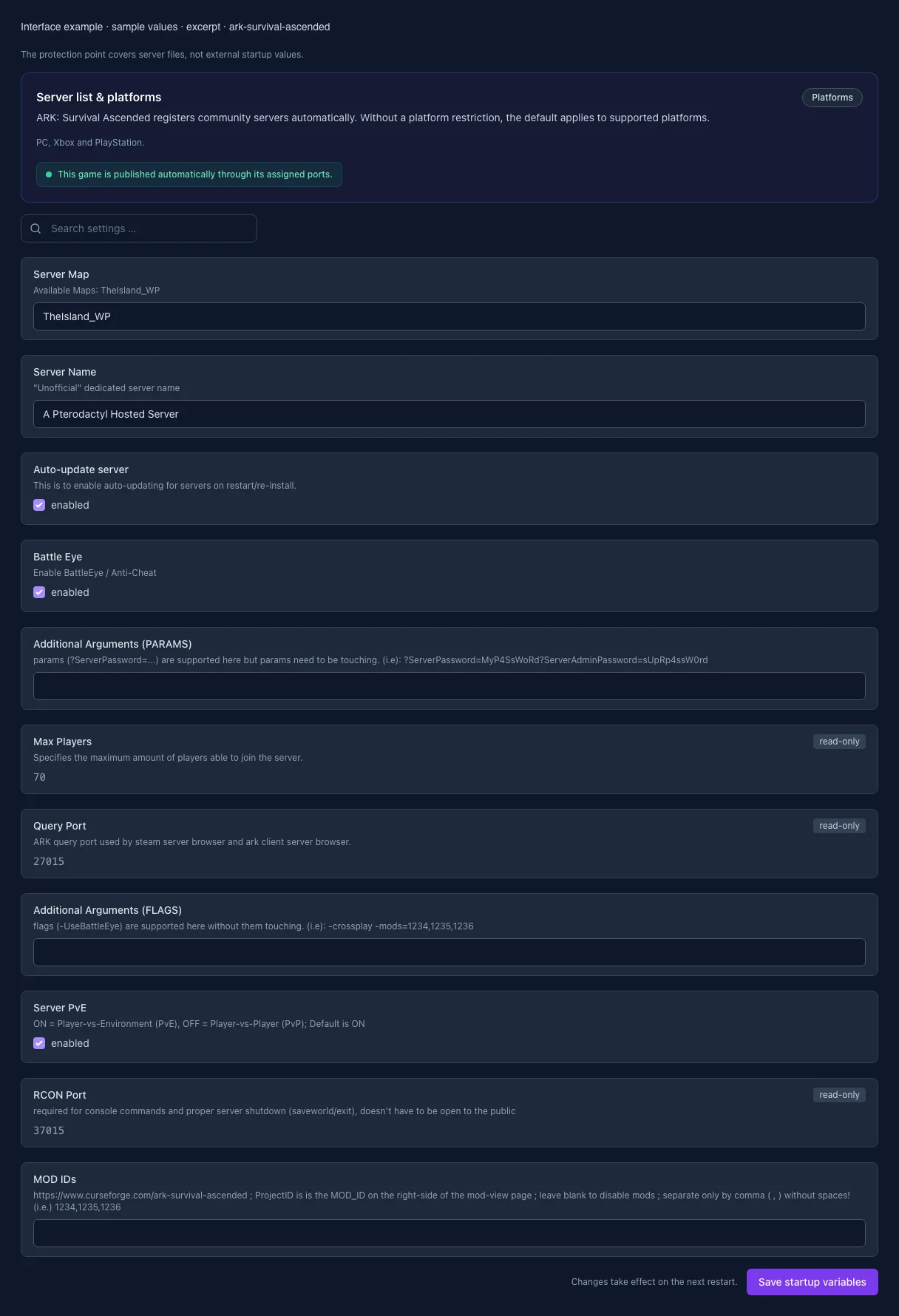
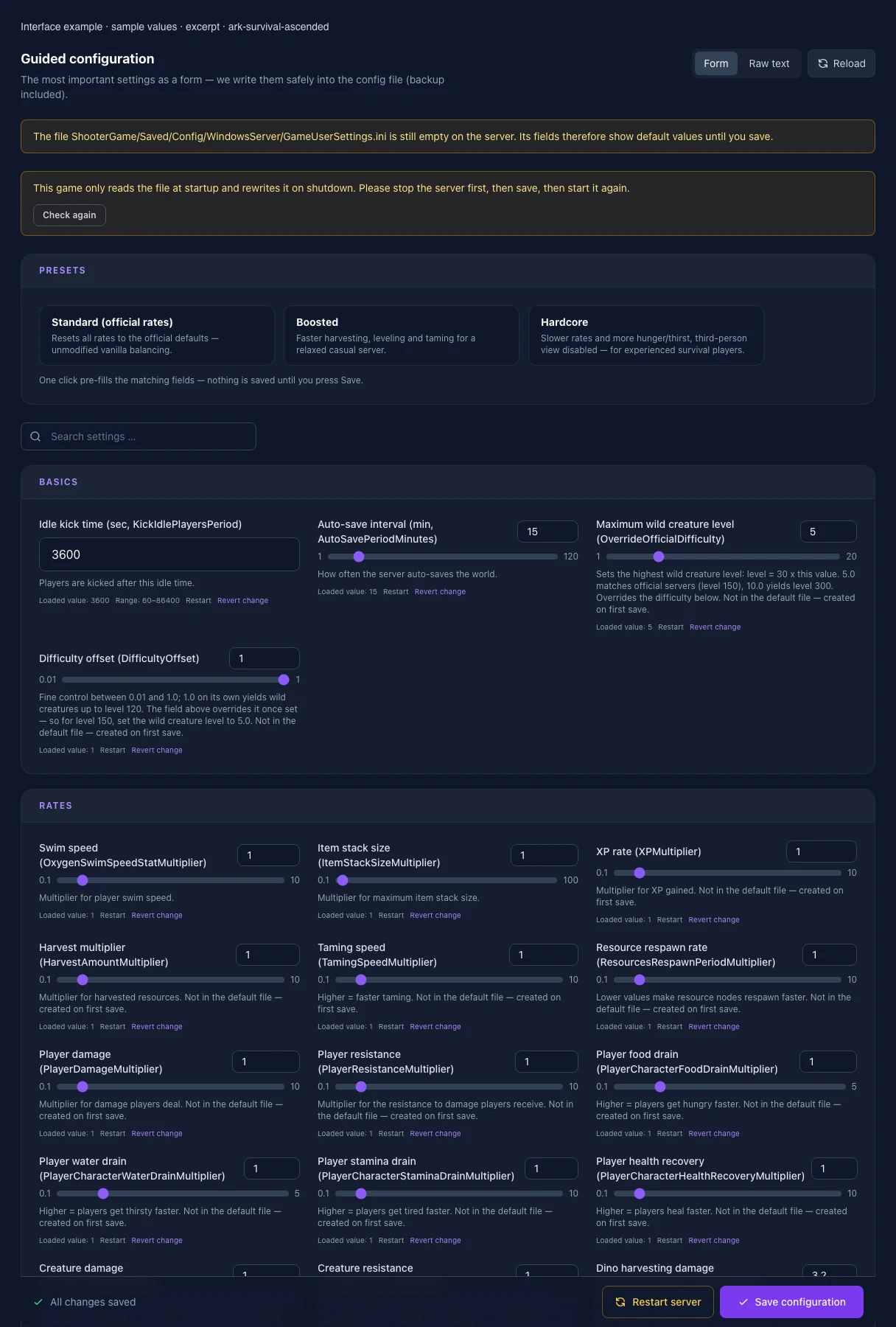
What the interface looks like

The image shows the interface on its capture date; earlier versions may differ.

Excerpt of the current interface with sample values. Values and prerequisites illustrate the controls; available tools depend on server software, plugins and permissions.
Excerpt of the current interface with sample values. Values and prerequisites illustrate the controls; available tools depend on server software, plugins and permissions. · Captured on 2026-10-08
Excerpt of the current interface with sample values. Values and prerequisites illustrate the controls; available tools depend on server software, plugins and permissions.
Excerpt of the current interface with sample values. Values and prerequisites illustrate the controls; available tools depend on server software, plugins and permissions. · Captured on 2026-10-08

What the settings do

These values come from our guided editors. Defaults are the editor starting values; they do not show the contents of a customer server.

Idle kick time (sec, KickIdlePlayersPeriod)

Players are kicked after this idle time.

Setting
KickIdlePlayersPeriod
Default
3600
Range / options
60 – 86400
Auto-save interval (min, AutoSavePeriodMinutes)

How often the server auto-saves the world.

Setting
AutoSavePeriodMinutes
Default
15
Range / options
1 – 120
Maximum wild creature level (OverrideOfficialDifficulty)

Sets the highest wild creature level: level = 30 x this value. 5.0 matches official servers (level 150), 10.0 yields level 300. Overrides the difficulty below. Not in the default file — created on first save.

Setting
OverrideOfficialDifficulty
Default
5
Range / options
1 – 20
Difficulty offset (DifficultyOffset)

Fine control between 0.01 and 1.0; 1.0 on its own yields wild creatures up to level 120. The field above overrides it once set — so for level 150, set the wild creature level to 5.0. Not in the default file — created on first save.

Setting
DifficultyOffset
Default
1
Range / options
0.01 – 1
Swim speed (OxygenSwimSpeedStatMultiplier)

Multiplier for player swim speed.

Setting
OxygenSwimSpeedStatMultiplier
Default
1
Range / options
0.1 – 10
Item stack size (ItemStackSizeMultiplier)

Multiplier for maximum item stack size.

Setting
ItemStackSizeMultiplier
Default
1
Range / options
0.1 – 100
XP rate (XPMultiplier)

Multiplier for XP gained. Not in the default file — created on first save.

Setting
XPMultiplier
Default
1
Range / options
0.1 – 10
Harvest multiplier (HarvestAmountMultiplier)

Multiplier for harvested resources. Not in the default file — created on first save.

Setting
HarvestAmountMultiplier
Default
1
Range / options
0.1 – 10
Taming speed (TamingSpeedMultiplier)

Higher = faster taming. Not in the default file — created on first save.

Setting
TamingSpeedMultiplier
Default
1
Range / options
0.1 – 10
Resource respawn rate (ResourcesRespawnPeriodMultiplier)

Lower values make resource nodes respawn faster. Not in the default file — created on first save.

Setting
ResourcesRespawnPeriodMultiplier
Default
1
Range / options
0.1 – 10
Player damage (PlayerDamageMultiplier)

Multiplier for damage players deal. Not in the default file — created on first save.

Setting
PlayerDamageMultiplier
Default
1
Range / options
0.1 – 10
Player resistance (PlayerResistanceMultiplier)

Multiplier for the resistance to damage players receive. Not in the default file — created on first save.

Setting
PlayerResistanceMultiplier
Default
1
Range / options
0.1 – 10
Player food drain (PlayerCharacterFoodDrainMultiplier)

Higher = players get hungry faster. Not in the default file — created on first save.

Setting
PlayerCharacterFoodDrainMultiplier
Default
1
Range / options
0.1 – 5
Player water drain (PlayerCharacterWaterDrainMultiplier)

Higher = players get thirsty faster. Not in the default file — created on first save.

Setting
PlayerCharacterWaterDrainMultiplier
Default
1
Range / options
0.1 – 5
Player stamina drain (PlayerCharacterStaminaDrainMultiplier)

Higher = players get tired faster. Not in the default file — created on first save.

Setting
PlayerCharacterStaminaDrainMultiplier
Default
1
Range / options
0.1 – 10
Player health recovery (PlayerCharacterHealthRecoveryMultiplier)

Higher = players heal faster. Not in the default file — created on first save.

Setting
PlayerCharacterHealthRecoveryMultiplier
Default
1
Range / options
0.1 – 10
Creature damage (DinoDamageMultiplier)

Multiplier for damage wild creatures deal. Not in the default file — created on first save.

Setting
DinoDamageMultiplier
Default
1
Range / options
0.1 – 10
Creature resistance (DinoResistanceMultiplier)

Multiplier for the resistance to damage wild creatures receive. Not in the default file — created on first save.

Setting
DinoResistanceMultiplier
Default
1
Range / options
0.1 – 10
Dino harvesting damage (DinoHarvestingDamageMultiplier)

Higher = tamed dinos harvest resources faster. Not in the default file — created on first save.

Setting
DinoHarvestingDamageMultiplier
Default
3.2
Range / options
0.1 – 10
Creature food drain (DinoCharacterFoodDrainMultiplier)

Higher = creatures get hungry faster (also affects taming time). Not in the default file — created on first save.

Setting
DinoCharacterFoodDrainMultiplier
Default
1
Range / options
0.1 – 10
Creature stamina drain (DinoCharacterStaminaDrainMultiplier)

Higher = creatures get tired faster. Not in the default file — created on first save.

Setting
DinoCharacterStaminaDrainMultiplier
Default
1
Range / options
0.1 – 10
Creature health recovery (DinoCharacterHealthRecoveryMultiplier)

Higher = creatures heal faster. Not in the default file — created on first save.

Setting
DinoCharacterHealthRecoveryMultiplier
Default
1
Range / options
0.1 – 10
Creature spawn count (DinoCountMultiplier)

Multiplier for the number of creatures spawned. Not in the default file — created on first save.

Setting
DinoCountMultiplier
Default
1
Range / options
0.1 – 10
Raid dino food drain (RaidDinoCharacterFoodDrainMultiplier)

Food drain rate for titan/raid creatures like Titanosaurs.

Setting
RaidDinoCharacterFoodDrainMultiplier
Default
1
Range / options
0.1 – 100
PvE dino decay period (PvEDinoDecayPeriodMultiplier)

How long unclaimed dinos persist in PvE mode before decaying.

Setting
PvEDinoDecayPeriodMultiplier
Default
1
Range / options
0.1 – 10
Max tamed dinos (MaxTamedDinos)

Server-wide cap on tamed creatures.

Setting
MaxTamedDinos
Default
5000
Range / options
0 – 20000
Soft tame limit (MaxTamedDinos_SoftTameLimit)

Above this count, inactive dinos become eligible for automatic deletion.

Setting
MaxTamedDinos_SoftTameLimit
Default
5000
Range / options
0 – 20000
Deletion countdown (sec, MaxTamedDinos_SoftTameLimit_CountdownForDeletionDuration)

Seconds until automatic deletion once the soft tame limit is exceeded.

Setting
MaxTamedDinos_SoftTameLimit_CountdownForDeletionDuration
Default
604800
Range / options
0 – 2592000
Allow cave building in PvE (AllowCaveBuildingPvE)

True = allows building in caves in PvE mode. Not in the default file — created on first save.

Setting
AllowCaveBuildingPvE
Default
False
Flyer carry in PvE (AllowFlyerCarryPvE)

True = flyers may pick up wild creatures in PvE. Not in the default file — created on first save.

Setting
AllowFlyerCarryPvE
Default
False
Allow raid dino feeding (AllowRaidDinoFeeding)

True = allows permanently taming Titanosaurs by feeding them. Not in the default file — created on first save.

Setting
AllowRaidDinoFeeding
Default
False
Max structures in range (TheMaxStructuresInRange)

Cap on structures within a radius (performance protection).

Setting
TheMaxStructuresInRange
Default
10500
Range / options
1000 – 50000
Structure resource-block radius (StructurePreventResourceRadiusMultiplier)

Multiplier for the radius in which structures block resource respawn.

Setting
StructurePreventResourceRadiusMultiplier
Default
1
Range / options
0 – 10
Platform saddle build area (PlatformSaddleBuildAreaBoundsMultiplier)

Multiplier for the usable build area on platform creatures.

Setting
PlatformSaddleBuildAreaBoundsMultiplier
Default
1
Range / options
0.1 – 10
Max structures per platform (PerPlatformMaxStructuresMultiplier)

Multiplier for the max number of structures per platform creature.

Setting
PerPlatformMaxStructuresMultiplier
Default
1
Range / options
0.1 – 10
Always allow structure pickup (AlwaysAllowStructurePickup)

True = structures can always be picked back up, not just briefly after placement.

Setting
AlwaysAllowStructurePickup
Default
True
Pickup window after placement (sec, StructurePickupTimeAfterPlacement)

How long after placement a structure can be picked back up without losing materials.

Setting
StructurePickupTimeAfterPlacement
Default
30
Range / options
0 – 600
Hold-to-pickup duration (sec, StructurePickupHoldDuration)

How long the pickup key must be held down.

Setting
StructurePickupHoldDuration
Default
0.5
Range / options
0 – 10
Power required for aquatic compartments (NeedsPowerToActivateAquaticCompartments)

True = aquatic compartments (Aquatica) require an active power source.

Setting
NeedsPowerToActivateAquaticCompartments
Default
True
Auto-destroy old structures (AutoDestroyOldStructuresMultiplier)

0 = disabled, 1.0 = enables auto-destruction of abandoned structures. Not in the default file — created on first save.

Setting
AutoDestroyOldStructuresMultiplier
Default
0
Range / options
0 – 2
Structure damage (StructureDamageMultiplier)

Multiplier for the damage structures deal (e.g. spiked walls). Not in the default file — created on first save.

Setting
StructureDamageMultiplier
Default
1
Range / options
0.1 – 10
Structure resistance (StructureResistanceMultiplier)

Multiplier for the resistance to damage structures receive. Not in the default file — created on first save.

Setting
StructureResistanceMultiplier
Default
1
Range / options
0.1 – 10
Tribe rename cooldown (min, TribeNameChangeCooldown)

Minutes required between two tribe rename actions.

Setting
TribeNameChangeCooldown
Default
15
Range / options
0 – 1440
Hide damage source from logs (AllowHideDamageSourceFromLogs)

True = allows players to hide their name as the damage source in the tribe log.

Setting
AllowHideDamageSourceFromLogs
Default
True
Log admin commands (AdminLogging)

True = logs all admin commands to in-game chat. Not in the default file — created on first save.

Setting
AdminLogging
Default
False
Disable join notifications (DontAlwaysNotifyPlayerJoined)

True = globally disables the notification when a player joins. Not in the default file — created on first save.

Setting
DontAlwaysNotifyPlayerJoined
Default
False
Leave notifications (AlwaysNotifyPlayerLeft)

True = players always get notified when someone leaves the server. Not in the default file — created on first save.

Setting
AlwaysNotifyPlayerLeft
Default
False
Block cross-ARK downloads (noTributeDownloads)

True = prevents downloading cross-ARK data (tributes) onto this server. Not in the default file — created on first save.

Setting
noTributeDownloads
Default
False
Show player location on map (ShowMapPlayerLocation)

True = shows the own position on the in-game map.

Setting
ShowMapPlayerLocation
Default
True
Allow third-person view (AllowThirdPersonPlayer)

True = players may switch to third-person view.

Setting
AllowThirdPersonPlayer
Default
True
Show crosshair (ServerCrosshair)

True = shows a crosshair to all players.

Setting
ServerCrosshair
Default
True
Show hit markers (AllowHitMarkers)

True = shows visual feedback on successful hits.

Setting
AllowHitMarkers
Default
True
Start time (hour, StartTimeHour)

Hour (0-23) the in-game clock starts at on server boot. -1 = random.

Setting
StartTimeHour
Default
-1
Range / options
-1 – 23
Implant suicide cooldown (sec, ImplantSuicideCD)

Cooldown for the implant's self-destruct (suicide) function.

Setting
ImplantSuicideCD
Default
28800
Range / options
0 – 86400
Buried treasure auto-reveal (sec, OverrideSecondsUntilBuriedTreasureAutoReveals)

Seconds until buried treasure is automatically revealed on the map.

Setting
OverrideSecondsUntilBuriedTreasureAutoReveals
Default
1209600
Range / options
0 – 2592000
Auto-unlock all engrams (AutoUnlockAllEngrams)

True = all engrams are available from level 1 without spending engram points. Not in the default file — created on first save.

Setting
AutoUnlockAllEngrams
Default
False
Hardcore mode (ServerHardcore)

True = enables hardcore mode. Not in the default file — created on first save.

Setting
ServerHardcore
Default
False
Disable PvE gamma adjustment (DisablePvEGamma)

True = disables gamma (brightness) adjustment in PvE mode. Not in the default file — created on first save.

Setting
DisablePvEGamma
Default
False
Proximity chat (ProximityChat)

True = only nearby players can see each other's chat messages. Not in the default file — created on first save.

Setting
ProximityChat
Default
False
Mating interval (MatingIntervalMultiplier)

Cooldown between two matings. Lower = creatures can mate more often. Lives in Game.ini — the file is created on first save.

Setting
MatingIntervalMultiplier
Default
1
Range / options
0.01 – 5
Egg hatch speed (EggHatchSpeedMultiplier)

Higher = eggs hatch faster. Lives in Game.ini — the file is created on first save.

Setting
EggHatchSpeedMultiplier
Default
1
Range / options
0.1 – 50
Baby maturation speed (BabyMatureSpeedMultiplier)

Higher = juveniles grow up faster. The most effective lever against multi-day raising times. Lives in Game.ini — the file is created on first save.

Setting
BabyMatureSpeedMultiplier
Default
1
Range / options
0.1 – 50
Baby food consumption (BabyFoodConsumptionSpeedMultiplier)

Lower = juveniles eat more slowly and starve less often while unattended. Lives in Game.ini — the file is created on first save.

Setting
BabyFoodConsumptionSpeedMultiplier
Default
1
Range / options
0.1 – 10
Egg laying interval (LayEggIntervalMultiplier)

Cooldown between two laid eggs. Lower = eggs are laid more often. Lives in Game.ini — the file is created on first save.

Setting
LayEggIntervalMultiplier
Default
1
Range / options
0.1 – 5
Server Map

Available Maps: TheIsland_WP

Setting
SERVER_MAP
Default
TheIsland_WP
When it takes effect
Takes effect after saving and restarting the server.
Server Name

"Unofficial" dedicated server name

Setting
SESSION_NAME
Default
A Pterodactyl Hosted Server
When it takes effect
Takes effect after saving and restarting the server.
Auto-update server

This is to enable auto-updating for servers on restart/re-install.

Setting
AUTO_UPDATE
Default
1
When it takes effect
Takes effect after saving and restarting the server.
Anti-cheat

Protects public servers against known cheats; every client must support it.

Setting
BATTLE_EYE
Default
1
When it takes effect
Takes effect after saving and restarting the server.
Additional Arguments (PARAMS)

params (?ServerPassword=...) are supported here but params need to be touching. (i.e): ?ServerPassword=MyP4SsWoRd?ServerAdminPassword=sUpRp4ssW0rd

Setting
ARGS_PARAMS
Default
When it takes effect
Takes effect after saving and restarting the server.
Max Players

Specifies the maximum amount of players able to join the server.

Setting
MAX_PLAYERS
Default
70
Range / options
1 – 200
When it takes effect
Takes effect after saving and restarting the server.
Query Port

ARK query port used by steam server browser and ark client server browser.

Setting
QUERY_PORT
Default
27015
Range / options
1025 – 65535
When it takes effect
Takes effect after saving and restarting the server.
Additional Arguments (FLAGS)

flags (-UseBattleEye) are supported here without them touching. (i.e): -crossplay -mods=1234,1235,1236

Setting
ARGS_FLAGS
Default
When it takes effect
Takes effect after saving and restarting the server.
PvE mode

Enables player versus environment; disabled means PvP.

Setting
SERVER_PVE
Default
1
When it takes effect
Takes effect after saving and restarting the server.
MOD IDs

https://www.curseforge.com/ark-survival-ascended ; ProjectID is is the MOD_ID on the right-side of the mod-view page ; leave blank to disable mods ; separate only by comma ( , ) without spaces! (i.e.) 1234,1235,1236

Setting
MOD_IDS
Default
When it takes effect
Takes effect after saving and restarting the server.