Back to overview

7 Days to Die: updates, settings and interface

Game updates, plugin versions and improvements to our interface with a traceable history.

Recorded, available and installed are different states. Your actual installation status and suitable updates are shown in the server panel.

Interface Deployed state checked

Guided startup parameters

The running panel release contains a change to this tool. Recorded field differences show new, removed or changed settings. The date identifies when the deployed state was checked; existing game and plugin installations are not updated by this interface change.

Interface Deployed state checked

Guided startup parameters

The running panel release contains a change to this tool. Recorded field differences show new, removed or changed settings. The date identifies when the deployed state was checked; existing game and plugin installations are not updated by this interface change.

Interface Deployed state checked

Guided startup parameters

The running panel release contains a change to this tool. Recorded field differences show new, removed or changed settings. The date identifies when the deployed state was checked; existing game and plugin installations are not updated by this interface change.

Interface Deployed state checked

Guided startup parameters

The running panel release contains a change to this tool. Recorded field differences show new, removed or changed settings. The date identifies when the deployed state was checked; existing game and plugin installations are not updated by this interface change.

Interface Deployed state checked

Guided startup parameters

The running panel release contains a change to this tool. Recorded field differences show new, removed or changed settings. The date identifies when the deployed state was checked; existing game and plugin installations are not updated by this interface change.

Interface Deployed state checked

Guided startup parameters

The running panel release contains a change to this tool. Recorded field differences show new, removed or changed settings. The date identifies when the deployed state was checked; existing game and plugin installations are not updated by this interface change.

Interface Deployed state checked

Guided startup parameters

The running panel release contains a change to this tool. Recorded field differences show new, removed or changed settings. The date identifies when the deployed state was checked; existing game and plugin installations are not updated by this interface change.

Interface Deployed state checked

Guided startup parameters

The running panel release contains a change to this tool. Recorded field differences show new, removed or changed settings. The date identifies when the deployed state was checked; existing game and plugin installations are not updated by this interface change.

Interface Deployed state checked

Guided startup parameters

The running panel release contains a change to this tool. Recorded field differences show new, removed or changed settings. The date identifies when the deployed state was checked; existing game and plugin installations are not updated by this interface change.

Setting Deployed state checked

7 Days to Die: settings

The running panel release contains a change to this tool. Recorded field differences show new, removed or changed settings. The date identifies when the deployed state was checked; existing game and plugin installations are not updated by this interface change.

Changed settings (45)
  • Auto Update: Changed AUTO_UPDATE

    1 = beim Start updaten

    Before

    Setting
    AUTO_UPDATE
    Default
    1
    When it takes effect
    Takes effect after saving and restarting the server.

    After

    Setting
    AUTO_UPDATE
    Default
    1
    When it takes effect
    Takes effect after saving and restarting the server.
  • Max Players: Changed MAX_PLAYERS

    Maximum player slots enforced at server startup (patched into serverconfig.xml ServerMaxPlayerCount by the GSH wrapper).

    Before

    Setting
    MAX_PLAYERS
    Default
    8
    Range / options
    1 – 64
    When it takes effect
    Takes effect after saving and restarting the server.

    After

    Setting
    MAX_PLAYERS
    Default
    8
    Range / options
    1 – 64
    When it takes effect
    Takes effect after saving and restarting the server.
  • Spielversion: Changed SRCDS_BETAID

    Waehle die 7 Days to Die-Version (Steam-Branch). 'public' = neueste offizielle Version. Aeltere Branches (v2.6, v2.5, ...) fuer aeltere Overhaul-Mods wie War of the Walkers. Nach dem Aendern der Version im Bereich Einstellungen einen Reinstall ausloesen, damit die gewaehlte Version heruntergeladen wird (Weltdaten bleiben erhalten, Backup empfohlen). Die gewaehlte Version bleibt jetzt auch nach einem Server-Neustart erhalten.

    Before

    Setting
    SRCDS_BETAID
    Default
    public
    Range / options
    public, v3.0.0, v2.6, v2.5, v1.4, alpha21.2, alpha20.7
    When it takes effect
    Takes effect after saving and restarting the server.

    After

    Setting
    SRCDS_BETAID
    Default
    public
    Range / options
    public, v3.0.0, v2.6, v2.5, v1.4, alpha21.2, alpha20.7
    When it takes effect
    Takes effect after saving and restarting the server.
  • Region: Changed Region

    Region used by server-browser filters.

    Before

    Setting
    Region
    Default
    Europe
    Range / options
    Europe, NorthAmericaEast, NorthAmericaWest, CentralAmerica, SouthAmerica, Russia, Asia, MiddleEast, Africa, Oceania

    After

    Setting
    Region
    Default
    Europe
    Range / options
    Europe, NorthAmericaEast, NorthAmericaWest, CentralAmerica, SouthAmerica, Russia, Asia, MiddleEast, Africa, Oceania
  • Save-game name: Changed GameName

    Controls the save name. Do not change after a series starts. Use A-Z, a-z, 0-9, spaces and _-. (at most 255 characters, no accented letters or leading/trailing spaces).

    Before

    Setting
    GameName
    Default
    MyGame

    After

    Setting
    GameName
    Default
    MyGame
  • Server language: Changed Language

    English language name used by search, e.g. German or English.

    Before

    Setting
    Language
    Default
    German

    After

    Setting
    Language
    Default
    German
  • World: Changed GameWorld

    Navezgane, RWG or the exact name of an existing world. WARNING: changing this loads/creates another save — back up the world first.

    Before

    Setting
    GameWorld
    Default
    Navezgane

    After

    Setting
    GameWorld
    Default
    Navezgane
  • Easy Anti-Cheat: Changed EACEnabled

    Keep enabled for public or crossplay sessions.

    Before

    Setting
    EACEnabled
    Default
    true

    After

    Setting
    EACEnabled
    Default
    true
  • Cheat/creative mode: Changed BuildCreate

    Enable only for testing; this changes the conditions of a regular series.

    Before

    Setting
    BuildCreate
    Default
    false

    After

    Setting
    BuildCreate
    Default
    false
  • Reset unvisited chunks (game days): Changed MaxChunkAge

    -1 = disabled. Otherwise long-unvisited, unprotected chunks can reset to their original state.

    Before

    Setting
    MaxChunkAge
    Default
    -1
    Range / options
    -1 – 3650

    After

    Setting
    MaxChunkAge
    Default
    -1
    Range / options
    -1 – 3650
  • Sandbox code (V3.1+): Changed SandboxCode

    Controls 150+ rules including difficulty, XP, day length, loot, zombie behaviour and Blood Moon. In the CURRENT 7DTD client open New Game → Sandbox Options, configure everything, choose Copy Code, then paste it here. Do not reuse legacy guide properties. Re-check/copy it after every game update: an invalid code can reset some or all settings to defaults.

    Before

    Setting
    SandboxCode
    Default
    AAAJABJACJADJARFBNC

    After

    Setting
    SandboxCode
    Default
    AAAJABJACJADJARFBNC
  • RWG seed: Changed WorldGenSeed

    Only for GameWorld=RWG. Do not change after a series starts or another world may be selected.

    Before

    Setting
    WorldGenSeed
    Default
    MyGame

    After

    Setting
    WorldGenSeed
    Default
    MyGame
  • RWG world size: Changed WorldGenSize

    Officially supported edge length. Larger worlds need considerably more generation time, RAM and disk.

    Before

    Setting
    WorldGenSize
    Default
    6144
    Range / options
    6144, 8192, 10240

    After

    Setting
    WorldGenSize
    Default
    6144
    Range / options
    6144, 8192, 10240
  • Land-claim size: Changed LandClaimSize

    Edge length of the protected area in blocks.

    Before

    Setting
    LandClaimSize
    Default
    41
    Range / options
    1 – 201

    After

    Setting
    LandClaimSize
    Default
    41
    Range / options
    1 – 201
  • Per-save data limit (MB): Changed SaveDataLimit

    -1 = disabled. Warning: the tested V3.3 dedicated server still reports -1 (unlimited) despite a positive XML value. Do not rely on this limit in that version. Versions that enforce it may reset saved chunks when the limit is reached.

    Before

    Setting
    SaveDataLimit
    Default
    -1
    Range / options
    -1 – 102400

    After

    Setting
    SaveDataLimit
    Default
    -1
    Range / options
    -1 – 102400
  • Land claims per player: Changed LandClaimCount

    Maximum active land-claim blocks per player.

    Before

    Setting
    LandClaimCount
    Default
    5
    Range / options
    0 – 20

    After

    Setting
    LandClaimCount
    Default
    5
    Range / options
    0 – 20
  • Website URL: Changed ServerWebsiteURL

    Optional full https:// URL linked in the server browser.

    Before

    Setting
    ServerWebsiteURL
    Default

    After

    Setting
    ServerWebsiteURL
    Default
  • Bedroll expiry (real days): Changed BedrollExpiryTime

    Real days since the last login before a bedroll becomes inactive.

    Before

    Setting
    BedrollExpiryTime
    Default
    45
    Range / options
    0 – 365

    After

    Setting
    BedrollExpiryTime
    Default
    45
    Range / options
    0 – 365
  • Minimum distance between claims: Changed LandClaimDeadZone

    Minimum block distance between claims owned by non-friends.

    Before

    Setting
    LandClaimDeadZone
    Default
    30
    Range / options
    0 – 200

    After

    Setting
    LandClaimDeadZone
    Default
    30
    Range / options
    0 – 200
  • Maximum spawned animals: Changed MaxSpawnedAnimals

    World-wide animal limit. Higher values mainly help when many players are spread far apart.

    Before

    Setting
    MaxSpawnedAnimals
    Default
    50
    Range / options
    0 – 100

    After

    Setting
    MaxSpawnedAnimals
    Default
    50
    Range / options
    0 – 100
  • Maximum spawned zombies: Changed MaxSpawnedZombies

    World-wide limit with very high CPU impact; Blood Moon and sleepers apply additional internal scaling.

    Before

    Setting
    MaxSpawnedZombies
    Default
    64
    Range / options
    0 – 128

    After

    Setting
    MaxSpawnedZombies
    Default
    64
    Range / options
    0 – 128
  • Player killing (PvP): Changed PlayerKillingMode

    0 = nobody, 1 = allies only, 2 = strangers only, 3 = everyone.

    Before

    Setting
    PlayerKillingMode
    Default
    3
    Range / options
    0, 1, 2, 3

    After

    Setting
    PlayerKillingMode
    Default
    3
    Range / options
    0, 1, 2, 3
  • Server description: Changed ServerDescription

    Text shown in the server browser.

    Before

    Setting
    ServerDescription
    Default
    A 7 Days to Die server

    After

    Setting
    ServerDescription
    Default
    A 7 Days to Die server
  • Dynamic mesh enabled: Changed DynamicMeshEnabled

    Dynamic distant rendering of world changes.

    Before

    Setting
    DynamicMeshEnabled
    Default
    true

    After

    Setting
    DynamicMeshEnabled
    Default
    true
  • Ignore EOS sanctions: Changed IgnoreEOSSanctions

    Leave disabled for crossplay. Bypassing EOS sanctions prevents crossplay.

    Before

    Setting
    IgnoreEOSSanctions
    Default
    false

    After

    Setting
    IgnoreEOSSanctions
    Default
    false
  • Claim decay mode: Changed LandClaimDecayMode

    0 = slow/linear, 1 = fast/exponential, 2 = no decay until expiry.

    Before

    Setting
    LandClaimDecayMode
    Default
    0
    Range / options
    0, 1, 2

    After

    Setting
    LandClaimDecayMode
    Default
    0
    Range / options
    0, 1, 2
  • Bedroll spawn-protection radius: Changed BedrollDeadZoneSize

    Radius where zombies do not spawn and cleared sleeper volumes do not respawn.

    Before

    Setting
    BedrollDeadZoneSize
    Default
    15
    Range / options
    0 – 150

    After

    Setting
    BedrollDeadZoneSize
    Default
    15
    Range / options
    0 – 150
  • Claim expiry (real days): Changed LandClaimExpiryTime

    Offline time before protection expires.

    Before

    Setting
    LandClaimExpiryTime
    Default
    7
    Range / options
    0 – 365

    After

    Setting
    LandClaimExpiryTime
    Default
    7
    Range / options
    0 – 365
  • Queued mesh layers: Changed MaxQueuedMeshLayers

    Lower values save RAM but can slow chunk generation.

    Before

    Setting
    MaxQueuedMeshLayers
    Default
    1000
    Range / options
    100 – 4000

    After

    Setting
    MaxQueuedMeshLayers
    Default
    1000
    Range / options
    100 – 4000
  • New-player safe zone (game hours): Changed PlayerSafeZoneHours

    Duration of the enemy-free spawn zone in in-game hours.

    Before

    Setting
    PlayerSafeZoneHours
    Default
    5
    Range / options
    0 – 72

    After

    Setting
    PlayerSafeZoneHours
    Default
    5
    Range / options
    0 – 72
  • New-player safe zone through level: Changed PlayerSafeZoneLevel

    New players create an enemy-free spawn zone through this level.

    Before

    Setting
    PlayerSafeZoneLevel
    Default
    5
    Range / options
    0 – 300

    After

    Setting
    PlayerSafeZoneLevel
    Default
    5
    Range / options
    0 – 300
  • First spawn near friend: Changed AllowSpawnNearFriend

    0 = disabled, 1 = always, 2 = only near friends in the forest biome.

    Before

    Setting
    AllowSpawnNearFriend
    Default
    2
    Range / options
    0, 1, 2

    After

    Setting
    AllowSpawnNearFriend
    Default
    2
    Range / options
    0, 1, 2
  • Shared kill-XP range: Changed PartySharedKillRange

    Maximum distance for shared party kill XP and quest-kill credit.

    Before

    Setting
    PartySharedKillRange
    Default
    100
    Range / options
    0 – 10000

    After

    Setting
    PartySharedKillRange
    Default
    100
    Range / options
    0 – 10000
  • Allow crossplay: Changed ServerAllowCrossplay

    Crossplay requires EAC, enforced EOS sanctions and a player count within the game-supported limit.

    Before

    Setting
    ServerAllowCrossplay
    Default
    false

    After

    Setting
    ServerAllowCrossplay
    Default
    false
  • Camera mode: Changed CameraRestrictionMode

    0 = freely switchable, 1 = first person only, 2 = third person only.

    Before

    Setting
    CameraRestrictionMode
    Default
    0
    Range / options
    0, 1, 2

    After

    Setting
    CameraRestrictionMode
    Default
    0
    Range / options
    0, 1, 2
  • Offline hardness delay (min.): Changed LandClaimOfflineDelay

    Minutes after logout before the offline hardness value applies.

    Before

    Setting
    LandClaimOfflineDelay
    Default
    0
    Range / options
    0 – 10080

    After

    Setting
    LandClaimOfflineDelay
    Default
    0
    Range / options
    0 – 10080
  • Dynamic-mesh concurrency: Changed DynamicMeshMaxItemCache

    More concurrent items require more RAM.

    Before

    Setting
    DynamicMeshMaxItemCache
    Default
    3
    Range / options
    1 – 16

    After

    Setting
    DynamicMeshMaxItemCache
    Default
    3
    Range / options
    1 – 16
  • Dynamic mesh only in claims: Changed DynamicMeshLandClaimOnly

    Restricts dynamic mesh to land-claim areas and reduces load.

    Before

    Setting
    DynamicMeshLandClaimOnly
    Default
    true

    After

    Setting
    DynamicMeshLandClaimOnly
    Default
    true
  • Lock player profiles: Changed PersistentPlayerProfiles

    Enabled: players always rejoin with the last profile used on this server.

    Before

    Setting
    PersistentPlayerProfiles
    Default
    false

    After

    Setting
    PersistentPlayerProfiles
    Default
    false
  • Dynamic-mesh claim buffer (chunks): Changed DynamicMeshLandClaimBuffer

    Chunk radius around land claims included in dynamic mesh.

    Before

    Setting
    DynamicMeshLandClaimBuffer
    Default
    3
    Range / options
    0 – 12

    After

    Setting
    DynamicMeshLandClaimBuffer
    Default
    3
    Range / options
    0 – 12
  • Join confirmation text: Changed ServerLoginConfirmationText

    Optional rules or notice players must confirm while joining.

    Before

    Setting
    ServerLoginConfirmationText
    Default

    After

    Setting
    ServerLoginConfirmationText
    Default
  • Maximum view distance: Changed ServerMaxAllowedViewDistance

    6–12; high values noticeably increase RAM and CPU usage.

    Before

    Setting
    ServerMaxAllowedViewDistance
    Default
    12
    Range / options
    6 – 12

    After

    Setting
    ServerMaxAllowedViewDistance
    Default
    12
    Range / options
    6 – 12
  • World download per player (KiB/s): Changed ServerMaxWorldTransferSpeedKiBs

    Maximum first-join world transfer rate; the current server file states about 1300 KiB/s as the effective maximum.

    Before

    Setting
    ServerMaxWorldTransferSpeedKiBs
    Default
    512
    Range / options
    64 – 1300

    After

    Setting
    ServerMaxWorldTransferSpeedKiBs
    Default
    512
    Range / options
    64 – 1300
  • Online claim hardness multiplier: Changed LandClaimOnlineDurabilityModifier

    0 = indestructible; default 4 means four times block hardness.

    Before

    Setting
    LandClaimOnlineDurabilityModifier
    Default
    4
    Range / options
    0 – 32

    After

    Setting
    LandClaimOnlineDurabilityModifier
    Default
    4
    Range / options
    0 – 32
  • Offline claim hardness multiplier: Changed LandClaimOfflineDurabilityModifier

    0 = indestructible; default 4 means four times block hardness.

    Before

    Setting
    LandClaimOfflineDurabilityModifier
    Default
    4
    Range / options
    0 – 32

    After

    Setting
    LandClaimOfflineDurabilityModifier
    Default
    4
    Range / options
    0 – 32
Interface Deployed state checked

Guided startup parameters

The running panel release contains a change to this tool. Recorded field differences show new, removed or changed settings. The date identifies when the deployed state was checked; existing game and plugin installations are not updated by this interface change.

Interface Change documented

Guided startup parameters: revised

The guided tools were revised in the shared panel code. The entry concerns the interface or its processing. The date records the change; availability on an individual server depends on the game, software, plugins and permissions.

Interface Change documented

Guided startup parameters: revised

The guided tools were revised in the shared panel code. The entry concerns the interface or its processing. The date records the change; availability on an individual server depends on the game, software, plugins and permissions.

Interface Change documented

Guided startup parameters: revised

The guided tools were revised in the shared panel code. The entry concerns the interface or its processing. The date records the change; availability on an individual server depends on the game, software, plugins and permissions.

Interface Change documented

Guided startup parameters: revised

The guided tools were revised in the shared panel code. The entry concerns the interface or its processing. The date records the change; availability on an individual server depends on the game, software, plugins and permissions.

Interface Change documented

Guided startup parameters: revised

The guided tools were revised in the shared panel code. The entry concerns the interface or its processing. The date records the change; availability on an individual server depends on the game, software, plugins and permissions.

Interface Change documented

Guided startup parameters: revised

The guided tools were revised in the shared panel code. The entry concerns the interface or its processing. The date records the change; availability on an individual server depends on the game, software, plugins and permissions.

Game update Published

V3.3.0 Stable

Announcement from the official source. The source describes the changes; your server installation status is shown separately in the update center.

Effects on plugins

No independent plugin compatibility test is documented for this announcement. Check the affected plugins in the update center before changing game versions.

Interface Change documented

Guided startup parameters: revised

The guided tools were revised in the shared panel code. The entry concerns the interface or its processing. The date records the change; availability on an individual server depends on the game, software, plugins and permissions.

Interface Change documented

Guided startup parameters: revised

The guided tools were revised in the shared panel code. The entry concerns the interface or its processing. The date records the change; availability on an individual server depends on the game, software, plugins and permissions.

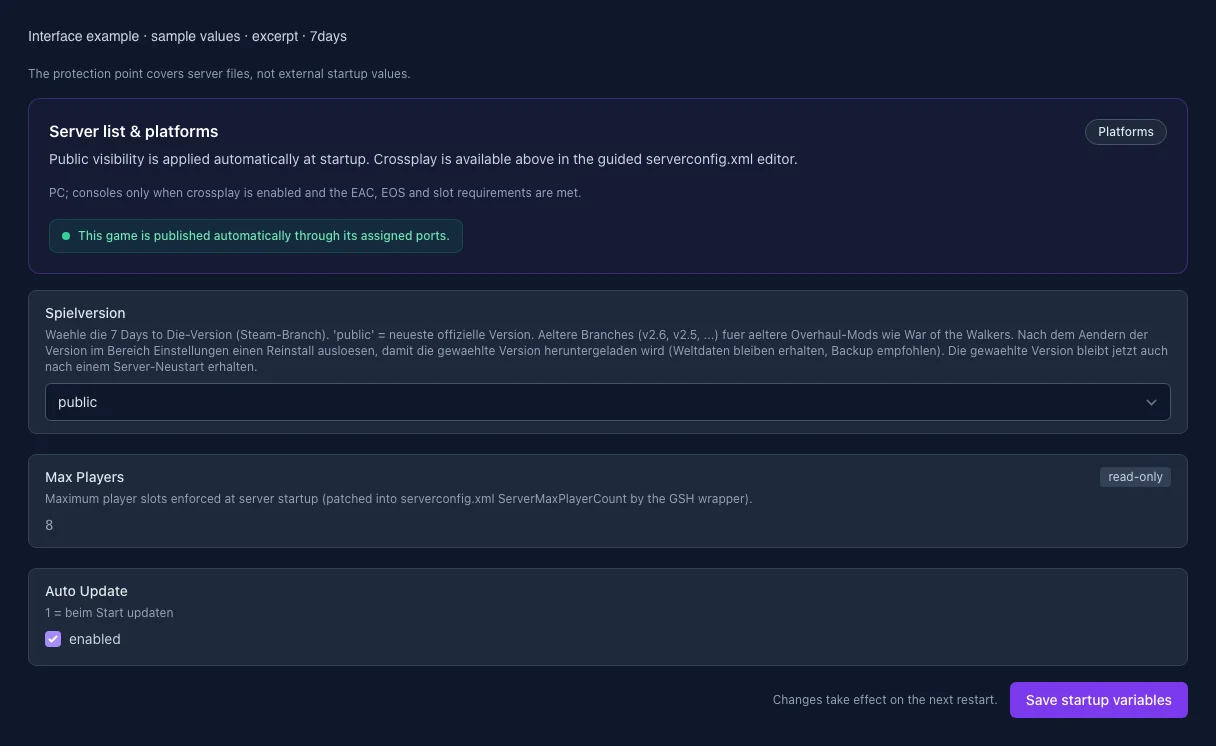
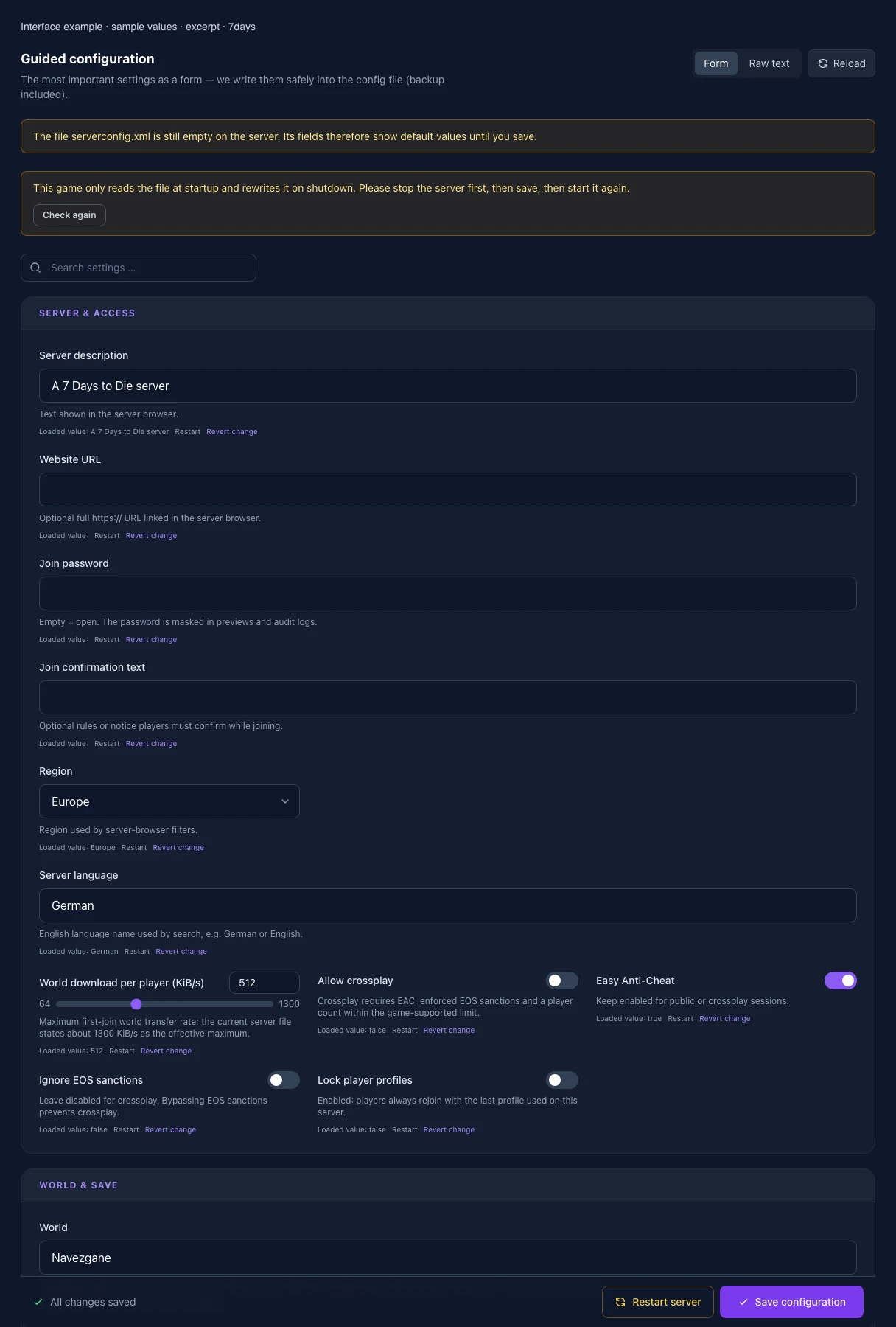
What the interface looks like

The image shows the interface on its capture date; earlier versions may differ.

Excerpt of the current interface with sample values. Values and prerequisites illustrate the controls; available tools depend on server software, plugins and permissions.
Excerpt of the current interface with sample values. Values and prerequisites illustrate the controls; available tools depend on server software, plugins and permissions. · Captured on 2026-10-08
Excerpt of the current interface with sample values. Values and prerequisites illustrate the controls; available tools depend on server software, plugins and permissions.
Excerpt of the current interface with sample values. Values and prerequisites illustrate the controls; available tools depend on server software, plugins and permissions. · Captured on 2026-10-08

What the settings do

These values come from our guided editors. Defaults are the editor starting values; they do not show the contents of a customer server.

Server description

Text shown in the server browser.

Setting
ServerDescription
Default
A 7 Days to Die server
Website URL

Optional full https:// URL linked in the server browser.

Setting
ServerWebsiteURL
Default
Join confirmation text

Optional rules or notice players must confirm while joining.

Setting
ServerLoginConfirmationText
Default
Region

Region used by server-browser filters.

Setting
Region
Default
Europe
Range / options
Europe, NorthAmericaEast, NorthAmericaWest, CentralAmerica, SouthAmerica, Russia, Asia, MiddleEast, Africa, Oceania
Server language

English language name used by search, e.g. German or English.

Setting
Language
Default
German
World download per player (KiB/s)

Maximum first-join world transfer rate; the current server file states about 1300 KiB/s as the effective maximum.

Setting
ServerMaxWorldTransferSpeedKiBs
Default
512
Range / options
64 – 1300
Allow crossplay

Crossplay requires EAC, enforced EOS sanctions and a player count within the game-supported limit.

Setting
ServerAllowCrossplay
Default
false
Easy Anti-Cheat

Keep enabled for public or crossplay sessions.

Setting
EACEnabled
Default
true
Ignore EOS sanctions

Leave disabled for crossplay. Bypassing EOS sanctions prevents crossplay.

Setting
IgnoreEOSSanctions
Default
false
Lock player profiles

Enabled: players always rejoin with the last profile used on this server.

Setting
PersistentPlayerProfiles
Default
false
World

Navezgane, RWG or the exact name of an existing world. WARNING: changing this loads/creates another save — back up the world first.

Setting
GameWorld
Default
Navezgane
RWG seed

Only for GameWorld=RWG. Do not change after a series starts or another world may be selected.

Setting
WorldGenSeed
Default
MyGame
RWG world size

Officially supported edge length. Larger worlds need considerably more generation time, RAM and disk.

Setting
WorldGenSize
Default
6144
Range / options
6144, 8192, 10240
Save-game name

Controls the save name. Do not change after a series starts. Use A-Z, a-z, 0-9, spaces and _-. (at most 255 characters, no accented letters or leading/trailing spaces).

Setting
GameName
Default
MyGame
Sandbox code (V3.1+)

Controls 150+ rules including difficulty, XP, day length, loot, zombie behaviour and Blood Moon. In the CURRENT 7DTD client open New Game → Sandbox Options, configure everything, choose Copy Code, then paste it here. Do not reuse legacy guide properties. Re-check/copy it after every game update: an invalid code can reset some or all settings to defaults.

Setting
SandboxCode
Default
AAAJABJACJADJARFBNC
New-player safe zone through level

New players create an enemy-free spawn zone through this level.

Setting
PlayerSafeZoneLevel
Default
5
Range / options
0 – 300
New-player safe zone (game hours)

Duration of the enemy-free spawn zone in in-game hours.

Setting
PlayerSafeZoneHours
Default
5
Range / options
0 – 72
Cheat/creative mode

Enable only for testing; this changes the conditions of a regular series.

Setting
BuildCreate
Default
false
Bedroll spawn-protection radius

Radius where zombies do not spawn and cleared sleeper volumes do not respawn.

Setting
BedrollDeadZoneSize
Default
15
Range / options
0 – 150
Bedroll expiry (real days)

Real days since the last login before a bedroll becomes inactive.

Setting
BedrollExpiryTime
Default
45
Range / options
0 – 365
First spawn near friend

0 = disabled, 1 = always, 2 = only near friends in the forest biome.

Setting
AllowSpawnNearFriend
Default
2
Range / options
0, 1, 2
Camera mode

0 = freely switchable, 1 = first person only, 2 = third person only.

Setting
CameraRestrictionMode
Default
0
Range / options
0, 1, 2
Shared kill-XP range

Maximum distance for shared party kill XP and quest-kill credit.

Setting
PartySharedKillRange
Default
100
Range / options
0 – 10000
Player killing (PvP)

0 = nobody, 1 = allies only, 2 = strangers only, 3 = everyone.

Setting
PlayerKillingMode
Default
3
Range / options
0, 1, 2, 3
Land claims per player

Maximum active land-claim blocks per player.

Setting
LandClaimCount
Default
5
Range / options
0 – 20
Land-claim size

Edge length of the protected area in blocks.

Setting
LandClaimSize
Default
41
Range / options
1 – 201
Minimum distance between claims

Minimum block distance between claims owned by non-friends.

Setting
LandClaimDeadZone
Default
30
Range / options
0 – 200
Claim expiry (real days)

Offline time before protection expires.

Setting
LandClaimExpiryTime
Default
7
Range / options
0 – 365
Claim decay mode

0 = slow/linear, 1 = fast/exponential, 2 = no decay until expiry.

Setting
LandClaimDecayMode
Default
0
Range / options
0, 1, 2
Online claim hardness multiplier

0 = indestructible; default 4 means four times block hardness.

Setting
LandClaimOnlineDurabilityModifier
Default
4
Range / options
0 – 32
Offline claim hardness multiplier

0 = indestructible; default 4 means four times block hardness.

Setting
LandClaimOfflineDurabilityModifier
Default
4
Range / options
0 – 32
Offline hardness delay (min.)

Minutes after logout before the offline hardness value applies.

Setting
LandClaimOfflineDelay
Default
0
Range / options
0 – 10080
Maximum spawned zombies

World-wide limit with very high CPU impact; Blood Moon and sleepers apply additional internal scaling.

Setting
MaxSpawnedZombies
Default
64
Range / options
0 – 128
Maximum spawned animals

World-wide animal limit. Higher values mainly help when many players are spread far apart.

Setting
MaxSpawnedAnimals
Default
50
Range / options
0 – 100
Maximum view distance

6–12; high values noticeably increase RAM and CPU usage.

Setting
ServerMaxAllowedViewDistance
Default
12
Range / options
6 – 12
Queued mesh layers

Lower values save RAM but can slow chunk generation.

Setting
MaxQueuedMeshLayers
Default
1000
Range / options
100 – 4000
Dynamic mesh enabled

Dynamic distant rendering of world changes.

Setting
DynamicMeshEnabled
Default
true
Dynamic mesh only in claims

Restricts dynamic mesh to land-claim areas and reduces load.

Setting
DynamicMeshLandClaimOnly
Default
true
Dynamic-mesh claim buffer (chunks)

Chunk radius around land claims included in dynamic mesh.

Setting
DynamicMeshLandClaimBuffer
Default
3
Range / options
0 – 12
Dynamic-mesh concurrency

More concurrent items require more RAM.

Setting
DynamicMeshMaxItemCache
Default
3
Range / options
1 – 16
Reset unvisited chunks (game days)

-1 = disabled. Otherwise long-unvisited, unprotected chunks can reset to their original state.

Setting
MaxChunkAge
Default
-1
Range / options
-1 – 3650
Per-save data limit (MB)

-1 = disabled. Warning: the tested V3.3 dedicated server still reports -1 (unlimited) despite a positive XML value. Do not rely on this limit in that version. Versions that enforce it may reset saved chunks when the limit is reached.

Setting
SaveDataLimit
Default
-1
Range / options
-1 – 102400
Game version (Steam branch)

public = current official version. Older branches are for compatible older mods. With automatic updates enabled, the selected branch is downloaded on the next start. With updates disabled, reinstalling is required. Back up your world and configuration first; older versions cannot read newer saves and settings.

Setting
SRCDS_BETAID
Default
public
Range / options
public, v3.0.0, v2.6, v2.5, v1.4, alpha21.2, alpha20.7
When it takes effect
Takes effect after saving and restarting the server.
Player slots

Purchased player slots. The startup wrapper writes this value to ServerMaxPlayerCount. It is read-only here; crossplay supports at most 8 slots.

Setting
MAX_PLAYERS
Default
8
Range / options
1 – 64
When it takes effect
Takes effect after saving and restarting the server.
Auto Update

1 = beim Start updaten

Setting
AUTO_UPDATE
Default
1
When it takes effect
Takes effect after saving and restarting the server.