Game updates, plugin versions and improvements to our interface with a traceable history.
Recorded, available and installed are different states. Your actual installation status and suitable updates are shown in the server panel.
InterfaceDeployed state checked
Guided startup parameters
The running panel release contains a change to this tool. Recorded field differences show new, removed or changed settings. The date identifies when the deployed state was checked; existing game and plugin installations are not updated by this interface change.
InterfaceDeployed state checked
Guided startup parameters
The running panel release contains a change to this tool. Recorded field differences show new, removed or changed settings. The date identifies when the deployed state was checked; existing game and plugin installations are not updated by this interface change.
SettingDeployed state checked
Enshrouded: settings
The running panel release contains a change to this tool. Recorded field differences show new, removed or changed settings. The date identifies when the deployed state was checked; existing game and plugin installations are not updated by this interface change.
Changed settings (42)
[SERVER] Server Name: Changed
SRV_NAME
Name of the server
Before
Setting
SRV_NAME
Default
My Server
When it takes effect
Takes effect after saving and restarting the server.
After
Setting
SRV_NAME
Default
My Server
When it takes effect
Takes effect after saving and restarting the server.
[SYSTEM] Validate: Changed
VALIDATE
Validate the serverfiles through Steam
Before
Setting
VALIDATE
Default
0
When it takes effect
Takes effect after saving and restarting the server.
After
Setting
VALIDATE
Default
0
When it takes effect
Takes effect after saving and restarting the server.
[SERVER] Steam Query Port: Changed
QUERY_PORT
Steam Query Port
Before
Setting
QUERY_PORT
Default
When it takes effect
Takes effect after saving and restarting the server.
After
Setting
QUERY_PORT
Default
When it takes effect
Takes effect after saving and restarting the server.
[SERVER] Auto Update: Changed
AUTO_UPDATE
Enable automatic updates on boot
Before
Setting
AUTO_UPDATE
Default
1
When it takes effect
Takes effect after saving and restarting the server.
After
Setting
AUTO_UPDATE
Default
1
When it takes effect
Takes effect after saving and restarting the server.
[SERVER] Max Players: Changed
MAX_PLAYERS
Maximum number of players allowed
Before
Setting
MAX_PLAYERS
Default
16
When it takes effect
Takes effect after saving and restarting the server.
After
Setting
MAX_PLAYERS
Default
16
When it takes effect
Takes effect after saving and restarting the server.
Voice chat range: Changed
voiceChatMode
Before
Setting
voiceChatMode
Default
Proximity
Range / options
Proximity, Global
After
Setting
voiceChatMode
Default
Proximity
Range / options
Proximity, Global
Text chat enabled: Changed
enableTextChat
Before
Setting
enableTextChat
Default
false
After
Setting
enableTextChat
Default
false
Voice chat enabled: Changed
enableVoiceChat
Before
Setting
enableVoiceChat
Default
false
After
Setting
enableVoiceChat
Default
false
Difficulty mode: Changed
gameSettingsPreset
Individual settings below only apply in Custom mode.
Multiplier: 1 = 100 % of the default value; 0.5 = 50 %, 2 = 200 %.
Before
Setting
gameSettings.experienceExplorationQuestsFactor
Default
1
Range / options
0.25 – 2
After
Setting
gameSettings.experienceExplorationQuestsFactor
Default
1
Range / options
0.25 – 2
InterfaceDeployed state checked
Guided startup parameters
The running panel release contains a change to this tool. Recorded field differences show new, removed or changed settings. The date identifies when the deployed state was checked; existing game and plugin installations are not updated by this interface change.
InterfaceDeployed state checked
Guided startup parameters
The running panel release contains a change to this tool. Recorded field differences show new, removed or changed settings. The date identifies when the deployed state was checked; existing game and plugin installations are not updated by this interface change.
InterfaceDeployed state checked
Guided startup parameters
The running panel release contains a change to this tool. Recorded field differences show new, removed or changed settings. The date identifies when the deployed state was checked; existing game and plugin installations are not updated by this interface change.
InterfaceDeployed state checked
Guided startup parameters
The running panel release contains a change to this tool. Recorded field differences show new, removed or changed settings. The date identifies when the deployed state was checked; existing game and plugin installations are not updated by this interface change.
InterfaceDeployed state checked
Guided startup parameters
The running panel release contains a change to this tool. Recorded field differences show new, removed or changed settings. The date identifies when the deployed state was checked; existing game and plugin installations are not updated by this interface change.
InterfaceDeployed state checked
Guided startup parameters
The running panel release contains a change to this tool. Recorded field differences show new, removed or changed settings. The date identifies when the deployed state was checked; existing game and plugin installations are not updated by this interface change.
InterfaceDeployed state checked
Guided startup parameters
The running panel release contains a change to this tool. Recorded field differences show new, removed or changed settings. The date identifies when the deployed state was checked; existing game and plugin installations are not updated by this interface change.
InterfaceDeployed state checked
Guided startup parameters
The running panel release contains a change to this tool. Recorded field differences show new, removed or changed settings. The date identifies when the deployed state was checked; existing game and plugin installations are not updated by this interface change.
InterfaceChange documented
Guided startup parameters: revised
The guided tools were revised in the shared panel code. The entry concerns the interface or its processing. The date records the change; availability on an individual server depends on the game, software, plugins and permissions.
InterfaceChange documented
Guided startup parameters: revised
The guided tools were revised in the shared panel code. The entry concerns the interface or its processing. The date records the change; availability on an individual server depends on the game, software, plugins and permissions.
InterfaceChange documented
Guided startup parameters: revised
The guided tools were revised in the shared panel code. The entry concerns the interface or its processing. The date records the change; availability on an individual server depends on the game, software, plugins and permissions.
InterfaceChange documented
Guided startup parameters: revised
The guided tools were revised in the shared panel code. The entry concerns the interface or its processing. The date records the change; availability on an individual server depends on the game, software, plugins and permissions.
InterfaceChange documented
Guided startup parameters: revised
The guided tools were revised in the shared panel code. The entry concerns the interface or its processing. The date records the change; availability on an individual server depends on the game, software, plugins and permissions.
InterfaceChange documented
Guided startup parameters: revised
The guided tools were revised in the shared panel code. The entry concerns the interface or its processing. The date records the change; availability on an individual server depends on the game, software, plugins and permissions.
InterfaceChange documented
Guided startup parameters: revised
The guided tools were revised in the shared panel code. The entry concerns the interface or its processing. The date records the change; availability on an individual server depends on the game, software, plugins and permissions.
InterfaceChange documented
Guided startup parameters: revised
The guided tools were revised in the shared panel code. The entry concerns the interface or its processing. The date records the change; availability on an individual server depends on the game, software, plugins and permissions.
Developer announcementPublished
The Enshrouded x Youtooz collab is here!
Announcement from the official source. The source describes the changes; your server installation status is shown separately in the update center.
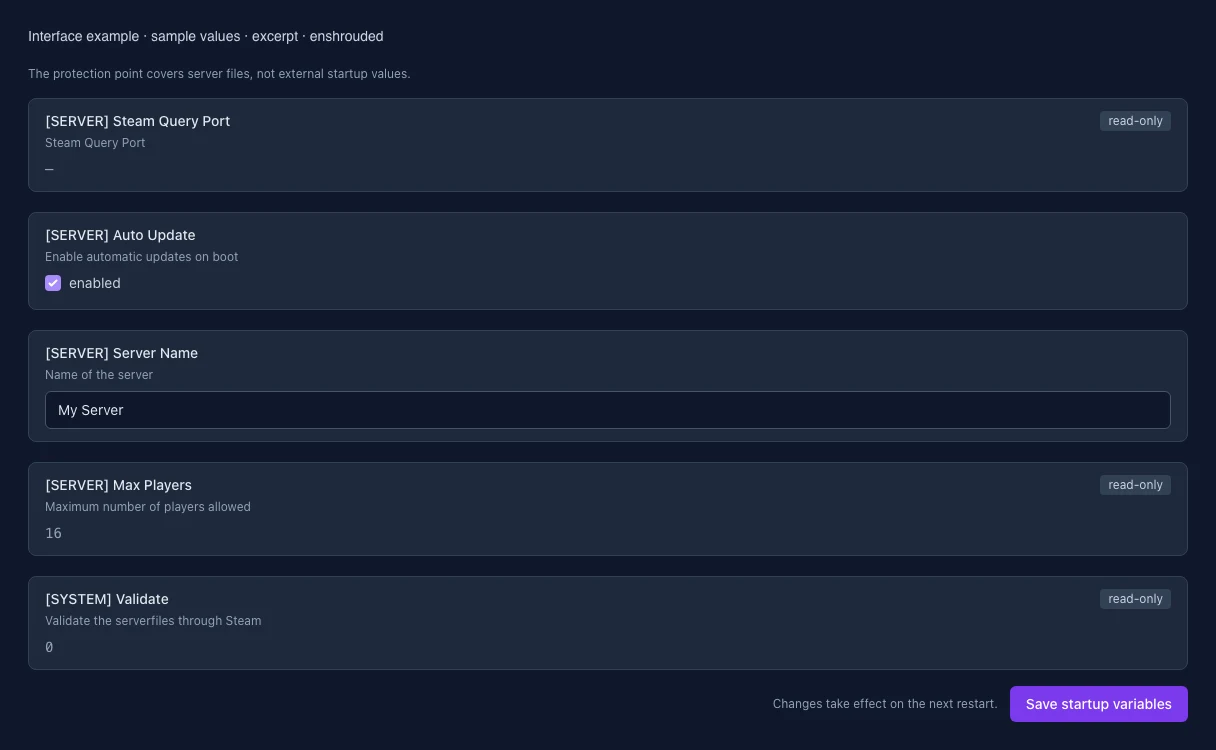
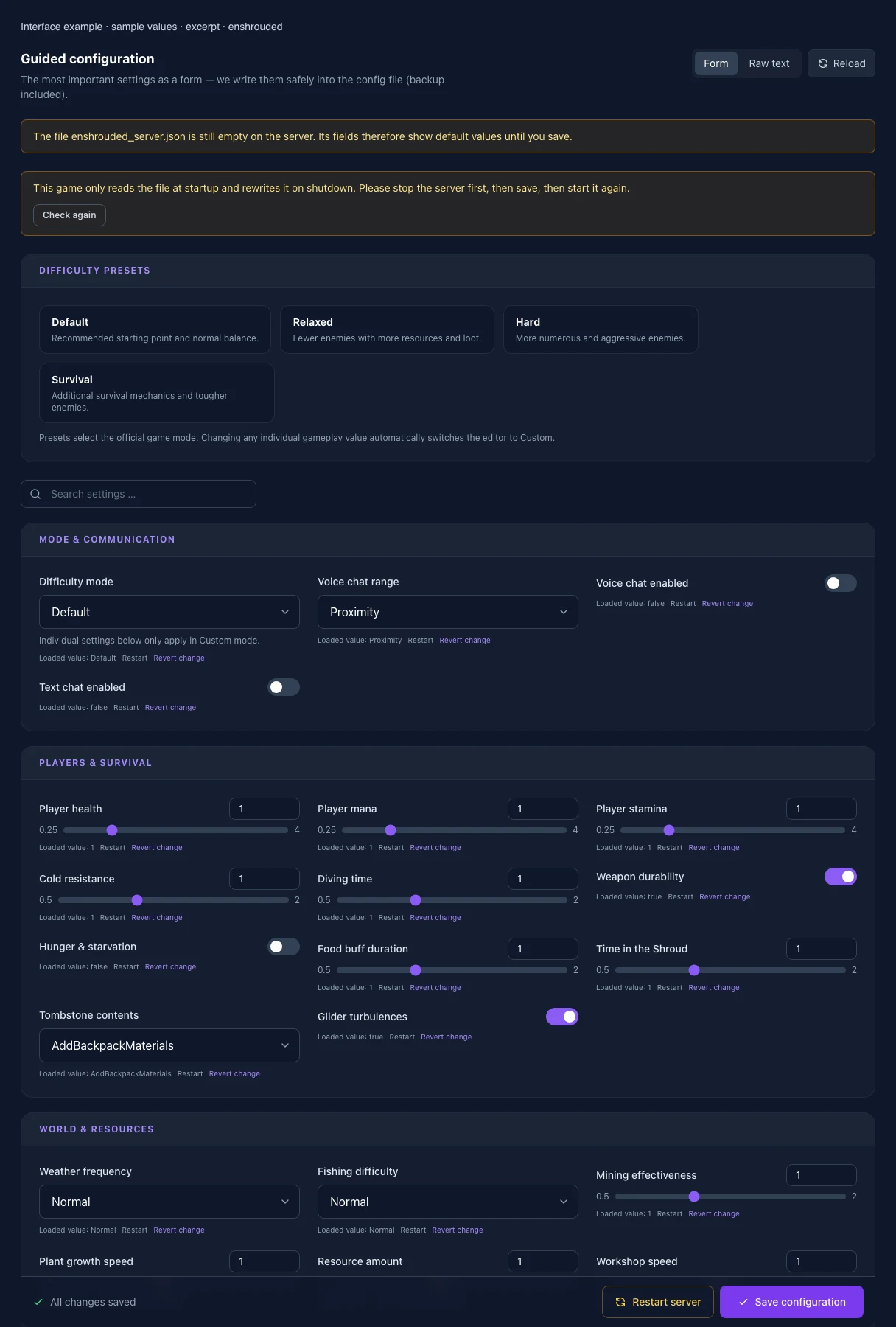
The image shows the interface on its capture date; earlier versions may differ.
Excerpt of the current interface with sample values. Values and prerequisites illustrate the controls; available tools depend on server software, plugins and permissions. · Captured on 2026-10-08Excerpt of the current interface with sample values. Values and prerequisites illustrate the controls; available tools depend on server software, plugins and permissions. · Captured on 2026-10-08
What the settings do
These values come from our guided editors. Defaults are the editor starting values; they do not show the contents of a customer server.
Difficulty mode
Individual settings below only apply in Custom mode.
Setting
gameSettingsPreset
Default
Default
Range / options
Default, Relaxed, Hard, Survival, Custom
Voice chat range
Setting
voiceChatMode
Default
Proximity
Range / options
Proximity, Global
Voice chat enabled
Setting
enableVoiceChat
Default
false
Text chat enabled
Setting
enableTextChat
Default
false
Player health
Multiplier: 1 = 100 % of the default value; 0.5 = 50 %, 2 = 200 %.
Setting
gameSettings.playerHealthFactor
Default
1
Range / options
0.25 – 4
Player mana
Multiplier: 1 = 100 % of the default value; 0.5 = 50 %, 2 = 200 %.
Setting
gameSettings.playerManaFactor
Default
1
Range / options
0.25 – 4
Player stamina
Multiplier: 1 = 100 % of the default value; 0.5 = 50 %, 2 = 200 %.
Setting
gameSettings.playerStaminaFactor
Default
1
Range / options
0.25 – 4
Cold resistance
Multiplier: 1 = 100 % of the default value; 0.5 = 50 %, 2 = 200 %.
Setting
gameSettings.playerBodyHeatFactor
Default
1
Range / options
0.5 – 2
Diving time
Multiplier: 1 = 100 % of the default value; 0.5 = 50 %, 2 = 200 %.
Setting
gameSettings.playerDivingTimeFactor
Default
1
Range / options
0.5 – 2
Weapon durability
Setting
gameSettings.enableDurability
Default
true
Hunger & starvation
Setting
gameSettings.enableStarvingDebuff
Default
false
Food buff duration
Multiplier: 1 = 100 % of the default value; 0.5 = 50 %, 2 = 200 %.
Setting
gameSettings.foodBuffDurationFactor
Default
1
Range / options
0.5 – 2
Time in the Shroud
Multiplier: 1 = 100 % of the default value; 0.5 = 50 %, 2 = 200 %.
Setting
gameSettings.shroudTimeFactor
Default
1
Range / options
0.5 – 2
Tombstone contents
Setting
gameSettings.tombstoneMode
Default
AddBackpackMaterials
Range / options
AddBackpackMaterials, Everything, NoTombstone
Glider turbulences
Setting
gameSettings.enableGliderTurbulences
Default
true
Weather frequency
Setting
gameSettings.weatherFrequency
Default
Normal
Range / options
Disabled, Rare, Normal, Often
Fishing difficulty
Setting
gameSettings.fishingDifficulty
Default
Normal
Range / options
VeryEasy, Easy, Normal, Hard, VeryHard
Mining effectiveness
Multiplier: 1 = 100 % of the default value; 0.5 = 50 %, 2 = 200 %.
Setting
gameSettings.miningDamageFactor
Default
1
Range / options
0.5 – 2
Plant growth speed
Multiplier: 1 = 100 % of the default value; 0.5 = 50 %, 2 = 200 %.
Setting
gameSettings.plantGrowthSpeedFactor
Default
1
Range / options
0.25 – 2
Resource amount
Multiplier: 1 = 100 % of the default value; 0.5 = 50 %, 2 = 200 %.
Setting
gameSettings.resourceDropStackAmountFactor
Default
1
Range / options
0.25 – 2
Workshop speed
Multiplier: 1 = 100 % of the default value; 0.5 = 50 %, 2 = 200 %.
Setting
gameSettings.factoryProductionSpeedFactor
Default
1
Range / options
0.25 – 2
Weapon upgrade costs
Multiplier: 1 = 100 % of the default value; 0.5 = 50 %, 2 = 200 %.
Setting
gameSettings.perkCostFactor
Default
1
Range / options
0.25 – 2
Combat experience
Multiplier: 1 = 100 % of the default value; 0.5 = 50 %, 2 = 200 %.
Setting
gameSettings.experienceCombatFactor
Default
1
Range / options
0.25 – 2
Mining experience
Multiplier: 1 = 100 % of the default value; 0.5 = 50 %, 2 = 200 %.
Setting
gameSettings.experienceMiningFactor
Default
1
Range / options
0 – 2
Exploration & quest experience
Multiplier: 1 = 100 % of the default value; 0.5 = 50 %, 2 = 200 %.
Setting
gameSettings.experienceExplorationQuestsFactor
Default
1
Range / options
0.25 – 2
Enemy amount
Setting
gameSettings.randomSpawnerAmount
Default
Normal
Range / options
Few, Normal, Many, Extreme
Simultaneous attackers
Setting
gameSettings.aggroPoolAmount
Default
Normal
Range / options
Few, Normal, Many, Extreme
Enemy damage
Multiplier: 1 = 100 % of the default value; 0.5 = 50 %, 2 = 200 %.
Setting
gameSettings.enemyDamageFactor
Default
1
Range / options
0.25 – 5
Enemy health
Multiplier: 1 = 100 % of the default value; 0.5 = 50 %, 2 = 200 %.
Setting
gameSettings.enemyHealthFactor
Default
1
Range / options
0.25 – 4
Enemy stun resistance
Multiplier: 1 = 100 % of the default value; 0.5 = 50 %, 2 = 200 %.
Setting
gameSettings.enemyStaminaFactor
Default
1
Range / options
0.5 – 2
Enemy perception
Multiplier: 1 = 100 % of the default value; 0.5 = 50 %, 2 = 200 %.
Setting
gameSettings.enemyPerceptionRangeFactor
Default
1
Range / options
0.5 – 2
Boss damage
Multiplier: 1 = 100 % of the default value; 0.5 = 50 %, 2 = 200 %.
Setting
gameSettings.bossDamageFactor
Default
1
Range / options
0.2 – 5
Boss health
Multiplier: 1 = 100 % of the default value; 0.5 = 50 %, 2 = 200 %.
Setting
gameSettings.bossHealthFactor
Default
1
Range / options
0.2 – 5
Attack frequency
Multiplier: 1 = 100 % of the default value; 0.5 = 50 %, 2 = 200 %.
Setting
gameSettings.threatBonus
Default
1
Range / options
0.25 – 4
Enemies passive until attacked
Setting
gameSettings.pacifyAllEnemies
Default
false
Taming startle penalty
Setting
gameSettings.tamingStartleRepercussion
Default
LoseSomeProgress
Range / options
KeepProgress, LoseSomeProgress, LoseAllProgress
Shroud curse
Setting
gameSettings.curseModifier
Default
Normal
Range / options
Easy, Normal, Hard
[SERVER] Steam Query Port
Steam Query Port
Setting
QUERY_PORT
Default
When it takes effect
Takes effect after saving and restarting the server.
[SERVER] Auto Update
Enable automatic updates on boot
Setting
AUTO_UPDATE
Default
1
When it takes effect
Takes effect after saving and restarting the server.
[SERVER] Server Name
Name of the server
Setting
SRV_NAME
Default
My Server
When it takes effect
Takes effect after saving and restarting the server.
[SERVER] Max Players
Maximum number of players allowed
Setting
MAX_PLAYERS
Default
16
When it takes effect
Takes effect after saving and restarting the server.
[SYSTEM] Validate
Validate the serverfiles through Steam
Setting
VALIDATE
Default
0
When it takes effect
Takes effect after saving and restarting the server.
Loading...
Cookie settings
We use cookies to improve your experience and analyze our website.
Cookie settings
Essential cookies
Required
These cookies are required for the core functions of the website and cannot be disabled.
Analytics cookies
Help us understand how the website and customer area are used (our own usage analytics, Google Analytics, Microsoft Clarity).
Marketing cookies
Allow the pseudonymous matching of an ad click to an order in order to measure conversions.