Developer announcement
Published
Enshrouded World Design Team Reddit AMA Recap!
Announcement from the official source. The source describes the changes; your server installation status is shown separately in the update center.
Game updates, plugin versions and improvements to our interface with a traceable history.
Recorded, available and installed are different states. Your actual installation status and suitable updates are shown in the server panel.
Announcement from the official source. The source describes the changes; your server installation status is shown separately in the update center.
Announcement from the official source. The source describes the changes; your server installation status is shown separately in the update center.
No independent plugin compatibility test is documented for this announcement. Check the affected plugins in the update center before changing game versions.
Announcement from the official source. The source describes the changes; your server installation status is shown separately in the update center.
Announcement from the official source. The source describes the changes; your server installation status is shown separately in the update center.
No independent plugin compatibility test is documented for this announcement. Check the affected plugins in the update center before changing game versions.
Announcement from the official source. The source describes the changes; your server installation status is shown separately in the update center.
No independent plugin compatibility test is documented for this announcement. Check the affected plugins in the update center before changing game versions.
Announcement from the official source. The source describes the changes; your server installation status is shown separately in the update center.
Announcement from the official source. The source describes the changes; your server installation status is shown separately in the update center.
No independent plugin compatibility test is documented for this announcement. Check the affected plugins in the update center before changing game versions.
Announcement from the official source. The source describes the changes; your server installation status is shown separately in the update center.
No independent plugin compatibility test is documented for this announcement. Check the affected plugins in the update center before changing game versions.
Announcement from the official source. The source describes the changes; your server installation status is shown separately in the update center.
No independent plugin compatibility test is documented for this announcement. Check the affected plugins in the update center before changing game versions.
Announcement from the official source. The source describes the changes; your server installation status is shown separately in the update center.
No independent plugin compatibility test is documented for this announcement. Check the affected plugins in the update center before changing game versions.
Announcement from the official source. The source describes the changes; your server installation status is shown separately in the update center.
Announcement from the official source. The source describes the changes; your server installation status is shown separately in the update center.
No independent plugin compatibility test is documented for this announcement. Check the affected plugins in the update center before changing game versions.
Announcement from the official source. The source describes the changes; your server installation status is shown separately in the update center.
No independent plugin compatibility test is documented for this announcement. Check the affected plugins in the update center before changing game versions.
Announcement from the official source. The source describes the changes; your server installation status is shown separately in the update center.
Announcement from the official source. The source describes the changes; your server installation status is shown separately in the update center.
No independent plugin compatibility test is documented for this announcement. Check the affected plugins in the update center before changing game versions.
Announcement from the official source. The source describes the changes; your server installation status is shown separately in the update center.
No independent plugin compatibility test is documented for this announcement. Check the affected plugins in the update center before changing game versions.
Announcement from the official source. The source describes the changes; your server installation status is shown separately in the update center.
Announcement from the official source. The source describes the changes; your server installation status is shown separately in the update center.
No independent plugin compatibility test is documented for this announcement. Check the affected plugins in the update center before changing game versions.
Announcement from the official source. The source describes the changes; your server installation status is shown separately in the update center.
No independent plugin compatibility test is documented for this announcement. Check the affected plugins in the update center before changing game versions.
Announcement from the official source. The source describes the changes; your server installation status is shown separately in the update center.
No independent plugin compatibility test is documented for this announcement. Check the affected plugins in the update center before changing game versions.
The image shows the interface on its capture date; earlier versions may differ.
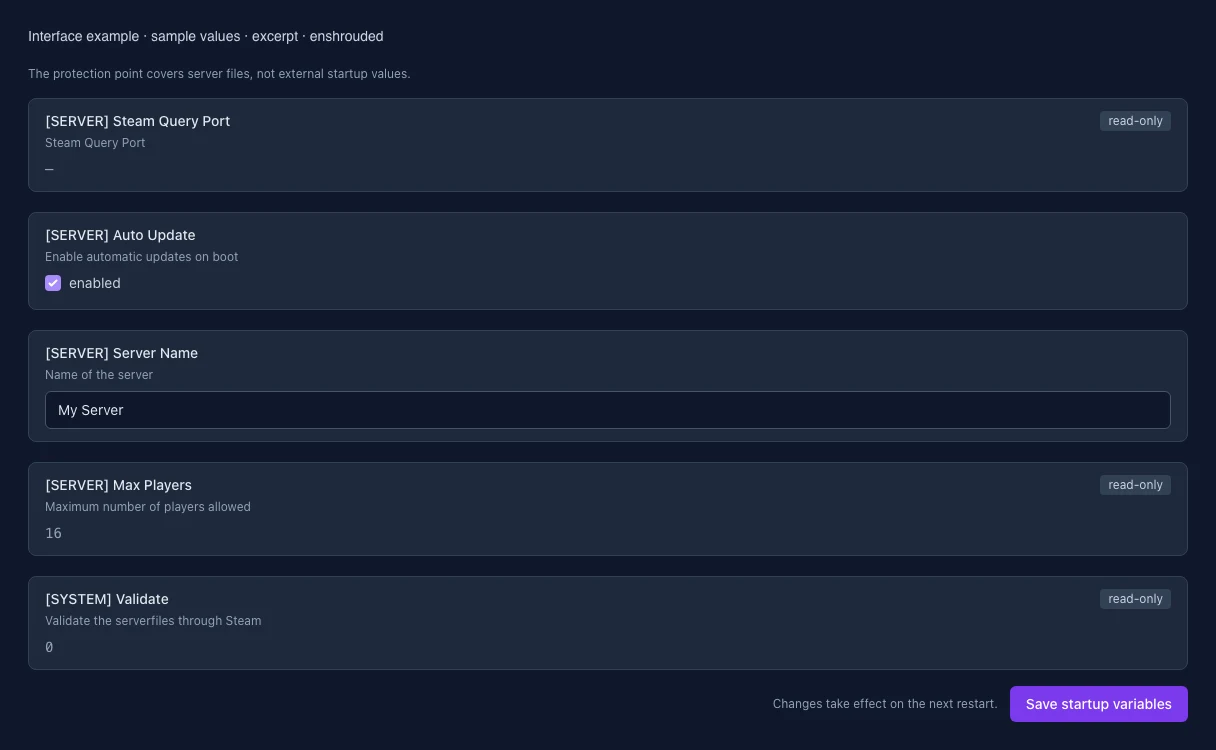
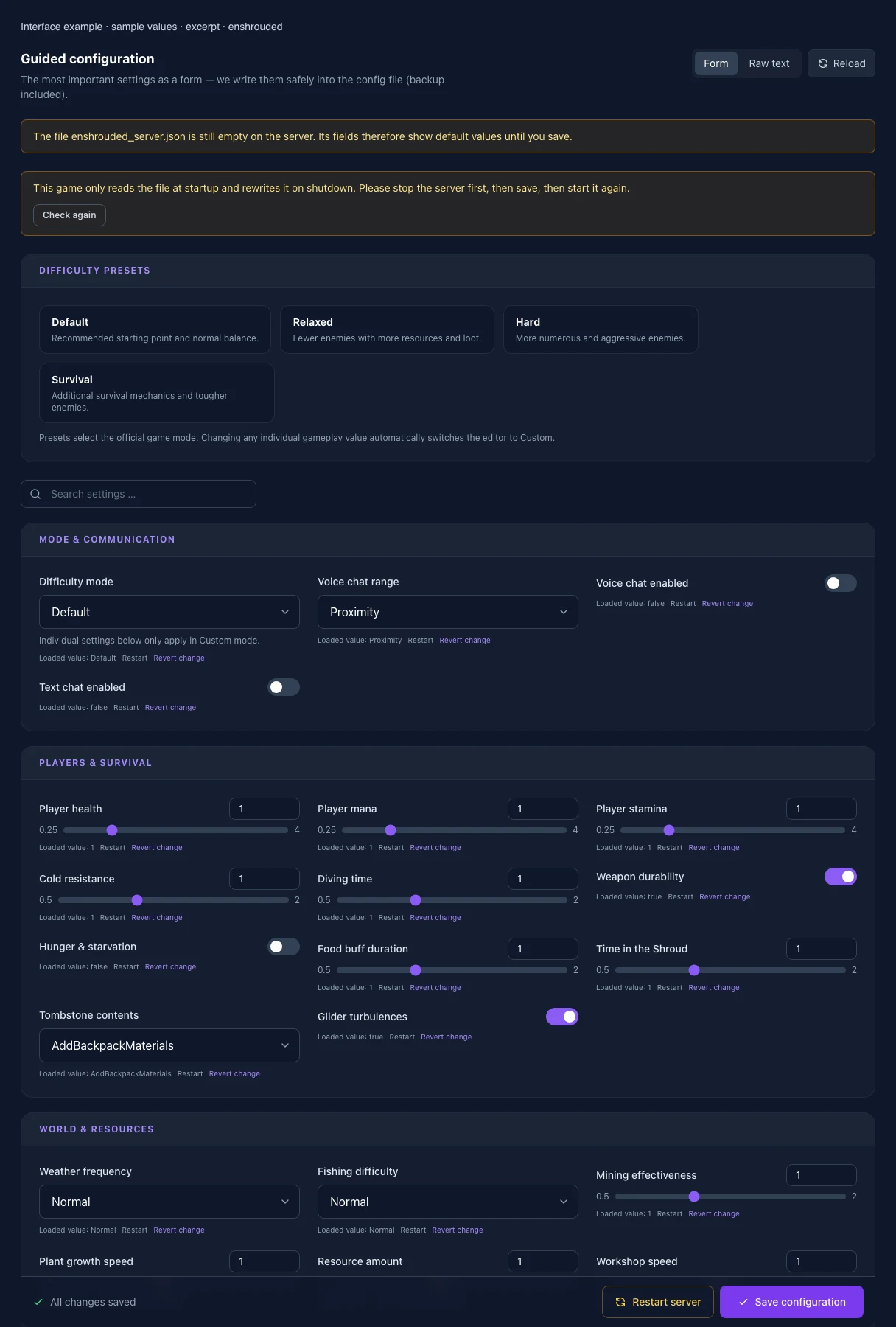
These values come from our guided editors. Defaults are the editor starting values; they do not show the contents of a customer server.
Individual settings below only apply in Custom mode.
Multiplier: 1 = 100 % of the default value; 0.5 = 50 %, 2 = 200 %.
Multiplier: 1 = 100 % of the default value; 0.5 = 50 %, 2 = 200 %.
Multiplier: 1 = 100 % of the default value; 0.5 = 50 %, 2 = 200 %.
Multiplier: 1 = 100 % of the default value; 0.5 = 50 %, 2 = 200 %.
Multiplier: 1 = 100 % of the default value; 0.5 = 50 %, 2 = 200 %.
Multiplier: 1 = 100 % of the default value; 0.5 = 50 %, 2 = 200 %.
Multiplier: 1 = 100 % of the default value; 0.5 = 50 %, 2 = 200 %.
Multiplier: 1 = 100 % of the default value; 0.5 = 50 %, 2 = 200 %.
Multiplier: 1 = 100 % of the default value; 0.5 = 50 %, 2 = 200 %.
Multiplier: 1 = 100 % of the default value; 0.5 = 50 %, 2 = 200 %.
Multiplier: 1 = 100 % of the default value; 0.5 = 50 %, 2 = 200 %.
Multiplier: 1 = 100 % of the default value; 0.5 = 50 %, 2 = 200 %.
Multiplier: 1 = 100 % of the default value; 0.5 = 50 %, 2 = 200 %.
Multiplier: 1 = 100 % of the default value; 0.5 = 50 %, 2 = 200 %.
Multiplier: 1 = 100 % of the default value; 0.5 = 50 %, 2 = 200 %.
Multiplier: 1 = 100 % of the default value; 0.5 = 50 %, 2 = 200 %.
Multiplier: 1 = 100 % of the default value; 0.5 = 50 %, 2 = 200 %.
Multiplier: 1 = 100 % of the default value; 0.5 = 50 %, 2 = 200 %.
Multiplier: 1 = 100 % of the default value; 0.5 = 50 %, 2 = 200 %.
Multiplier: 1 = 100 % of the default value; 0.5 = 50 %, 2 = 200 %.
Multiplier: 1 = 100 % of the default value; 0.5 = 50 %, 2 = 200 %.
Multiplier: 1 = 100 % of the default value; 0.5 = 50 %, 2 = 200 %.
Steam Query Port
Enable automatic updates on boot
Name of the server
Maximum number of players allowed
Validate the serverfiles through Steam