Game updates, plugin versions and improvements to our interface with a traceable history.
Recorded, available and installed are different states. Your actual installation status and suitable updates are shown in the server panel.
InterfaceDeployed state checked
Guided startup parameters
The running panel release contains a change to this tool. Recorded field differences show new, removed or changed settings. The date identifies when the deployed state was checked; existing game and plugin installations are not updated by this interface change.
InterfaceDeployed state checked
Guided startup parameters
The running panel release contains a change to this tool. Recorded field differences show new, removed or changed settings. The date identifies when the deployed state was checked; existing game and plugin installations are not updated by this interface change.
SettingDeployed state checked
tModLoader: settings
The running panel release contains a change to this tool. Recorded field differences show new, removed or changed settings. The date identifies when the deployed state was checked; existing game and plugin installations are not updated by this interface change.
Changed settings (7)
MOTD: Changed
MOTD
Message of the day.
Before
Setting
MOTD
Default
Welcome!
When it takes effect
Takes effect after saving and restarting the server.
After
Setting
MOTD
Default
Welcome!
When it takes effect
Takes effect after saving and restarting the server.
Language: Changed
LANGUAGE
1=en 2=de 3=it 4=fr 5=es.
Before
Setting
LANGUAGE
Default
1
Range / options
1, 2, 3, 4, 5
When it takes effect
Takes effect after saving and restarting the server.
After
Setting
LANGUAGE
Default
1
Range / options
1, 2, 3, 4, 5
When it takes effect
Takes effect after saving and restarting the server.
Difficulty: Changed
DIFFICULTY
0 = normal, 1 = expert, 2 = master, 3 = journey.
Before
Setting
DIFFICULTY
Default
0
Range / options
0, 1, 2, 3
When it takes effect
Takes effect after saving and restarting the server.
After
Setting
DIFFICULTY
Default
0
Range / options
0, 1, 2, 3
When it takes effect
Takes effect after saving and restarting the server.
World Name: Changed
WORLD_NAME
Name of the world to autocreate.
Before
Setting
WORLD_NAME
Default
world
When it takes effect
Takes effect after saving and restarting the server.
After
Setting
WORLD_NAME
Default
world
When it takes effect
Takes effect after saving and restarting the server.
World Seed: Changed
WORLD_SEED
Seed der Welt (optional). Wirkt NUR bei der ersten Welterzeugung (-autocreate); eine bestehende Welt behaelt ihren Seed. Leer = zufaellig. Spezial-Seeds wie 'for the worthy', 'not the bees' oder 'getfixedboi' sind moeglich.
Before
Setting
WORLD_SEED
Default
When it takes effect
Takes effect after saving and restarting the server.
After
Setting
WORLD_SEED
Default
When it takes effect
Takes effect after saving and restarting the server.
World Size: Changed
WORLD_SIZE
1 = small, 2 = medium, 3 = large.
Before
Setting
WORLD_SIZE
Default
1
Range / options
1, 2, 3
When it takes effect
Takes effect after saving and restarting the server.
After
Setting
WORLD_SIZE
Default
1
Range / options
1, 2, 3
When it takes effect
Takes effect after saving and restarting the server.
Max Players: Changed
MAX_PLAYERS
Maximum number of players.
Before
Setting
MAX_PLAYERS
Default
8
When it takes effect
Takes effect after saving and restarting the server.
After
Setting
MAX_PLAYERS
Default
8
Range / options
0 – 999
When it takes effect
Takes effect after saving and restarting the server.
InterfaceDeployed state checked
Guided startup parameters
The running panel release contains a change to this tool. Recorded field differences show new, removed or changed settings. The date identifies when the deployed state was checked; existing game and plugin installations are not updated by this interface change.
InterfaceDeployed state checked
Guided startup parameters
The running panel release contains a change to this tool. Recorded field differences show new, removed or changed settings. The date identifies when the deployed state was checked; existing game and plugin installations are not updated by this interface change.
InterfaceDeployed state checked
Guided startup parameters
The running panel release contains a change to this tool. Recorded field differences show new, removed or changed settings. The date identifies when the deployed state was checked; existing game and plugin installations are not updated by this interface change.
InterfaceDeployed state checked
Guided startup parameters
The running panel release contains a change to this tool. Recorded field differences show new, removed or changed settings. The date identifies when the deployed state was checked; existing game and plugin installations are not updated by this interface change.
InterfaceDeployed state checked
Guided startup parameters
The running panel release contains a change to this tool. Recorded field differences show new, removed or changed settings. The date identifies when the deployed state was checked; existing game and plugin installations are not updated by this interface change.
InterfaceDeployed state checked
Guided startup parameters
The running panel release contains a change to this tool. Recorded field differences show new, removed or changed settings. The date identifies when the deployed state was checked; existing game and plugin installations are not updated by this interface change.
InterfaceDeployed state checked
Guided startup parameters
The running panel release contains a change to this tool. Recorded field differences show new, removed or changed settings. The date identifies when the deployed state was checked; existing game and plugin installations are not updated by this interface change.
InterfaceDeployed state checked
Guided startup parameters
The running panel release contains a change to this tool. Recorded field differences show new, removed or changed settings. The date identifies when the deployed state was checked; existing game and plugin installations are not updated by this interface change.
InterfaceChange documented
Guided startup parameters: revised
The guided tools were revised in the shared panel code. The entry concerns the interface or its processing. The date records the change; availability on an individual server depends on the game, software, plugins and permissions.
InterfaceChange documented
Guided startup parameters: revised
The guided tools were revised in the shared panel code. The entry concerns the interface or its processing. The date records the change; availability on an individual server depends on the game, software, plugins and permissions.
InterfaceChange documented
Guided startup parameters: revised
The guided tools were revised in the shared panel code. The entry concerns the interface or its processing. The date records the change; availability on an individual server depends on the game, software, plugins and permissions.
InterfaceChange documented
Guided startup parameters: revised
The guided tools were revised in the shared panel code. The entry concerns the interface or its processing. The date records the change; availability on an individual server depends on the game, software, plugins and permissions.
InterfaceChange documented
Guided startup parameters: revised
The guided tools were revised in the shared panel code. The entry concerns the interface or its processing. The date records the change; availability on an individual server depends on the game, software, plugins and permissions.
InterfaceChange documented
Guided startup parameters: revised
The guided tools were revised in the shared panel code. The entry concerns the interface or its processing. The date records the change; availability on an individual server depends on the game, software, plugins and permissions.
InterfaceChange documented
Guided startup parameters: revised
The guided tools were revised in the shared panel code. The entry concerns the interface or its processing. The date records the change; availability on an individual server depends on the game, software, plugins and permissions.
InterfaceChange documented
Guided startup parameters: revised
The guided tools were revised in the shared panel code. The entry concerns the interface or its processing. The date records the change; availability on an individual server depends on the game, software, plugins and permissions.
InterfaceChange documented
Guided startup parameters: revised
The guided tools were revised in the shared panel code. The entry concerns the interface or its processing. The date records the change; availability on an individual server depends on the game, software, plugins and permissions.
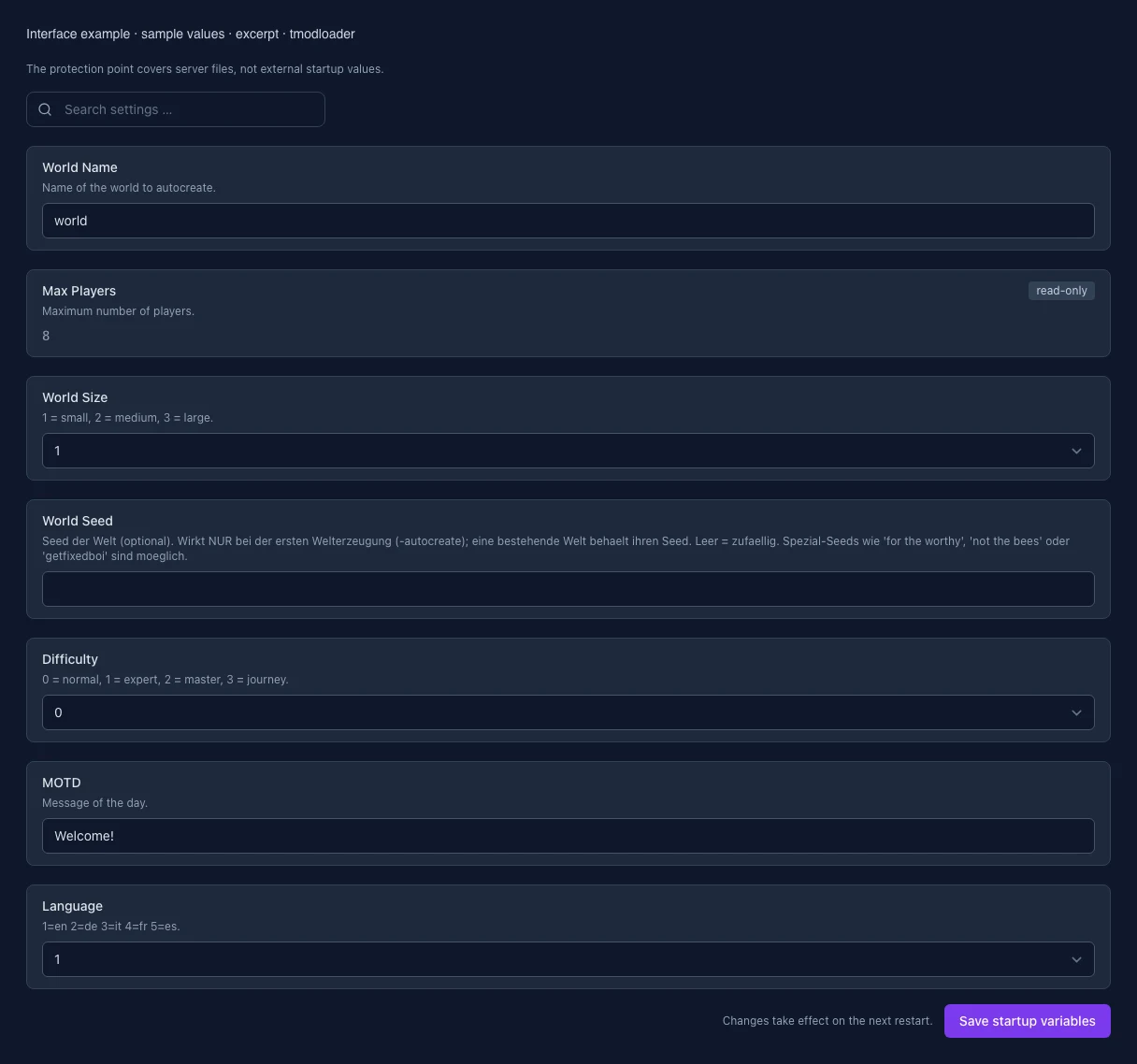
What the interface looks like
The image shows the interface on its capture date; earlier versions may differ.
Excerpt of the current interface with sample values. Values and prerequisites illustrate the controls; available tools depend on server software, plugins and permissions. · Captured on 2026-10-08
What the settings do
These values come from our guided editors. Defaults are the editor starting values; they do not show the contents of a customer server.
World name
World filename, 1–20 letters, digits, hyphens or underscores. A different name loads or creates a different world.
Setting
WORLD_NAME
Default
world
When it takes effect
Takes effect after saving and restarting the server.
Player limit
Maximum simultaneous players. Set by the purchased server and read-only here.
Setting
MAX_PLAYERS
Default
8
Range / options
0 – 999
When it takes effect
Takes effect after saving and restarting the server.
World size
Size of a newly generated world. An existing world keeps its size.
Setting
WORLD_SIZE
Default
1
Range / options
1, 2, 3
When it takes effect
Takes effect after saving and restarting the server.
World seed
Optional, up to 40 characters. Used only when a world is first generated. An existing world keeps its seed. Empty means random; special seeds such as for the worthy are supported.
Setting
WORLD_SEED
Default
When it takes effect
Takes effect after saving and restarting the server.
Difficulty
Difficulty of a newly generated world. An existing world keeps its difficulty.
Setting
DIFFICULTY
Default
0
Range / options
0, 1, 2, 3
When it takes effect
Takes effect after saving and restarting the server.
Greeting (MOTD)
In-game greeting, 1–40 characters. Accented letters, emoji and single quotes are allowed. The startup command does not support double quotes, dollar signs, backticks, control characters, consecutive backslashes or a trailing backslash.
Setting
MOTD
Default
Welcome!
When it takes effect
Takes effect after saving and restarting the server.
Game language
Game language. Restart after saving.
Setting
LANGUAGE
Default
1
Range / options
1, 2, 3, 4, 5
When it takes effect
Takes effect after saving and restarting the server.
Loading...
Cookie settings
We use cookies to improve your experience and analyze our website.
Cookie settings
Essential cookies
Required
These cookies are required for the core functions of the website and cannot be disabled.
Analytics cookies
Help us understand how the website and customer area are used (our own usage analytics, Google Analytics, Microsoft Clarity).
Marketing cookies
Allow the pseudonymous matching of an ad click to an order in order to measure conversions.