ARK: Survival Ascended: updates, settings and interface
Game updates, plugin versions and improvements to our interface with a traceable history.
Recorded, available and installed are different states. Your actual installation status and suitable updates are shown in the server panel.
InterfaceChange documented
Guided startup parameters: revised
The guided tools were revised in the shared panel code. The entry concerns the interface or its processing. The date records the change; availability on an individual server depends on the game, software, plugins and permissions.
InterfaceChange documented
Guided startup parameters: revised
The guided tools were revised in the shared panel code. The entry concerns the interface or its processing. The date records the change; availability on an individual server depends on the game, software, plugins and permissions.
InterfaceChange documented
Guided startup parameters: revised
The guided tools were revised in the shared panel code. The entry concerns the interface or its processing. The date records the change; availability on an individual server depends on the game, software, plugins and permissions.
InterfaceChange documented
Guided startup parameters: revised
The guided tools were revised in the shared panel code. The entry concerns the interface or its processing. The date records the change; availability on an individual server depends on the game, software, plugins and permissions.
InterfaceChange documented
Guided startup parameters: revised
The guided tools were revised in the shared panel code. The entry concerns the interface or its processing. The date records the change; availability on an individual server depends on the game, software, plugins and permissions.
InterfaceChange documented
Guided startup parameters: revised
The guided tools were revised in the shared panel code. The entry concerns the interface or its processing. The date records the change; availability on an individual server depends on the game, software, plugins and permissions.
InterfaceChange documented
Guided startup parameters: revised
The guided tools were revised in the shared panel code. The entry concerns the interface or its processing. The date records the change; availability on an individual server depends on the game, software, plugins and permissions.
InterfaceChange documented
Guided startup parameters: revised
The guided tools were revised in the shared panel code. The entry concerns the interface or its processing. The date records the change; availability on an individual server depends on the game, software, plugins and permissions.
InterfaceChange documented
Guided startup parameters: revised
The guided tools were revised in the shared panel code. The entry concerns the interface or its processing. The date records the change; availability on an individual server depends on the game, software, plugins and permissions.
InterfaceChange documented
Guided startup parameters: revised
The guided tools were revised in the shared panel code. The entry concerns the interface or its processing. The date records the change; availability on an individual server depends on the game, software, plugins and permissions.
InterfaceChange documented
Guided startup parameters: revised
The guided tools were revised in the shared panel code. The entry concerns the interface or its processing. The date records the change; availability on an individual server depends on the game, software, plugins and permissions.
InterfaceChange documented
Guided startup parameters: revised
The guided tools were revised in the shared panel code. The entry concerns the interface or its processing. The date records the change; availability on an individual server depends on the game, software, plugins and permissions.
InterfaceChange documented
Guided startup parameters: revised
The guided tools were revised in the shared panel code. The entry concerns the interface or its processing. The date records the change; availability on an individual server depends on the game, software, plugins and permissions.
SettingChange documented
Server configuration: settings revised
The guided interface was updated. The history shows added, changed and removed fields with explanations and editor defaults. The date records the documented change, not the historical deployment time.
Fine control between 0.01 and 1.0; 1.0 on its own yields wild creatures up to level 120. The field above overrides it once set — so for level 150, set the wild creature level to 5.0. Not in the default file — created on first save.
Before
Setting
DifficultyOffset
Default
1
Range / options
0.01 – 1
After
Setting
DifficultyOffset
Default
1
Range / options
0.01 – 1
Maximum wild creature level (OverrideOfficialDifficulty): Added
OverrideOfficialDifficulty
Sets the highest wild creature level: level = 30 x this value. 5.0 matches official servers (level 150), 10.0 yields level 300. Overrides the difficulty below. Not in the default file — created on first save.
After
Setting
OverrideOfficialDifficulty
Default
5
Range / options
1 – 20
InterfaceChange documented
Guided startup parameters: revised
The guided tools were revised in the shared panel code. The entry concerns the interface or its processing. The date records the change; availability on an individual server depends on the game, software, plugins and permissions.
InterfaceChange documented
Guided startup parameters: revised
The guided tools were revised in the shared panel code. The entry concerns the interface or its processing. The date records the change; availability on an individual server depends on the game, software, plugins and permissions.
InterfaceChange documented
Guided startup parameters: revised
The guided tools were revised in the shared panel code. The entry concerns the interface or its processing. The date records the change; availability on an individual server depends on the game, software, plugins and permissions.
Developer announcementPublished
Community Crunch 522: The Good, the Bad and the Ugly
Announcement from the official source. The source describes the changes; your server installation status is shown separately in the update center.
The guided tools were revised in the shared panel code. The entry concerns the interface or its processing. The date records the change; availability on an individual server depends on the game, software, plugins and permissions.
InterfaceChange documented
Guided startup parameters: revised
The guided tools were revised in the shared panel code. The entry concerns the interface or its processing. The date records the change; availability on an individual server depends on the game, software, plugins and permissions.
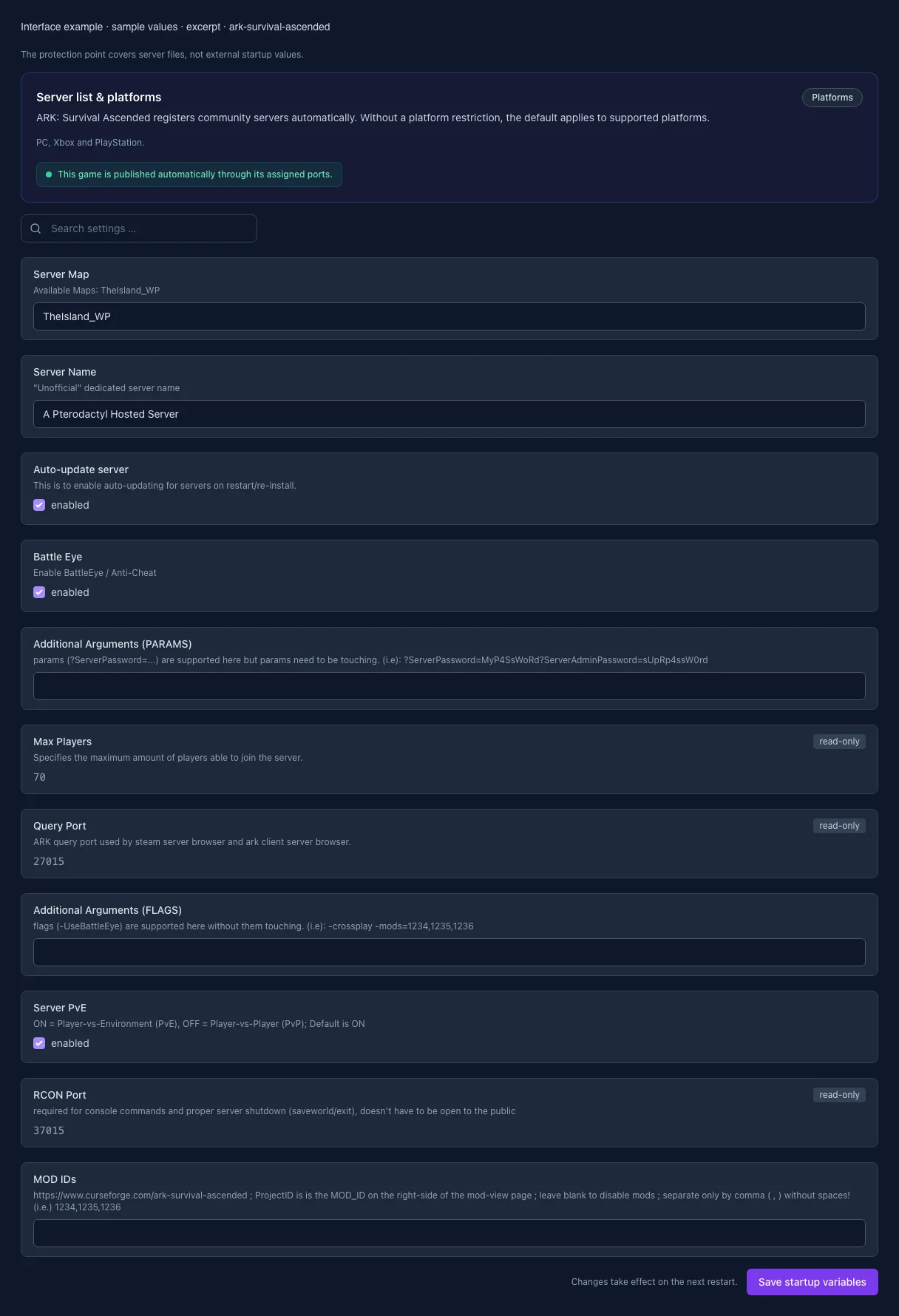
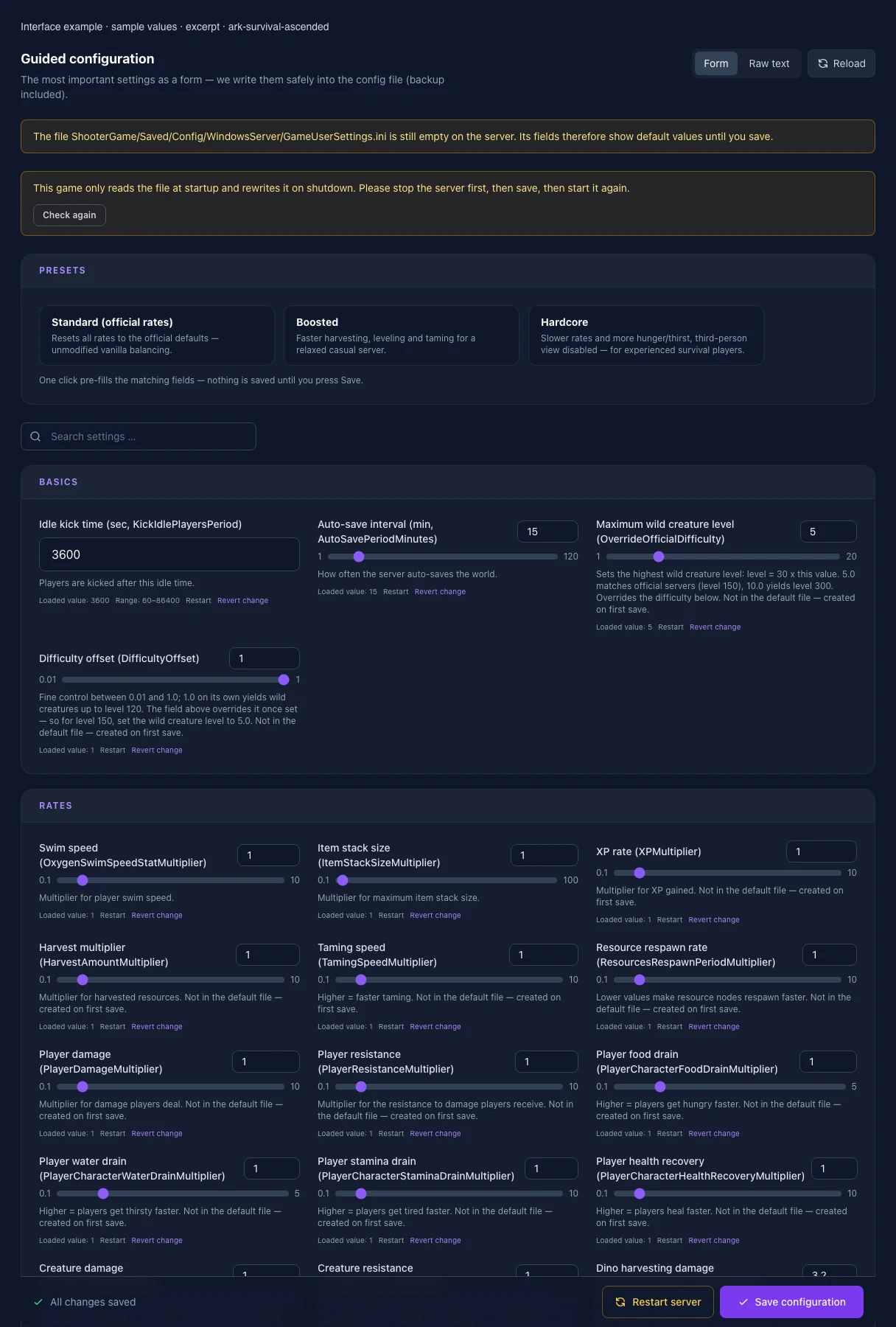
What the interface looks like
The image shows the interface on its capture date; earlier versions may differ.
Excerpt of the current interface with sample values. Values and prerequisites illustrate the controls; available tools depend on server software, plugins and permissions. · Captured on 2026-10-08Excerpt of the current interface with sample values. Values and prerequisites illustrate the controls; available tools depend on server software, plugins and permissions. · Captured on 2026-10-08
What the settings do
These values come from our guided editors. Defaults are the editor starting values; they do not show the contents of a customer server.
Idle kick time (sec, KickIdlePlayersPeriod)
Players are kicked after this idle time.
Setting
KickIdlePlayersPeriod
Default
3600
Range / options
60 – 86400
Auto-save interval (min, AutoSavePeriodMinutes)
How often the server auto-saves the world.
Setting
AutoSavePeriodMinutes
Default
15
Range / options
1 – 120
Maximum wild creature level (OverrideOfficialDifficulty)
Sets the highest wild creature level: level = 30 x this value. 5.0 matches official servers (level 150), 10.0 yields level 300. Overrides the difficulty below. Not in the default file — created on first save.
Setting
OverrideOfficialDifficulty
Default
5
Range / options
1 – 20
Difficulty offset (DifficultyOffset)
Fine control between 0.01 and 1.0; 1.0 on its own yields wild creatures up to level 120. The field above overrides it once set — so for level 150, set the wild creature level to 5.0. Not in the default file — created on first save.
Setting
DifficultyOffset
Default
1
Range / options
0.01 – 1
Swim speed (OxygenSwimSpeedStatMultiplier)
Multiplier for player swim speed.
Setting
OxygenSwimSpeedStatMultiplier
Default
1
Range / options
0.1 – 10
Item stack size (ItemStackSizeMultiplier)
Multiplier for maximum item stack size.
Setting
ItemStackSizeMultiplier
Default
1
Range / options
0.1 – 100
XP rate (XPMultiplier)
Multiplier for XP gained. Not in the default file — created on first save.
Setting
XPMultiplier
Default
1
Range / options
0.1 – 10
Harvest multiplier (HarvestAmountMultiplier)
Multiplier for harvested resources. Not in the default file — created on first save.
Setting
HarvestAmountMultiplier
Default
1
Range / options
0.1 – 10
Taming speed (TamingSpeedMultiplier)
Higher = faster taming. Not in the default file — created on first save.
Lower = juveniles eat more slowly and starve less often while unattended. Lives in Game.ini — the file is created on first save.
Setting
BabyFoodConsumptionSpeedMultiplier
Default
1
Range / options
0.1 – 10
Egg laying interval (LayEggIntervalMultiplier)
Cooldown between two laid eggs. Lower = eggs are laid more often. Lives in Game.ini — the file is created on first save.
Setting
LayEggIntervalMultiplier
Default
1
Range / options
0.1 – 5
Server Map
Available Maps: TheIsland_WP
Setting
SERVER_MAP
Default
TheIsland_WP
When it takes effect
Takes effect after saving and restarting the server.
Server Name
"Unofficial" dedicated server name
Setting
SESSION_NAME
Default
A Pterodactyl Hosted Server
When it takes effect
Takes effect after saving and restarting the server.
Auto-update server
This is to enable auto-updating for servers on restart/re-install.
Setting
AUTO_UPDATE
Default
1
When it takes effect
Takes effect after saving and restarting the server.
Anti-cheat
Protects public servers against known cheats; every client must support it.
Setting
BATTLE_EYE
Default
1
When it takes effect
Takes effect after saving and restarting the server.
Additional Arguments (PARAMS)
params (?ServerPassword=...) are supported here but params need to be touching. (i.e): ?ServerPassword=MyP4SsWoRd?ServerAdminPassword=sUpRp4ssW0rd
Setting
ARGS_PARAMS
Default
When it takes effect
Takes effect after saving and restarting the server.
Max Players
Specifies the maximum amount of players able to join the server.
Setting
MAX_PLAYERS
Default
70
Range / options
1 – 200
When it takes effect
Takes effect after saving and restarting the server.
Query Port
ARK query port used by steam server browser and ark client server browser.
Setting
QUERY_PORT
Default
27015
Range / options
1025 – 65535
When it takes effect
Takes effect after saving and restarting the server.
Additional Arguments (FLAGS)
flags (-UseBattleEye) are supported here without them touching. (i.e): -crossplay -mods=1234,1235,1236
Setting
ARGS_FLAGS
Default
When it takes effect
Takes effect after saving and restarting the server.
PvE mode
Enables player versus environment; disabled means PvP.
Setting
SERVER_PVE
Default
1
When it takes effect
Takes effect after saving and restarting the server.
MOD IDs
https://www.curseforge.com/ark-survival-ascended ; ProjectID is is the MOD_ID on the right-side of the mod-view page ; leave blank to disable mods ; separate only by comma ( , ) without spaces! (i.e.) 1234,1235,1236
Setting
MOD_IDS
Default
When it takes effect
Takes effect after saving and restarting the server.
Loading...
Cookie settings
We use cookies to improve your experience and analyze our website.
Cookie settings
Essential cookies
Required
These cookies are required for the core functions of the website and cannot be disabled.
Analytics cookies
Help us understand how the website and customer area are used (our own usage analytics, Google Analytics, Microsoft Clarity).
Marketing cookies
Allow the pseudonymous matching of an ad click to an order in order to measure conversions.