Game updates, plugin versions and improvements to our interface with a traceable history.
Recorded, available and installed are different states. Your actual installation status and suitable updates are shown in the server panel.
InterfaceChange documented
Guided startup parameters: revised
The guided tools were revised in the shared panel code. The entry concerns the interface or its processing. The date records the change; availability on an individual server depends on the game, software, plugins and permissions.
InterfaceChange documented
Guided startup parameters: revised
The guided tools were revised in the shared panel code. The entry concerns the interface or its processing. The date records the change; availability on an individual server depends on the game, software, plugins and permissions.
InterfaceChange documented
Guided startup parameters: revised
The guided tools were revised in the shared panel code. The entry concerns the interface or its processing. The date records the change; availability on an individual server depends on the game, software, plugins and permissions.
InterfaceChange documented
Guided startup parameters: revised
The guided tools were revised in the shared panel code. The entry concerns the interface or its processing. The date records the change; availability on an individual server depends on the game, software, plugins and permissions.
Game updatePublished
v1.22.7 - Auction house upgrades
Announcement from the official source. The source describes the changes; your server installation status is shown separately in the update center.
Effects on plugins
No independent plugin compatibility test is documented for this announcement. Check the affected plugins in the update center before changing game versions.
The guided tools were revised in the shared panel code. The entry concerns the interface or its processing. The date records the change; availability on an individual server depends on the game, software, plugins and permissions.
InterfaceChange documented
Guided startup parameters: revised
The guided tools were revised in the shared panel code. The entry concerns the interface or its processing. The date records the change; availability on an individual server depends on the game, software, plugins and permissions.
InterfaceChange documented
Guided startup parameters: revised
The guided tools were revised in the shared panel code. The entry concerns the interface or its processing. The date records the change; availability on an individual server depends on the game, software, plugins and permissions.
InterfaceChange documented
Guided startup parameters: revised
The guided tools were revised in the shared panel code. The entry concerns the interface or its processing. The date records the change; availability on an individual server depends on the game, software, plugins and permissions.
SettingChange documented
Vintage Story: startup parameters changed
The definition of visible startup parameters changed in the panel code. The listed values explain added, changed and removed fields. The date records the definition change; existing server values were not automatically changed by it.
Supported server software: Vintage Story
Changed settings (5)
Release branch: Added
FILES_BRANCH
After
Setting
FILES_BRANCH
Default
stable
Range / options
stable, unstable, pre
When it takes effect
Takes effect after saving and restarting the server.
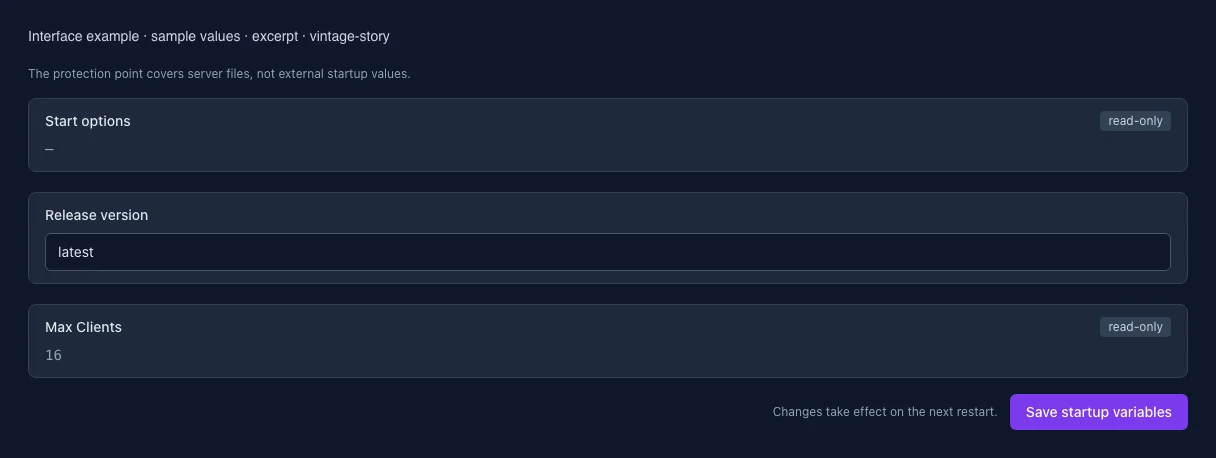
Max Clients: Added
MAX_CLIENTS
After
Setting
MAX_CLIENTS
Default
16
Range / options
… – 256
When it takes effect
Takes effect after saving and restarting the server.
Start options: Added
OPTIONS
After
Setting
OPTIONS
Default
When it takes effect
Takes effect after saving and restarting the server.
Release version: Added
RELEASE_VERSION
After
Setting
RELEASE_VERSION
Default
latest
When it takes effect
Takes effect after saving and restarting the server.
Defines the location for the temporary files in sqlite. This is needed for the "/db vacuum" command (added in 1.19) since else it will use the /tmp folder which by default only has 100MB and is in memory.
After
Setting
SQLITE_TMPDIR
Default
/home/container/data/Backups
When it takes effect
Takes effect after saving and restarting the server.
Game updatePublished
v1.22.6 - Server safety patch #2
Announcement from the official source. The source describes the changes; your server installation status is shown separately in the update center.
Effects on plugins
No independent plugin compatibility test is documented for this announcement. Check the affected plugins in the update center before changing game versions.
The guided tools were revised in the shared panel code. The entry concerns the interface or its processing. The date records the change; availability on an individual server depends on the game, software, plugins and permissions.
InterfaceChange documented
Guided startup parameters: revised
The guided tools were revised in the shared panel code. The entry concerns the interface or its processing. The date records the change; availability on an individual server depends on the game, software, plugins and permissions.
InterfaceChange documented
Guided startup parameters: revised
The guided tools were revised in the shared panel code. The entry concerns the interface or its processing. The date records the change; availability on an individual server depends on the game, software, plugins and permissions.
Game updatePublished
v1.22.4/5 - Server safety patch
Announcement from the official source. The source describes the changes; your server installation status is shown separately in the update center.
Effects on plugins
No independent plugin compatibility test is documented for this announcement. Check the affected plugins in the update center before changing game versions.
The guided tools were revised in the shared panel code. The entry concerns the interface or its processing. The date records the change; availability on an individual server depends on the game, software, plugins and permissions.
InterfaceChange documented
Guided startup parameters: revised
The guided tools were revised in the shared panel code. The entry concerns the interface or its processing. The date records the change; availability on an individual server depends on the game, software, plugins and permissions.
InterfaceChange documented
Guided startup parameters: revised
The guided tools were revised in the shared panel code. The entry concerns the interface or its processing. The date records the change; availability on an individual server depends on the game, software, plugins and permissions.
InterfaceChange documented
Guided startup parameters: revised
The guided tools were revised in the shared panel code. The entry concerns the interface or its processing. The date records the change; availability on an individual server depends on the game, software, plugins and permissions.
Game updatePublished
Anego Studios Development update, June 2026
Announcement from the official source. The source describes the changes; your server installation status is shown separately in the update center.
Effects on plugins
No independent plugin compatibility test is documented for this announcement. Check the affected plugins in the update center before changing game versions.
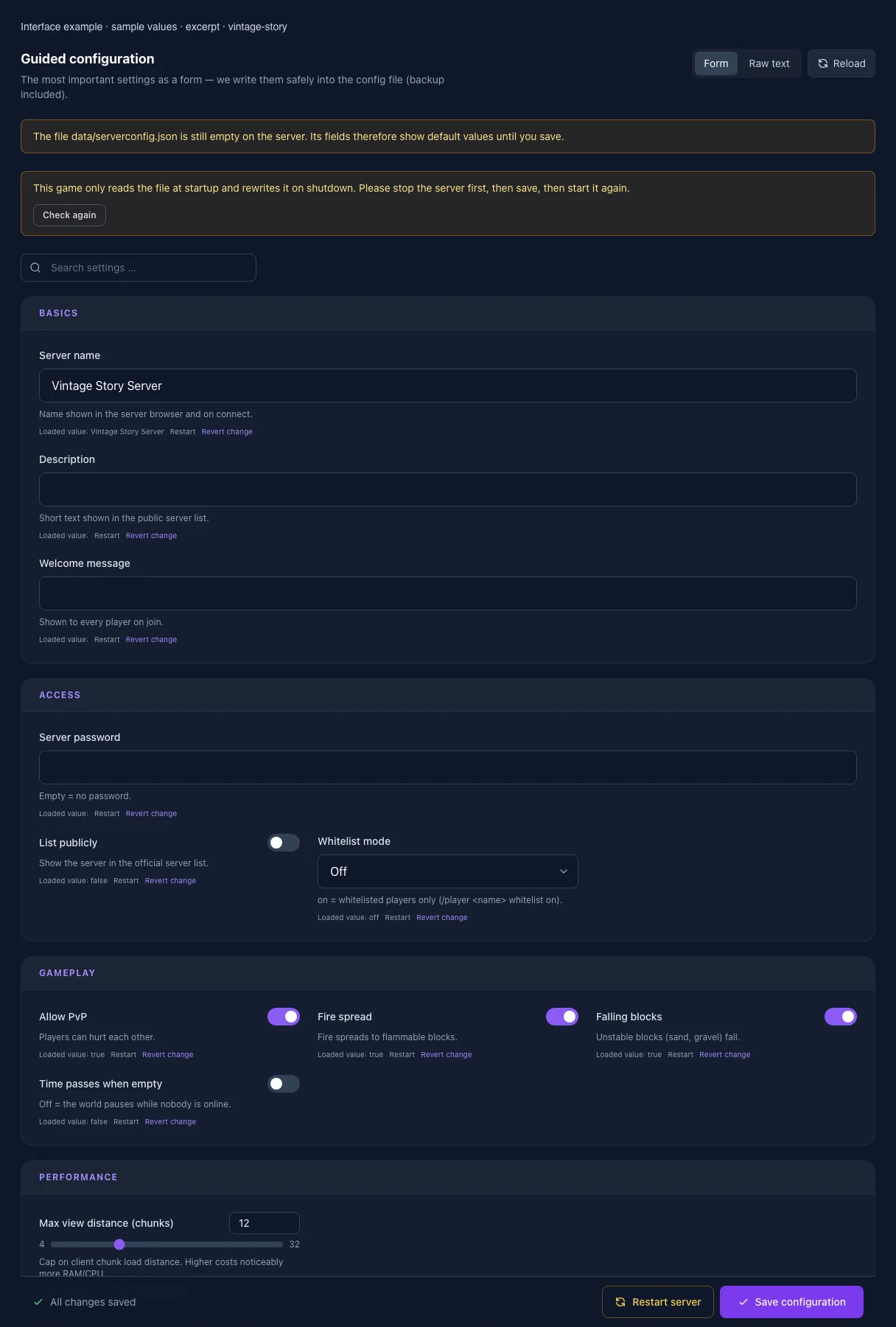
The image shows the interface on its capture date; earlier versions may differ.
Excerpt of the current interface with sample values. Values and prerequisites illustrate the controls; available tools depend on server software, plugins and permissions. · Captured on 2026-10-08Excerpt of the current interface with sample values. Values and prerequisites illustrate the controls; available tools depend on server software, plugins and permissions. · Captured on 2026-10-08
What the settings do
These values come from our guided editors. Defaults are the editor starting values; they do not show the contents of a customer server.
Server name
Name shown in the server browser and on connect.
Setting
ServerName
Default
Vintage Story Server
Description
Short text shown in the public server list.
Setting
ServerDescription
Default
Welcome message
Shown to every player on join.
Setting
WelcomeMessage
Default
List publicly
Show the server in the official server list.
Setting
AdvertiseServer
Default
false
Whitelist mode
Default and On allow only whitelisted players on a dedicated server. Add players with /player <name> whitelist on. Off allows all players to join.
Setting
WhitelistMode
Default
0
Range / options
0, 1, 2
Allow PvP
Players can hurt each other.
Setting
AllowPvP
Default
true
Fire spread
Fire spreads to flammable blocks. Applied as a world rule through StartupCommands on restart, including existing worlds.
Setting
AllowFireSpread
Default
true
Falling blocks
Unstable blocks (sand, gravel) fall. Applied as a world rule through StartupCommands on restart, including existing worlds.
Setting
AllowFallingBlocks
Default
true
Time passes when empty
Off = the world pauses while nobody is online.
Setting
PassTimeWhenEmpty
Default
false
Max view distance (chunks)
Cap on client chunk load distance. Higher costs noticeably more RAM/CPU.
Setting
MaxChunkRadius
Default
12
Range / options
4 – 32
World name
Only applies when a new world is created — an existing world is unchanged.
Setting
WorldConfig.WorldName
Default
World seed
Empty = random. Only applies when a new world is created.
Setting
WorldConfig.Seed
Default
Additional startup options
Technical startup arguments from the server template. This value is read-only; use the guided configuration above for gameplay rules.
Setting
OPTIONS
Default
When it takes effect
Takes effect after saving and restarting the server.
Installation version
latest installs the newest version of the selected release branch; alternatively enter an exact version such as 1.22.7. Saving and restarting do not change the version already installed. This value takes effect only during reinstallation. Check the Update Center for update status.
Setting
RELEASE_VERSION
Default
latest
When it takes effect
Takes effect after saving and restarting the server.
Player slots
Maximum number of players connected at once. The purchased slots are passed as --maxclients on startup and are read-only here; this overrides MaxClients in serverconfig.json.
Setting
MAX_CLIENTS
Default
16
Range / options
… – 256
When it takes effect
Takes effect after saving and restarting the server.
Loading...
Cookie settings
We use cookies to improve your experience and analyze our website.
Cookie settings
Essential cookies
Required
These cookies are required for the core functions of the website and cannot be disabled.
Analytics cookies
Help us understand how the website and customer area are used (our own usage analytics, Google Analytics, Microsoft Clarity).
Marketing cookies
Allow the pseudonymous matching of an ad click to an order in order to measure conversions.