Back to overview

V Rising: updates, settings and interface

Game updates, plugin versions and improvements to our interface with a traceable history.

Recorded, available and installed are different states. Your actual installation status and suitable updates are shown in the server panel.

Interface Change documented

Guided startup parameters: revised

The guided tools were revised in the shared panel code. The entry concerns the interface or its processing. The date records the change; availability on an individual server depends on the game, software, plugins and permissions.

Interface Change documented

Guided startup parameters: revised

The guided tools were revised in the shared panel code. The entry concerns the interface or its processing. The date records the change; availability on an individual server depends on the game, software, plugins and permissions.

Interface Change documented

Guided startup parameters: revised

The guided tools were revised in the shared panel code. The entry concerns the interface or its processing. The date records the change; availability on an individual server depends on the game, software, plugins and permissions.

Interface Change documented

Guided startup parameters: revised

The guided tools were revised in the shared panel code. The entry concerns the interface or its processing. The date records the change; availability on an individual server depends on the game, software, plugins and permissions.

Interface Change documented

Guided startup parameters: revised

The guided tools were revised in the shared panel code. The entry concerns the interface or its processing. The date records the change; availability on an individual server depends on the game, software, plugins and permissions.

Interface Change documented

Guided startup parameters: revised

The guided tools were revised in the shared panel code. The entry concerns the interface or its processing. The date records the change; availability on an individual server depends on the game, software, plugins and permissions.

Interface Change documented

Guided startup parameters: revised

The guided tools were revised in the shared panel code. The entry concerns the interface or its processing. The date records the change; availability on an individual server depends on the game, software, plugins and permissions.

Interface Change documented

Guided startup parameters: revised

The guided tools were revised in the shared panel code. The entry concerns the interface or its processing. The date records the change; availability on an individual server depends on the game, software, plugins and permissions.

Interface Change documented

Guided startup parameters: revised

The guided tools were revised in the shared panel code. The entry concerns the interface or its processing. The date records the change; availability on an individual server depends on the game, software, plugins and permissions.

Interface Change documented

Guided startup parameters: revised

The guided tools were revised in the shared panel code. The entry concerns the interface or its processing. The date records the change; availability on an individual server depends on the game, software, plugins and permissions.

Interface Change documented

Guided startup parameters: revised

The guided tools were revised in the shared panel code. The entry concerns the interface or its processing. The date records the change; availability on an individual server depends on the game, software, plugins and permissions.

Interface Change documented

Guided startup parameters: revised

The guided tools were revised in the shared panel code. The entry concerns the interface or its processing. The date records the change; availability on an individual server depends on the game, software, plugins and permissions.

Interface Change documented

Guided startup parameters: revised

The guided tools were revised in the shared panel code. The entry concerns the interface or its processing. The date records the change; availability on an individual server depends on the game, software, plugins and permissions.

Interface Change documented

Guided startup parameters: revised

The guided tools were revised in the shared panel code. The entry concerns the interface or its processing. The date records the change; availability on an individual server depends on the game, software, plugins and permissions.

Interface Change documented

Guided startup parameters: revised

The guided tools were revised in the shared panel code. The entry concerns the interface or its processing. The date records the change; availability on an individual server depends on the game, software, plugins and permissions.

Interface Change documented

Guided startup parameters: revised

The guided tools were revised in the shared panel code. The entry concerns the interface or its processing. The date records the change; availability on an individual server depends on the game, software, plugins and permissions.

Interface Change documented

Guided startup parameters: revised

The guided tools were revised in the shared panel code. The entry concerns the interface or its processing. The date records the change; availability on an individual server depends on the game, software, plugins and permissions.

Interface Change documented

Sandbox settings: guided editor added

The guided interface was updated. The history shows added, changed and removed fields with explanations and editor defaults. The date records the documented change, not the historical deployment time.

Changed settings (77)
  • Unlock all waypoints: Added AllWaypointsUnlocked

    After

    Setting
    AllWaypointsUnlocked
    Default
    false
  • Global chat: Added AllowGlobalChat

    After

    Setting
    AllowGlobalChat
    Default
    true
  • Announce siege weapons: Added AnnounceSiegeWeaponSpawn

    After

    Setting
    AnnounceSiegeWeaponSpawn
    Default
    true
  • Bound items block bat form: Added BatBoundItems

    After

    Setting
    BatBoundItems
    Default
    false
  • Soul shards block bat form: Added BatBoundShards

    After

    Setting
    BatBoundShards
    Default
    false
  • Keep equipment on death: Added BloodBoundEquipment

    After

    Setting
    BloodBoundEquipment
    Default
    true
  • Blood drain: Added BloodDrainModifier

    After

    Setting
    BloodDrainModifier
    Default
    1
    Range / options
    0 – 3
  • Blood essence yield: Added BloodEssenceYieldModifier

    After

    Setting
    BloodEssenceYieldModifier
    Default
    1
    Range / options
    0.25 – 3
  • Build cost: Added BuildCostModifier

    After

    Setting
    BuildCostModifier
    Default
    1
    Range / options
    0 – 3
  • Loot enemy containers: Added CanLootEnemyContainers

    After

    Setting
    CanLootEnemyContainers
    Default
    true
  • Castle blood essence drain: Added CastleBloodEssenceDrainModifier

    After

    Setting
    CastleBloodEssenceDrainModifier
    Default
    1
    Range / options
    0 – 3
  • Castle damage: Added CastleDamageMode

    After

    Setting
    CastleDamageMode
    Default
    Never
    Range / options
    Never, Always, TimeRestricted
  • Castle decay: Added CastleDecayRateModifier

    After

    Setting
    CastleDecayRateModifier
    Default
    1
    Range / options
    0 – 3
  • Castle heart rule: Added CastleHeartDamageMode

    After

    Setting
    CastleHeartDamageMode
    Default
    CanBeDestroyedByPlayers
    Range / options
    CanBeDestroyedOnlyWhenDecaying, CanBeDestroyedByPlayers, CanBeSeizedOrDestroyedByPlayers
  • Post-raid protection (sec): Added CastleRaidProtectionTime

    After

    Setting
    CastleRaidProtectionTime
    Default
    1800
    Range / options
    0 – 604800
  • Raid duration (sec): Added CastleRaidTimer

    After

    Setting
    CastleRaidTimer
    Default
    600
    Range / options
    60 – 3600
  • Relocation cooldown (sec): Added CastleRelocationCooldown

    After

    Setting
    CastleRelocationCooldown
    Default
    10800
    Range / options
    0 – 2592000
  • Allow castle relocation: Added CastleRelocationEnabled

    After

    Setting
    CastleRelocationEnabled
    Default
    true
  • Sieged status (sec): Added CastleSiegeTimer

    After

    Setting
    CastleSiegeTimer
    Default
    420
    Range / options
    60 – 1800
  • Castles per player: Added CastleStatModifiers_Global.CastleLimit

    After

    Setting
    CastleStatModifiers_Global.CastleLimit
    Default
    2
    Range / options
    0 – 255
  • Clan size: Added ClanSize

    After

    Setting
    ClanSize
    Default
    4
    Range / options
    1 – 50
  • Craft speed: Added CraftRateModifier

    After

    Setting
    CraftRateModifier
    Default
    1
    Range / options
    0.25 – 6
  • Death container access: Added DeathContainerPermission

    After

    Setting
    DeathContainerPermission
    Default
    Anyone
    Range / options
    Anyone, ClanMembers, OnlySelf
  • Durability loss on death: Added Death_DurabilityFactorLoss

    After

    Setting
    Death_DurabilityFactorLoss
    Default
    0.125
    Range / options
    0 – 1
  • Drop loss as resources: Added Death_DurabilityLossFactorAsResources

    After

    Setting
    Death_DurabilityLossFactorAsResources
    Default
    1
    Range / options
    0 – 1
  • Dismantle refund: Added DismantleResourceModifier

    After

    Setting
    DismantleResourceModifier
    Default
    1
    Range / options
    0 – 1
  • General loot: Added DropTableModifier_General

    After

    Setting
    DropTableModifier_General
    Default
    1
    Range / options
    0.25 – 3
  • Mission loot: Added DropTableModifier_Missions

    After

    Setting
    DropTableModifier_Missions
    Default
    1
    Range / options
    0.25 – 3
  • Durability drain: Added DurabilityDrainModifier

    After

    Setting
    DurabilityDrainModifier
    Default
    1
    Range / options
    0 – 3
  • Combat difficulty: Added GameDifficulty

    After

    Setting
    GameDifficulty
    Default
    Normal
    Range / options
    Relaxed, Normal, Hard
  • Game mode: Added GameModeType

    After

    Setting
    GameModeType
    Default
    PvP
    Range / options
    PvE, PvP
  • Blood moon buff: Added GameTimeModifiers.BloodMoonBuff

    After

    Setting
    GameTimeModifiers.BloodMoonBuff
    Default
    0.2
    Range / options
    0 – 1
  • Blood moon maximum (days): Added GameTimeModifiers.BloodMoonFrequency_Max

    After

    Setting
    GameTimeModifiers.BloodMoonFrequency_Max
    Default
    18
    Range / options
    1 – 255
  • Blood moon minimum (days): Added GameTimeModifiers.BloodMoonFrequency_Min

    After

    Setting
    GameTimeModifiers.BloodMoonFrequency_Min
    Default
    10
    Range / options
    1 – 255
  • Day-night cycle (sec): Added GameTimeModifiers.DayDurationInSeconds

    After

    Setting
    GameTimeModifiers.DayDurationInSeconds
    Default
    1080
    Range / options
    60 – 86400
  • Day ends (hour): Added GameTimeModifiers.DayEndHour

    After

    Setting
    GameTimeModifiers.DayEndHour
    Default
    17
    Range / options
    0 – 23
  • Day starts (hour): Added GameTimeModifiers.DayStartHour

    After

    Setting
    GameTimeModifiers.DayStartHour
    Default
    9
    Range / options
    0 – 23
  • Garlic strength: Added GarlicAreaStrengthModifier

    After

    Setting
    GarlicAreaStrengthModifier
    Default
    1
    Range / options
    0 – 3
  • Holy radiation strength: Added HolyAreaStrengthModifier

    After

    Setting
    HolyAreaStrengthModifier
    Default
    1
    Range / options
    0 – 3
  • Stack size: Added InventoryStacksModifier

    After

    Setting
    InventoryStacksModifier
    Default
    1
    Range / options
    0.25 – 3
  • Material yield: Added MaterialYieldModifier_Global

    After

    Setting
    MaterialYieldModifier_Global
    Default
    1
    Range / options
    0.25 – 3
  • Player damage: Added PlayerDamageMode

    After

    Setting
    PlayerDamageMode
    Default
    Always
    Range / options
    Always, TimeRestricted
  • Time zone: Added PlayerInteractionSettings.TimeZone

    After

    Setting
    PlayerInteractionSettings.TimeZone
    Default
    Local
    Range / options
    Local, UTC, PST, EST, CET, CST
  • Weekday castle raids: end: Added PlayerInteractionSettings.VSCastleWeekdayTime.EndHour

    After

    Setting
    PlayerInteractionSettings.VSCastleWeekdayTime.EndHour
    Default
    22
    Range / options
    0 – 23
  • Weekday castle raids: start: Added PlayerInteractionSettings.VSCastleWeekdayTime.StartHour

    After

    Setting
    PlayerInteractionSettings.VSCastleWeekdayTime.StartHour
    Default
    20
    Range / options
    0 – 23
  • Weekend castle raids: end: Added PlayerInteractionSettings.VSCastleWeekendTime.EndHour

    After

    Setting
    PlayerInteractionSettings.VSCastleWeekendTime.EndHour
    Default
    22
    Range / options
    0 – 23
  • Weekend castle raids: start: Added PlayerInteractionSettings.VSCastleWeekendTime.StartHour

    After

    Setting
    PlayerInteractionSettings.VSCastleWeekendTime.StartHour
    Default
    20
    Range / options
    0 – 23
  • Weekday player PvP: end: Added PlayerInteractionSettings.VSPlayerWeekdayTime.EndHour

    After

    Setting
    PlayerInteractionSettings.VSPlayerWeekdayTime.EndHour
    Default
    22
    Range / options
    0 – 23
  • Weekday player PvP: start: Added PlayerInteractionSettings.VSPlayerWeekdayTime.StartHour

    After

    Setting
    PlayerInteractionSettings.VSPlayerWeekdayTime.StartHour
    Default
    20
    Range / options
    0 – 23
  • Weekend player PvP: end: Added PlayerInteractionSettings.VSPlayerWeekendTime.EndHour

    After

    Setting
    PlayerInteractionSettings.VSPlayerWeekendTime.EndHour
    Default
    22
    Range / options
    0 – 23
  • Weekend player PvP: start: Added PlayerInteractionSettings.VSPlayerWeekendTime.StartHour

    After

    Setting
    PlayerInteractionSettings.VSPlayerWeekendTime.StartHour
    Default
    20
    Range / options
    0 – 23
  • PvP spawn protection: Added PvPProtectionMode

    After

    Setting
    PvPProtectionMode
    Default
    Medium
    Range / options
    Disabled, VeryShort, Short, Medium, Long
  • Recipe cost: Added RecipeCostModifier

    After

    Setting
    RecipeCostModifier
    Default
    1
    Range / options
    0 – 3
  • Refinement cost: Added RefinementCostModifier

    After

    Setting
    RefinementCostModifier
    Default
    1
    Range / options
    0 – 3
  • Refinement speed: Added RefinementRateModifier

    After

    Setting
    RefinementRateModifier
    Default
    1
    Range / options
    0.25 – 6
  • Soul shard availability: Added RelicSpawnType

    After

    Setting
    RelicSpawnType
    Default
    Unique
    Range / options
    Unique, Plentiful
  • Repair cost: Added RepairCostModifier

    After

    Setting
    RepairCostModifier
    Default
    1
    Range / options
    0 – 3
  • Research cost: Added ResearchCostModifier

    After

    Setting
    ResearchCostModifier
    Default
    1
    Range / options
    0 – 3
  • Servant conversion speed: Added ServantConvertRateModifier

    After

    Setting
    ServantConvertRateModifier
    Default
    1
    Range / options
    0.25 – 6
  • Show siege weapons on map: Added ShowSiegeWeaponMapIcon

    After

    Setting
    ShowSiegeWeaponMapIcon
    Default
    false
  • Siege weapon health: Added SiegeWeaponHealth

    After

    Setting
    SiegeWeaponHealth
    Default
    Normal
    Range / options
    VeryLow, Low, Normal, High, VeryHigh, MegaHigh, UltraHigh, CrazyHigh, Max
  • Silver strength: Added SilverStrengthModifier

    After

    Setting
    SilverStrengthModifier
    Default
    1
    Range / options
    0 – 3
  • Sun damage: Added SunDamageModifier

    After

    Setting
    SunDamageModifier
    Default
    1
    Range / options
    0 – 3
  • Bound items block teleport: Added TeleportBoundItems

    After

    Setting
    TeleportBoundItems
    Default
    true
  • Trader prices: Added TraderModifiers.PriceModifier

    After

    Setting
    TraderModifiers.PriceModifier
    Default
    1
    Range / options
    0.25 – 10
  • Trader restock time: Added TraderModifiers.RestockTimerModifier

    After

    Setting
    TraderModifiers.RestockTimerModifier
    Default
    1
    Range / options
    0.25 – 10
  • Trader stock: Added TraderModifiers.StockModifier

    After

    Setting
    TraderModifiers.StockModifier
    Default
    1
    Range / options
    0.25 – 10
  • Normal enemies: extra levels: Added UnitStatModifiers_Global.LevelIncrease

    After

    Setting
    UnitStatModifiers_Global.LevelIncrease
    Default
    0
    Range / options
    0 – 100
  • Normal enemies: health: Added UnitStatModifiers_Global.MaxHealthModifier

    After

    Setting
    UnitStatModifiers_Global.MaxHealthModifier
    Default
    1
    Range / options
    0.01 – 10
  • Normal enemies: power: Added UnitStatModifiers_Global.PowerModifier

    After

    Setting
    UnitStatModifiers_Global.PowerModifier
    Default
    1
    Range / options
    0.01 – 10
  • V Blood: extra levels: Added UnitStatModifiers_VBlood.LevelIncrease

    After

    Setting
    UnitStatModifiers_VBlood.LevelIncrease
    Default
    0
    Range / options
    0 – 100
  • V Blood: health: Added UnitStatModifiers_VBlood.MaxHealthModifier

    After

    Setting
    UnitStatModifiers_VBlood.MaxHealthModifier
    Default
    1
    Range / options
    0.01 – 10
  • V Blood: power: Added UnitStatModifiers_VBlood.PowerModifier

    After

    Setting
    UnitStatModifiers_VBlood.PowerModifier
    Default
    1
    Range / options
    0.01 – 10
  • Vampire health: Added VampireStatModifiers.MaxHealthModifier

    After

    Setting
    VampireStatModifiers.MaxHealthModifier
    Default
    1
    Range / options
    0.01 – 10
  • Vampire physical power: Added VampireStatModifiers.PhysicalPowerModifier

    After

    Setting
    VampireStatModifiers.PhysicalPowerModifier
    Default
    1
    Range / options
    0.01 – 10
  • Vampire resource power: Added VampireStatModifiers.ResourcePowerModifier

    After

    Setting
    VampireStatModifiers.ResourcePowerModifier
    Default
    1
    Range / options
    0.01 – 10
  • Vampire spell power: Added VampireStatModifiers.SpellPowerModifier

    After

    Setting
    VampireStatModifiers.SpellPowerModifier
    Default
    1
    Range / options
    0.01 – 10
Setting Change documented

V Rising: startup parameters changed

The definition of visible startup parameters changed in the panel code. The listed values explain added, changed and removed fields. The date records the definition change; existing server values were not automatically changed by it.

Supported server software: V Rising

Changed settings (1)
  • Auto Save Interval: Changed VR_SAVE_INTERVAL

    Interval in seconds between each autosave.

    Before

    Setting
    VR_SAVE_INTERVAL
    Default
    120
    Range / options
    1 – …
    When it takes effect
    Takes effect after saving and restarting the server.

    After

    Setting
    VR_SAVE_INTERVAL
    Default
    120
    Range / options
    30 – …
    When it takes effect
    Takes effect after saving and restarting the server.
Interface Change documented

Guided startup parameters: revised

The guided tools were revised in the shared panel code. The entry concerns the interface or its processing. The date records the change; availability on an individual server depends on the game, software, plugins and permissions.

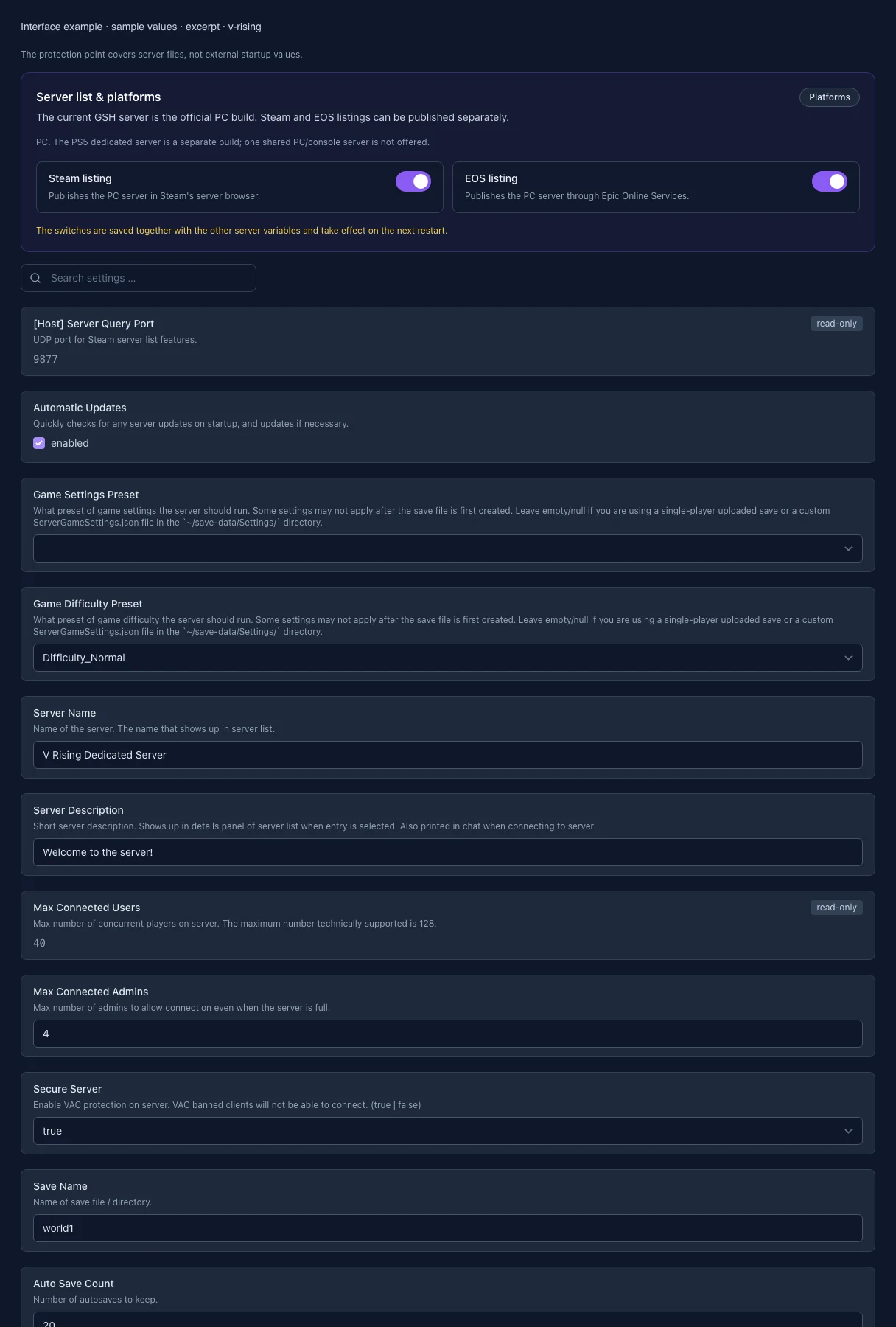
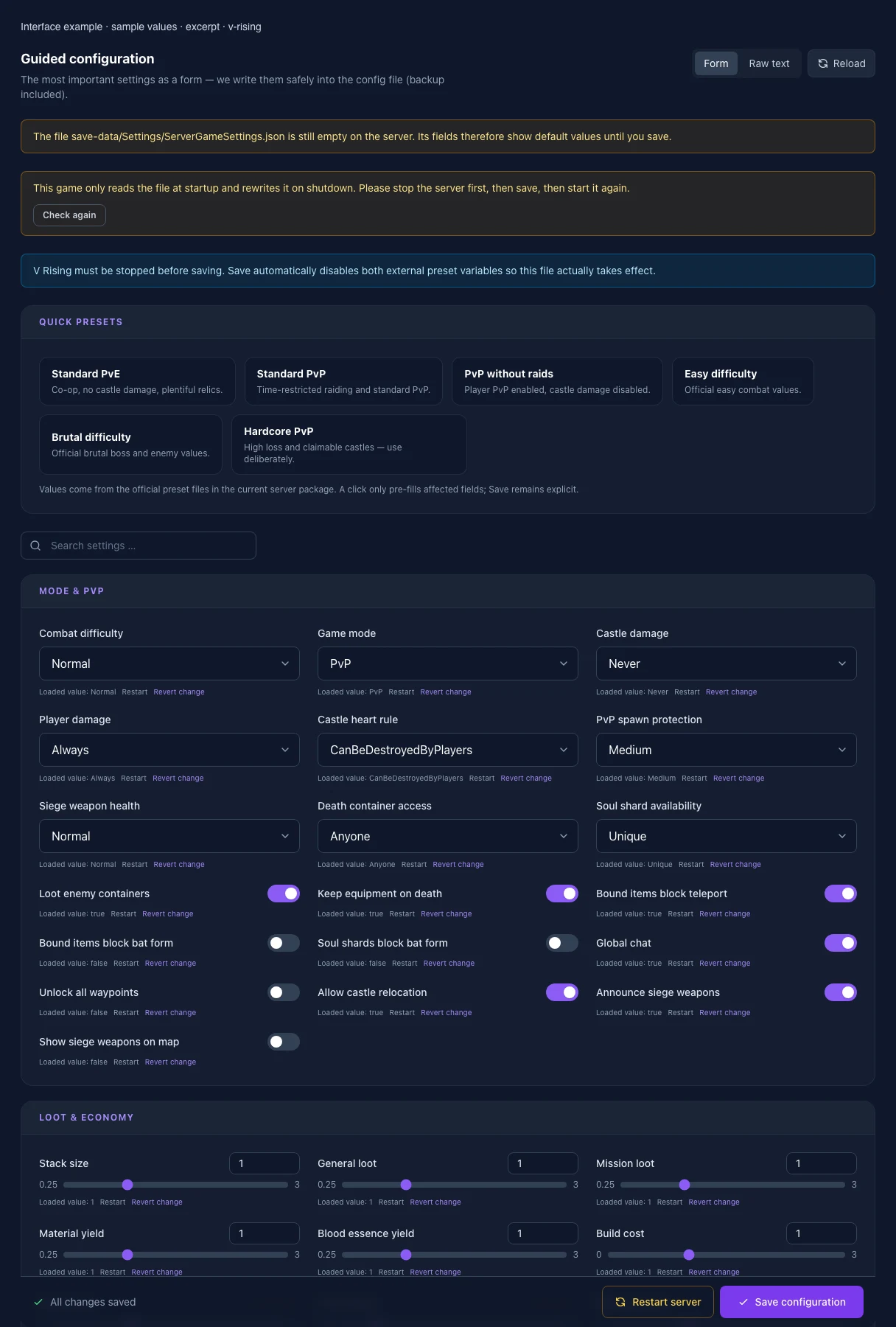
What the interface looks like

The image shows the interface on its capture date; earlier versions may differ.

Excerpt of the current interface with sample values. Values and prerequisites illustrate the controls; available tools depend on server software, plugins and permissions.
Excerpt of the current interface with sample values. Values and prerequisites illustrate the controls; available tools depend on server software, plugins and permissions. · Captured on 2026-10-08
Excerpt of the current interface with sample values. Values and prerequisites illustrate the controls; available tools depend on server software, plugins and permissions.
Excerpt of the current interface with sample values. Values and prerequisites illustrate the controls; available tools depend on server software, plugins and permissions. · Captured on 2026-10-08

What the settings do

These values come from our guided editors. Defaults are the editor starting values; they do not show the contents of a customer server.

Combat difficulty
Setting
GameDifficulty
Default
Normal
Range / options
Relaxed, Normal, Hard
Game mode
Setting
GameModeType
Default
PvP
Range / options
PvE, PvP
Castle damage
Setting
CastleDamageMode
Default
Never
Range / options
Never, Always, TimeRestricted
Player damage
Setting
PlayerDamageMode
Default
Always
Range / options
Always, TimeRestricted
Castle heart rule
Setting
CastleHeartDamageMode
Default
CanBeDestroyedByPlayers
Range / options
CanBeDestroyedOnlyWhenDecaying, CanBeDestroyedByPlayers, CanBeSeizedOrDestroyedByPlayers
PvP spawn protection
Setting
PvPProtectionMode
Default
Medium
Range / options
Disabled, VeryShort, Short, Medium, Long
Siege weapon health
Setting
SiegeWeaponHealth
Default
Normal
Range / options
VeryLow, Low, Normal, High, VeryHigh, MegaHigh, UltraHigh, CrazyHigh, Max
Death container access
Setting
DeathContainerPermission
Default
Anyone
Range / options
Anyone, ClanMembers, OnlySelf
Soul shard availability
Setting
RelicSpawnType
Default
Unique
Range / options
Unique, Plentiful
Loot enemy containers
Setting
CanLootEnemyContainers
Default
true
Keep equipment on death
Setting
BloodBoundEquipment
Default
true
Bound items block teleport
Setting
TeleportBoundItems
Default
true
Bound items block bat form
Setting
BatBoundItems
Default
false
Soul shards block bat form
Setting
BatBoundShards
Default
false
Global chat
Setting
AllowGlobalChat
Default
true
Unlock all waypoints
Setting
AllWaypointsUnlocked
Default
false
Allow castle relocation
Setting
CastleRelocationEnabled
Default
true
Announce siege weapons
Setting
AnnounceSiegeWeaponSpawn
Default
true
Show siege weapons on map
Setting
ShowSiegeWeaponMapIcon
Default
false
Stack size
Setting
InventoryStacksModifier
Default
1
Range / options
0.25 – 3
General loot
Setting
DropTableModifier_General
Default
1
Range / options
0.25 – 3
Mission loot
Setting
DropTableModifier_Missions
Default
1
Range / options
0.25 – 3
Material yield
Setting
MaterialYieldModifier_Global
Default
1
Range / options
0.25 – 3
Blood essence yield
Setting
BloodEssenceYieldModifier
Default
1
Range / options
0.25 – 3
Build cost
Setting
BuildCostModifier
Default
1
Range / options
0 – 3
Recipe cost
Setting
RecipeCostModifier
Default
1
Range / options
0 – 3
Craft speed
Setting
CraftRateModifier
Default
1
Range / options
0.25 – 6
Research cost
Setting
ResearchCostModifier
Default
1
Range / options
0 – 3
Refinement cost
Setting
RefinementCostModifier
Default
1
Range / options
0 – 3
Refinement speed
Setting
RefinementRateModifier
Default
1
Range / options
0.25 – 6
Dismantle refund
Setting
DismantleResourceModifier
Default
1
Range / options
0 – 1
Servant conversion speed
Setting
ServantConvertRateModifier
Default
1
Range / options
0.25 – 6
Repair cost
Setting
RepairCostModifier
Default
1
Range / options
0 – 3
Clan size
Setting
ClanSize
Default
4
Range / options
1 – 50
Durability loss on death
Setting
Death_DurabilityFactorLoss
Default
0.125
Range / options
0 – 1
Drop loss as resources
Setting
Death_DurabilityLossFactorAsResources
Default
1
Range / options
0 – 1
Blood drain
Setting
BloodDrainModifier
Default
1
Range / options
0 – 3
Durability drain
Setting
DurabilityDrainModifier
Default
1
Range / options
0 – 3
Garlic strength
Setting
GarlicAreaStrengthModifier
Default
1
Range / options
0 – 3
Holy radiation strength
Setting
HolyAreaStrengthModifier
Default
1
Range / options
0 – 3
Silver strength
Setting
SilverStrengthModifier
Default
1
Range / options
0 – 3
Sun damage
Setting
SunDamageModifier
Default
1
Range / options
0 – 3
Castle decay
Setting
CastleDecayRateModifier
Default
1
Range / options
0 – 3
Castle blood essence drain
Setting
CastleBloodEssenceDrainModifier
Default
1
Range / options
0 – 3
Sieged status (sec)
Setting
CastleSiegeTimer
Default
420
Range / options
60 – 1800
Raid duration (sec)
Setting
CastleRaidTimer
Default
600
Range / options
60 – 3600
Post-raid protection (sec)
Setting
CastleRaidProtectionTime
Default
1800
Range / options
0 – 604800
Relocation cooldown (sec)
Setting
CastleRelocationCooldown
Default
10800
Range / options
0 – 2592000
Castles per player
Setting
CastleStatModifiers_Global.CastleLimit
Default
2
Range / options
0 – 255
Day-night cycle (sec)
Setting
GameTimeModifiers.DayDurationInSeconds
Default
1080
Range / options
60 – 86400
Day starts (hour)
Setting
GameTimeModifiers.DayStartHour
Default
9
Range / options
0 – 23
Day ends (hour)
Setting
GameTimeModifiers.DayEndHour
Default
17
Range / options
0 – 23
Blood moon minimum (days)
Setting
GameTimeModifiers.BloodMoonFrequency_Min
Default
10
Range / options
1 – 255
Blood moon maximum (days)
Setting
GameTimeModifiers.BloodMoonFrequency_Max
Default
18
Range / options
1 – 255
Blood moon buff
Setting
GameTimeModifiers.BloodMoonBuff
Default
0.2
Range / options
0 – 1
Vampire health
Setting
VampireStatModifiers.MaxHealthModifier
Default
1
Range / options
0.01 – 10
Vampire physical power
Setting
VampireStatModifiers.PhysicalPowerModifier
Default
1
Range / options
0.01 – 10
Vampire spell power
Setting
VampireStatModifiers.SpellPowerModifier
Default
1
Range / options
0.01 – 10
Vampire resource power
Setting
VampireStatModifiers.ResourcePowerModifier
Default
1
Range / options
0.01 – 10
Normal enemies: health
Setting
UnitStatModifiers_Global.MaxHealthModifier
Default
1
Range / options
0.01 – 10
Normal enemies: power
Setting
UnitStatModifiers_Global.PowerModifier
Default
1
Range / options
0.01 – 10
Normal enemies: extra levels
Setting
UnitStatModifiers_Global.LevelIncrease
Default
0
Range / options
0 – 100
V Blood: health
Setting
UnitStatModifiers_VBlood.MaxHealthModifier
Default
1
Range / options
0.01 – 10
V Blood: power
Setting
UnitStatModifiers_VBlood.PowerModifier
Default
1
Range / options
0.01 – 10
V Blood: extra levels
Setting
UnitStatModifiers_VBlood.LevelIncrease
Default
0
Range / options
0 – 100
Time zone
Setting
PlayerInteractionSettings.TimeZone
Default
Local
Range / options
Local, UTC, PST, EST, CET, CST
Weekday player PvP: start
Setting
PlayerInteractionSettings.VSPlayerWeekdayTime.StartHour
Default
20
Range / options
0 – 23
Weekday player PvP: end
Setting
PlayerInteractionSettings.VSPlayerWeekdayTime.EndHour
Default
22
Range / options
0 – 23
Weekend player PvP: start
Setting
PlayerInteractionSettings.VSPlayerWeekendTime.StartHour
Default
20
Range / options
0 – 23
Weekend player PvP: end
Setting
PlayerInteractionSettings.VSPlayerWeekendTime.EndHour
Default
22
Range / options
0 – 23
Weekday castle raids: start
Setting
PlayerInteractionSettings.VSCastleWeekdayTime.StartHour
Default
20
Range / options
0 – 23
Weekday castle raids: end
Setting
PlayerInteractionSettings.VSCastleWeekdayTime.EndHour
Default
22
Range / options
0 – 23
Weekend castle raids: start
Setting
PlayerInteractionSettings.VSCastleWeekendTime.StartHour
Default
20
Range / options
0 – 23
Weekend castle raids: end
Setting
PlayerInteractionSettings.VSCastleWeekendTime.EndHour
Default
22
Range / options
0 – 23
Trader stock
Setting
TraderModifiers.StockModifier
Default
1
Range / options
0.25 – 10
Trader prices
Setting
TraderModifiers.PriceModifier
Default
1
Range / options
0.25 – 10
Trader restock time
Setting
TraderModifiers.RestockTimerModifier
Default
1
Range / options
0.25 – 10
[Host] Server Query Port

UDP port for Steam server list features.

Setting
VR_QUERY_PORT
Default
9877
Range / options
1024 – 65536
When it takes effect
Takes effect after saving and restarting the server.
Automatic Updates

Quickly checks for any server updates on startup, and updates if necessary.

Setting
AUTO_UPDATE
Default
1
When it takes effect
Takes effect after saving and restarting the server.
Gameplay preset

Presets shape new saves. Choose “No preset” when using custom file settings or an uploaded save.

Setting
VR_PRESET
Default
Range / options
, DuoPvP, DuoPvP_DailySiege, DuoPvP_NoSiege, DuoPvP_WeekendSiege, HardcoreDuoPvP, HardcorePvP, HardcoreTrioPvP, Level30PvE, Level30PvP, Level40PvE, Level40PvP, Level50PvE, Level50PvP, Level60PvE, Level60PvP, Level70PvE, Level70PvP, Level80PvE, Level80PvP, Level90PvE, Level90PvP, SoloPvP, StandardPvE, StandardPvP, StandardPvP_DailySiege, StandardPvP_NoSiege, StandardPvP_WeekendSiege, TrioPvP, TrioPvP_DailySiege, TrioPvP_NoSiege, TrioPvP_WeekendSiege
When it takes effect
Takes effect after saving and restarting the server.
Difficulty preset

Presets shape new saves. Choose “No preset” when using custom file settings or an uploaded save.

Setting
VR_DIFFICULTY_PRESET
Default
Difficulty_Normal
Range / options
, Difficulty_Easy, Difficulty_Normal, Difficulty_Brutal
When it takes effect
Takes effect after saving and restarting the server.
Server Name

Name of the server. The name that shows up in server list.

Setting
VR_NAME
Default
V Rising Dedicated Server
When it takes effect
Takes effect after saving and restarting the server.
Server Description

Short server description. Shows up in details panel of server list when entry is selected. Also printed in chat when connecting to server.

Setting
VR_DESCRIPTION
Default
Welcome to the server!
When it takes effect
Takes effect after saving and restarting the server.
Max Connected Users

Max number of concurrent players on server. The maximum number technically supported is 128.

Setting
VR_MAX_USERS
Default
40
Range / options
1 – 128
When it takes effect
Takes effect after saving and restarting the server.
Max Connected Admins

Max number of admins to allow connection even when the server is full.

Setting
VR_MAX_ADMINS
Default
4
Range / options
0 – …
When it takes effect
Takes effect after saving and restarting the server.
Secure Server

Enable VAC protection on server. VAC banned clients will not be able to connect. (true | false)

Setting
VR_SECURE
Default
true
Range / options
true, false
When it takes effect
Takes effect after saving and restarting the server.
Save game

Selects the save or save directory. Changing it later loads a different or new save.

Setting
VR_SAVE_NAME
Default
world1
When it takes effect
Takes effect after saving and restarting the server.
Auto Save Count

Number of autosaves to keep.

Setting
VR_SAVE_COUNT
Default
20
Range / options
0 – …
When it takes effect
Takes effect after saving and restarting the server.
Auto Save Interval

Interval in seconds between each autosave.

Setting
VR_SAVE_INTERVAL
Default
120
Range / options
30 – …
When it takes effect
Takes effect after saving and restarting the server.
[Advanced] Server FPS

Target FPS for server.

Setting
VR_FPS
Default
30
Range / options
1 – …
When it takes effect
Takes effect after saving and restarting the server.
List on Epic

Controls whether the server appears in the relevant public server browser.

Setting
VR_LIST_ON_EOS
Default
true
Range / options
true, false
When it takes effect
Takes effect after saving and restarting the server.
List on Steam

Controls whether the server appears in the relevant public server browser.

Setting
VR_LIST_ON_STEAM
Default
true
Range / options
true, false
When it takes effect
Takes effect after saving and restarting the server.
[Repair] Validate Server Files

Leave empty (no value) for OFF or set to "true" for ON. Validates all server files when Automatic Updates is enabled. Note: This will significantly increase server startup times, so it is recommended to only enable this when needed.

Setting
VALIDATE
Default
Range / options
, true
When it takes effect
Takes effect after saving and restarting the server.