Sons of the Forest: updates, settings and interface
Game updates, plugin versions and improvements to our interface with a traceable history.
Recorded, available and installed are different states. Your actual installation status and suitable updates are shown in the server panel.
Game updatePublished
Patch 07 Update
Announcement from the official source. The source describes the changes; your server installation status is shown separately in the update center.
Effects on plugins
No independent plugin compatibility test is documented for this announcement. Check the affected plugins in the update center before changing game versions.
Announcement from the official source. The source describes the changes; your server installation status is shown separately in the update center.
Effects on plugins
No independent plugin compatibility test is documented for this announcement. Check the affected plugins in the update center before changing game versions.
Announcement from the official source. The source describes the changes; your server installation status is shown separately in the update center.
Effects on plugins
No independent plugin compatibility test is documented for this announcement. Check the affected plugins in the update center before changing game versions.
Patch 06 - Hard survival mode, Stone building, Custom effigies and lots more
Announcement from the official source. The source describes the changes; your server installation status is shown separately in the update center.
Effects on plugins
No independent plugin compatibility test is documented for this announcement. Check the affected plugins in the update center before changing game versions.
Announcement from the official source. The source describes the changes; your server installation status is shown separately in the update center.
Effects on plugins
No independent plugin compatibility test is documented for this announcement. Check the affected plugins in the update center before changing game versions.
Announcement from the official source. The source describes the changes; your server installation status is shown separately in the update center.
Effects on plugins
No independent plugin compatibility test is documented for this announcement. Check the affected plugins in the update center before changing game versions.
Announcement from the official source. The source describes the changes; your server installation status is shown separately in the update center.
Effects on plugins
No independent plugin compatibility test is documented for this announcement. Check the affected plugins in the update center before changing game versions.
Announcement from the official source. The source describes the changes; your server installation status is shown separately in the update center.
Effects on plugins
No independent plugin compatibility test is documented for this announcement. Check the affected plugins in the update center before changing game versions.
Patch 05 - Log sleds, Re-growing trees, Advanced cooking and lots more
Announcement from the official source. The source describes the changes; your server installation status is shown separately in the update center.
Effects on plugins
No independent plugin compatibility test is documented for this announcement. Check the affected plugins in the update center before changing game versions.
Announcement from the official source. The source describes the changes; your server installation status is shown separately in the update center.
Effects on plugins
No independent plugin compatibility test is documented for this announcement. Check the affected plugins in the update center before changing game versions.
Patch 04 - Action cam, A.I. improvements, bug fixes, GPS changes and lots more
Announcement from the official source. The source describes the changes; your server installation status is shown separately in the update center.
Effects on plugins
No independent plugin compatibility test is documented for this announcement. Check the affected plugins in the update center before changing game versions.
Patch 03 - Knight V, Spring trap, Night Vision, Solar power and more
Announcement from the official source. The source describes the changes; your server installation status is shown separately in the update center.
Effects on plugins
No independent plugin compatibility test is documented for this announcement. Check the affected plugins in the update center before changing game versions.
Announcement from the official source. The source describes the changes; your server installation status is shown separately in the update center.
Effects on plugins
No independent plugin compatibility test is documented for this announcement. Check the affected plugins in the update center before changing game versions.
Patch 02 - New cave system, Boss battle, Balance tweaks, Bug fixes and lots more
Announcement from the official source. The source describes the changes; your server installation status is shown separately in the update center.
Effects on plugins
No independent plugin compatibility test is documented for this announcement. Check the affected plugins in the update center before changing game versions.
Announcement from the official source. The source describes the changes; your server installation status is shown separately in the update center.
Effects on plugins
No independent plugin compatibility test is documented for this announcement. Check the affected plugins in the update center before changing game versions.
Announcement from the official source. The source describes the changes; your server installation status is shown separately in the update center.
Effects on plugins
No independent plugin compatibility test is documented for this announcement. Check the affected plugins in the update center before changing game versions.
Patch 01 - Hang gliders, Binoculars, Balance tweaks, Bug fixes and lots more
Announcement from the official source. The source describes the changes; your server installation status is shown separately in the update center.
Effects on plugins
No independent plugin compatibility test is documented for this announcement. Check the affected plugins in the update center before changing game versions.
Announcement from the official source. The source describes the changes; your server installation status is shown separately in the update center.
Effects on plugins
No independent plugin compatibility test is documented for this announcement. Check the affected plugins in the update center before changing game versions.
Announcement from the official source. The source describes the changes; your server installation status is shown separately in the update center.
Effects on plugins
No independent plugin compatibility test is documented for this announcement. Check the affected plugins in the update center before changing game versions.
Announcement from the official source. The source describes the changes; your server installation status is shown separately in the update center.
Effects on plugins
No independent plugin compatibility test is documented for this announcement. Check the affected plugins in the update center before changing game versions.
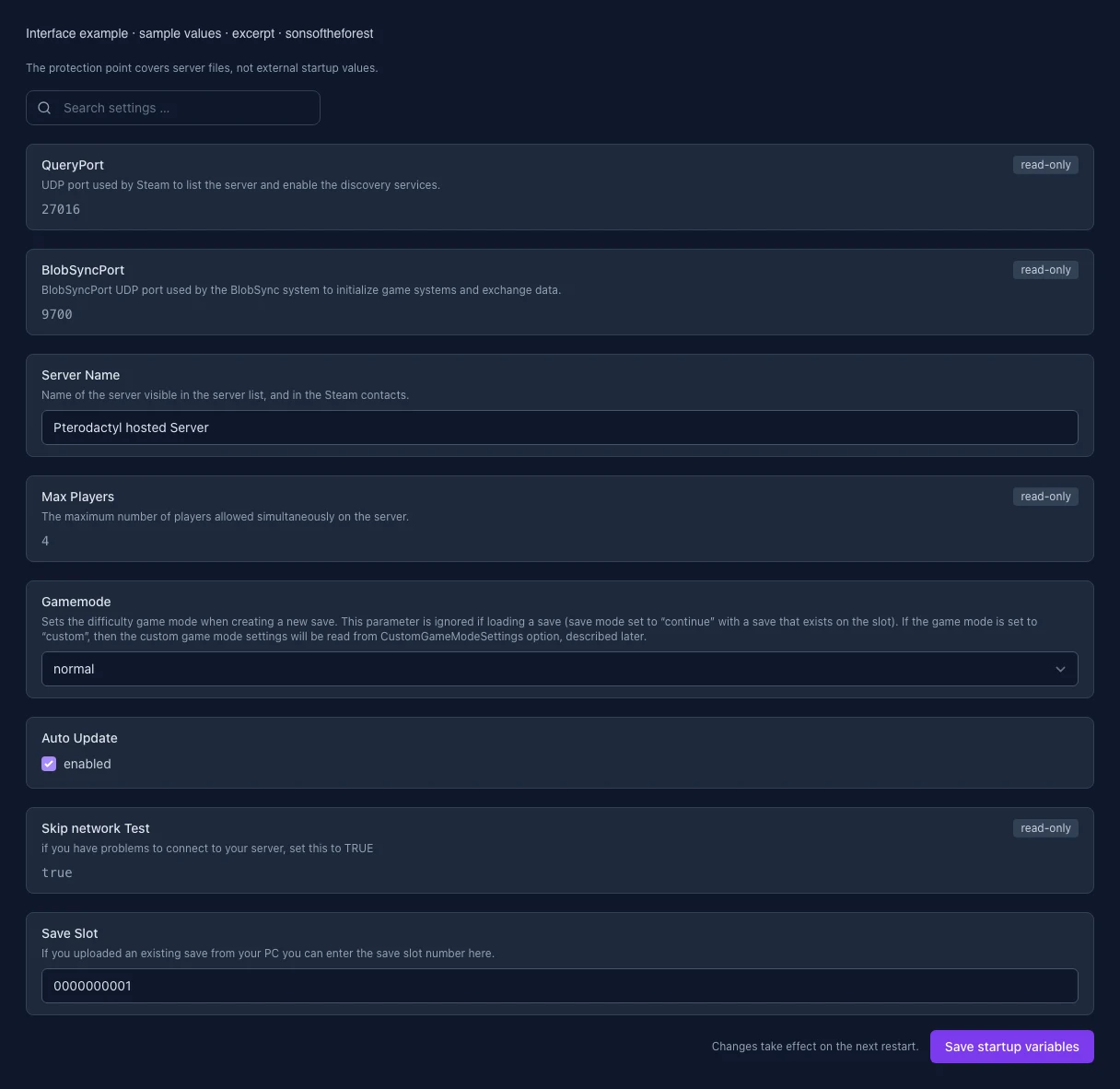
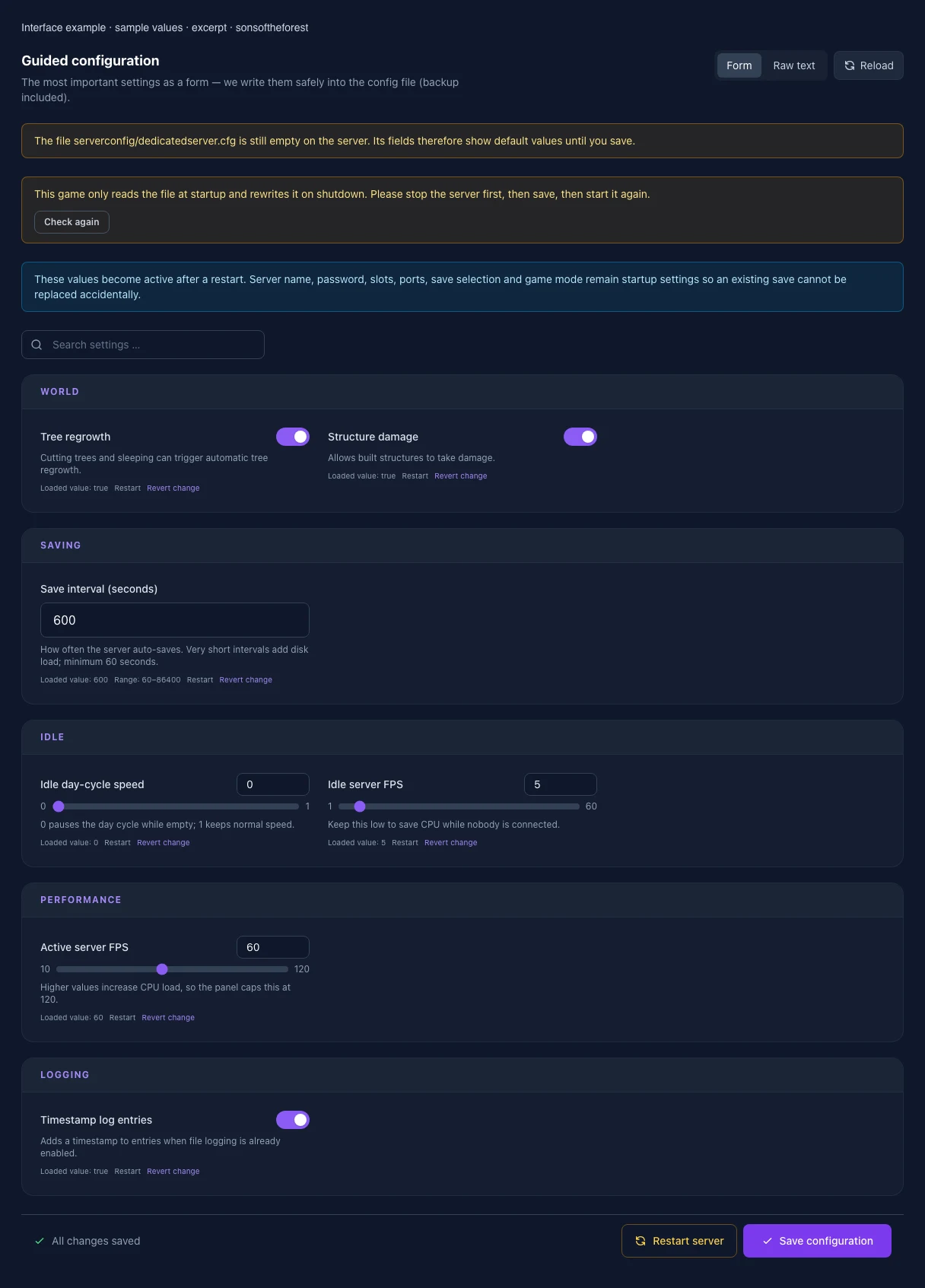
The image shows the interface on its capture date; earlier versions may differ.
Excerpt of the current interface with sample values. Values and prerequisites illustrate the controls; available tools depend on server software, plugins and permissions. · Captured on 2026-10-08Excerpt of the current interface with sample values. Values and prerequisites illustrate the controls; available tools depend on server software, plugins and permissions. · Captured on 2026-10-08
What the settings do
These values come from our guided editors. Defaults are the editor starting values; they do not show the contents of a customer server.
Tree regrowth
Cutting trees and sleeping can trigger automatic tree regrowth.
Setting
/GameSettings/Gameplay.TreeRegrowth
Default
true
Structure damage
Allows built structures to take damage.
Setting
/GameSettings/Structure.Damage
Default
true
Save interval (seconds)
How often the server auto-saves. Very short intervals add disk load; minimum 60 seconds.
Setting
/SaveInterval
Default
600
Range / options
60 – 86400
Idle day-cycle speed
0 pauses the day cycle while empty; 1 keeps normal speed.
Setting
/IdleDayCycleSpeed
Default
0
Range / options
0 – 1
Idle server FPS
Keep this low to save CPU while nobody is connected.
Setting
/IdleTargetFramerate
Default
5
Range / options
1 – 60
Active server FPS
Higher values increase CPU load, so the panel caps this at 120.
Setting
/ActiveTargetFramerate
Default
60
Range / options
10 – 120
Timestamp log entries
Adds a timestamp to entries when file logging is already enabled.
Setting
/TimestampLogEntries
Default
true
QueryPort
UDP port used by Steam to list the server and enable the discovery services.
Setting
QUERY_PORT
Default
27016
Range / options
1024 – 65536
When it takes effect
Takes effect after saving and restarting the server.
BlobSyncPort
BlobSyncPort UDP port used by the BlobSync system to initialize game systems and exchange data.
Setting
BLOBSYNC_PORT
Default
9700
Range / options
1024 – 65536
When it takes effect
Takes effect after saving and restarting the server.
Server Name
Name of the server visible in the server list, and in the Steam contacts.
Setting
SRV_NAME
Default
Pterodactyl hosted Server
When it takes effect
Takes effect after saving and restarting the server.
Max Players
The maximum number of players allowed simultaneously on the server.
Setting
MAX_PLAYERS
Default
4
Range / options
1 – 8
When it takes effect
Takes effect after saving and restarting the server.
Game mode
Sets the base game mode at launch or when a new world is created.
Setting
GAME_MODE
Default
normal
Range / options
normal, hard, hardsurvival, peaceful, custom
When it takes effect
Takes effect after saving and restarting the server.
Auto Update
Setting
AUTO_UPDATE
Default
1
When it takes effect
Takes effect after saving and restarting the server.
Skip network Test
if you have problems to connect to your server, set this to TRUE
Setting
SKIP_TESTS
Default
true
Range / options
true, false
When it takes effect
Takes effect after saving and restarting the server.
Save slot
Selects the save slot. Changing it loads another slot without deleting the previous one.
Setting
SAVE_SLOT
Default
0000000001
Range / options
… – 30
When it takes effect
Takes effect after saving and restarting the server.
Loading...
Cookie settings
We use cookies to improve your experience and analyze our website.
Cookie settings
Essential cookies
Required
These cookies are required for the core functions of the website and cannot be disabled.
Analytics cookies
Help us understand how the website and customer area are used (our own usage analytics, Google Analytics, Microsoft Clarity).
Marketing cookies
Allow the pseudonymous matching of an ad click to an order in order to measure conversions.