Game updates, plugin versions and improvements to our interface with a traceable history.
Recorded, available and installed are different states. Your actual installation status and suitable updates are shown in the server panel.
Game updatePublished
1.0 Fixes v1.0.0.6
Announcement from the official source. The source describes the changes; your server installation status is shown separately in the update center.
Effects on plugins
No independent plugin compatibility test is documented for this announcement. Check the affected plugins in the update center before changing game versions.
Announcement from the official source. The source describes the changes; your server installation status is shown separately in the update center.
Effects on plugins
No independent plugin compatibility test is documented for this announcement. Check the affected plugins in the update center before changing game versions.
Announcement from the official source. The source describes the changes; your server installation status is shown separately in the update center.
Effects on plugins
No independent plugin compatibility test is documented for this announcement. Check the affected plugins in the update center before changing game versions.
Announcement from the official source. The source describes the changes; your server installation status is shown separately in the update center.
Effects on plugins
No independent plugin compatibility test is documented for this announcement. Check the affected plugins in the update center before changing game versions.
Announcement from the official source. The source describes the changes; your server installation status is shown separately in the update center.
Effects on plugins
No independent plugin compatibility test is documented for this announcement. Check the affected plugins in the update center before changing game versions.
Announcement from the official source. The source describes the changes; your server installation status is shown separately in the update center.
Effects on plugins
No independent plugin compatibility test is documented for this announcement. Check the affected plugins in the update center before changing game versions.
Announcement from the official source. The source describes the changes; your server installation status is shown separately in the update center.
Effects on plugins
No independent plugin compatibility test is documented for this announcement. Check the affected plugins in the update center before changing game versions.
Announcement from the official source. The source describes the changes; your server installation status is shown separately in the update center.
Effects on plugins
No independent plugin compatibility test is documented for this announcement. Check the affected plugins in the update center before changing game versions.
Announcement from the official source. The source describes the changes; your server installation status is shown separately in the update center.
Effects on plugins
No independent plugin compatibility test is documented for this announcement. Check the affected plugins in the update center before changing game versions.
Announcement from the official source. The source describes the changes; your server installation status is shown separately in the update center.
Effects on plugins
No independent plugin compatibility test is documented for this announcement. Check the affected plugins in the update center before changing game versions.
Announcement from the official source. The source describes the changes; your server installation status is shown separately in the update center.
Effects on plugins
No independent plugin compatibility test is documented for this announcement. Check the affected plugins in the update center before changing game versions.
Announcement from the official source. The source describes the changes; your server installation status is shown separately in the update center.
Effects on plugins
No independent plugin compatibility test is documented for this announcement. Check the affected plugins in the update center before changing game versions.
Announcement from the official source. The source describes the changes; your server installation status is shown separately in the update center.
Effects on plugins
No independent plugin compatibility test is documented for this announcement. Check the affected plugins in the update center before changing game versions.
Announcement from the official source. The source describes the changes; your server installation status is shown separately in the update center.
Effects on plugins
No independent plugin compatibility test is documented for this announcement. Check the affected plugins in the update center before changing game versions.
Announcement from the official source. The source describes the changes; your server installation status is shown separately in the update center.
Effects on plugins
No independent plugin compatibility test is documented for this announcement. Check the affected plugins in the update center before changing game versions.
Announcement from the official source. The source describes the changes; your server installation status is shown separately in the update center.
Effects on plugins
No independent plugin compatibility test is documented for this announcement. Check the affected plugins in the update center before changing game versions.
Announcement from the official source. The source describes the changes; your server installation status is shown separately in the update center.
Effects on plugins
No independent plugin compatibility test is documented for this announcement. Check the affected plugins in the update center before changing game versions.
Announcement from the official source. The source describes the changes; your server installation status is shown separately in the update center.
Effects on plugins
No independent plugin compatibility test is documented for this announcement. Check the affected plugins in the update center before changing game versions.
Announcement from the official source. The source describes the changes; your server installation status is shown separately in the update center.
Effects on plugins
No independent plugin compatibility test is documented for this announcement. Check the affected plugins in the update center before changing game versions.
Announcement from the official source. The source describes the changes; your server installation status is shown separately in the update center.
Effects on plugins
No independent plugin compatibility test is documented for this announcement. Check the affected plugins in the update center before changing game versions.
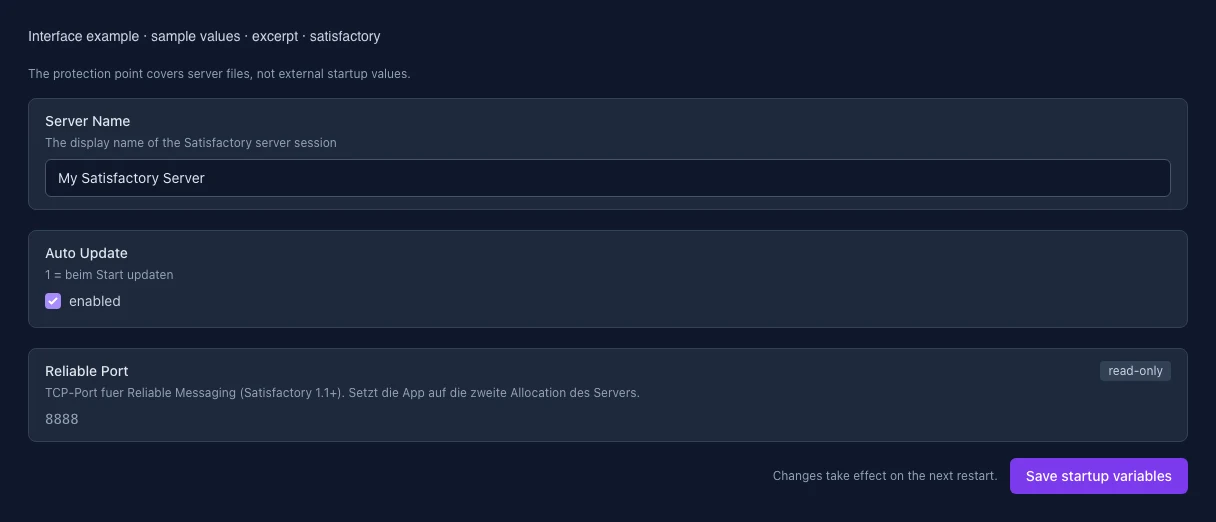
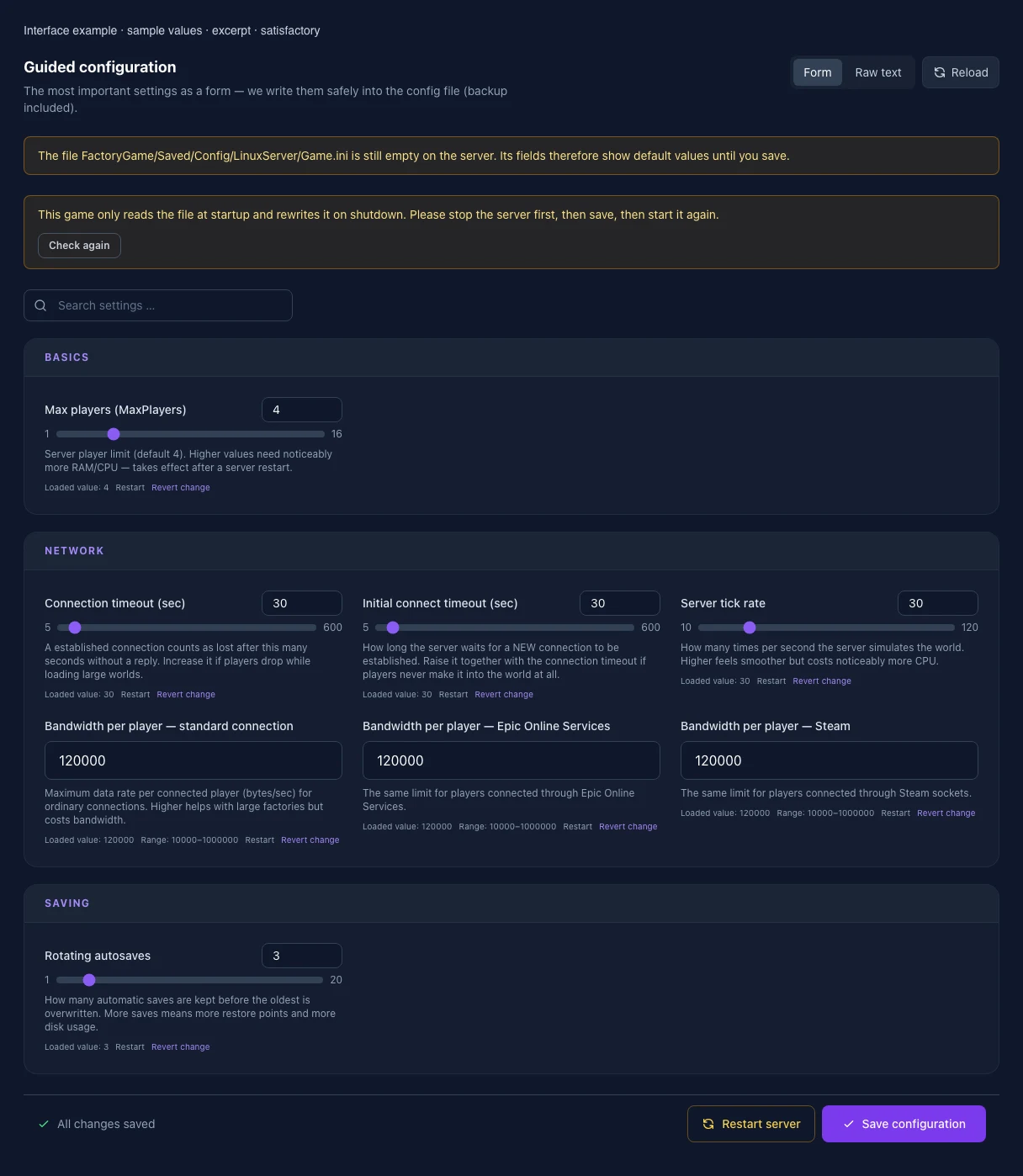
The image shows the interface on its capture date; earlier versions may differ.
Excerpt of the current interface with sample values. Values and prerequisites illustrate the controls; available tools depend on server software, plugins and permissions. · Captured on 2026-10-08Excerpt of the current interface with sample values. Values and prerequisites illustrate the controls; available tools depend on server software, plugins and permissions. · Captured on 2026-10-08
What the settings do
These values come from our guided editors. Defaults are the editor starting values; they do not show the contents of a customer server.
Max players (MaxPlayers)
Server player limit (default 4). Higher values need noticeably more RAM/CPU — takes effect after a server restart.
Setting
MaxPlayers
Default
4
Range / options
1 – 16
Connection timeout (sec)
A established connection counts as lost after this many seconds without a reply. Increase it if players drop while loading large worlds.
Setting
ConnectionTimeout
Default
30
Range / options
5 – 600
Initial connect timeout (sec)
How long the server waits for a NEW connection to be established. Raise it together with the connection timeout if players never make it into the world at all.
Setting
InitialConnectTimeout
Default
30
Range / options
5 – 600
Network tick rate (Hz)
Upper limit for network ticks per second. The actual tick rate may be lower; Live Status shows the measured value. A higher limit does not guarantee a higher tick rate.
Setting
NetServerMaxTickRate
Default
30
Range / options
10 – 120
Bandwidth per player — Steam
Steam sockets data rate in bytes/sec. Satisfactory overwrites this file value on startup according to its network quality (tested default profile: 120,000). Change network quality in the Satisfactory Server Manager for a lasting effect.
Setting
MaxClientRate
Default
120000
Range / options
10000 – 1000000
Rotating autosaves
How many automatic saves are kept before the oldest is overwritten. More saves means more restore points and more disk usage.
Setting
mNumRotatingAutosaves
Default
3
Range / options
1 – 20
Egg name (no in-game effect)
The Satisfactory startup command does not use this egg variable. It changes neither the in-game server name nor the world name. Set the in-game server name during initial setup in Live Status, or later in the Satisfactory Server Manager.
Setting
SERVER_NAME
Default
My Satisfactory Server
When it takes effect
Takes effect after saving and restarting the server.
Auto Update
1 = beim Start updaten
Setting
AUTO_UPDATE
Default
1
When it takes effect
Takes effect after saving and restarting the server.
Reliable messaging port (TCP)
Additional TCP port for reliable messaging from Satisfactory 1.1 onward. It is automatically assigned to the second port allocation and is read-only.
Setting
RELIABLE_PORT
Default
8888
Range / options
1 – 65535
When it takes effect
Takes effect after saving and restarting the server.
Loading...
Cookie settings
We use cookies to improve your experience and analyze our website.
Cookie settings
Essential cookies
Required
These cookies are required for the core functions of the website and cannot be disabled.
Analytics cookies
Help us understand how the website and customer area are used (our own usage analytics, Google Analytics, Microsoft Clarity).
Marketing cookies
Allow the pseudonymous matching of an ad click to an order in order to measure conversions.