Game updates, plugin versions and improvements to our interface with a traceable history.
Recorded, available and installed are different states. Your actual installation status and suitable updates are shown in the server panel.
InterfaceChange documented
Guided startup parameters: revised
The guided tools were revised in the shared panel code. The entry concerns the interface or its processing. The date records the change; availability on an individual server depends on the game, software, plugins and permissions.
InterfaceChange documented
Guided startup parameters: revised
The guided tools were revised in the shared panel code. The entry concerns the interface or its processing. The date records the change; availability on an individual server depends on the game, software, plugins and permissions.
InterfaceChange documented
Guided startup parameters: revised
The guided tools were revised in the shared panel code. The entry concerns the interface or its processing. The date records the change; availability on an individual server depends on the game, software, plugins and permissions.
Developer announcementPublished
Show your Spiffo’s pride, and help us fundraise
Announcement from the official source. The source describes the changes; your server installation status is shown separately in the update center.
Announcement from the official source. The source describes the changes; your server installation status is shown separately in the update center.
Effects on plugins
No independent plugin compatibility test is documented for this announcement. Check the affected plugins in the update center before changing game versions.
Announcement from the official source. The source describes the changes; your server installation status is shown separately in the update center.
Effects on plugins
No independent plugin compatibility test is documented for this announcement. Check the affected plugins in the update center before changing game versions.
Announcement from the official source. The source describes the changes; your server installation status is shown separately in the update center.
Effects on plugins
No independent plugin compatibility test is documented for this announcement. Check the affected plugins in the update center before changing game versions.
The guided tools were revised in the shared panel code. The entry concerns the interface or its processing. The date records the change; availability on an individual server depends on the game, software, plugins and permissions.
Developer announcementPublished
B42 CHECKLIST
Announcement from the official source. The source describes the changes; your server installation status is shown separately in the update center.
The guided tools were revised in the shared panel code. The entry concerns the interface or its processing. The date records the change; availability on an individual server depends on the game, software, plugins and permissions.
InterfaceChange documented
Project Zomboid: game tools: revised
The guided tools were revised in the shared panel code. The entry concerns the interface or its processing. The date records the change; availability on an individual server depends on the game, software, plugins and permissions.
Changed interface controls
Added
newUsername
InterfaceChange documented
Project Zomboid: game tools: added
The guided tools were added to the shared panel code. The entry concerns the interface or its processing. The date records the change; availability on an individual server depends on the game, software, plugins and permissions.
Game updatePublished
42.20: The Big Glow Up
Announcement from the official source. The source describes the changes; your server installation status is shown separately in the update center.
Effects on plugins
No independent plugin compatibility test is documented for this announcement. Check the affected plugins in the update center before changing game versions.
The guided tools were revised in the shared panel code. The entry concerns the interface or its processing. The date records the change; availability on an individual server depends on the game, software, plugins and permissions.
Developer announcementPublished
BUILD 42 STABLE PLANS
Announcement from the official source. The source describes the changes; your server installation status is shown separately in the update center.
The guided tools were revised in the shared panel code. The entry concerns the interface or its processing. The date records the change; availability on an individual server depends on the game, software, plugins and permissions.
SettingChange documented
Project Zomboid: startup parameters changed
The definition of visible startup parameters changed in the panel code. The listed values explain added, changed and removed fields. The date records the definition change; existing server values were not automatically changed by it.
Supported server software: Project Zomboid
Changed settings (6)
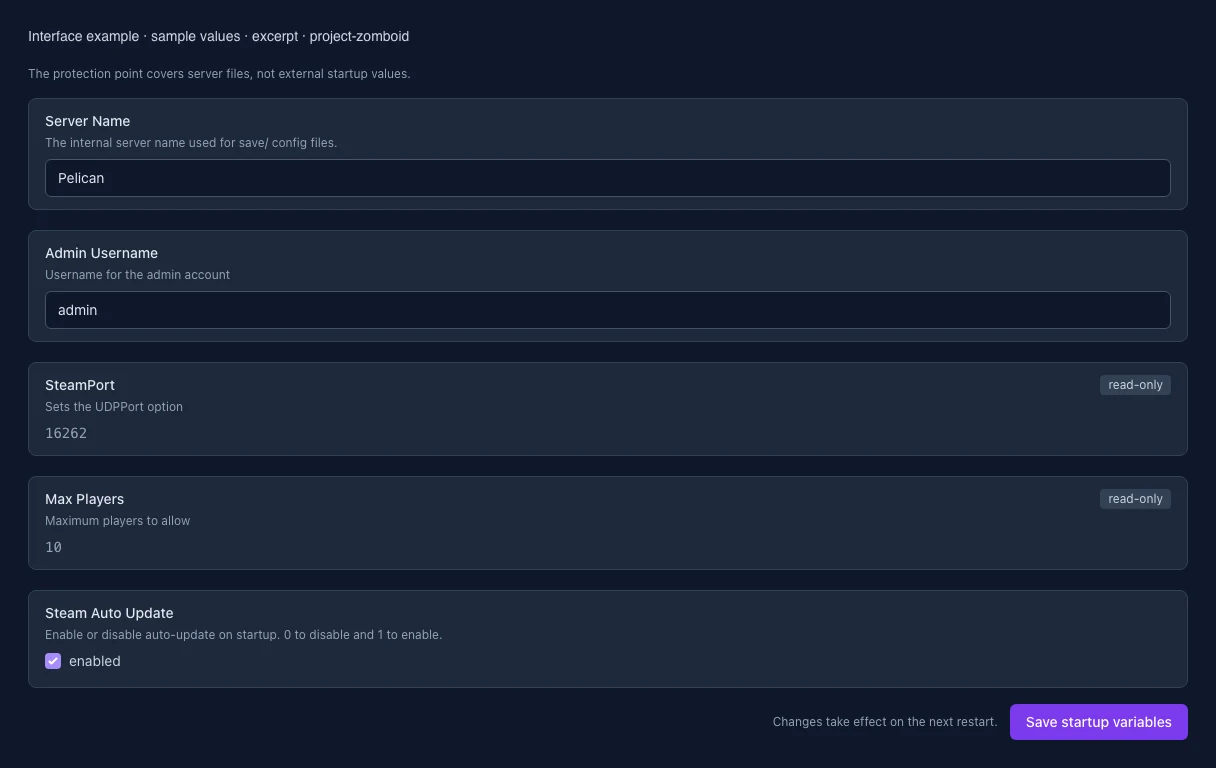
Admin Username: Added
ADMIN_USER
Username for the admin account
After
Setting
ADMIN_USER
Default
admin
When it takes effect
Takes effect after saving and restarting the server.
Steam Auto Update: Added
AUTO_UPDATE
Enable or disable auto-update on startup. 0 to disable and 1 to enable.
After
Setting
AUTO_UPDATE
Default
1
When it takes effect
Takes effect after saving and restarting the server.
Max Players: Added
MAX_PLAYERS
Maximum players to allow
After
Setting
MAX_PLAYERS
Default
10
When it takes effect
Takes effect after saving and restarting the server.
Server Name: Added
SERVER_NAME
The internal server name used for save/ config files.
After
Setting
SERVER_NAME
Default
Pelican
When it takes effect
Takes effect after saving and restarting the server.
Beta branch to install, such as b41multiplayer. Leave blank to install normal branch
After
Setting
SRCDS_BETAID
Default
When it takes effect
Takes effect after saving and restarting the server.
SteamPort: Added
STEAM_PORT
Sets the UDPPort option
After
Setting
STEAM_PORT
Default
16262
When it takes effect
Takes effect after saving and restarting the server.
InterfaceChange documented
Guided startup parameters: revised
The guided tools were revised in the shared panel code. The entry concerns the interface or its processing. The date records the change; availability on an individual server depends on the game, software, plugins and permissions.
InterfaceChange documented
Guided startup parameters: revised
The guided tools were revised in the shared panel code. The entry concerns the interface or its processing. The date records the change; availability on an individual server depends on the game, software, plugins and permissions.
Developer announcementPublished
NEXT STEPS
Announcement from the official source. The source describes the changes; your server installation status is shown separately in the update center.
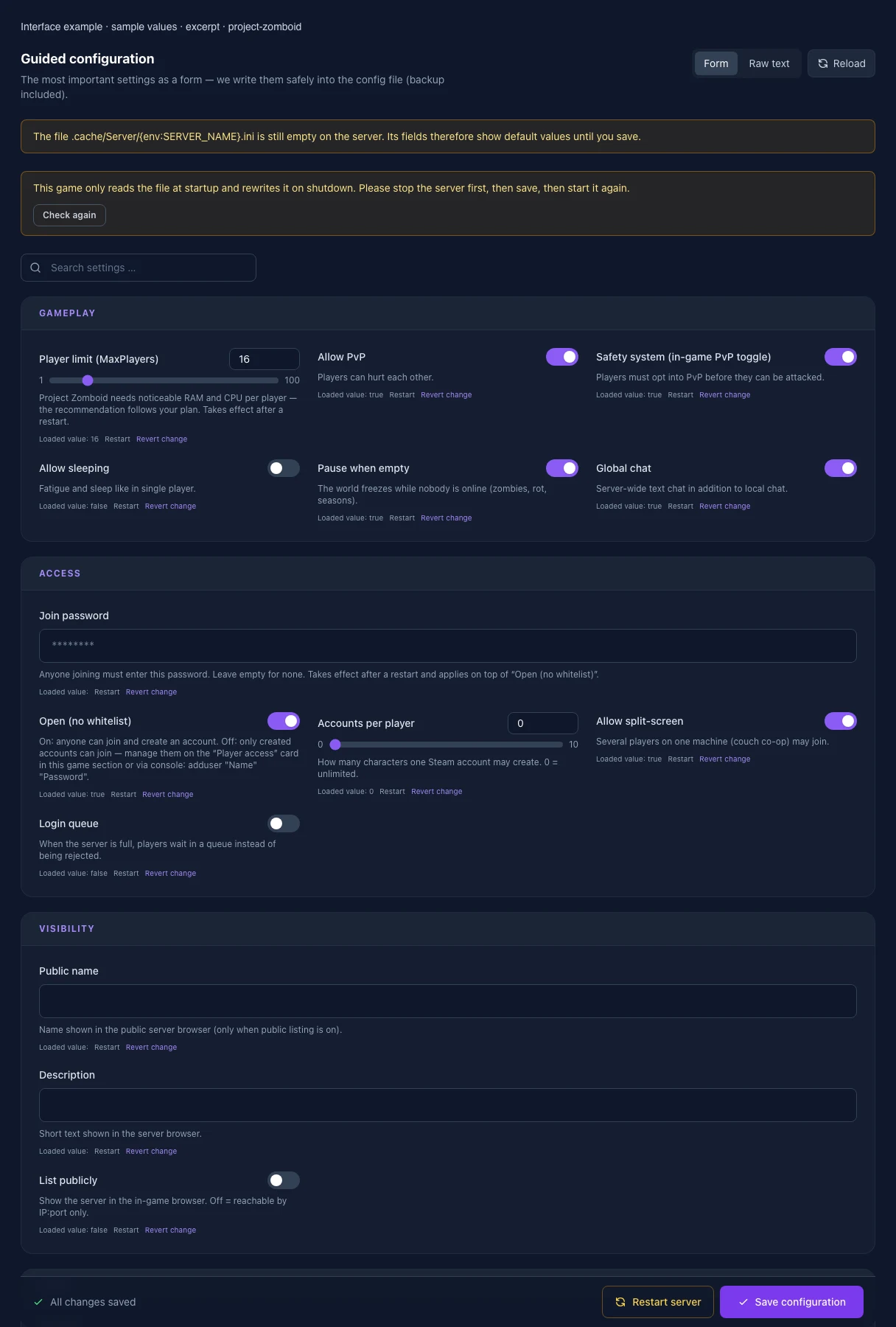
The image shows the interface on its capture date; earlier versions may differ.
Excerpt of the current interface with sample values. Values and prerequisites illustrate the controls; available tools depend on server software, plugins and permissions. · Captured on 2026-10-08Excerpt of the current interface with sample values. Values and prerequisites illustrate the controls; available tools depend on server software, plugins and permissions. · Captured on 2026-10-08
What the settings do
These values come from our guided editors. Defaults are the editor starting values; they do not show the contents of a customer server.
Player limit (MaxPlayers)
Project Zomboid needs noticeable RAM and CPU per player — the recommendation follows your plan. Takes effect after a restart.
Setting
MaxPlayers
Default
16
Range / options
1 – 100
Public name
Name in the public server browser. Empty uses “My PZ Server”. Maximum 63 UTF-8 bytes: accented letters use 2 bytes; most emoji use 4. Takes effect after a restart.
Setting
PublicName
Default
Description
Short text shown in the server browser.
Setting
PublicDescription
Default
List publicly
Show the server in the in-game browser. Off = reachable by IP:port only.
Setting
Public
Default
false
Open (no whitelist)
On: anyone can join and create an account. Off: only created accounts can join — manage them on the “Player access” card in this game section or via console: adduser "Name" "Password".
Setting
Open
Default
true
Allow PvP
Players can hurt each other.
Setting
PVP
Default
true
Safety system (in-game PvP toggle)
Players must opt into PvP before they can be attacked.
Setting
SafetySystem
Default
true
Allow sleeping
Fatigue and sleep like in single player.
Setting
SleepAllowed
Default
false
Pause when empty
The world freezes while nobody is online (zombies, rot, seasons).
Setting
PauseEmpty
Default
true
Global chat
Server-wide text chat in addition to local chat.
Setting
GlobalChat
Default
true
Mod IDs
Mod IDs from mod.info, separated by semicolons. Every player needs the same mods (Workshop downloads them automatically).
Setting
Mods
Default
Workshop IDs
Steam Workshop IDs of the mods, separated by semicolons.
Setting
WorkshopItems
Default
Accounts per player
How many characters one Steam account may create. 0 = unlimited.
Setting
MaxAccountsPerUser
Default
0
Range / options
0 – 10
Allow split-screen
Several players on one machine (couch co-op) may join.
Setting
AllowCoop
Default
true
Login queue
When the server is full, players wait in a queue instead of being rejected.
Setting
LoginQueueEnabled
Default
false
Players may claim safehouses
The core of the group feature: off = nobody can protect a building.
Setting
PlayerSafehouse
Default
false
Admins claim safehouses too
Affects accounts with the admin role only.
Setting
AdminSafehouse
Default
false
Days survived before claiming
A character must survive this many days before claiming a safehouse. 0 = immediately.
Setting
SafehouseDaySurvivedToClaim
Default
0
Range / options
0 – 365
Outsiders may enter
Off: non-members cannot enter the building.
Setting
SafehouseAllowTrepass
Default
true
Fire possible inside
Off: the building cannot burn — protects against arson.
Setting
SafehouseAllowFire
Default
true
Outsiders may loot
Off: only members take items from the safehouse.
Setting
SafehouseAllowLoot
Default
true
Respawn in the safehouse
After death, members start in the shared safehouse instead of a random spot.
Setting
SafehouseAllowRespawn
Default
false
Shops and warehouses claimable too
On: commercial buildings can become safehouses, not just homes.
Setting
SafehouseAllowNonResidential
Default
false
Expiry when away (hours)
The claim expires after this many hours without a visit. 144 = six days.
Setting
SafeHouseRemovalTime
Default
144
Range / options
0 – 8760
Allow factions
Players can found groups with their own name and tag.
Setting
Faction
Default
true
Days survived before founding
The founder must survive this many days. 0 = immediately.
Setting
FactionDaySurvivedToCreate
Default
0
Range / options
0 – 365
Members required for a tag
From this many members the faction shows its tag above names.
Setting
FactionPlayersRequiredForTag
Default
1
Range / options
1 – 32
Melee damage vs players (%)
Percentage of normal damage. 30 = players take far less than zombies do.
Setting
PVPMeleeDamageModifier
Default
30.0
Range / options
0 – 500
Firearm damage vs players (%)
Percentage of normal firearm damage in PvP.
Setting
PVPFirearmDamageModifier
Default
50.0
Range / options
0 – 500
Hits interrupt the opponent
On: a hit triggers a stagger — favours whoever strikes first.
Setting
PVPMeleeWhileHitReaction
Default
false
Seconds until PvP is armed
How long arming PvP mode takes. Prevents surprise attacks.
Setting
SafetyToggleTimer
Default
2
Range / options
0 – 60
Seconds until PvP disarms
PvP stays active this long after switching it off.
Setting
SafetyCooldownTimer
Default
3
Range / options
0 – 60
Respawn at your own death spot
On: the new character starts where the previous one died.
Setting
PlayerRespawnWithSelf
Default
false
Respawn at a teammate
On: the new character may start next to a living teammate.
Setting
PlayerRespawnWithOther
Default
false
Starting items
Item IDs separated by commas, e.g. Base.Axe,Base.Bag_BigHikingBag. Empty = none. Unknown IDs are ignored.
Setting
SpawnItems
Default
Welcome message
Shown in chat as soon as someone joins. <LINE> inserts a line break.
Setting
ServerWelcomeMessage
Default
Show names above players
Off: other players stay anonymous — popular on hardcore roleplay servers.
Setting
DisplayUserName
Default
true
Steam names in the player list
On: the list shows Steam profiles instead of character names only.
Setting
SteamScoreboard
Default
false
Voice chat
Built-in in-game voice chat.
Setting
VoiceEnable
Default
true
Voice full volume up to (tiles)
Up to this distance the voice is heard at full volume.
Setting
VoiceMinDistance
Default
10.0
Range / options
0 – 100
Voice range (tiles)
Beyond this nothing is heard.
Setting
VoiceMaxDistance
Default
100.0
Range / options
0 – 1000
Directional audio
On: voices come from the speaker's direction.
Setting
Voice3D
Default
true
Ping limit (ms)
Players above this latency are disconnected. 0 = no limit.
Setting
PingLimit
Default
0
Range / options
0 – 2000
Save world every (minutes)
Extra intermediate saves. 0 = only on shutdown, as shipped.
Setting
SaveWorldEveryMinutes
Default
0
Range / options
0 – 1440
Server Name
The internal server name used for save/ config files.
Setting
SERVER_NAME
Default
Pelican
When it takes effect
Takes effect after saving and restarting the server.
Admin username
Username of the initial administrator account.
Setting
ADMIN_USER
Default
admin
When it takes effect
Takes effect after saving and restarting the server.
SteamPort
Sets the UDPPort option
Setting
STEAM_PORT
Default
16262
When it takes effect
Takes effect after saving and restarting the server.
Max Players
Maximum players to allow
Setting
MAX_PLAYERS
Default
10
When it takes effect
Takes effect after saving and restarting the server.
Steam Auto Update
Enable or disable auto-update on startup. 0 to disable and 1 to enable.
Setting
AUTO_UPDATE
Default
1
When it takes effect
Takes effect after saving and restarting the server.
Loading...
Cookie settings
We use cookies to improve your experience and analyze our website.
Cookie settings
Essential cookies
Required
These cookies are required for the core functions of the website and cannot be disabled.
Analytics cookies
Help us understand how the website and customer area are used (our own usage analytics, Google Analytics, Microsoft Clarity).
Marketing cookies
Allow the pseudonymous matching of an ad click to an order in order to measure conversions.