Game updates, plugin versions and improvements to our interface with a traceable history.
Recorded, available and installed are different states. Your actual installation status and suitable updates are shown in the server panel.
InterfaceChange documented
Guided startup parameters: revised
The guided tools were revised in the shared panel code. The entry concerns the interface or its processing. The date records the change; availability on an individual server depends on the game, software, plugins and permissions.
SettingChange documented
Necesse: startup parameters changed
The definition of visible startup parameters changed in the panel code. The listed values explain added, changed and removed fields. The date records the definition change; existing server values were not automatically changed by it.
Supported server software: Necesse
Changed settings (2)
Steam App ID: Removed
SRCDS_APPID
DO NOT EDIT
Before
Setting
SRCDS_APPID
Default
1169370
Range / options
1169370
When it takes effect
Takes effect after saving and restarting the server.
Steam Beta Branch: Removed
SRCDS_BETAID
Steam Beta branch to install.
Before
Setting
SRCDS_BETAID
Default
When it takes effect
Takes effect after saving and restarting the server.
InterfaceChange documented
Guided startup parameters: revised
The guided tools were revised in the shared panel code. The entry concerns the interface or its processing. The date records the change; availability on an individual server depends on the game, software, plugins and permissions.
InterfaceChange documented
Guided startup parameters: revised
The guided tools were revised in the shared panel code. The entry concerns the interface or its processing. The date records the change; availability on an individual server depends on the game, software, plugins and permissions.
Game updatePublished
v.1.3.3 - Small tweaks and bug fixes
Announcement from the official source. The source describes the changes; your server installation status is shown separately in the update center.
Effects on plugins
No independent plugin compatibility test is documented for this announcement. Check the affected plugins in the update center before changing game versions.
The guided tools were revised in the shared panel code. The entry concerns the interface or its processing. The date records the change; availability on an individual server depends on the game, software, plugins and permissions.
InterfaceChange documented
Guided startup parameters: revised
The guided tools were revised in the shared panel code. The entry concerns the interface or its processing. The date records the change; availability on an individual server depends on the game, software, plugins and permissions.
InterfaceChange documented
Guided startup parameters: revised
The guided tools were revised in the shared panel code. The entry concerns the interface or its processing. The date records the change; availability on an individual server depends on the game, software, plugins and permissions.
InterfaceChange documented
Guided startup parameters: revised
The guided tools were revised in the shared panel code. The entry concerns the interface or its processing. The date records the change; availability on an individual server depends on the game, software, plugins and permissions.
InterfaceChange documented
Guided startup parameters: revised
The guided tools were revised in the shared panel code. The entry concerns the interface or its processing. The date records the change; availability on an individual server depends on the game, software, plugins and permissions.
InterfaceChange documented
Guided startup parameters: revised
The guided tools were revised in the shared panel code. The entry concerns the interface or its processing. The date records the change; availability on an individual server depends on the game, software, plugins and permissions.
InterfaceChange documented
Guided startup parameters: revised
The guided tools were revised in the shared panel code. The entry concerns the interface or its processing. The date records the change; availability on an individual server depends on the game, software, plugins and permissions.
Game updatePublished
v.1.3.2 hotfix build 24650233
Announcement from the official source. The source describes the changes; your server installation status is shown separately in the update center.
Effects on plugins
No independent plugin compatibility test is documented for this announcement. Check the affected plugins in the update center before changing game versions.
Announcement from the official source. The source describes the changes; your server installation status is shown separately in the update center.
Effects on plugins
No independent plugin compatibility test is documented for this announcement. Check the affected plugins in the update center before changing game versions.
Announcement from the official source. The source describes the changes; your server installation status is shown separately in the update center.
Effects on plugins
No independent plugin compatibility test is documented for this announcement. Check the affected plugins in the update center before changing game versions.
Necesse Rust & Romance Update + Steam Free Weekend is now live!
Announcement from the official source. The source describes the changes; your server installation status is shown separately in the update center.
Effects on plugins
No independent plugin compatibility test is documented for this announcement. Check the affected plugins in the update center before changing game versions.
The guided tools were revised in the shared panel code. The entry concerns the interface or its processing. The date records the change; availability on an individual server depends on the game, software, plugins and permissions.
InterfaceChange documented
Guided startup parameters: revised
The guided tools were revised in the shared panel code. The entry concerns the interface or its processing. The date records the change; availability on an individual server depends on the game, software, plugins and permissions.
SettingChange documented
Necesse: startup parameters changed
The definition of visible startup parameters changed in the panel code. The listed values explain added, changed and removed fields. The date records the definition change; existing server values were not automatically changed by it.
Supported server software: Necesse
Changed settings (1)
Workshop Mod IDs: Added
MOD_IDS
Komma-getrennte Steam-Workshop-IDs (App 1169040). Werden beim (Neu-)Start heruntergeladen und als .jar in ./mods abgelegt. Leer = keine Mods.
After
Setting
MOD_IDS
Default
When it takes effect
Takes effect after saving and restarting the server.
InterfaceChange documented
Guided startup parameters: revised
The guided tools were revised in the shared panel code. The entry concerns the interface or its processing. The date records the change; availability on an individual server depends on the game, software, plugins and permissions.
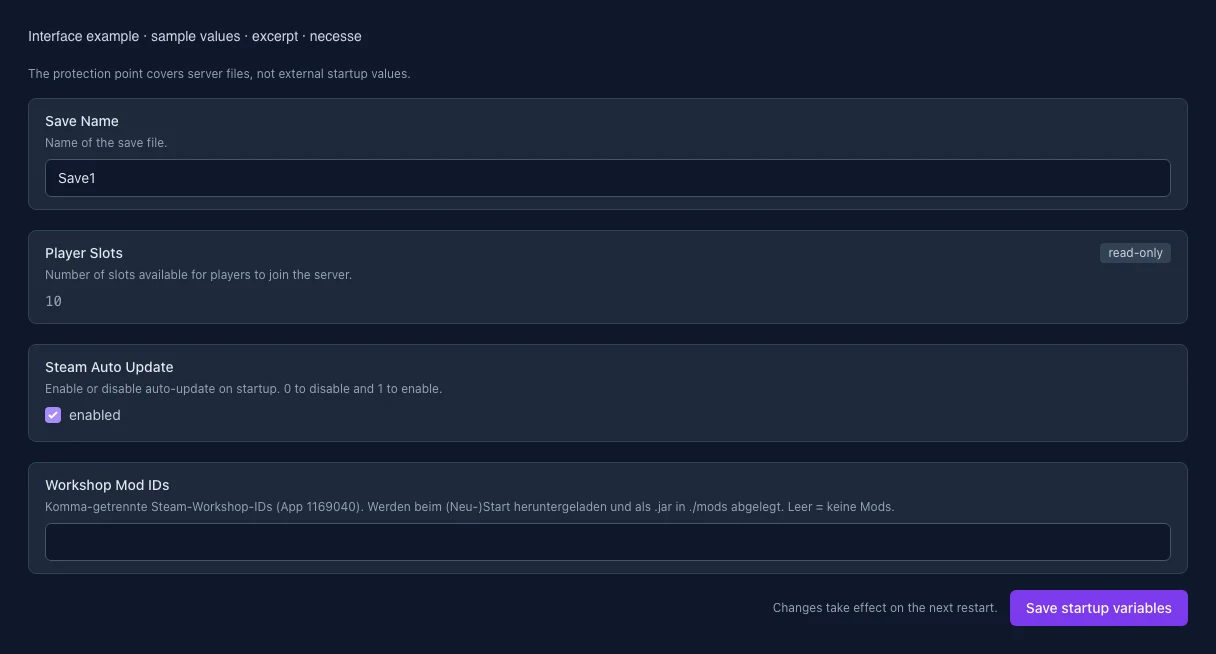
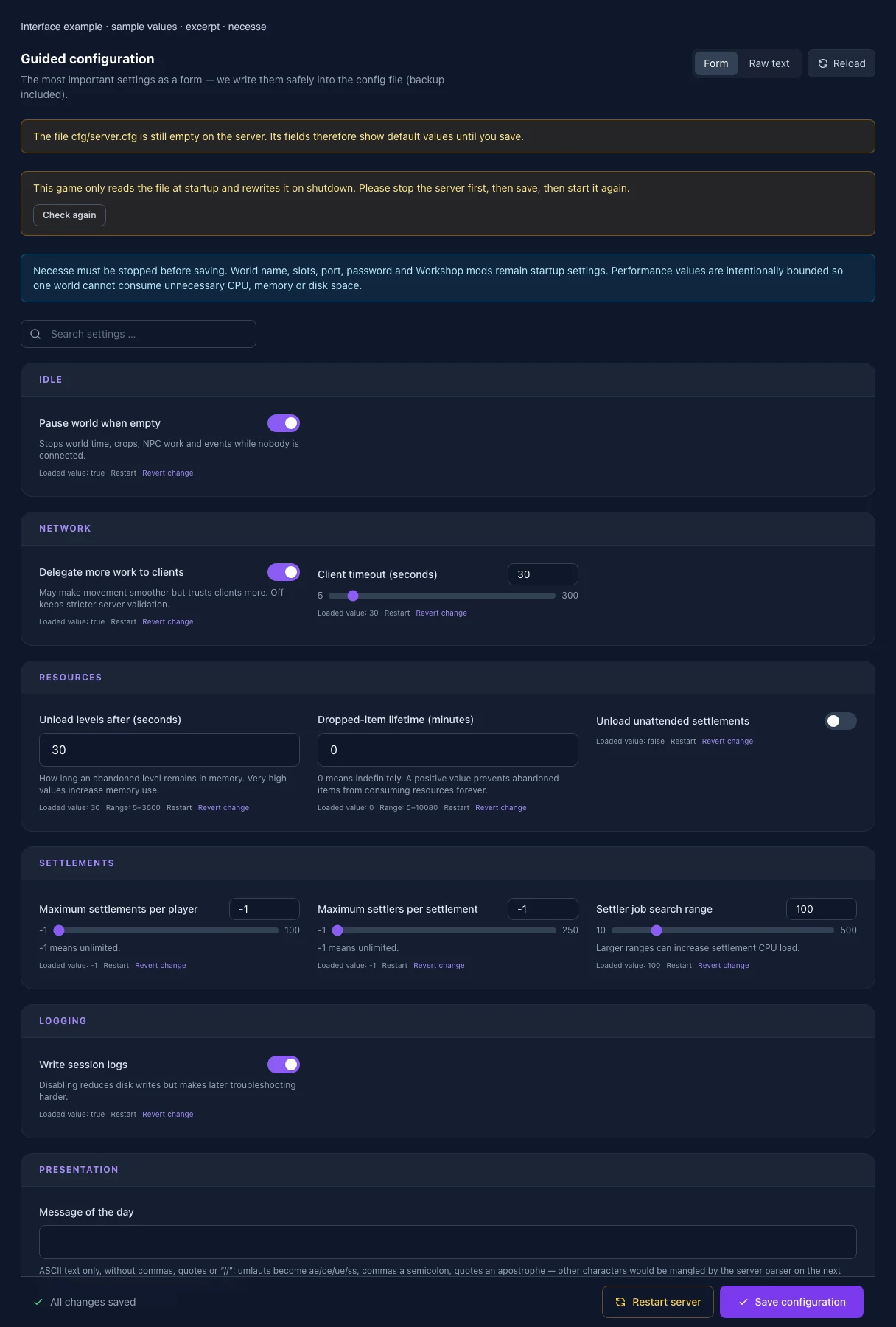
What the interface looks like
The image shows the interface on its capture date; earlier versions may differ.
Excerpt of the current interface with sample values. Values and prerequisites illustrate the controls; available tools depend on server software, plugins and permissions. · Captured on 2026-10-08Excerpt of the current interface with sample values. Values and prerequisites illustrate the controls; available tools depend on server software, plugins and permissions. · Captured on 2026-10-08
What the settings do
These values come from our guided editors. Defaults are the editor starting values; they do not show the contents of a customer server.
Pause world when empty
Stops world time, crops, NPC work and events while nobody is connected.
Setting
pauseWhenEmpty
Default
true
Delegate more work to clients
May make movement smoother but trusts clients more. Off keeps stricter server validation.
Setting
giveClientsPower
Default
true
Client timeout (seconds)
Setting
maxClientLatencySeconds
Default
30
Range / options
5 – 300
Unload levels after (seconds)
How long an abandoned level remains in memory. Very high values increase memory use.
Setting
unloadLevelsCooldown
Default
30
Range / options
5 – 3600
Dropped-item lifetime (minutes)
0 means indefinitely. A positive value prevents abandoned items from consuming resources forever.
Setting
droppedItemsLifeMinutes
Default
0
Range / options
0 – 10080
Unload unattended settlements
Setting
unloadSettlements
Default
false
Maximum settlements per player
-1 means unlimited.
Setting
maxSettlementsPerPlayer
Default
-1
Range / options
-1 – 100
Maximum settlers per settlement
-1 means unlimited.
Setting
maxSettlersPerSettlement
Default
-1
Range / options
-1 – 250
Settler job search range (tiles)
Larger ranges can increase settlement CPU load.
Setting
jobSearchRange
Default
100
Range / options
10 – 500
Write session logs
Disabling reduces disk writes but makes later troubleshooting harder.
Setting
logging
Default
true
Message of the day
Text, accented characters and emoji are preserved. Commas, quotes, backslashes and other special characters are safely escaped in the config file. The preview shows this escaping; the game displays your original text.
Setting
MOTD
Default
Save Name
World filename: 1–20 characters, using only A–Z, a–z, 0–9, hyphen and underscore. Another name loads or creates another world.
Setting
SAVE_NAME
Default
Save1
When it takes effect
Takes effect after saving and restarting the server.
Player slots
Maximum number of players connected at the same time. This value comes from your booked server and is read-only here.
Setting
SERVER_SLOTS
Default
10
Range / options
… – 99
When it takes effect
Takes effect after saving and restarting the server.
Steam Auto Update
Enable or disable auto-update on startup. 0 to disable and 1 to enable.
Setting
AUTO_UPDATE
Default
1
When it takes effect
Takes effect after saving and restarting the server.
Workshop mod IDs
Numeric Steam Workshop IDs, separated by commas. Mods are loaded on the next start. Leave empty for no Workshop mods.
Setting
MOD_IDS
Default
When it takes effect
Takes effect after saving and restarting the server.
Loading...
Cookie settings
We use cookies to improve your experience and analyze our website.
Cookie settings
Essential cookies
Required
These cookies are required for the core functions of the website and cannot be disabled.
Analytics cookies
Help us understand how the website and customer area are used (our own usage analytics, Google Analytics, Microsoft Clarity).
Marketing cookies
Allow the pseudonymous matching of an ad click to an order in order to measure conversions.