Back to overview

Eco: updates, settings and interface

Game updates, plugin versions and improvements to our interface with a traceable history.

Recorded, available and installed are different states. Your actual installation status and suitable updates are shown in the server panel.

Developer announcement Published

Developer Stream on February 21th (2pm PST): Constitutions

Announcement from the official source. The source describes the changes; your server installation status is shown separately in the update center.

Game update Published

Version 0.8.3.3 released!

Announcement from the official source. The source describes the changes; your server installation status is shown separately in the update center.

Effects on plugins

No independent plugin compatibility test is documented for this announcement. Check the affected plugins in the update center before changing game versions.

Game update Published

Version 0.8.3.1 released!

Announcement from the official source. The source describes the changes; your server installation status is shown separately in the update center.

Effects on plugins

No independent plugin compatibility test is documented for this announcement. Check the affected plugins in the update center before changing game versions.

Game update Published

Version 0.8.3.0 released!

Announcement from the official source. The source describes the changes; your server installation status is shown separately in the update center.

Effects on plugins

No independent plugin compatibility test is documented for this announcement. Check the affected plugins in the update center before changing game versions.

Game update Published

Version 0.8.2.0 released!

Announcement from the official source. The source describes the changes; your server installation status is shown separately in the update center.

Effects on plugins

No independent plugin compatibility test is documented for this announcement. Check the affected plugins in the update center before changing game versions.

Developer announcement Published

World Environment Day Sale

Announcement from the official source. The source describes the changes; your server installation status is shown separately in the update center.

Developer announcement Published

Towns, Nations, and United Nations: Multiple Governments in Eco

Announcement from the official source. The source describes the changes; your server installation status is shown separately in the update center.

Developer announcement Published

Mining with Realism - Wet and Dry Tailings

Announcement from the official source. The source describes the changes; your server installation status is shown separately in the update center.

Developer announcement Published

The Design Pillars of Eco

Announcement from the official source. The source describes the changes; your server installation status is shown separately in the update center.

Game update Published

Version 0.8.1.4 released!

Announcement from the official source. The source describes the changes; your server installation status is shown separately in the update center.

Effects on plugins

No independent plugin compatibility test is documented for this announcement. Check the affected plugins in the update center before changing game versions.

Developer announcement Published

Eco Game Arc: From powerless to powerful

Announcement from the official source. The source describes the changes; your server installation status is shown separately in the update center.

Developer announcement Published

From Running a Government to Building One

Announcement from the official source. The source describes the changes; your server installation status is shown separately in the update center.

Developer announcement Published

The Eco Movement: The Eco Peaks Newsletter

Announcement from the official source. The source describes the changes; your server installation status is shown separately in the update center.

Game update Published

Version 0.8.1.1 released!

Announcement from the official source. The source describes the changes; your server installation status is shown separately in the update center.

Effects on plugins

No independent plugin compatibility test is documented for this announcement. Check the affected plugins in the update center before changing game versions.

Game update Published

Version 0.8.1.0 released!

Announcement from the official source. The source describes the changes; your server installation status is shown separately in the update center.

Effects on plugins

No independent plugin compatibility test is documented for this announcement. Check the affected plugins in the update center before changing game versions.

Game update Published

Version 0.8.0.7 released!

Announcement from the official source. The source describes the changes; your server installation status is shown separately in the update center.

Effects on plugins

No independent plugin compatibility test is documented for this announcement. Check the affected plugins in the update center before changing game versions.

Game update Published

Version 0.8.0.6 released!

Announcement from the official source. The source describes the changes; your server installation status is shown separately in the update center.

Effects on plugins

No independent plugin compatibility test is documented for this announcement. Check the affected plugins in the update center before changing game versions.

Game update Published

Version 0.8.0.4 released!

Announcement from the official source. The source describes the changes; your server installation status is shown separately in the update center.

Effects on plugins

No independent plugin compatibility test is documented for this announcement. Check the affected plugins in the update center before changing game versions.

Game update Published

Eco 8.0, Early-Access Anniversary Update. Biggest Yet

Announcement from the official source. The source describes the changes; your server installation status is shown separately in the update center.

Effects on plugins

No independent plugin compatibility test is documented for this announcement. Check the affected plugins in the update center before changing game versions.

Game update Published

Version 0.8.0.3 released!

Announcement from the official source. The source describes the changes; your server installation status is shown separately in the update center.

Effects on plugins

No independent plugin compatibility test is documented for this announcement. Check the affected plugins in the update center before changing game versions.

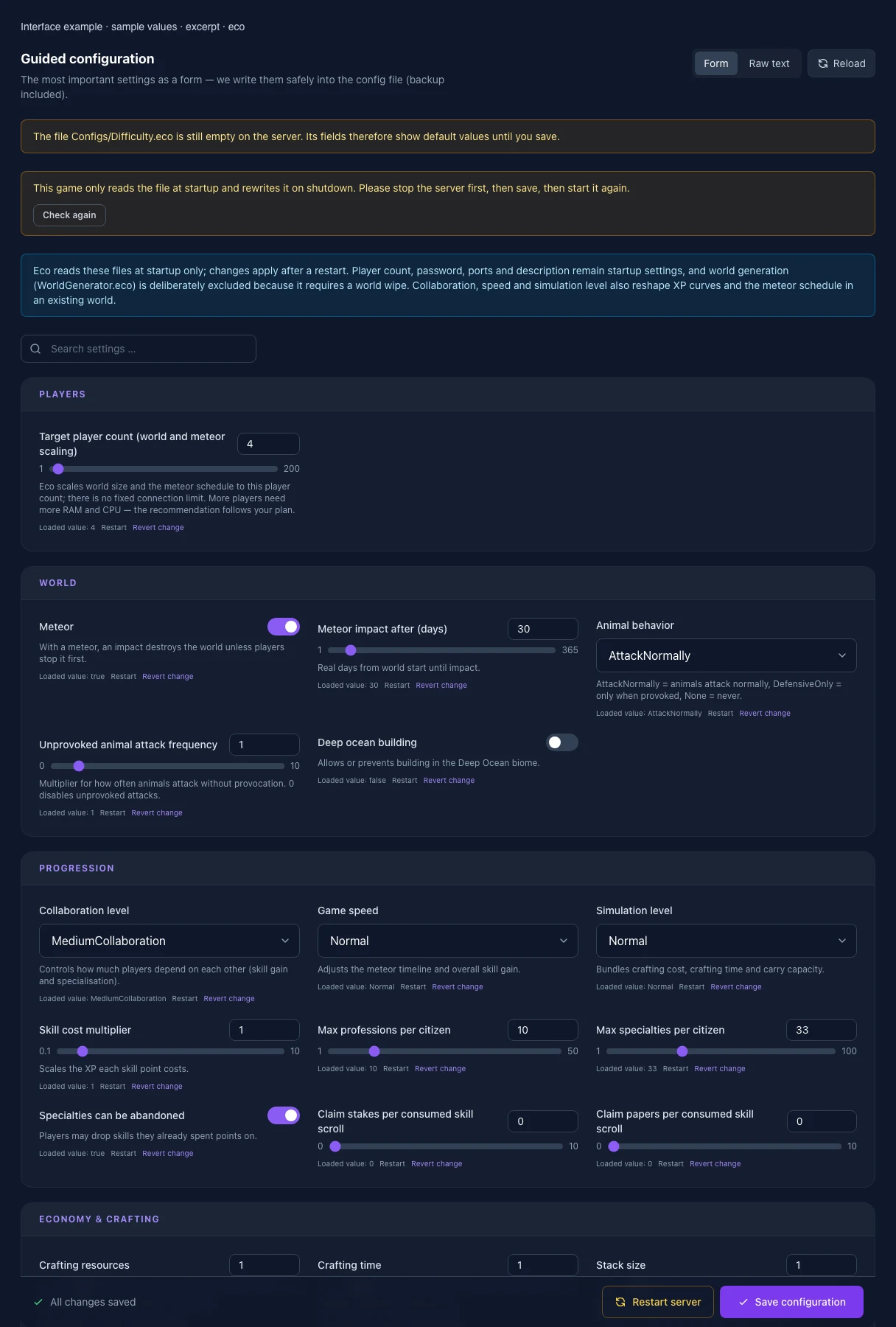
What the interface looks like

The image shows the interface on its capture date; earlier versions may differ.

Excerpt of the current interface with sample values. Values and prerequisites illustrate the controls; available tools depend on server software, plugins and permissions.
Excerpt of the current interface with sample values. Values and prerequisites illustrate the controls; available tools depend on server software, plugins and permissions. · Captured on 2026-10-08
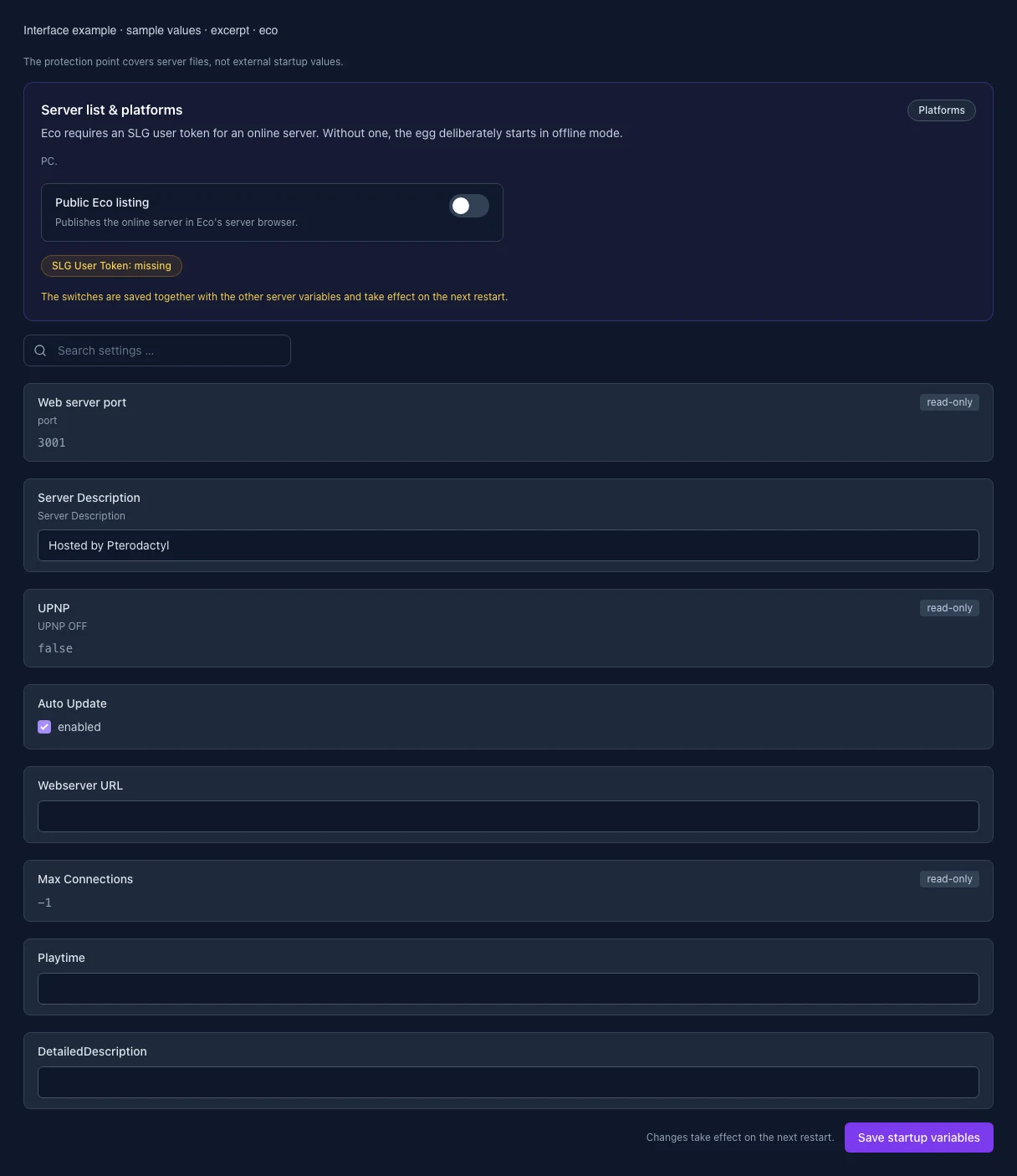
Excerpt of the current interface with sample values. Values and prerequisites illustrate the controls; available tools depend on server software, plugins and permissions.
Excerpt of the current interface with sample values. Values and prerequisites illustrate the controls; available tools depend on server software, plugins and permissions. · Captured on 2026-10-08

What the settings do

These values come from our guided editors. Defaults are the editor starting values; they do not show the contents of a customer server.

Target player count (world and meteor scaling)

Eco scales world size and the meteor schedule to this player count; there is no fixed connection limit. More players need more RAM and CPU — the recommendation follows your plan.

Setting
/GameSettings/DesiredNumberOfPlayers
Default
4
Range / options
1 – 200
Meteor

With a meteor, an impact destroys the world unless players stop it first.
Setting
/GameSettings/HasMeteor
Default
true
Meteor impact after (days)

Real days from world start until impact.

Setting
/GameSettings/AdvancedGameSettings/MeteorImpactInDays
Default
30
Range / options
1 – 365
Animal behavior

Animals attack normally, only when provoked, or never.

Setting
/GameSettings/AnimalBehavior
Default
AttackNormally
Range / options
AttackNormally, DefensiveOnly, None
Unprovoked animal attack frequency

Multiplier for how often animals attack without provocation. 0 disables unprovoked attacks.

Setting
/GameSettings/AdvancedGameSettings/AnimalUnprovokedAttackFrequencyMultiplier
Default
1
Range / options
0 – 10
Deep ocean building

Allows or prevents building in the Deep Ocean biome.

Setting
/GameSettings/AdvancedGameSettings/AllowDeepOceanBuilding
Default
false
Collaboration level

Controls how much players depend on each other (skill gain and specialisation).

Setting
/GameSettings/CollaborationLevel
Default
MediumCollaboration
Range / options
NoCollaboration, LowCollaboration, MediumCollaboration, HighCollaboration
Game speed

Adjusts the meteor timeline and overall skill gain.

Setting
/GameSettings/GameSpeed
Default
Normal
Range / options
VerySlow, Slow, Normal, Fast, VeryFast
Simulation level

Bundles crafting cost, crafting time and carry capacity.

Setting
/GameSettings/SimulationLevel
Default
Normal
Range / options
Generous, Normal, Hardcore
Skill cost multiplier

Scales the XP each skill point costs.

Setting
/GameSettings/AdvancedGameSettings/SkillCostMultiplier
Default
1
Range / options
0.1 – 10
Max professions per citizen
Setting
/GameSettings/AdvancedGameSettings/MaxProfessionsPerCitizen
Default
10
Range / options
1 – 50
Max specialties per citizen
Setting
/GameSettings/AdvancedGameSettings/MaxSpecialtiesPerCitizen
Default
33
Range / options
1 – 100
Specialties can be abandoned

Players may drop skills they already spent points on.

Setting
/GameSettings/AdvancedGameSettings/CanAbandonSpecialties
Default
true
Claim stakes per consumed skill scroll
Setting
/GameSettings/AdvancedGameSettings/ClaimStakesGrantedUponSkillscrollConsumed
Default
0
Range / options
0 – 10
Claim papers per consumed skill scroll
Setting
/GameSettings/AdvancedGameSettings/ClaimPapersGrantedUponSkillscrollConsumed
Default
0
Range / options
0 – 10
Crafting resources

Multiplier applied to crafting resource cost.

Setting
/GameSettings/AdvancedGameSettings/CraftResourceMultiplier
Default
1
Range / options
0.1 – 10
Crafting time

Multiplier applied to crafting time.

Setting
/GameSettings/AdvancedGameSettings/CraftTimeMultiplier
Default
1
Range / options
0.1 – 10
Stack size

Multiplier applied to item max stack size. Eco requires at least 0.25; very large stacks increase memory use. The panel caps the value at 10.

Setting
/GameSettings/AdvancedGameSettings/StackSizeMultiplier
Default
1
Range / options
0.25 – 10
Weight

Multiplier applied to item weight.

Setting
/GameSettings/AdvancedGameSettings/WeightMultiplier
Default
1
Range / options
0.1 – 10
Fuel efficiency

Multiplier applied to fuel yield per unit.

Setting
/GameSettings/AdvancedGameSettings/FuelEfficiencyMultiplier
Default
1
Range / options
0.1 – 10
Plant growth

Global scale for how quickly plants mature.

Setting
/GameSettings/AdvancedGameSettings/GrowthRateMultiplier
Default
1
Range / options
0.1 – 10
Storage connection range

Multiplier for the distance from which storage containers can be linked. Eco requires at least 0.5.

Setting
/GameSettings/AdvancedGameSettings/ConnectionRangeMultiplier
Default
1
Range / options
0.5 – 10
Food shelf life

Multiplier for how long food lasts before spoiling.

Setting
/GameSettings/AdvancedGameSettings/ShelfLifeMultiplier
Default
1
Range / options
0.1 – 10
Skill required to replace parts

Parts on stations and vehicles may only be swapped with the matching skill.

Setting
/GameSettings/AdvancedGameSettings/RequireSkillsToReplaceParts
Default
true
Broken parts disable vehicles

Off: broken parts only raise running costs instead of stopping the vehicle.

Setting
/GameSettings/AdvancedGameSettings/BrokenPartsWillDisableVehicles
Default
true
Swim speed (ocean)
Setting
/SwimSpeed/Ocean
Default
0.75
Range / options
0.1 – 2
Swim speed (deep ocean)
Setting
/SwimSpeed/DeepOcean
Default
0.25
Range / options
0.1 – 2
Calories per second (ocean)
Setting
/CalorieConsumptionRate/Ocean
Default
2
Range / options
0 – 100
Calories per second (deep ocean)
Setting
/CalorieConsumptionRate/DeepOcean
Default
30
Range / options
0 – 100
Drowning while swimming

Enabled: when calories run out while swimming, the player is teleported to the nearest shore.

Setting
/PlayerCanDrownWhenSwimming
Default
true
Exhaustion (playtime limit)

Limits daily playtime per player. The hours per weekday are configured below (Exhaustion.eco).

Setting
/GameSettings/ExhaustionEnabled
Default
true
Hours played per day

Only applies while exhaustion is enabled.

Setting
/GameSettings/HoursPlayedPerDay
Default
3
Range / options
0.5 – 24
Monday

Hours of playtime granted on this weekday. Only applies while exhaustion is enabled.

Setting
/MondayExhaustionRefreshHours
Default
3
Range / options
0 – 24
Tuesday

Hours of playtime granted on this weekday. Only applies while exhaustion is enabled.

Setting
/TuesdayExhaustionRefreshHours
Default
3
Range / options
0 – 24
Wednesday

Hours of playtime granted on this weekday. Only applies while exhaustion is enabled.

Setting
/WednesdayExhaustionRefreshHours
Default
3
Range / options
0 – 24
Thursday

Hours of playtime granted on this weekday. Only applies while exhaustion is enabled.

Setting
/ThursdayExhaustionRefreshHours
Default
3
Range / options
0 – 24
Friday

Hours of playtime granted on this weekday. Only applies while exhaustion is enabled.

Setting
/FridayExhaustionRefreshHours
Default
6
Range / options
0 – 24
Saturday

Hours of playtime granted on this weekday. Only applies while exhaustion is enabled.

Setting
/SaturdayExhaustionRefreshHours
Default
6
Range / options
0 – 24
Sunday

Hours of playtime granted on this weekday. Only applies while exhaustion is enabled.

Setting
/SundayExhaustionRefreshHours
Default
6
Range / options
0 – 24
Bank unused playtime

At the daily refresh, unused playtime is added to a time bank.

Setting
/AllowPlaytimeSaving
Default
true
Maximum banked hours
Setting
/MaxSavedHours
Default
15
Range / options
0 – 168
Pause while resting

The playtime countdown pauses while the player sits or sleeps.

Setting
/AllowExhaustionPauseOnRest
Default
true
Bonus hours when enabled

Extra playtime each player receives when exhaustion is first enabled.

Setting
/BonusHoursOnExhaustionEnabled
Default
2
Range / options
0 – 24
Retroactive bonus for late joiners

Players joining after the first day receive the bonus retroactively.

Setting
/BonusRetroactiveHoursAfterStart
Default
true
Daily refresh: hour

Hour (server time) at which playtime is recalculated every day.

Setting
/RefreshLocalHours
Default
0
Range / options
0 – 23
Daily refresh: minute
Setting
/RefreshLocalMinutes
Default
0
Range / options
0 – 59
Web server port

port

Setting
WEB_PORT
Default
3001
Range / options
0 – 999999
When it takes effect
Takes effect after saving and restarting the server.
List in the public server browser

Controls whether the server appears in the relevant public server browser.

Setting
PUB_SRV
Default
false
Range / options
true, false
When it takes effect
Takes effect after saving and restarting the server.
Server Description

Server Description

Setting
SRV_DES
Default
Hosted by Pterodactyl
When it takes effect
Takes effect after saving and restarting the server.
UPNP

UPNP OFF

Setting
UPNP
Default
false
When it takes effect
Takes effect after saving and restarting the server.
Auto Update
Setting
AUTO_UPDATE
Default
1
When it takes effect
Takes effect after saving and restarting the server.
Webserver URL
Setting
WEBSRVURL
Default
When it takes effect
Takes effect after saving and restarting the server.
Max Connections
Setting
MAX_CON
Default
-1
Range / options
-1 – 200
When it takes effect
Takes effect after saving and restarting the server.
Playtime
Setting
PLAYTIME
Default
When it takes effect
Takes effect after saving and restarting the server.
DetailedDescription
Setting
DEDES
Default
When it takes effect
Takes effect after saving and restarting the server.