Developer announcement
Published
Windrose is setting sail now!
Announcement from the official source. The source describes the changes; your server installation status is shown separately in the update center.
Game updates, plugin versions and improvements to our interface with a traceable history.
Recorded, available and installed are different states. Your actual installation status and suitable updates are shown in the server panel.
Announcement from the official source. The source describes the changes; your server installation status is shown separately in the update center.
Announcement from the official source. The source describes the changes; your server installation status is shown separately in the update center.
Announcement from the official source. The source describes the changes; your server installation status is shown separately in the update center.
Announcement from the official source. The source describes the changes; your server installation status is shown separately in the update center.
Announcement from the official source. The source describes the changes; your server installation status is shown separately in the update center.
Announcement from the official source. The source describes the changes; your server installation status is shown separately in the update center.
Announcement from the official source. The source describes the changes; your server installation status is shown separately in the update center.
Announcement from the official source. The source describes the changes; your server installation status is shown separately in the update center.
The image shows the interface on its capture date; earlier versions may differ.
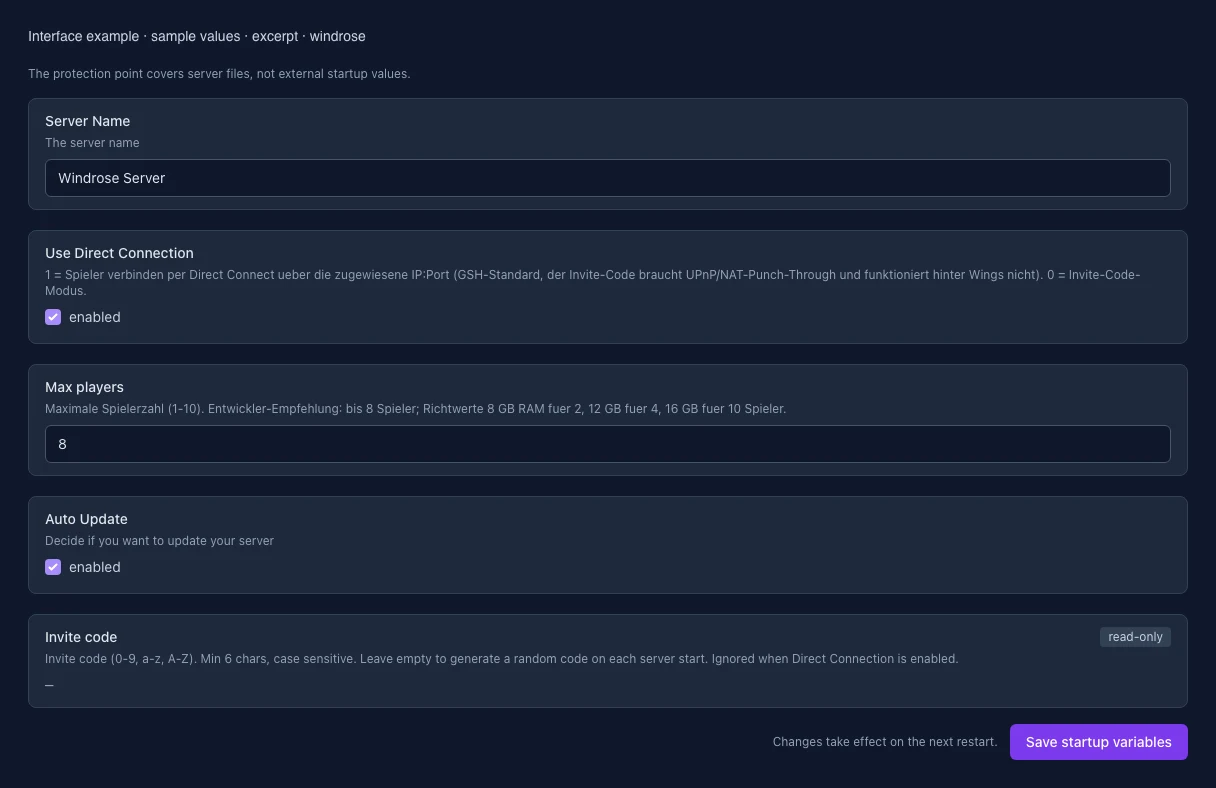
These values come from our guided editors. Defaults are the editor starting values; they do not show the contents of a customer server.
The server name
1 = Spieler verbinden per Direct Connect ueber die zugewiesene IP:Port (GSH-Standard, der Invite-Code braucht UPnP/NAT-Punch-Through und funktioniert hinter Wings nicht). 0 = Invite-Code-Modus.
Maximale Spielerzahl (1-10). Entwickler-Empfehlung: bis 8 Spieler; Richtwerte 8 GB RAM fuer 2, 12 GB fuer 4, 16 GB fuer 10 Spieler.
Decide if you want to update your server
Invite code (0-9, a-z, A-Z). Min 6 chars, case sensitive. Leave empty to generate a random code on each server start. Ignored when Direct Connection is enabled.