Game updates, plugin versions and improvements to our interface with a traceable history.
Recorded, available and installed are different states. Your actual installation status and suitable updates are shown in the server panel.
InterfaceChange documented
Guided startup parameters: revised
The guided tools were revised in the shared panel code. The entry concerns the interface or its processing. The date records the change; availability on an individual server depends on the game, software, plugins and permissions.
InterfaceChange documented
Guided startup parameters: revised
The guided tools were revised in the shared panel code. The entry concerns the interface or its processing. The date records the change; availability on an individual server depends on the game, software, plugins and permissions.
InterfaceChange documented
Guided startup parameters: revised
The guided tools were revised in the shared panel code. The entry concerns the interface or its processing. The date records the change; availability on an individual server depends on the game, software, plugins and permissions.
InterfaceChange documented
Guided startup parameters: revised
The guided tools were revised in the shared panel code. The entry concerns the interface or its processing. The date records the change; availability on an individual server depends on the game, software, plugins and permissions.
InterfaceChange documented
Guided startup parameters: added
The guided tools were added to the shared panel code. The entry concerns the interface or its processing. The date records the change; availability on an individual server depends on the game, software, plugins and permissions.
InterfaceChange documented
Palworld: game tools: revised
The guided tools were revised in the shared panel code. The entry concerns the interface or its processing. The date records the change; availability on an individual server depends on the game, software, plugins and permissions.
InterfaceChange documented
Palworld: game tools: added
The guided tools were added to the shared panel code. The entry concerns the interface or its processing. The date records the change; availability on an individual server depends on the game, software, plugins and permissions.
Changed interface controls
Added
communityServer
maxPlayers
serverName
serverPassword
Developer announcementPublished
Skol! Palworld X Valheim Steam Bundle!
Announcement from the official source. The source describes the changes; your server installation status is shown separately in the update center.
Announcement from the official source. The source describes the changes; your server installation status is shown separately in the update center.
Effects on plugins
No independent plugin compatibility test is documented for this announcement. Check the affected plugins in the update center before changing game versions.
Announcement from the official source. The source describes the changes; your server installation status is shown separately in the update center.
Effects on plugins
No independent plugin compatibility test is documented for this announcement. Check the affected plugins in the update center before changing game versions.
Announcement from the official source. The source describes the changes; your server installation status is shown separately in the update center.
Effects on plugins
No independent plugin compatibility test is documented for this announcement. Check the affected plugins in the update center before changing game versions.
【2nd Anniversary】 Special Video Unveiled Ahead of 2026 Official Release!!
Announcement from the official source. The source describes the changes; your server installation status is shown separately in the update center.
Effects on plugins
No independent plugin compatibility test is documented for this announcement. Check the affected plugins in the update center before changing game versions.
Announcement from the official source. The source describes the changes; your server installation status is shown separately in the update center.
Effects on plugins
No independent plugin compatibility test is documented for this announcement. Check the affected plugins in the update center before changing game versions.
Palworld’s “Home Sweet Home” Update arrives December 17!
Announcement from the official source. The source describes the changes; your server installation status is shown separately in the update center.
Effects on plugins
No independent plugin compatibility test is documented for this announcement. Check the affected plugins in the update center before changing game versions.
Announcement from the official source. The source describes the changes; your server installation status is shown separately in the update center.
Effects on plugins
No independent plugin compatibility test is documented for this announcement. Check the affected plugins in the update center before changing game versions.
Announcement from the official source. The source describes the changes; your server installation status is shown separately in the update center.
Effects on plugins
No independent plugin compatibility test is documented for this announcement. Check the affected plugins in the update center before changing game versions.
Update v0.6.8: Halloween! Zoe's Halloween costume and Depresso suit!
Announcement from the official source. The source describes the changes; your server installation status is shown separately in the update center.
Effects on plugins
No independent plugin compatibility test is documented for this announcement. Check the affected plugins in the update center before changing game versions.
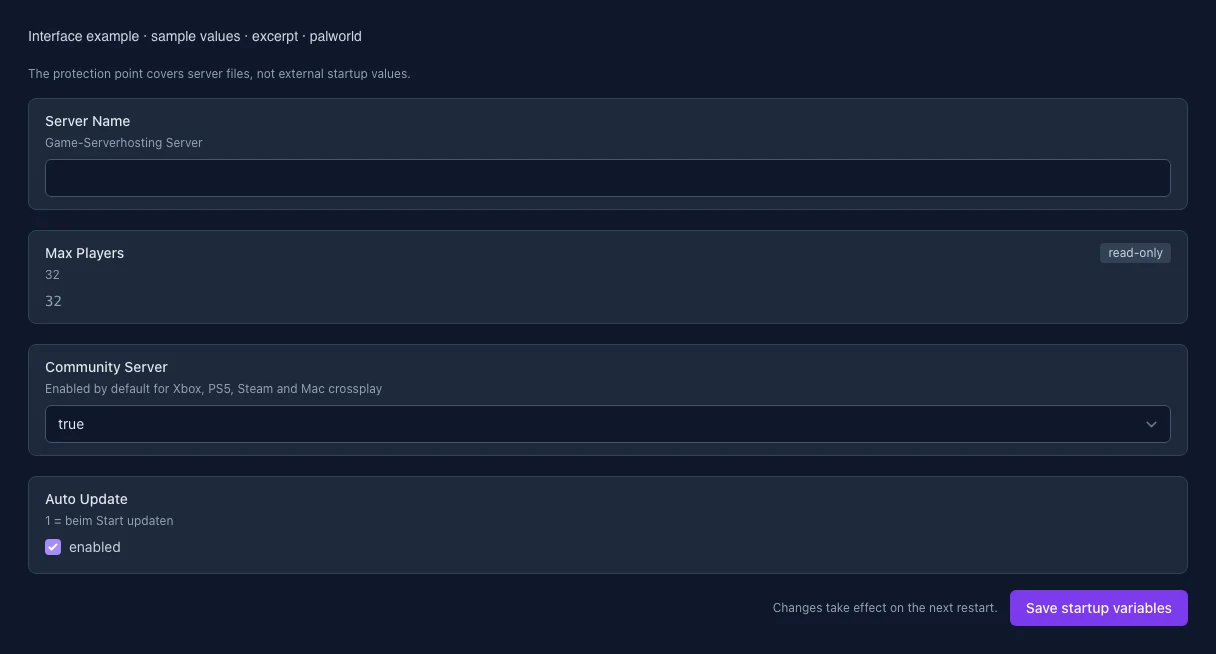
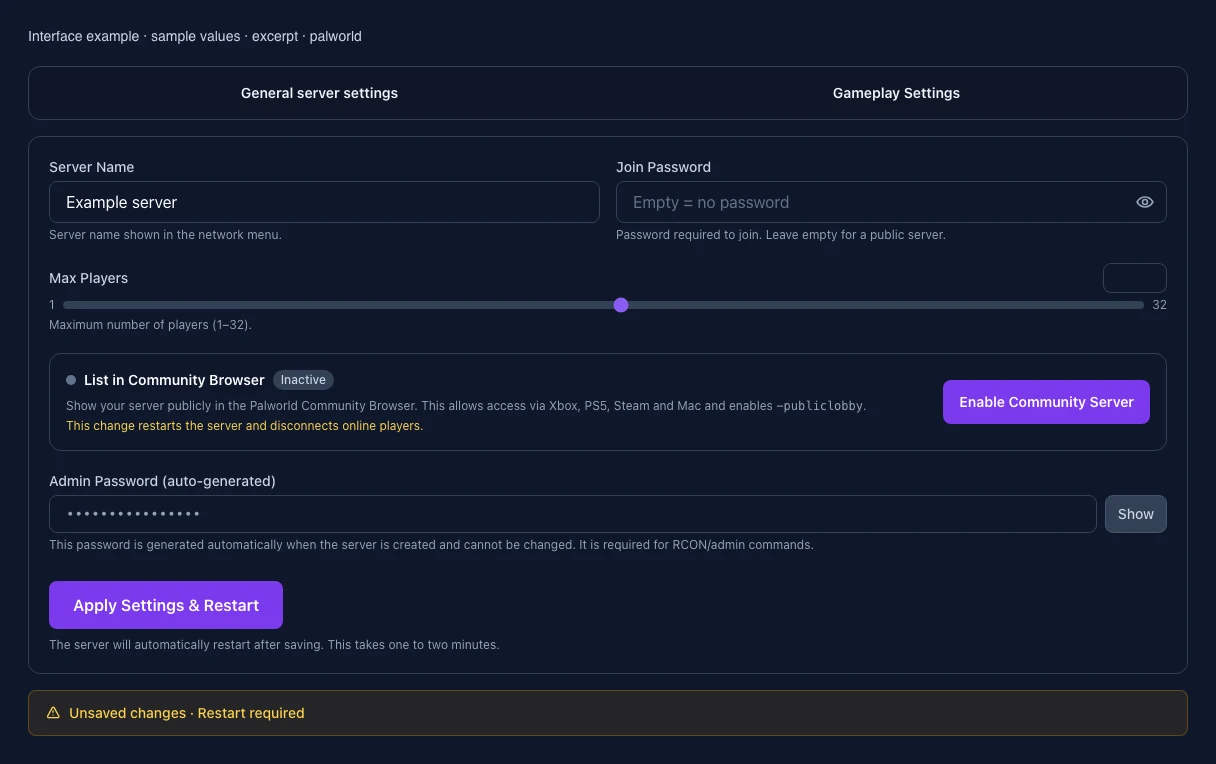
The image shows the interface on its capture date; earlier versions may differ.
Excerpt of the current interface with sample values. Values and prerequisites illustrate the controls; available tools depend on server software, plugins and permissions. · Captured on 2026-10-08Excerpt of the current interface with sample values. Values and prerequisites illustrate the controls; available tools depend on server software, plugins and permissions. · Captured on 2026-10-08
What the settings do
These values come from our guided editors. Defaults are the editor starting values; they do not show the contents of a customer server.
Difficulty
Setting
Difficulty
Default
Normal
Range / options
None, Easy, Normal, Hard
When it takes effect
Takes effect after saving and restarting the server.
Death Penalty
Setting
DeathPenalty
Default
All
Range / options
None, Item, ItemAndEquipment, All
When it takes effect
Takes effect after saving and restarting the server.
EXP Rate
Setting
ExpRate
Default
1
Range / options
0.1 – 20
When it takes effect
Takes effect after saving and restarting the server.
Pal Capture Rate
Setting
PalCaptureRate
Default
1
Range / options
0.1 – 20
When it takes effect
Takes effect after saving and restarting the server.
Pal Spawn Rate
Setting
PalSpawnNumRate
Default
1
Range / options
0.1 – 20
When it takes effect
Takes effect after saving and restarting the server.
Collection Drop Rate
Setting
CollectionDropRate
Default
1
Range / options
0.1 – 20
When it takes effect
Takes effect after saving and restarting the server.
Daytime Speed
Setting
DayTimeSpeedRate
Default
1
Range / options
0.1 – 20
When it takes effect
Takes effect after saving and restarting the server.
Nighttime Speed
Setting
NightTimeSpeedRate
Default
1
Range / options
0.1 – 20
When it takes effect
Takes effect after saving and restarting the server.
Player-to-Player Damage
Setting
bEnablePlayerToPlayerDamage
Default
true
When it takes effect
Takes effect after saving and restarting the server.
Friendly Fire
Setting
bEnableFriendlyFire
Default
false
When it takes effect
Takes effect after saving and restarting the server.
Raid events
Setting
bEnableInvaderEnemy
Default
true
When it takes effect
Takes effect after saving and restarting the server.
Player list in pause menu
Setting
bShowPlayerList
Default
true
When it takes effect
Takes effect after saving and restarting the server.
Huge Pal Egg hatch time (hours)
Setting
PalEggDefaultHatchingTime
Default
72
Range / options
0 – 720
When it takes effect
Takes effect after saving and restarting the server.
Max Players per Guild
Setting
GuildPlayerMaxNum
Default
20
Range / options
1 – 100
When it takes effect
Takes effect after saving and restarting the server.
Player Attack Damage
Setting
PlayerDamageRateAttack
Default
1
Range / options
0.1 – 5
When it takes effect
Takes effect after saving and restarting the server.
Player Hunger Rate
Setting
PlayerStomachDecreaceRate
Default
1
Range / options
0.1 – 5
When it takes effect
Takes effect after saving and restarting the server.
Hardcore Mode
Setting
bHardcore
Default
false
When it takes effect
Takes effect after saving and restarting the server.
Lose Pals on Death
Setting
bPalLost
Default
false
When it takes effect
Takes effect after saving and restarting the server.
Pal Randomizer
Setting
RandomizerType
Default
None
Range / options
None, Region, All
When it takes effect
Takes effect after saving and restarting the server.
Randomizer Seed
Setting
RandomizerSeed
Default
When it takes effect
Takes effect after saving and restarting the server.
Random Pal Levels
Setting
bIsRandomizerPalLevelRandom
Default
false
When it takes effect
Takes effect after saving and restarting the server.
Max. Base Camp Workers
Setting
BaseCampWorkerMaxNum
Default
15
Range / options
1 – 50
When it takes effect
Takes effect after saving and restarting the server.
Max. Base Camps per Guild
Setting
BaseCampMaxNumInGuild
Default
4
Range / options
1 – 10
When it takes effect
Takes effect after saving and restarting the server.
Building Deterioration Rate
Setting
BuildObjectDeteriorationDamageRate
Default
1
Range / options
0 – 10
When it takes effect
Takes effect after saving and restarting the server.
Global Palbox: Export
Setting
bAllowGlobalPalboxExport
Default
true
When it takes effect
Takes effect after saving and restarting the server.
Global Palbox: Import
Setting
bAllowGlobalPalboxImport
Default
false
When it takes effect
Takes effect after saving and restarting the server.
Server Name
Game-Serverhosting Server
Setting
SERVER_NAME
Default
When it takes effect
Takes effect after saving and restarting the server.
Max Players
32
Setting
MAX_PLAYERS
Default
32
Range / options
1 – 32
When it takes effect
Takes effect after saving and restarting the server.
Community Server
Enabled by default for Xbox, PS5, Steam and Mac crossplay
Setting
COMMUNITY_SERVER
Default
true
Range / options
true, false
When it takes effect
Takes effect after saving and restarting the server.
Auto Update
1 = beim Start updaten
Setting
AUTO_UPDATE
Default
1
When it takes effect
Takes effect after saving and restarting the server.
Loading...
Cookie settings
We use cookies to improve your experience and analyze our website.
Cookie settings
Essential cookies
Required
These cookies are required for the core functions of the website and cannot be disabled.
Analytics cookies
Help us understand how the website and customer area are used (our own usage analytics, Google Analytics, Microsoft Clarity).
Marketing cookies
Allow the pseudonymous matching of an ad click to an order in order to measure conversions.