Game updates, plugin versions and improvements to our interface with a traceable history.
Recorded, available and installed are different states. Your actual installation status and suitable updates are shown in the server panel.
Game updatePublished
Version 1.1.21 released as stable
Announcement from the official source. The source describes the changes; your server installation status is shown separately in the update center.
Effects on plugins
No independent plugin compatibility test is documented for this announcement. Check the affected plugins in the update center before changing game versions.
Announcement from the official source. The source describes the changes; your server installation status is shown separately in the update center.
Effects on plugins
No independent plugin compatibility test is documented for this announcement. Check the affected plugins in the update center before changing game versions.
Announcement from the official source. The source describes the changes; your server installation status is shown separately in the update center.
Effects on plugins
No independent plugin compatibility test is documented for this announcement. Check the affected plugins in the update center before changing game versions.
Announcement from the official source. The source describes the changes; your server installation status is shown separately in the update center.
Effects on plugins
No independent plugin compatibility test is documented for this announcement. Check the affected plugins in the update center before changing game versions.
Announcement from the official source. The source describes the changes; your server installation status is shown separately in the update center.
Effects on plugins
No independent plugin compatibility test is documented for this announcement. Check the affected plugins in the update center before changing game versions.
Announcement from the official source. The source describes the changes; your server installation status is shown separately in the update center.
Effects on plugins
No independent plugin compatibility test is documented for this announcement. Check the affected plugins in the update center before changing game versions.
Announcement from the official source. The source describes the changes; your server installation status is shown separately in the update center.
Effects on plugins
No independent plugin compatibility test is documented for this announcement. Check the affected plugins in the update center before changing game versions.
Announcement from the official source. The source describes the changes; your server installation status is shown separately in the update center.
Effects on plugins
No independent plugin compatibility test is documented for this announcement. Check the affected plugins in the update center before changing game versions.
Announcement from the official source. The source describes the changes; your server installation status is shown separately in the update center.
Effects on plugins
No independent plugin compatibility test is documented for this announcement. Check the affected plugins in the update center before changing game versions.
Announcement from the official source. The source describes the changes; your server installation status is shown separately in the update center.
Effects on plugins
No independent plugin compatibility test is documented for this announcement. Check the affected plugins in the update center before changing game versions.
Announcement from the official source. The source describes the changes; your server installation status is shown separately in the update center.
Effects on plugins
No independent plugin compatibility test is documented for this announcement. Check the affected plugins in the update center before changing game versions.
Announcement from the official source. The source describes the changes; your server installation status is shown separately in the update center.
Effects on plugins
No independent plugin compatibility test is documented for this announcement. Check the affected plugins in the update center before changing game versions.
Announcement from the official source. The source describes the changes; your server installation status is shown separately in the update center.
Effects on plugins
No independent plugin compatibility test is documented for this announcement. Check the affected plugins in the update center before changing game versions.
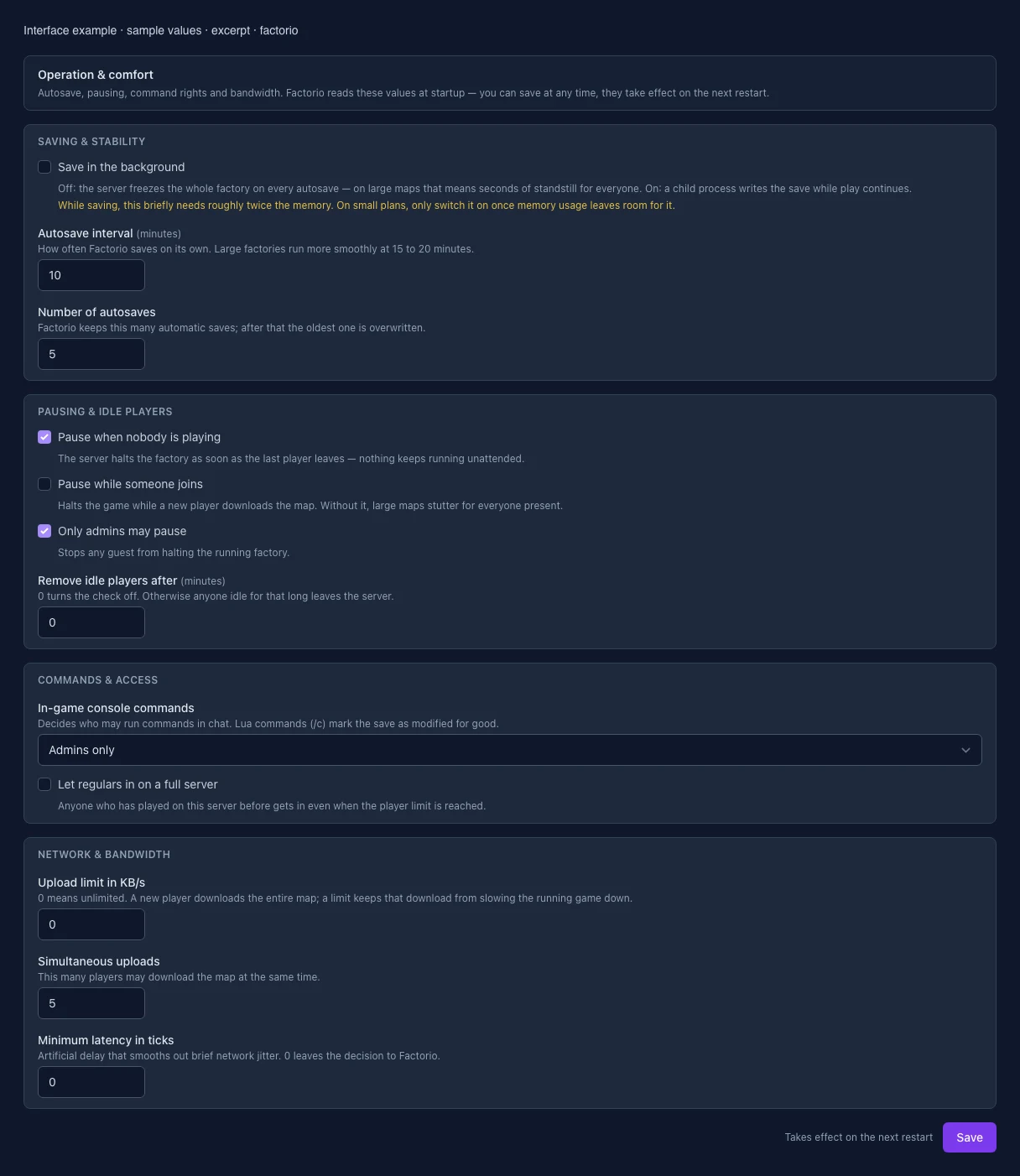
The image shows the interface on its capture date; earlier versions may differ.
Excerpt of the current interface with sample values. Values and prerequisites illustrate the controls; available tools depend on server software, plugins and permissions. · Captured on 2026-10-08Excerpt of the current interface with sample values. Values and prerequisites illustrate the controls; available tools depend on server software, plugins and permissions. · Captured on 2026-10-08
What the settings do
These values come from our guided editors. Defaults are the editor starting values; they do not show the contents of a customer server.
Save in the background
Off: the server freezes the whole factory on every autosave — on large maps that means seconds of standstill for everyone. On: a child process writes the save while play continues.
Setting
non_blocking_saving
Default
false
Autosave interval
How often Factorio saves on its own. Large factories run more smoothly at 15 to 20 minutes.
Setting
autosave_interval
Default
10
Range / options
1 – 120
Number of autosaves
Factorio keeps this many automatic saves; after that the oldest one is overwritten.
Setting
autosave_slots
Default
5
Range / options
1 – 20
Pause when nobody is playing
The server halts the factory as soon as the last player leaves — nothing keeps running unattended.
Setting
auto_pause
Default
true
Pause while someone joins
Halts the game while a new player downloads the map. Without it, large maps stutter for everyone present.
Setting
auto_pause_when_players_connect
Default
false
Only admins may pause
Stops any guest from halting the running factory.
Setting
only_admins_can_pause_the_game
Default
true
Remove idle players after
0 turns the check off. Otherwise anyone idle for that long leaves the server.
Setting
afk_autokick_interval
Default
0
Range / options
0 – 1440
In-game console commands
Decides who may run commands in chat. Lua commands (/c) mark the save as modified for good.
Setting
allow_commands
Default
admins-only
Range / options
true, false, admins-only
Let regulars in on a full server
Anyone who has played on this server before gets in even when the player limit is reached.
Setting
ignore_player_limit_for_returning_players
Default
false
Upload limit in KB/s
0 means unlimited. A new player downloads the entire map; a limit keeps that download from slowing the running game down.
Setting
max_upload_in_kilobytes_per_second
Default
0
Range / options
0 – 1000000
Simultaneous uploads
This many players may download the map at the same time.
Setting
max_upload_slots
Default
5
Range / options
0 – 64
Minimum latency in ticks
Artificial delay that smooths out brief network jitter. 0 leaves the decision to Factorio.
Setting
minimum_latency_in_ticks
Default
0
Range / options
0 – 60
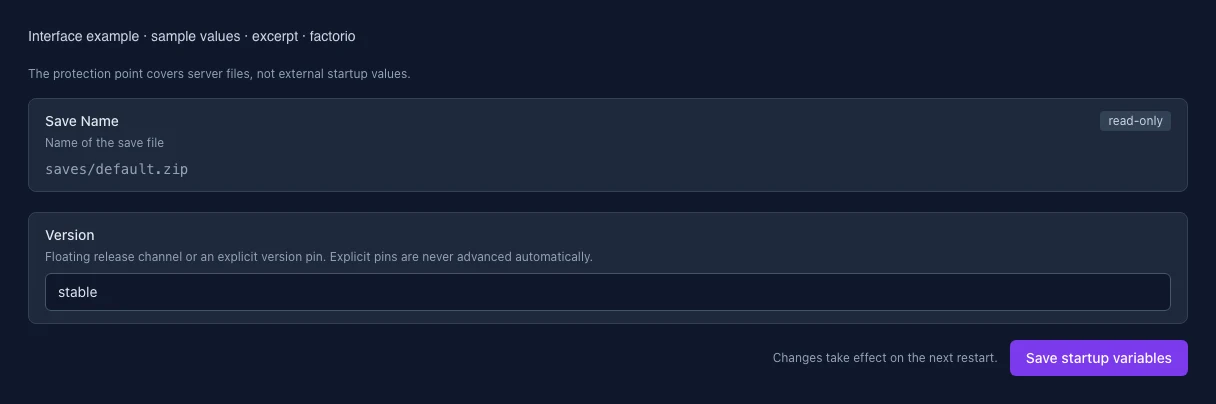
Save Name
Name of the save file
Setting
SAVE_NAME
Default
saves/default.zip
When it takes effect
Takes effect after saving and restarting the server.
Version
Floating release channel or an explicit version pin. Explicit pins are never advanced automatically.
Setting
FACTORIO_VERSION
Default
stable
When it takes effect
Takes effect after saving and restarting the server.
Loading...
Cookie settings
We use cookies to improve your experience and analyze our website.
Cookie settings
Essential cookies
Required
These cookies are required for the core functions of the website and cannot be disabled.
Analytics cookies
Help us understand how the website and customer area are used (our own usage analytics, Google Analytics, Microsoft Clarity).
Marketing cookies
Allow the pseudonymous matching of an ad click to an order in order to measure conversions.