Game updates, plugin versions and improvements to our interface with a traceable history.
Recorded, available and installed are different states. Your actual installation status and suitable updates are shown in the server panel.
Game updatePublished
Core Keeper’s Bags & Blasts Update is Out Now!
Announcement from the official source. The source describes the changes; your server installation status is shown separately in the update center.
Effects on plugins
No independent plugin compatibility test is documented for this announcement. Check the affected plugins in the update center before changing game versions.
Announcement from the official source. The source describes the changes; your server installation status is shown separately in the update center.
Effects on plugins
No independent plugin compatibility test is documented for this announcement. Check the affected plugins in the update center before changing game versions.
Core Keeper’s Bags & Blasts Update Is Coming March 10th!
Announcement from the official source. The source describes the changes; your server installation status is shown separately in the update center.
Effects on plugins
No independent plugin compatibility test is documented for this announcement. Check the affected plugins in the update center before changing game versions.
Announcement from the official source. The source describes the changes; your server installation status is shown separately in the update center.
Effects on plugins
No independent plugin compatibility test is documented for this announcement. Check the affected plugins in the update center before changing game versions.
A First Look at Core Keeper’s 2025 Content Updates
Announcement from the official source. The source describes the changes; your server installation status is shown separately in the update center.
Effects on plugins
No independent plugin compatibility test is documented for this announcement. Check the affected plugins in the update center before changing game versions.
Announcement from the official source. The source describes the changes; your server installation status is shown separately in the update center.
Effects on plugins
No independent plugin compatibility test is documented for this announcement. Check the affected plugins in the update center before changing game versions.
Announcement from the official source. The source describes the changes; your server installation status is shown separately in the update center.
Effects on plugins
No independent plugin compatibility test is documented for this announcement. Check the affected plugins in the update center before changing game versions.
Announcement from the official source. The source describes the changes; your server installation status is shown separately in the update center.
Effects on plugins
No independent plugin compatibility test is documented for this announcement. Check the affected plugins in the update center before changing game versions.
Announcement from the official source. The source describes the changes; your server installation status is shown separately in the update center.
Effects on plugins
No independent plugin compatibility test is documented for this announcement. Check the affected plugins in the update center before changing game versions.
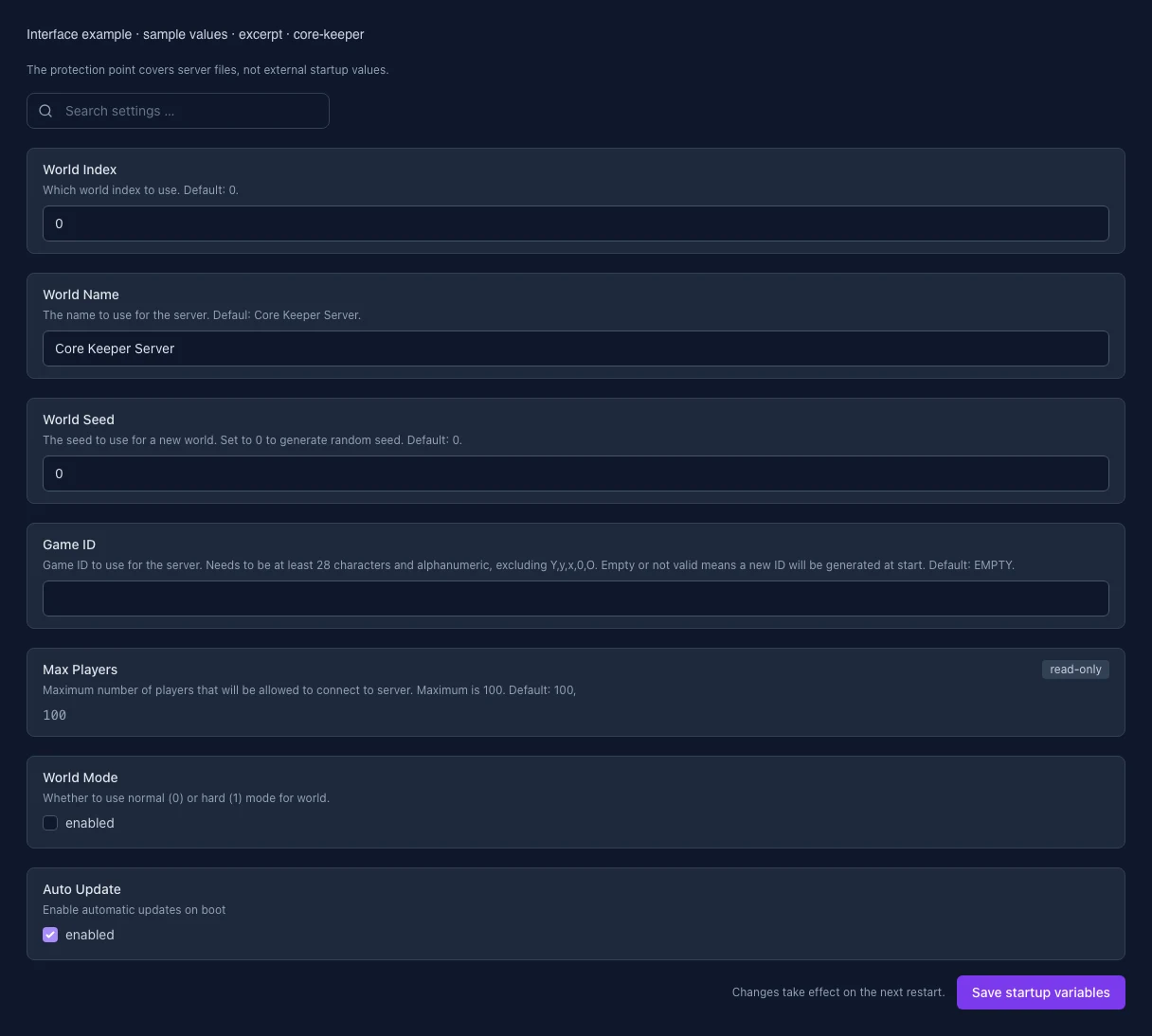
The image shows the interface on its capture date; earlier versions may differ.
Excerpt of the current interface with sample values. Values and prerequisites illustrate the controls; available tools depend on server software, plugins and permissions. · Captured on 2026-10-08
What the settings do
These values come from our guided editors. Defaults are the editor starting values; they do not show the contents of a customer server.
World index
Number of the world to load. Default: 0. Whole numbers from 0 only. A different index selects a different save.
Setting
WORLD_INDEX
Default
0
Range / options
0 – …
When it takes effect
Takes effect after saving and restarting the server.
Server name
Server display name, 3–100 characters. The world index selects the save. Restart after saving.
Setting
WORLD_NAME
Default
Core Keeper Server
When it takes effect
Takes effect after saving and restarting the server.
World seed
Seed for a newly generated world. This field accepts whole numbers from 0; 0 generates a random seed. An existing world keeps its seed.
Setting
WORLD_SEED
Default
0
Range / options
0 – …
When it takes effect
Takes effect after saving and restarting the server.
Maximum players
Maximum number of players connected at the same time. Set by the server and read-only here.
Setting
MAX_PLAYERS
Default
100
Range / options
1 – 100
When it takes effect
Takes effect after saving and restarting the server.
Hard world mode
Off: normal mode. On: hard mode for a newly generated world. An existing world keeps its mode.
Setting
WORLD_MODE
Default
0
When it takes effect
Takes effect after saving and restarting the server.
Automatic updates on startup
Enables automatic game updates when the server starts. Find the switch under Updates.
Setting
AUTO_UPDATE
Default
1
When it takes effect
Takes effect after saving and restarting the server.
Loading...
Cookie settings
We use cookies to improve your experience and analyze our website.
Cookie settings
Essential cookies
Required
These cookies are required for the core functions of the website and cannot be disabled.
Analytics cookies
Help us understand how the website and customer area are used (our own usage analytics, Google Analytics, Microsoft Clarity).
Marketing cookies
Allow the pseudonymous matching of an ad click to an order in order to measure conversions.