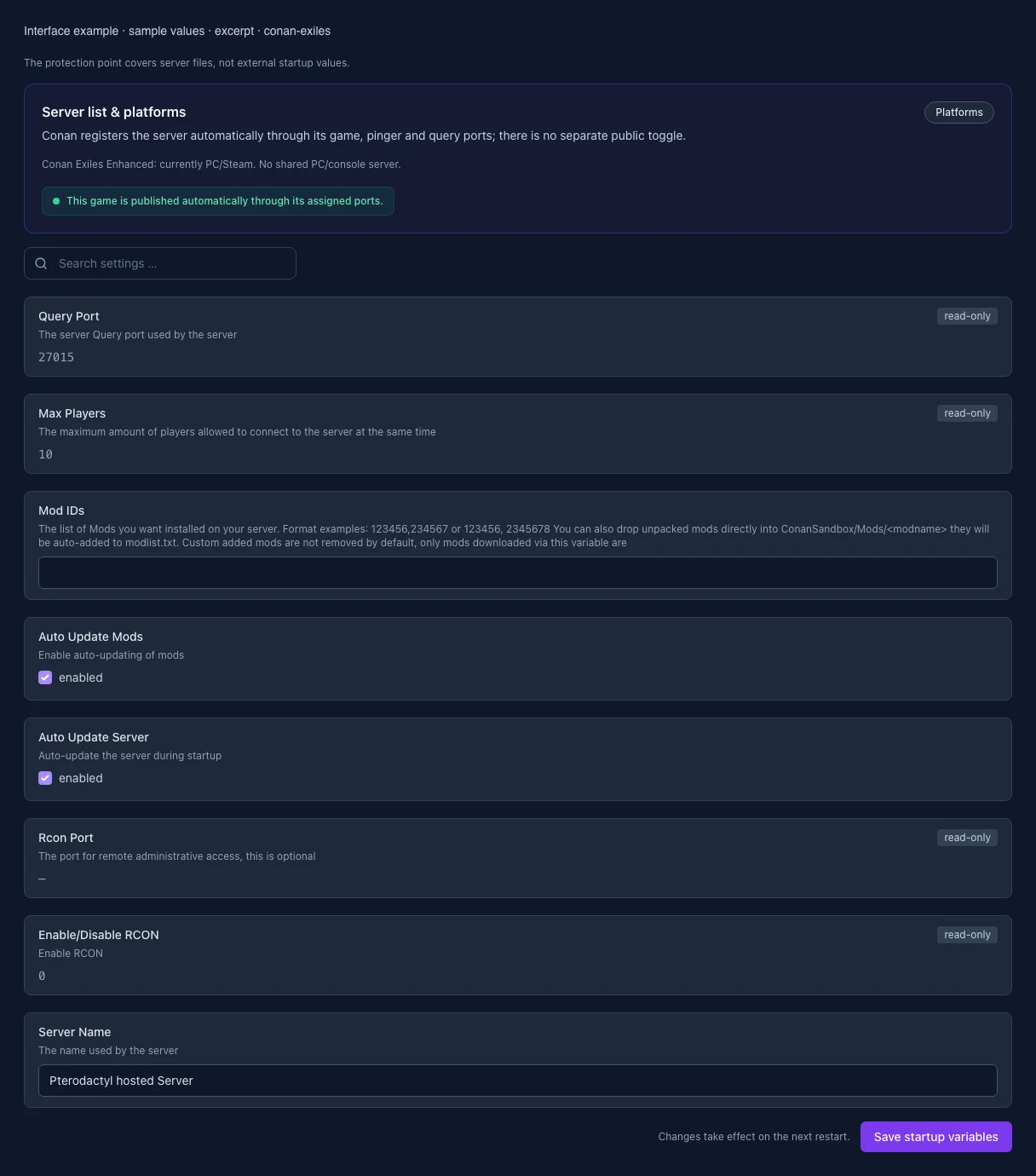
- Mod IDs: Changed
MOD_IDS
The list of Mods you want installed on your server.
Format examples: 123456,234567 or 123456, 2345678
You can also drop unpacked mods directly into ConanSandbox/Mods/<modname> they will be auto-added to modlist.txt. Custom added mods are not removed by default, only mods downloaded via this variable are
Before
- Setting
- MOD_IDS
- Default
- When it takes effect
- Takes effect after saving and restarting the server.
After
- Setting
- MOD_IDS
- Default
- When it takes effect
- Takes effect after saving and restarting the server.
- Query Port: Changed
QUERY_PORT
The server Query port used by the server
Before
- Setting
- QUERY_PORT
- Default
- 27015
- Range / options
- … – 65535
- When it takes effect
- Takes effect after saving and restarting the server.
After
- Setting
- QUERY_PORT
- Default
- 27015
- Range / options
- … – 65535
- When it takes effect
- Takes effect after saving and restarting the server.
- Auto Update Server: Changed
AUTO_UPDATE
Auto-update the server during startup
Before
- Setting
- AUTO_UPDATE
- Default
- 1
- When it takes effect
- Takes effect after saving and restarting the server.
After
- Setting
- AUTO_UPDATE
- Default
- 1
- When it takes effect
- Takes effect after saving and restarting the server.
- Max Players: Changed
MAX_PLAYERS
The maximum amount of players allowed to connect to the server at the same time
Before
- Setting
- MAX_PLAYERS
- Default
- 10
- Range / options
- 1 – 70
- When it takes effect
- Takes effect after saving and restarting the server.
After
- Setting
- MAX_PLAYERS
- Default
- 10
- Range / options
- 1 – 70
- When it takes effect
- Takes effect after saving and restarting the server.
- Server Name: Changed
SERVER_NAME
The name used by the server
Before
- Setting
- SERVER_NAME
- Default
- Pterodactyl hosted Server
- When it takes effect
- Takes effect after saving and restarting the server.
After
- Setting
- SERVER_NAME
- Default
- Pterodactyl hosted Server
- When it takes effect
- Takes effect after saving and restarting the server.
- Auto Update Mods: Changed
UPDATE_MODS
Enable auto-updating of mods
Before
- Setting
- UPDATE_MODS
- Default
- 1
- When it takes effect
- Takes effect after saving and restarting the server.
After
- Setting
- UPDATE_MODS
- Default
- 1
- When it takes effect
- Takes effect after saving and restarting the server.
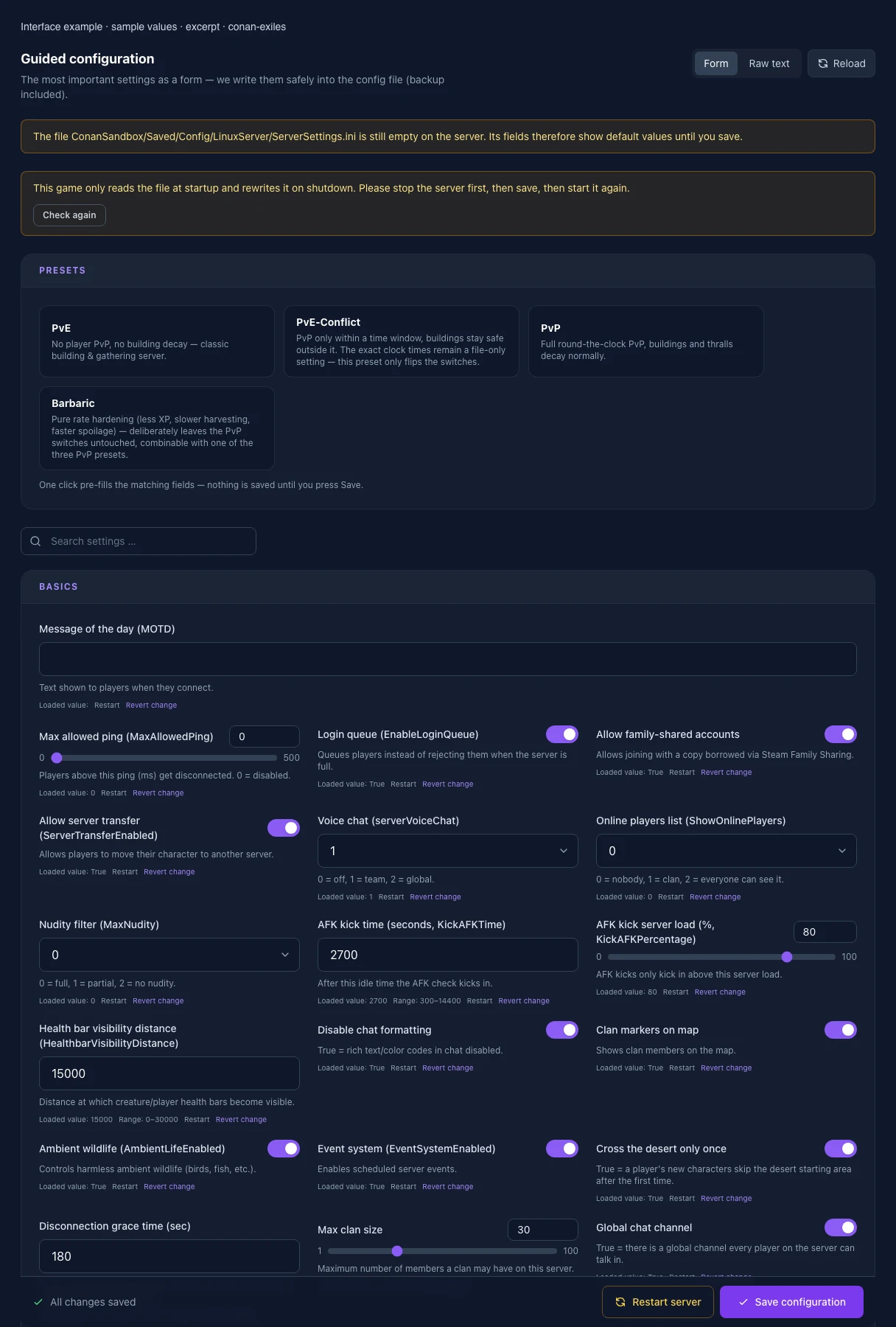
- Nudity filter (MaxNudity): Changed
MaxNudity
0 = no nudity, 1 = partial, 2 = full.
Before
- Setting
- MaxNudity
- Default
- 0
- Range / options
- 0, 1, 2
After
- Setting
- MaxNudity
- Default
- 0
- Range / options
- 0, 1, 2
- PvP enabled (PVPEnabled): Changed
PVPEnabled
True = players can attack each other.
Before
- Setting
- PVPEnabled
- Default
- False
After
- Setting
- PVPEnabled
- Default
- False
- AFK kick time (seconds, KickAFKTime): Changed
KickAFKTime
After this idle time the AFK check kicks in.
Before
- Setting
- KickAFKTime
- Default
- 2700
- Range / options
- 300 – 14400
After
- Setting
- KickAFKTime
- Default
- 2700
- Range / options
- 300 – 14400
- No ownership: Changed
NoOwnership
True = ownership rules stop existing entirely — anyone can use any structure or container. Far-reaching change.
Before
- Setting
- NoOwnership
- Default
- False
After
- Setting
- NoOwnership
- Default
- False
- Max clan size: Changed
clanMaxSize
Maximum number of members a clan may have on this server.
Before
- Setting
- clanMaxSize
- Default
- 30
- Range / options
- 1 – 100
After
- Setting
- clanMaxSize
- Default
- 30
- Range / options
- 1 – 100
- Global chat channel: Changed
ChatHasGlobal
True = there is a global channel every player on the server can talk in.
Before
- Setting
- ChatHasGlobal
- Default
- True
After
- Setting
- ChatHasGlobal
- Default
- True
- Max aggro range (MaxAggroRange): Changed
MaxAggroRange
Distance beyond which NPCs stop chasing players.
Before
- Setting
- MaxAggroRange
- Default
- 9000
- Range / options
- 1000 – 20000
After
- Setting
- MaxAggroRange
- Default
- 9000
- Range / options
- 1000 – 20000
- Avatar lifetime (sec): Changed
AvatarLifetime
How long a summoned avatar stays active.
Before
- Setting
- AvatarLifetime
- Default
- 600
- Range / options
- 60 – 3600
After
- Setting
- AvatarLifetime
- Default
- 600
- Range / options
- 60 – 3600
- Max allowed ping (MaxAllowedPing): Changed
MaxAllowedPing
Players above this ping (ms) get disconnected. 0 = disabled.
Before
- Setting
- MaxAllowedPing
- Default
- 0
- Range / options
- 0 – 500
After
- Setting
- MaxAllowedPing
- Default
- 0
- Range / options
- 0 – 500
- Disable avatars (AvatarsDisabled): Changed
AvatarsDisabled
True = god avatars cannot be summoned.
Before
- Setting
- AvatarsDisabled
- Default
- False
After
- Setting
- AvatarsDisabled
- Default
- False
- Local chat radius: Changed
ChatLocalRadius
How far local chat messages carry around a player.
Before
- Setting
- ChatLocalRadius
- Default
- 5000
- Range / options
- 500 – 50000
After
- Setting
- ChatLocalRadius
- Default
- 5000
- Range / options
- 500 – 50000
- Cross the desert only once: Changed
CrossDesertOnce
True = a player's new characters skip the desert starting area after the first time.
Before
- Setting
- CrossDesertOnce
- Default
- True
After
- Setting
- CrossDesertOnce
- Default
- True
- Allow Asia: Changed
RegionAllowAsia
Controls which regions players may join from.
Before
- Setting
- RegionAllowAsia
- Default
- True
After
- Setting
- RegionAllowAsia
- Default
- True
- Blocked regions (list): Changed
RegionBlockList
Finer block list on top of the switches above. Leave empty if unused.
Before
- Setting
- RegionBlockList
- Default
After
- Setting
- RegionBlockList
- Default
- Restrict PvP to a time window (RestrictPVPTime): Changed
RestrictPVPTime
Enables the weekday-based PvP time windows. Set the times in the PvP schedule below.
Before
- Setting
- RestrictPVPTime
- Default
- False
After
- Setting
- RestrictPVPTime
- Default
- False
- Thrall decay time (sec): Changed
ThrallDecayTime
Time until placed thralls decay from inactivity.
Before
- Setting
- ThrallDecayTime
- Default
- 1296000
- Range / options
- 3600 – 2592000
After
- Setting
- ThrallDecayTime
- Default
- 1296000
- Range / options
- 3600 – 2592000
- Voice chat (serverVoiceChat): Changed
serverVoiceChat
0 = off, 1 = team, 2 = global.
Before
- Setting
- serverVoiceChat
- Default
- 1
- Range / options
- 0, 1, 2
After
- Setting
- serverVoiceChat
- Default
- 1
- Range / options
- 0, 1, 2
- Avatar summon time (sec): Changed
AvatarSummonTime
Channel time before the avatar appears.
Before
- Setting
- AvatarSummonTime
- Default
- 60
- Range / options
- 0 – 600
After
- Setting
- AvatarSummonTime
- Default
- 60
- Range / options
- 0 – 600
- Corpses per player: Changed
CorpsesPerPlayer
Max number of simultaneous corpses per player (prevents loot loss).
Before
- Setting
- CorpsesPerPlayer
- Default
- 10
- Range / options
- 0 – 50
After
- Setting
- CorpsesPerPlayer
- Default
- 10
- Range / options
- 0 – 50
- Fatalities (EnableFatalities): Changed
EnableFatalities
Allows finishing off helpless enemies/captives.
Before
- Setting
- EnableFatalities
- Default
- True
After
- Setting
- EnableFatalities
- Default
- True
- Login queue (EnableLoginQueue): Changed
EnableLoginQueue
Queues players instead of rejecting them when the server is full.
Before
- Setting
- EnableLoginQueue
- Default
- True
After
- Setting
- EnableLoginQueue
- Default
- True
- Target lock (EnableTargetLock): Changed
EnableTargetLock
Allows locking onto a target in combat.
Before
- Setting
- EnableTargetLock
- Default
- True
After
- Setting
- EnableTargetLock
- Default
- True
- Friday — PvP enabled: Changed
PVPEnabledFriday
Only takes effect while the time restriction above is switched on.
Before
- Setting
- PVPEnabledFriday
- Default
- False
After
- Setting
- PVPEnabledFriday
- Default
- False
- Monday — PvP enabled: Changed
PVPEnabledMonday
Only takes effect while the time restriction above is switched on.
Before
- Setting
- PVPEnabledMonday
- Default
- False
After
- Setting
- PVPEnabledMonday
- Default
- False
- Sunday — PvP enabled: Changed
PVPEnabledSunday
Only takes effect while the time restriction above is switched on.
Before
- Setting
- PVPEnabledSunday
- Default
- False
After
- Setting
- PVPEnabledSunday
- Default
- False
- Friday — PvP to (hour): Changed
PVPTimeFridayEnd
Whole hour in server time, 0–24.
Before
- Setting
- PVPTimeFridayEnd
- Default
- 0
- Range / options
- 0 – 24
After
- Setting
- PVPTimeFridayEnd
- Default
- 0
- Range / options
- 0 – 24
- Monday — PvP to (hour): Changed
PVPTimeMondayEnd
Whole hour in server time, 0–24.
Before
- Setting
- PVPTimeMondayEnd
- Default
- 0
- Range / options
- 0 – 24
After
- Setting
- PVPTimeMondayEnd
- Default
- 0
- Range / options
- 0 – 24
- Sunday — PvP to (hour): Changed
PVPTimeSundayEnd
Whole hour in server time, 0–24.
Before
- Setting
- PVPTimeSundayEnd
- Default
- 0
- Range / options
- 0 – 24
After
- Setting
- PVPTimeSundayEnd
- Default
- 0
- Range / options
- 0 – 24
- Daytime speed: Changed
DayTimeSpeedScale
Speed at which the daytime phase passes.
Before
- Setting
- DayTimeSpeedScale
- Default
- 1
- Range / options
- 0.1 – 10
After
- Setting
- DayTimeSpeedScale
- Default
- 1
- Range / options
- 0.1 – 10
- Clan markers on map: Changed
EnableClanMarkers
Shows clan members on the map.
Before
- Setting
- EnableClanMarkers
- Default
- True
After
- Setting
- EnableClanMarkers
- Default
- True
- BattlEye anti-cheat: Changed
IsBattlEyeEnabled
Locks out players without BattlEye. Can false-positive with mods — usually off on modded servers.
Before
- Setting
- IsBattlEyeEnabled
- Default
- False
After
- Setting
- IsBattlEyeEnabled
- Default
- False
- AFK kick server load (%, KickAFKPercentage): Changed
KickAFKPercentage
AFK kicks only kick in above this server load.
Before
- Setting
- KickAFKPercentage
- Default
- 80
- Range / options
- 0 – 100
After
- Setting
- KickAFKPercentage
- Default
- 80
- Range / options
- 0 – 100
- NPC corpse lifetime (sec): Changed
NPCCorpseLifeTime
How long NPC/creature corpses persist.
Before
- Setting
- NPCCorpseLifeTime
- Default
- 600
- Range / options
- 60 – 86400
After
- Setting
- NPCCorpseLifeTime
- Default
- 600
- Range / options
- 60 – 86400
- Tuesday — PvP enabled: Changed
PVPEnabledTuesday
Only takes effect while the time restriction above is switched on.
Before
- Setting
- PVPEnabledTuesday
- Default
- False
After
- Setting
- PVPEnabledTuesday
- Default
- False
- Tuesday — PvP to (hour): Changed
PVPTimeTuesdayEnd
Whole hour in server time, 0–24.
Before
- Setting
- PVPTimeTuesdayEnd
- Default
- 0
- Range / options
- 0 – 24
After
- Setting
- PVPTimeTuesdayEnd
- Default
- 0
- Range / options
- 0 – 24
- Allow Africa: Changed
RegionAllowAfrica
Controls which regions players may join from.
Before
- Setting
- RegionAllowAfrica
- Default
- True
After
- Setting
- RegionAllowAfrica
- Default
- True
- Online players list (ShowOnlinePlayers): Changed
ShowOnlinePlayers
0 = nobody, 1 = clan, 2 = everyone can see it.
Before
- Setting
- ShowOnlinePlayers
- Default
- 0
- Range / options
- 0, 1, 2
After
- Setting
- ShowOnlinePlayers
- Default
- 0
- Range / options
- 0, 1, 2
- Ambient wildlife (AmbientLifeEnabled): Changed
AmbientLifeEnabled
Controls harmless ambient wildlife (birds, fish, etc.).
Before
- Setting
- AmbientLifeEnabled
- Default
- True
After
- Setting
- AmbientLifeEnabled
- Default
- True
- Creative mode for everyone (CreativeModeServer): Changed
CreativeModeServer
1 = every player builds without material cost. For building and roleplay servers.
Before
- Setting
- CreativeModeServer
- Default
- 0
- Range / options
- 0, 1
After
- Setting
- CreativeModeServer
- Default
- 0
- Range / options
- 0, 1
- Dawn/dusk speed: Changed
DawnDuskSpeedScale
Speed of the dawn/dusk transition phases.
Before
- Setting
- DawnDuskSpeedScale
- Default
- 1
- Range / options
- 0.1 – 10
After
- Setting
- DawnDuskSpeedScale
- Default
- 1
- Range / options
- 0.1 – 10
- Day/night cycle speed: Changed
DayCycleSpeedScale
Overall speed of the day/night cycle. Not in the default file — created on first save.
Before
- Setting
- DayCycleSpeedScale
- Default
- 1
- Range / options
- 0.1 – 10
After
- Setting
- DayCycleSpeedScale
- Default
- 1
- Range / options
- 0.1 – 10
- Decay bonus time rate: Changed
DecayBonusTimeRate
Bonus time credited to the decay timer by player activity.
Before
- Setting
- DecayBonusTimeRate
- Default
- 600
- Range / options
- 0 – 86400
After
- Setting
- DecayBonusTimeRate
- Default
- 600
- Range / options
- 0 – 86400
- Disable thrall decay: Changed
DisableThrallDecay
True = placed thralls do NOT decay from inactivity.
Before
- Setting
- DisableThrallDecay
- Default
- True
After
- Setting
- DisableThrallDecay
- Default
- True
- Follower down-but-not-out: Changed
EnableFollowerDbno
True = followers get knocked out instead of dying immediately.
Before
- Setting
- EnableFollowerDbno
- Default
- True
After
- Setting
- EnableFollowerDbno
- Default
- True
- Event system (EventSystemEnabled): Changed
EventSystemEnabled
Enables scheduled server events.
Before
- Setting
- EventSystemEnabled
- Default
- True
After
- Setting
- EventSystemEnabled
- Default
- True
- Spoil rate (ItemSpoilRateScale): Changed
ItemSpoilRateScale
Multiplier for how fast perishable items spoil.
Before
- Setting
- ItemSpoilRateScale
- Default
- 1
- Range / options
- 0 – 10
After
- Setting
- ItemSpoilRateScale
- Default
- 1
- Range / options
- 0 – 10
- Death map markers: Changed
MaxDeathMapMarkers
How many death locations stay marked on the map at once. 0 = no markers.
Before
- Setting
- MaxDeathMapMarkers
- Default
- 3
- Range / options
- 0 – 20
After
- Setting
- MaxDeathMapMarkers
- Default
- 3
- Range / options
- 0 – 20
- Saturday — PvP enabled: Changed
PVPEnabledSaturday
Only takes effect while the time restriction above is switched on.
Before
- Setting
- PVPEnabledSaturday
- Default
- False
After
- Setting
- PVPEnabledSaturday
- Default
- False
- Thursday — PvP enabled: Changed
PVPEnabledThursday
Only takes effect while the time restriction above is switched on.
Before
- Setting
- PVPEnabledThursday
- Default
- False
After
- Setting
- PVPEnabledThursday
- Default
- False
- Friday — PvP from (hour): Changed
PVPTimeFridayStart
Whole hour in server time, 0–24.
Before
- Setting
- PVPTimeFridayStart
- Default
- 0
- Range / options
- 0 – 24
After
- Setting
- PVPTimeFridayStart
- Default
- 0
- Range / options
- 0 – 24
- Monday — PvP from (hour): Changed
PVPTimeMondayStart
Whole hour in server time, 0–24.
Before
- Setting
- PVPTimeMondayStart
- Default
- 0
- Range / options
- 0 – 24
After
- Setting
- PVPTimeMondayStart
- Default
- 0
- Range / options
- 0 – 24
- Saturday — PvP to (hour): Changed
PVPTimeSaturdayEnd
Whole hour in server time, 0–24.
Before
- Setting
- PVPTimeSaturdayEnd
- Default
- 0
- Range / options
- 0 – 24
After
- Setting
- PVPTimeSaturdayEnd
- Default
- 0
- Range / options
- 0 – 24
- Sunday — PvP from (hour): Changed
PVPTimeSundayStart
Whole hour in server time, 0–24.
Before
- Setting
- PVPTimeSundayStart
- Default
- 0
- Range / options
- 0 – 24
After
- Setting
- PVPTimeSundayStart
- Default
- 0
- Range / options
- 0 – 24
- Thursday — PvP to (hour): Changed
PVPTimeThursdayEnd
Whole hour in server time, 0–24.
Before
- Setting
- PVPTimeThursdayEnd
- Default
- 0
- Range / options
- 0 – 24
After
- Setting
- PVPTimeThursdayEnd
- Default
- 0
- Range / options
- 0 – 24
- Allow Oceania: Changed
RegionAllowOceania
Controls which regions players may join from.
Before
- Setting
- RegionAllowOceania
- Default
- True
After
- Setting
- RegionAllowOceania
- Default
- True
- NPC damage multiplier: Changed
NPCDamageMultiplier
Multiplies damage dealt by NPCs/creatures.
Before
- Setting
- NPCDamageMultiplier
- Default
- 1
- Range / options
- 0.1 – 10
After
- Setting
- NPCDamageMultiplier
- Default
- 1
- Range / options
- 0.1 – 10
- NPC health multiplier: Changed
NPCHealthMultiplier
Multiplier for max health of NPCs/creatures.
Before
- Setting
- NPCHealthMultiplier
- Default
- 1
- Range / options
- 0.1 – 10
After
- Setting
- NPCHealthMultiplier
- Default
- 1
- Range / options
- 0.1 – 10
- Nighttime speed: Changed
NightTimeSpeedScale
Speed at which the nighttime phase passes.
Before
- Setting
- NightTimeSpeedScale
- Default
- 1
- Range / options
- 0.1 – 10
After
- Setting
- NightTimeSpeedScale
- Default
- 1
- Range / options
- 0.1 – 10
- Wednesday — PvP enabled: Changed
PVPEnabledWednesday
Only takes effect while the time restriction above is switched on.
Before
- Setting
- PVPEnabledWednesday
- Default
- False
After
- Setting
- PVPEnabledWednesday
- Default
- False
- Tuesday — PvP from (hour): Changed
PVPTimeTuesdayStart
Whole hour in server time, 0–24.
Before
- Setting
- PVPTimeTuesdayStart
- Default
- 0
- Range / options
- 0 – 24
After
- Setting
- PVPTimeTuesdayStart
- Default
- 0
- Range / options
- 0 – 24
- Wednesday — PvP to (hour): Changed
PVPTimeWednesdayEnd
Whole hour in server time, 0–24.
Before
- Setting
- PVPTimeWednesdayEnd
- Default
- 0
- Range / options
- 0 – 24
After
- Setting
- PVPTimeWednesdayEnd
- Default
- 0
- Range / options
- 0 – 24
- Undermesh detection tolerance: Changed
AllowedTimeUndermesh
How long a player may stay below the world before detection acts. Lower = stricter.
Before
- Setting
- AllowedTimeUndermesh
- Default
- 1
- Range / options
- 0 – 300
After
- Setting
- AllowedTimeUndermesh
- Default
- 1
- Range / options
- 0 – 300
- NPC camps ignore land claim: Changed
CampsIgnoreLandclaim
True = NPC camps can respawn even on claimed land.
Before
- Setting
- CampsIgnoreLandclaim
- Default
- True
After
- Setting
- CampsIgnoreLandclaim
- Default
- True
- Max chat message length: Changed
ChatMaxMessageLength
Maximum number of characters per chat message.
Before
- Setting
- ChatMaxMessageLength
- Default
- 512
- Range / options
- 32 – 2048
After
- Setting
- ChatMaxMessageLength
- Default
- 512
- Range / options
- 32 – 2048
- Drop equipment on death: Changed
DropEquipmentOnDeath
What a player loses on death: DropEverything = everything, DropBackpack = backpack only (worn gear stays), DropNothing = nothing.
Before
- Setting
- DropEquipmentOnDeath
- Default
- DropEverything
- Range / options
- DropEverything, DropBackpack, DropNothing
After
- Setting
- DropEquipmentOnDeath
- Default
- DropEverything
- Range / options
- DropEverything, DropBackpack, DropNothing
- Durability multiplier: Changed
DurabilityMultiplier
How long weapons, tools and armor last before wearing out.
Before
- Setting
- DurabilityMultiplier
- Default
- 1
- Range / options
- 0.1 – 10
After
- Setting
- DurabilityMultiplier
- Default
- 1
- Range / options
- 0.1 – 10
- Max building decay time (sec): Changed
MaxBuildingDecayTime
Upper bound for time until buildings decay.
Before
- Setting
- MaxBuildingDecayTime
- Default
- 1296000
- Range / options
- 3600 – 2592000
After
- Setting
- MaxBuildingDecayTime
- Default
- 1296000
- Range / options
- 3600 – 2592000
- NPC respawn multiplier: Changed
NPCRespawnMultiplier
Multiplier for NPC respawn speed.
Before
- Setting
- NPCRespawnMultiplier
- Default
- 1
- Range / options
- 0.1 – 10
After
- Setting
- NPCRespawnMultiplier
- Default
- 1
- Range / options
- 0.1 – 10
- Saturday — PvP from (hour): Changed
PVPTimeSaturdayStart
Whole hour in server time, 0–24.
Before
- Setting
- PVPTimeSaturdayStart
- Default
- 0
- Range / options
- 0 – 24
After
- Setting
- PVPTimeSaturdayStart
- Default
- 0
- Range / options
- 0 – 24
- Thursday — PvP from (hour): Changed
PVPTimeThursdayStart
Whole hour in server time, 0–24.
Before
- Setting
- PVPTimeThursdayStart
- Default
- 0
- Range / options
- 0 – 24
After
- Setting
- PVPTimeThursdayStart
- Default
- 0
- Range / options
- 0 – 24
- Player corpse lifetime (sec): Changed
PlayerCorpseLifeTime
How long player corpses with loot persist.
Before
- Setting
- PlayerCorpseLifeTime
- Default
- 1800
- Range / options
- 60 – 86400
After
- Setting
- PlayerCorpseLifeTime
- Default
- 1800
- Range / options
- 60 – 86400
- Point-of-interest build protection: Changed
PoiProtectionEnabled
True = building is blocked at points of interest (dungeons, ruins, cities).
Before
- Setting
- PoiProtectionEnabled
- Default
- False
After
- Setting
- PoiProtectionEnabled
- Default
- False
- Client catch-up time: Changed
UseClientCatchUpTime
True = client clock quickly catches up to server time after reconnecting.
Before
- Setting
- UseClientCatchUpTime
- Default
- True
After
- Setting
- UseClientCatchUpTime
- Default
- True
- Allow building anywhere: Changed
AllowBuildingAnywhere
True = land-claim rules for build placement are ignored.
Before
- Setting
- AllowBuildingAnywhere
- Default
- False
After
- Setting
- AllowBuildingAnywhere
- Default
- False
- Building pickup: Changed
BuildingPickupEnabled
True = freshly placed building pieces can be picked back up briefly.
Before
- Setting
- BuildingPickupEnabled
- Default
- True
After
- Setting
- BuildingPickupEnabled
- Default
- True
- Building preload radius: Changed
BuildingPreloadRadius
How far ahead buildings are loaded. Higher = fewer pop-in stutters, more memory.
Before
- Setting
- BuildingPreloadRadius
- Default
- 80
- Range / options
- 0 – 500
After
- Setting
- BuildingPreloadRadius
- Default
- 80
- Range / options
- 0 – 500
- Disable chat formatting: Changed
DisableChatFormatting
True = rich text/color codes in chat disabled.
Before
- Setting
- DisableChatFormatting
- Default
- True
After
- Setting
- DisableChatFormatting
- Default
- True
- Dynamic building damage: Changed
DynamicBuildingDamage
Scales building damage based on server activity.
Before
- Setting
- DynamicBuildingDamage
- Default
- False
After
- Setting
- DynamicBuildingDamage
- Default
- False
- Wednesday — PvP from (hour): Changed
PVPTimeWednesdayStart
Whole hour in server time, 0–24.
Before
- Setting
- PVPTimeWednesdayStart
- Default
- 0
- Range / options
- 0 – 24
After
- Setting
- PVPTimeWednesdayStart
- Default
- 0
- Range / options
- 0 – 24
- Message of the day (MOTD): Changed
ServerMessageOfTheDay
Text shown to players when they connect.
Before
- Setting
- ServerMessageOfTheDay
- Default
After
- Setting
- ServerMessageOfTheDay
- Default
- Allow server transfer (ServerTransferEnabled): Changed
ServerTransferEnabled
Allows players to move their character to another server.
Before
- Setting
- ServerTransferEnabled
- Default
- True
After
- Setting
- ServerTransferEnabled
- Default
- True
- Exhaustion time (sec): Changed
StaminaExhaustionTime
How long exhaustion lasts after stamina hits zero.
Before
- Setting
- StaminaExhaustionTime
- Default
- 3.75
- Range / options
- 0.1 – 30
After
- Setting
- StaminaExhaustionTime
- Default
- 3.75
- Range / options
- 0.1 – 30
- Thrall exclusion radius: Changed
ThrallExclusionRadius
Radius around land claims where no wild thralls spawn.
Before
- Setting
- ThrallExclusionRadius
- Default
- 100
- Range / options
- 0 – 2000
After
- Setting
- ThrallExclusionRadius
- Default
- 100
- Range / options
- 0 – 2000
- Build-from-storage radius: Changed
BuildFromStorageRadius
Range within which storage is tapped while building.
Before
- Setting
- BuildFromStorageRadius
- Default
- 4000
- Range / options
- 0 – 20000
After
- Setting
- BuildFromStorageRadius
- Default
- 4000
- Range / options
- 0 – 20000
- Craft-from-storage radius: Changed
CraftFromStorageRadius
Range within which storage is tapped while crafting.
Before
- Setting
- CraftFromStorageRadius
- Default
- 4000
- Range / options
- 0 – 20000
After
- Setting
- CraftFromStorageRadius
- Default
- 4000
- Range / options
- 0 – 20000
- Crafting cost multiplier: Changed
CraftingCostMultiplier
Multiplier for resource consumption when crafting.
Before
- Setting
- CraftingCostMultiplier
- Default
- 1
- Range / options
- 0 – 10
After
- Setting
- CraftingCostMultiplier
- Default
- 1
- Range / options
- 0 – 10
- Show building score: Changed
DecayShowBuildingScore
True = shows the building-score value when inspecting building pieces.
Before
- Setting
- DecayShowBuildingScore
- Default
- False
After
- Setting
- DecayShowBuildingScore
- Default
- False
- Disconnection grace time (sec): Changed
DisconnectionGraceTime
How long a disconnected player's slot stays reserved so they can rejoin without queueing.
Before
- Setting
- DisconnectionGraceTime
- Default
- 180
- Range / options
- 0 – 3600
After
- Setting
- DisconnectionGraceTime
- Default
- 180
- Range / options
- 0 – 3600
- Everybody can loot corpses: Changed
EverybodyCanLootCorpse
True = anybody can loot a dead player's corpse. False = only the player can recover their own items.
Before
- Setting
- EverybodyCanLootCorpse
- Default
- False
After
- Setting
- EverybodyCanLootCorpse
- Default
- False
- Feed box range: Changed
FeedBoxRangeMultiplier
Multiplier for the range at which feed boxes supply thralls/animals.
Before
- Setting
- FeedBoxRangeMultiplier
- Default
- 1
- Range / options
- 0.1 – 10
After
- Setting
- FeedBoxRangeMultiplier
- Default
- 1
- Range / options
- 0.1 – 10
- Follower rescue cooldown (sec): Changed
FollowerRescueCooldown
Cooldown between two rescues of the same follower.
Before
- Setting
- FollowerRescueCooldown
- Default
- 3600
- Range / options
- 0 – 86400
After
- Setting
- FollowerRescueCooldown
- Default
- 3600
- Range / options
- 0 – 86400
- Fuel burn time: Changed
FuelBurnTimeMultiplier
Multiplier for how long fuel burns in furnaces.
Before
- Setting
- FuelBurnTimeMultiplier
- Default
- 1
- Range / options
- 0.1 – 10
After
- Setting
- FuelBurnTimeMultiplier
- Default
- 1
- Range / options
- 0.1 – 10
- Thrall damage multiplier (MinionDamageMultiplier): Changed
MinionDamageMultiplier
Multiplies damage dealt by thralls/followers.
Before
- Setting
- MinionDamageMultiplier
- Default
- 1
- Range / options
- 0.1 – 10
After
- Setting
- MinionDamageMultiplier
- Default
- 1
- Range / options
- 0.1 – 10
- NPC knockback multiplier: Changed
NPCKnockbackMultiplier
Multiplies knockback dealt by NPCs.
Before
- Setting
- NPCKnockbackMultiplier
- Default
- 1
- Range / options
- 0 – 10
After
- Setting
- NPCKnockbackMultiplier
- Default
- 1
- Range / options
- 0 – 10
- Player damage multiplier: Changed
PlayerDamageMultiplier
Multiplies damage dealt by players.
Before
- Setting
- PlayerDamageMultiplier
- Default
- 1
- Range / options
- 0.1 – 10
After
- Setting
- PlayerDamageMultiplier
- Default
- 1
- Range / options
- 0.1 – 10
- Sprint speed: Changed
PlayerSprintSpeedScale
Scales players' sprint speed.
Before
- Setting
- PlayerSprintSpeedScale
- Default
- 1
- Range / options
- 0.1 – 5
After
- Setting
- PlayerSprintSpeedScale
- Default
- 1
- Range / options
- 0.1 – 5
- XP from kills: Changed
PlayerXPKillMultiplier
Multiplier for XP from kills.
Before
- Setting
- PlayerXPKillMultiplier
- Default
- 1
- Range / options
- 0 – 10
After
- Setting
- PlayerXPKillMultiplier
- Default
- 1
- Range / options
- 0 – 10
- XP rate (PlayerXPRateMultiplier): Changed
PlayerXPRateMultiplier
Global XP multiplier for all activities.
Before
- Setting
- PlayerXPRateMultiplier
- Default
- 1
- Range / options
- 0.1 – 10
After
- Setting
- PlayerXPRateMultiplier
- Default
- 1
- Range / options
- 0.1 – 10
- XP over time: Changed
PlayerXPTimeMultiplier
Multiplier for XP gained passively over time.
Before
- Setting
- PlayerXPTimeMultiplier
- Default
- 1
- Range / options
- 0 – 10
After
- Setting
- PlayerXPTimeMultiplier
- Default
- 1
- Range / options
- 0 – 10
- Unconscious time (sec): Changed
UnconsciousTimeSeconds
How long a knocked-out character stays unconscious.
Before
- Setting
- UnconsciousTimeSeconds
- Default
- 1800
- Range / options
- 60 – 7200
After
- Setting
- UnconsciousTimeSeconds
- Default
- 1800
- Range / options
- 60 – 7200
- Harvest amount multiplier (HarvestAmountMultiplier): Changed
HarvestAmountMultiplier
Multiplier for harvested resource amount. Not in the default file — created on first save.
Before
- Setting
- HarvestAmountMultiplier
- Default
- 1
- Range / options
- 0.1 – 10
After
- Setting
- HarvestAmountMultiplier
- Default
- 1
- Range / options
- 0.1 – 10
- XP from crafting: Changed
PlayerXPCraftMultiplier
Multiplier for XP from crafting items.
Before
- Setting
- PlayerXPCraftMultiplier
- Default
- 1
- Range / options
- 0 – 10
After
- Setting
- PlayerXPCraftMultiplier
- Default
- 1
- Range / options
- 0 – 10
- Allow North America: Changed
RegionAllowNorthAmerica
Controls which regions players may join from.
Before
- Setting
- RegionAllowNorthAmerica
- Default
- True
After
- Setting
- RegionAllowNorthAmerica
- Default
- True
- Allow South America: Changed
RegionAllowSouthAmerica
Controls which regions players may join from.
Before
- Setting
- RegionAllowSouthAmerica
- Default
- True
After
- Setting
- RegionAllowSouthAmerica
- Default
- True
- Stability loss multiplier: Changed
StabilityLossMultiplier
Multiplier for how fast building pieces lose stability.
Before
- Setting
- StabilityLossMultiplier
- Default
- 1
- Range / options
- 0 – 10
After
- Setting
- StabilityLossMultiplier
- Default
- 1
- Range / options
- 0 – 10
- Stamina regeneration time (sec): Changed
StaminaRegenerationTime
Time until stamina is fully regenerated.
Before
- Setting
- StaminaRegenerationTime
- Default
- 3.75
- Range / options
- 0.1 – 30
After
- Setting
- StaminaRegenerationTime
- Default
- 3.75
- Range / options
- 0.1 – 30
- Allow family-shared accounts: Changed
AllowFamilySharedAccount
Allows joining with a copy borrowed via Steam Family Sharing.
Before
- Setting
- AllowFamilySharedAccount
- Default
- True
After
- Setting
- AllowFamilySharedAccount
- Default
- True
- Building damage multiplier: Changed
BuildingDamageMultiplier
General multiplier for damage dealt to buildings.
Before
- Setting
- BuildingDamageMultiplier
- Default
- 1
- Range / options
- 0 – 10
After
- Setting
- BuildingDamageMultiplier
- Default
- 1
- Range / options
- 0 – 10
- Conversion speed (ItemConvertionMultiplier): Changed
ItemConvertionMultiplier
Multiplier for conversion processes (e.g. fermentation, compost).
Before
- Setting
- ItemConvertionMultiplier
- Default
- 1
- Range / options
- 0.1 – 10
After
- Setting
- ItemConvertionMultiplier
- Default
- 1
- Range / options
- 0.1 – 10
- NPC damage taken multiplier: Changed
NPCDamageTakenMultiplier
Multiplies damage taken by NPCs.
Before
- Setting
- NPCDamageTakenMultiplier
- Default
- 1
- Range / options
- 0.1 – 10
After
- Setting
- NPCDamageTakenMultiplier
- Default
- 1
- Range / options
- 0.1 – 10
- NPC max spawn cap multiplier: Changed
NPCMaxSpawnCapMultiplier
Multiplier for the max number of concurrent NPCs.
Before
- Setting
- NPCMaxSpawnCapMultiplier
- Default
- 1
- Range / options
- 0.1 – 10
After
- Setting
- NPCMaxSpawnCapMultiplier
- Default
- 1
- Range / options
- 0.1 – 10
- Movement speed: Changed
PlayerMovementSpeedScale
Scales players' base movement speed.
Before
- Setting
- PlayerMovementSpeedScale
- Default
- 1
- Range / options
- 0.1 – 5
After
- Setting
- PlayerMovementSpeedScale
- Default
- 1
- Range / options
- 0.1 – 5
- Allow Central Europe: Changed
RegionAllowCentralEurope
Controls which regions players may join from.
Before
- Setting
- RegionAllowCentralEurope
- Default
- True
After
- Setting
- RegionAllowCentralEurope
- Default
- True
- Allow Eastern Europe: Changed
RegionAllowEasternEurope
Controls which regions players may join from.
Before
- Setting
- RegionAllowEasternEurope
- Default
- True
After
- Setting
- RegionAllowEasternEurope
- Default
- True
- Allow Western Europe: Changed
RegionAllowWesternEurope
Controls which regions players may join from.
Before
- Setting
- RegionAllowWesternEurope
- Default
- True
After
- Setting
- RegionAllowWesternEurope
- Default
- True
- Thrall population limit enabled: Changed
UseMinionPopulationLimit
True = the server enforces the thrall population limit.
Before
- Setting
- UseMinionPopulationLimit
- Default
- False
After
- Setting
- UseMinionPopulationLimit
- Default
- False
- Decay time per building score point: Changed
BuildingDecayTimePerScore
Extra decay time granted per structure building-score point.
Before
- Setting
- BuildingDecayTimePerScore
- Default
- 5400
- Range / options
- 0 – 86400
After
- Setting
- BuildingDecayTimePerScore
- Default
- 5400
- Range / options
- 0 – 86400
- Building validation: Changed
BuildingValidationEnabled
Validates placed building pieces server-side against manipulated clients.
Before
- Setting
- BuildingValidationEnabled
- Default
- False
After
- Setting
- BuildingValidationEnabled
- Default
- False
- Containers ignore ownership: Changed
ContainersIgnoreOwnership
True = any clan member can use storage containers, regardless of owner.
Before
- Setting
- ContainersIgnoreOwnership
- Default
- True
After
- Setting
- ContainersIgnoreOwnership
- Default
- True
- Land claim radius multiplier: Changed
LandClaimRadiusMultiplier
Multiplier for the radius of land claims.
Before
- Setting
- LandClaimRadiusMultiplier
- Default
- 1
- Range / options
- 0.1 – 10
After
- Setting
- LandClaimRadiusMultiplier
- Default
- 1
- Range / options
- 0.1 – 10
- Base thrall population limit: Changed
MinionPopulationBaseValue
Base value for the max number of thralls/followers on the server.
Before
- Setting
- MinionPopulationBaseValue
- Default
- 50
- Range / options
- 0 – 500
After
- Setting
- MinionPopulationBaseValue
- Default
- 50
- Range / options
- 0 – 500
- Extra thralls per player: Changed
MinionPopulationPerPlayer
How many extra thralls each player adds to the limit.
Before
- Setting
- MinionPopulationPerPlayer
- Default
- 5
- Range / options
- 0 – 100
After
- Setting
- MinionPopulationPerPlayer
- Default
- 5
- Range / options
- 0 – 100
- Build-from-storage radius (PvP): Changed
PVPBuildFromStorageRadius
Same as CraftFromStorageRadius, but specific to PvP servers.
Before
- Setting
- PVPBuildFromStorageRadius
- Default
- 600
- Range / options
- 0 – 20000
After
- Setting
- PVPBuildFromStorageRadius
- Default
- 600
- Range / options
- 0 – 20000
- Player knockback multiplier: Changed
PlayerKnockbackMultiplier
Multiplies knockback dealt by players.
Before
- Setting
- PlayerKnockbackMultiplier
- Default
- 1
- Range / options
- 0 – 10
After
- Setting
- PlayerKnockbackMultiplier
- Default
- 1
- Range / options
- 0 – 10
- XP from harvesting: Changed
PlayerXPHarvestMultiplier
Multiplier for XP from harvesting resources.
Before
- Setting
- PlayerXPHarvestMultiplier
- Default
- 1
- Range / options
- 0 – 10
After
- Setting
- PlayerXPHarvestMultiplier
- Default
- 1
- Range / options
- 0 – 10
- Structure damage multiplier: Changed
StructureDamageMultiplier
Multiplier for damage dealt to building structures.
Before
- Setting
- StructureDamageMultiplier
- Default
- 1
- Range / options
- 0 – 10
After
- Setting
- StructureDamageMultiplier
- Default
- 1
- Range / options
- 0 – 10
- Structure health multiplier: Changed
StructureHealthMultiplier
Multiplier for building structures' health points.
Before
- Setting
- StructureHealthMultiplier
- Default
- 1
- Range / options
- 0.1 – 10
After
- Setting
- StructureHealthMultiplier
- Default
- 1
- Range / options
- 0.1 – 10
- Scouting time (min): Changed
ThrallScoutingTimeMinutes
Time until a scout thrall reports a target.
Before
- Setting
- ThrallScoutingTimeMinutes
- Default
- 10
- Range / options
- 1 – 120
After
- Setting
- ThrallScoutingTimeMinutes
- Default
- 10
- Range / options
- 1 – 120
- Thrall teleport cooldown (sec): Changed
ThrallTeleportingCooldown
Cooldown before a stuck thrall gets teleported back.
Before
- Setting
- ThrallTeleportingCooldown
- Default
- 10
- Range / options
- 0 – 600
After
- Setting
- ThrallTeleportingCooldown
- Default
- 10
- Range / options
- 0 – 600
- Avatar dome damage: Changed
AvatarDomeDamageMultiplier
Damage factor of the protective dome against summoned gods.
Before
- Setting
- AvatarDomeDamageMultiplier
- Default
- 1
- Range / options
- 0 – 10
After
- Setting
- AvatarDomeDamageMultiplier
- Default
- 1
- Range / options
- 0 – 10
- Cooldown before follower rescue (sec): Changed
DamageCooldownBeforeRescue
How long after the last damage you must wait before a downed follower can be rescued.
Before
- Setting
- DamageCooldownBeforeRescue
- Default
- 600
- Range / options
- 0 – 7200
After
- Setting
- DamageCooldownBeforeRescue
- Default
- 600
- Range / options
- 0 – 7200
- Cleanup time multiplier after decay: Changed
DecayCleanupTimeMultiplier
Multiplier for the time until decayed buildings are finally cleaned up.
Before
- Setting
- DecayCleanupTimeMultiplier
- Default
- 2
- Range / options
- 0 – 10
After
- Setting
- DecayCleanupTimeMultiplier
- Default
- 2
- Range / options
- 0 – 10
- Disable building abandonment: Changed
DisableBuildingAbandonment
True = buildings do NOT decay from owner inactivity.
Before
- Setting
- DisableBuildingAbandonment
- Default
- True
After
- Setting
- DisableBuildingAbandonment
- Default
- True
- Time to auto-demolish (sec): Changed
MaxDecayTimeToAutoDemolish
Time after decay starts until a building is auto-demolished.
Before
- Setting
- MaxDecayTimeToAutoDemolish
- Default
- 604800
- Range / options
- 0 – 2592000
After
- Setting
- MaxDecayTimeToAutoDemolish
- Default
- 604800
- Range / options
- 0 – 2592000
- Hunger while idle: Changed
PlayerIdleHungerMultiplier
How fast idle players consume food.
Before
- Setting
- PlayerIdleHungerMultiplier
- Default
- 1
- Range / options
- 0 – 10
After
- Setting
- PlayerIdleHungerMultiplier
- Default
- 1
- Range / options
- 0 – 10
- Thirst while idle: Changed
PlayerIdleThirstMultiplier
How fast idle players consume water.
Before
- Setting
- PlayerIdleThirstMultiplier
- Default
- 1
- Range / options
- 0 – 10
After
- Setting
- PlayerIdleThirstMultiplier
- Default
- 1
- Range / options
- 0 – 10
- Regen pause after stamina use (sec): Changed
StaminaOnConsumeRegenPause
Delay before stamina starts regenerating again after an action.
Before
- Setting
- StaminaOnConsumeRegenPause
- Default
- 1.10000002
- Range / options
- 0 – 30
After
- Setting
- StaminaOnConsumeRegenPause
- Default
- 1.10000002
- Range / options
- 0 – 30
- Thrall conversion speed: Changed
ThrallConversionMultiplier
Multiplier for thrall conversion time at the Wheel of Pain.
Before
- Setting
- ThrallConversionMultiplier
- Default
- 1
- Range / options
- 0.1 – 10
After
- Setting
- ThrallConversionMultiplier
- Default
- 1
- Range / options
- 0.1 – 10
- Undermesh detection: Changed
bUndermeshDetectionEnabled
Detects players glitching below the world geometry — the most common cheat on PvP servers.
Before
- Setting
- bUndermeshDetectionEnabled
- Default
- True
After
- Setting
- bUndermeshDetectionEnabled
- Default
- True
- Decay time multiplier: Changed
BuildingDecayTimeMultiplier
Multiplier for the overall building decay time.
Before
- Setting
- BuildingDecayTimeMultiplier
- Default
- 1
- Range / options
- 0 – 10
After
- Setting
- BuildingDecayTimeMultiplier
- Default
- 1
- Range / options
- 0 – 10
- Building replication distance: Changed
BuildingReplicationDistance
Distance at which buildings are replicated to clients. 0 = engine default.
Before
- Setting
- BuildingReplicationDistance
- Default
- 0
- Range / options
- 0 – 100000
After
- Setting
- BuildingReplicationDistance
- Default
- 0
- Range / options
- 0 – 100000
- Dynamic building damage period (sec): Changed
DynamicBuildingDamagePeriod
Time window used to recalculate dynamic building damage.
Before
- Setting
- DynamicBuildingDamagePeriod
- Default
- 1800
- Range / options
- 60 – 86400
After
- Setting
- DynamicBuildingDamagePeriod
- Default
- 1800
- Range / options
- 60 – 86400
- Health bar visibility distance (HealthbarVisibilityDistance): Changed
HealthbarVisibilityDistance
Distance at which creature/player health bars become visible.
Before
- Setting
- HealthbarVisibilityDistance
- Default
- 15000
- Range / options
- 0 – 30000
After
- Setting
- HealthbarVisibilityDistance
- Default
- 15000
- Range / options
- 0 – 30000
- Minimum durability after repair: Changed
ItemRepairMinimumDurability
Durability floor below which an item can no longer be repaired (fraction 0–1).
Before
- Setting
- ItemRepairMinimumDurability
- Default
- 0.1
- Range / options
- 0 – 1
After
- Setting
- ItemRepairMinimumDurability
- Default
- 0.1
- Range / options
- 0 – 1
- Thrall damage taken multiplier: Changed
MinionDamageTakenMultiplier
Multiplies damage taken by thralls.
Before
- Setting
- MinionDamageTakenMultiplier
- Default
- 1
- Range / options
- 0.1 – 10
After
- Setting
- MinionDamageTakenMultiplier
- Default
- 1
- Range / options
- 0.1 – 10
- Allowed overpopulation: Changed
MinionOverpopulationAllowed
Tolerance for how far the limit may be exceeded.
Before
- Setting
- MinionOverpopulationAllowed
- Default
- 10
- Range / options
- 0 – 100
After
- Setting
- MinionOverpopulationAllowed
- Default
- 10
- Range / options
- 0 – 100
- Overpopulation cleanup interval (min): Changed
MinionOverpopulationCleanup
How often excess thralls are removed during overpopulation.
Before
- Setting
- MinionOverpopulationCleanup
- Default
- 60
- Range / options
- 0 – 1440
After
- Setting
- MinionOverpopulationCleanup
- Default
- 60
- Range / options
- 0 – 1440
- Player damage taken multiplier: Changed
PlayerDamageTakenMultiplier
Multiplies damage taken by players.
Before
- Setting
- PlayerDamageTakenMultiplier
- Default
- 1
- Range / options
- 0.1 – 10
After
- Setting
- PlayerDamageTakenMultiplier
- Default
- 1
- Range / options
- 0.1 – 10
- Encumbrance multiplier: Changed
PlayerEncumbranceMultiplier
Multiplier for players' max carry weight.
Before
- Setting
- PlayerEncumbranceMultiplier
- Default
- 1
- Range / options
- 0.1 – 10
After
- Setting
- PlayerEncumbranceMultiplier
- Default
- 1
- Range / options
- 0.1 – 10
- Health regeneration: Changed
PlayerHealthRegenSpeedScale
Scales the speed of health regeneration.
Before
- Setting
- PlayerHealthRegenSpeedScale
- Default
- 1
- Range / options
- 0 – 10
After
- Setting
- PlayerHealthRegenSpeedScale
- Default
- 1
- Range / options
- 0 – 10
- Stamina cost multiplier: Changed
PlayerStaminaCostMultiplier
Multiplier for general stamina consumption.
Before
- Setting
- PlayerStaminaCostMultiplier
- Default
- 1
- Range / options
- 0 – 10
After
- Setting
- PlayerStaminaCostMultiplier
- Default
- 1
- Range / options
- 0 – 10
- Restrict avatar summoning to a time window: Changed
RestrictAvatarSummoningTime
Gods may then only be summoned inside the window below.
Before
- Setting
- RestrictAvatarSummoningTime
- Default
- False
After
- Setting
- RestrictAvatarSummoningTime
- Default
- False
- Avatar dome duration: Changed
AvatarDomeDurationMultiplier
How long the protective dome stays up.
Before
- Setting
- AvatarDomeDurationMultiplier
- Default
- 1
- Range / options
- 0.1 – 10
After
- Setting
- AvatarDomeDurationMultiplier
- Default
- 1
- Range / options
- 0.1 – 10
- Concussive (knockout) damage multiplier: Changed
ConciousnessDamageMultiplier
Multiplies damage that knocks enemies out instead of killing them.
Before
- Setting
- ConciousnessDamageMultiplier
- Default
- 1
- Range / options
- 0.1 – 10
After
- Setting
- ConciousnessDamageMultiplier
- Default
- 1
- Range / options
- 0.1 – 10
- Friendly fire multiplier: Changed
FriendlyFireDamageMultiplier
Damage between clan members. 0 = no friendly fire.
Before
- Setting
- FriendlyFireDamageMultiplier
- Default
- 0.25
- Range / options
- 0 – 10
After
- Setting
- FriendlyFireDamageMultiplier
- Default
- 0.25
- Range / options
- 0 – 10
- Hunger while active: Changed
PlayerActiveHungerMultiplier
How fast active players consume food. Lower = get hungry slower.
Before
- Setting
- PlayerActiveHungerMultiplier
- Default
- 1
- Range / options
- 0 – 10
After
- Setting
- PlayerActiveHungerMultiplier
- Default
- 1
- Range / options
- 0 – 10
- Thirst while active: Changed
PlayerActiveThirstMultiplier
How fast active players consume water. Lower = get thirsty slower.
Before
- Setting
- PlayerActiveThirstMultiplier
- Default
- 1
- Range / options
- 0 – 10
After
- Setting
- PlayerActiveThirstMultiplier
- Default
- 1
- Range / options
- 0 – 10
- Stamina regeneration: Changed
PlayerStaminaRegenSpeedScale
Scales the speed of stamina regeneration.
Before
- Setting
- PlayerStaminaRegenSpeedScale
- Default
- 1
- Range / options
- 0 – 10
After
- Setting
- PlayerStaminaRegenSpeedScale
- Default
- 1
- Range / options
- 0 – 10
- Thrall damage to NPCs: Changed
ThrallDamageToNPCsMultiplier
Multiplier for damage your thralls deal to NPCs.
Before
- Setting
- ThrallDamageToNPCsMultiplier
- Default
- 0.5
- Range / options
- 0 – 10
After
- Setting
- ThrallDamageToNPCsMultiplier
- Default
- 0.5
- Range / options
- 0 – 10
- Avatars on weekdays to (hour): Changed
AvatarSummoningTimeWeekdayEnd
Whole hour in server time, 0–24.
Before
- Setting
- AvatarSummoningTimeWeekdayEnd
- Default
- 0
- Range / options
- 0 – 24
After
- Setting
- AvatarSummoningTimeWeekdayEnd
- Default
- 0
- Range / options
- 0 – 24
- Avatars on weekends to (hour): Changed
AvatarSummoningTimeWeekendEnd
Whole hour in server time, 0–24.
Before
- Setting
- AvatarSummoningTimeWeekendEnd
- Default
- 0
- Range / options
- 0 – 24
After
- Setting
- AvatarSummoningTimeWeekendEnd
- Default
- 0
- Range / options
- 0 – 24
- Disable land claim notifications: Changed
DisableLandclaimNotifications
True = no chat notification for land claim conflicts.
Before
- Setting
- DisableLandclaimNotifications
- Default
- True
After
- Setting
- DisableLandclaimNotifications
- Default
- True
- Restrict building-damage time window: Changed
RestrictPVPBuildingDamageTime
Enables separate time windows for PvP building damage.
Before
- Setting
- RestrictPVPBuildingDamageTime
- Default
- False
After
- Setting
- RestrictPVPBuildingDamageTime
- Default
- False
- Regen pause after exhaustion (sec): Changed
StaminaOnExhaustionRegenPause
Delay before stamina regenerates again after full exhaustion.
Before
- Setting
- StaminaOnExhaustionRegenPause
- Default
- 2
- Range / options
- 0 – 30
After
- Setting
- StaminaOnExhaustionRegenPause
- Default
- 2
- Range / options
- 0 – 30
- Min distance from home: Changed
ThrallMinDistanceAwayFromHome
Minimum distance at which thralls count as "stranded".
Before
- Setting
- ThrallMinDistanceAwayFromHome
- Default
- 5000
- Range / options
- 0 – 50000
After
- Setting
- ThrallMinDistanceAwayFromHome
- Default
- 5000
- Range / options
- 0 – 50000
- Player structures damageable: Changed
CanDamagePlayerOwnedStructures
True = other players' structures can be attacked.
Before
- Setting
- CanDamagePlayerOwnedStructures
- Default
- False
After
- Setting
- CanDamagePlayerOwnedStructures
- Default
- False
- Friday — Building damage enabled: Changed
PVPBuildingDamageEnabledFriday
Only takes effect while the time restriction above is switched on.
Before
- Setting
- PVPBuildingDamageEnabledFriday
- Default
- False
After
- Setting
- PVPBuildingDamageEnabledFriday
- Default
- False
- Monday — Building damage enabled: Changed
PVPBuildingDamageEnabledMonday
Only takes effect while the time restriction above is switched on.
Before
- Setting
- PVPBuildingDamageEnabledMonday
- Default
- False
After
- Setting
- PVPBuildingDamageEnabledMonday
- Default
- False
- Sunday — Building damage enabled: Changed
PVPBuildingDamageEnabledSunday
Only takes effect while the time restriction above is switched on.
Before
- Setting
- PVPBuildingDamageEnabledSunday
- Default
- False
After
- Setting
- PVPBuildingDamageEnabledSunday
- Default
- False
- Friday — Building damage to (hour): Changed
PVPBuildingDamageTimeFridayEnd
Whole hour in server time, 0–24.
Before
- Setting
- PVPBuildingDamageTimeFridayEnd
- Default
- 0
- Range / options
- 0 – 24
After
- Setting
- PVPBuildingDamageTimeFridayEnd
- Default
- 0
- Range / options
- 0 – 24
- Monday — Building damage to (hour): Changed
PVPBuildingDamageTimeMondayEnd
Whole hour in server time, 0–24.
Before
- Setting
- PVPBuildingDamageTimeMondayEnd
- Default
- 0
- Range / options
- 0 – 24
After
- Setting
- PVPBuildingDamageTimeMondayEnd
- Default
- 0
- Range / options
- 0 – 24
- Sunday — Building damage to (hour): Changed
PVPBuildingDamageTimeSundayEnd
Whole hour in server time, 0–24.
Before
- Setting
- PVPBuildingDamageTimeSundayEnd
- Default
- 0
- Range / options
- 0 – 24
After
- Setting
- PVPBuildingDamageTimeSundayEnd
- Default
- 0
- Range / options
- 0 – 24
- Personal craft-from-storage radius: Changed
PersonalCraftFromStorageRadius
Range for accessing personal (bank) storage while crafting.
Before
- Setting
- PersonalCraftFromStorageRadius
- Default
- 4000
- Range / options
- 0 – 20000
After
- Setting
- PersonalCraftFromStorageRadius
- Default
- 4000
- Range / options
- 0 – 20000
- Corruption gain multiplier: Changed
PlayerCorruptionGainMultiplier
Multiplier for players' corruption gain.
Before
- Setting
- PlayerCorruptionGainMultiplier
- Default
- 1
- Range / options
- 0 – 10
After
- Setting
- PlayerCorruptionGainMultiplier
- Default
- 1
- Range / options
- 0 – 10
- Resource respawn speed: Changed
ResourceRespawnSpeedMultiplier
How fast harvested resources respawn.
Before
- Setting
- ResourceRespawnSpeedMultiplier
- Default
- 1
- Range / options
- 0.1 – 10
After
- Setting
- ResourceRespawnSpeedMultiplier
- Default
- 1
- Range / options
- 0.1 – 10
- Animal pen breeding time: Changed
AnimalPenCraftingTimeMultiplier
Multiplier for breeding time in animal pens.
Before
- Setting
- AnimalPenCraftingTimeMultiplier
- Default
- 1
- Range / options
- 0.1 – 10
After
- Setting
- AnimalPenCraftingTimeMultiplier
- Default
- 1
- Range / options
- 0.1 – 10
- Avatars on weekdays from (hour): Changed
AvatarSummoningTimeWeekdayStart
Whole hour in server time, 0–24.
Before
- Setting
- AvatarSummoningTimeWeekdayStart
- Default
- 0
- Range / options
- 0 – 24
After
- Setting
- AvatarSummoningTimeWeekdayStart
- Default
- 0
- Range / options
- 0 – 24
- Avatars on weekends from (hour): Changed
AvatarSummoningTimeWeekendStart
Whole hour in server time, 0–24.
Before
- Setting
- AvatarSummoningTimeWeekendStart
- Default
- 0
- Range / options
- 0 – 24
After
- Setting
- AvatarSummoningTimeWeekendStart
- Default
- 0
- Range / options
- 0 – 24
- Tuesday — Building damage enabled: Changed
PVPBuildingDamageEnabledTuesday
Only takes effect while the time restriction above is switched on.
Before
- Setting
- PVPBuildingDamageEnabledTuesday
- Default
- False
After
- Setting
- PVPBuildingDamageEnabledTuesday
- Default
- False
- Tuesday — Building damage to (hour): Changed
PVPBuildingDamageTimeTuesdayEnd
Whole hour in server time, 0–24.
Before
- Setting
- PVPBuildingDamageTimeTuesdayEnd
- Default
- 0
- Range / options
- 0 – 24
After
- Setting
- PVPBuildingDamageTimeTuesdayEnd
- Default
- 0
- Range / options
- 0 – 24
- Thrall damage to players: Changed
ThrallDamageToPlayersMultiplier
Multiplier for damage your thralls deal to players.
Before
- Setting
- ThrallDamageToPlayersMultiplier
- Default
- 0.5
- Range / options
- 0 – 10
After
- Setting
- ThrallDamageToPlayersMultiplier
- Default
- 0.5
- Range / options
- 0 – 10
- Characters remain in world after logout: Changed
LogoutCharactersRemainInTheWorld
True = logged-out players remain in the world unconscious and can be attacked.
Before
- Setting
- LogoutCharactersRemainInTheWorld
- Default
- True
After
- Setting
- LogoutCharactersRemainInTheWorld
- Default
- True
- Saturday — Building damage enabled: Changed
PVPBuildingDamageEnabledSaturday
Only takes effect while the time restriction above is switched on.
Before
- Setting
- PVPBuildingDamageEnabledSaturday
- Default
- False
After
- Setting
- PVPBuildingDamageEnabledSaturday
- Default
- False
- Thursday — Building damage enabled: Changed
PVPBuildingDamageEnabledThursday
Only takes effect while the time restriction above is switched on.
Before
- Setting
- PVPBuildingDamageEnabledThursday
- Default
- False
After
- Setting
- PVPBuildingDamageEnabledThursday
- Default
- False
- Friday — Building damage from (hour): Changed
PVPBuildingDamageTimeFridayStart
Whole hour in server time, 0–24.
Before
- Setting
- PVPBuildingDamageTimeFridayStart
- Default
- 0
- Range / options
- 0 – 24
After
- Setting
- PVPBuildingDamageTimeFridayStart
- Default
- 0
- Range / options
- 0 – 24
- Monday — Building damage from (hour): Changed
PVPBuildingDamageTimeMondayStart
Whole hour in server time, 0–24.
Before
- Setting
- PVPBuildingDamageTimeMondayStart
- Default
- 0
- Range / options
- 0 – 24
After
- Setting
- PVPBuildingDamageTimeMondayStart
- Default
- 0
- Range / options
- 0 – 24
- Saturday — Building damage to (hour): Changed
PVPBuildingDamageTimeSaturdayEnd
Whole hour in server time, 0–24.
Before
- Setting
- PVPBuildingDamageTimeSaturdayEnd
- Default
- 0
- Range / options
- 0 – 24
After
- Setting
- PVPBuildingDamageTimeSaturdayEnd
- Default
- 0
- Range / options
- 0 – 24
- Sunday — Building damage from (hour): Changed
PVPBuildingDamageTimeSundayStart
Whole hour in server time, 0–24.
Before
- Setting
- PVPBuildingDamageTimeSundayStart
- Default
- 0
- Range / options
- 0 – 24
After
- Setting
- PVPBuildingDamageTimeSundayStart
- Default
- 0
- Range / options
- 0 – 24
- Thursday — Building damage to (hour): Changed
PVPBuildingDamageTimeThursdayEnd
Whole hour in server time, 0–24.
Before
- Setting
- PVPBuildingDamageTimeThursdayEnd
- Default
- 0
- Range / options
- 0 – 24
After
- Setting
- PVPBuildingDamageTimeThursdayEnd
- Default
- 0
- Range / options
- 0 – 24
- Moving stamina regen rate: Changed
StaminaMovingRegenRateMultiplier
Multiplier for stamina regen while moving.
Before
- Setting
- StaminaMovingRegenRateMultiplier
- Default
- 1
- Range / options
- 0 – 10
After
- Setting
- StaminaMovingRegenRateMultiplier
- Default
- 1
- Range / options
- 0 – 10
- Stationary stamina regen rate: Changed
StaminaStaticRegenRateMultiplier
Multiplier for stamina regen while standing still.
Before
- Setting
- StaminaStaticRegenRateMultiplier
- Default
- 1
- Range / options
- 0 – 10
After
- Setting
- StaminaStaticRegenRateMultiplier
- Default
- 1
- Range / options
- 0 – 10
- Wednesday — Building damage enabled: Changed
PVPBuildingDamageEnabledWednesday
Only takes effect while the time restriction above is switched on.
Before
- Setting
- PVPBuildingDamageEnabledWednesday
- Default
- False
After
- Setting
- PVPBuildingDamageEnabledWednesday
- Default
- False
- Tuesday — Building damage from (hour): Changed
PVPBuildingDamageTimeTuesdayStart
Whole hour in server time, 0–24.
Before
- Setting
- PVPBuildingDamageTimeTuesdayStart
- Default
- 0
- Range / options
- 0 – 24
After
- Setting
- PVPBuildingDamageTimeTuesdayStart
- Default
- 0
- Range / options
- 0 – 24
- Wednesday — Building damage to (hour): Changed
PVPBuildingDamageTimeWednesdayEnd
Whole hour in server time, 0–24.
Before
- Setting
- PVPBuildingDamageTimeWednesdayEnd
- Default
- 0
- Range / options
- 0 – 24
After
- Setting
- PVPBuildingDamageTimeWednesdayEnd
- Default
- 0
- Range / options
- 0 – 24
- Stamina cost while sprinting: Changed
PlayerStaminaCostSprintMultiplier
Multiplier for stamina consumption while sprinting.
Before
- Setting
- PlayerStaminaCostSprintMultiplier
- Default
- 1
- Range / options
- 0 – 10
After
- Setting
- PlayerStaminaCostSprintMultiplier
- Default
- 1
- Range / options
- 0 – 10
- PvP mount endurance damage: Changed
PvPMountEnduranceDamageMultiplier
Multiplier for endurance damage mounts take in PvP.
Before
- Setting
- PvPMountEnduranceDamageMultiplier
- Default
- 1
- Range / options
- 0 – 10
After
- Setting
- PvPMountEnduranceDamageMultiplier
- Default
- 1
- Range / options
- 0 – 10
- Thrall corruption removal: Changed
ThrallCorruptionRemovalMultiplier
Multiplier for corruption removal on thralls.
Before
- Setting
- ThrallCorruptionRemovalMultiplier
- Default
- 1
- Range / options
- 0 – 10
After
- Setting
- ThrallCorruptionRemovalMultiplier
- Default
- 1
- Range / options
- 0 – 10
- Saturday — Building damage from (hour): Changed
PVPBuildingDamageTimeSaturdayStart
Whole hour in server time, 0–24.
Before
- Setting
- PVPBuildingDamageTimeSaturdayStart
- Default
- 0
- Range / options
- 0 – 24
After
- Setting
- PVPBuildingDamageTimeSaturdayStart
- Default
- 0
- Range / options
- 0 – 24
- Thursday — Building damage from (hour): Changed
PVPBuildingDamageTimeThursdayStart
Whole hour in server time, 0–24.
Before
- Setting
- PVPBuildingDamageTimeThursdayStart
- Default
- 0
- Range / options
- 0 – 24
After
- Setting
- PVPBuildingDamageTimeThursdayStart
- Default
- 0
- Range / options
- 0 – 24
- Overweight penalty multiplier: Changed
PlayerEncumbrancePenaltyMultiplier
Multiplier for the movement penalty when overweight.
Before
- Setting
- PlayerEncumbrancePenaltyMultiplier
- Default
- 1
- Range / options
- 0 – 10
After
- Setting
- PlayerEncumbrancePenaltyMultiplier
- Default
- 1
- Range / options
- 0 – 10
- Rescue only on own land claim: Changed
EnableFollowerRescueOnLandClaimOnly
True = knocked-out followers can only be rescued on your own land claim.
Before
- Setting
- EnableFollowerRescueOnLandClaimOnly
- Default
- True
After
- Setting
- EnableFollowerRescueOnLandClaimOnly
- Default
- True
- Wednesday — Building damage from (hour): Changed
PVPBuildingDamageTimeWednesdayStart
Whole hour in server time, 0–24.
Before
- Setting
- PVPBuildingDamageTimeWednesdayStart
- Default
- 0
- Range / options
- 0 – 24
After
- Setting
- PVPBuildingDamageTimeWednesdayStart
- Default
- 0
- Range / options
- 0 – 24
- Offline unconscious body lifetime (hours): Changed
OfflinePlayersUnconsciousBodiesHours
How long offline unconscious player bodies persist.
Before
- Setting
- OfflinePlayersUnconsciousBodiesHours
- Default
- 168
- Range / options
- 0 – 720
After
- Setting
- OfflinePlayersUnconsciousBodiesHours
- Default
- 168
- Range / options
- 0 – 720
- Repair penalty chance: Changed
ItemRepairDurabilityLossPenaltyChance
Chance that a repair costs extra durability (fraction 0–1).
Before
- Setting
- ItemRepairDurabilityLossPenaltyChance
- Default
- 1
- Range / options
- 0 – 1
After
- Setting
- ItemRepairDurabilityLossPenaltyChance
- Default
- 1
- Range / options
- 0 – 1
- Disable building during PvP window: Changed
DisableBuildingDuringTimeRestrictedPVP
Prevents building while the PvP time window is active.
Before
- Setting
- DisableBuildingDuringTimeRestrictedPVP
- Default
- False
After
- Setting
- DisableBuildingDuringTimeRestrictedPVP
- Default
- False
- Rescue in build-exclusion zone: Changed
EnableFollowerRescueInBuildExclusionZone
True = follower rescue is also allowed in build-exclusion zones.
Before
- Setting
- EnableFollowerRescueInBuildExclusionZone
- Default
- False
After
- Setting
- EnableFollowerRescueInBuildExclusionZone
- Default
- False
- Corruption gain from sorcery: Changed
PlayerCorruptionGainFromSorceryMultiplier
Multiplier for corruption gained from casting sorcery.
Before
- Setting
- PlayerCorruptionGainFromSorceryMultiplier
- Default
- 1
- Range / options
- 0 – 10
After
- Setting
- PlayerCorruptionGainFromSorceryMultiplier
- Default
- 1
- Range / options
- 0 – 10