Back to overview

Abiotic Factor: updates, settings and interface

Game updates, plugin versions and improvements to our interface with a traceable history.

Recorded, available and installed are different states. Your actual installation status and suitable updates are shown in the server panel.

Game update Published

Hotfix 1.0.0.20474

Announcement from the official source. The source describes the changes; your server installation status is shown separately in the update center.

Effects on plugins

No independent plugin compatibility test is documented for this announcement. Check the affected plugins in the update center before changing game versions.

Game update Published

Hotfix 1.0.0.20184

Announcement from the official source. The source describes the changes; your server installation status is shown separately in the update center.

Effects on plugins

No independent plugin compatibility test is documented for this announcement. Check the affected plugins in the update center before changing game versions.

Game update Published

ABIOTIC FACTOR 1.0 OUT NOW!

Announcement from the official source. The source describes the changes; your server installation status is shown separately in the update center.

Effects on plugins

No independent plugin compatibility test is documented for this announcement. Check the affected plugins in the update center before changing game versions.

Game update Published

1.0 Update - Cold Fusion

Announcement from the official source. The source describes the changes; your server installation status is shown separately in the update center.

Effects on plugins

No independent plugin compatibility test is documented for this announcement. Check the affected plugins in the update center before changing game versions.

Game update Published

1.0 Refresher for Tenured Scientists

Announcement from the official source. The source describes the changes; your server installation status is shown separately in the update center.

Effects on plugins

No independent plugin compatibility test is documented for this announcement. Check the affected plugins in the update center before changing game versions.

Game update Published

1.0 Save Upgrading Guide

Announcement from the official source. The source describes the changes; your server installation status is shown separately in the update center.

Effects on plugins

No independent plugin compatibility test is documented for this announcement. Check the affected plugins in the update center before changing game versions.

Developer announcement Published

Abiotic Factor Launch Times

Announcement from the official source. The source describes the changes; your server installation status is shown separately in the update center.

Developer announcement Published

Peer Review #8

Announcement from the official source. The source describes the changes; your server installation status is shown separately in the update center.

Game update Published

Release Date Trailer

Announcement from the official source. The source describes the changes; your server installation status is shown separately in the update center.

Effects on plugins

No independent plugin compatibility test is documented for this announcement. Check the affected plugins in the update center before changing game versions.

Developer announcement Published

SR #22: Second Look at Cold Fusion

Announcement from the official source. The source describes the changes; your server installation status is shown separately in the update center.

Developer announcement Published

Abiotic Factor’s Sandbox Settings

Announcement from the official source. The source describes the changes; your server installation status is shown separately in the update center.

Developer announcement Published

Peer Review #7

Announcement from the official source. The source describes the changes; your server installation status is shown separately in the update center.

Developer announcement Published

SR #21: Home Worlds

Announcement from the official source. The source describes the changes; your server installation status is shown separately in the update center.

Developer announcement Published

Peer Review #6

Announcement from the official source. The source describes the changes; your server installation status is shown separately in the update center.

Developer announcement Published

Sale Ending Soon!

Announcement from the official source. The source describes the changes; your server installation status is shown separately in the update center.

Developer announcement Published

Pricing Announcement

Announcement from the official source. The source describes the changes; your server installation status is shown separately in the update center.

Developer announcement Published

First Look at Cold Fusion

Announcement from the official source. The source describes the changes; your server installation status is shown separately in the update center.

Developer announcement Published

Peer Review #5

Announcement from the official source. The source describes the changes; your server installation status is shown separately in the update center.

Developer announcement Published

Q&A Vlog 3

Announcement from the official source. The source describes the changes; your server installation status is shown separately in the update center.

Developer announcement Published

Spanish Localization

Announcement from the official source. The source describes the changes; your server installation status is shown separately in the update center.

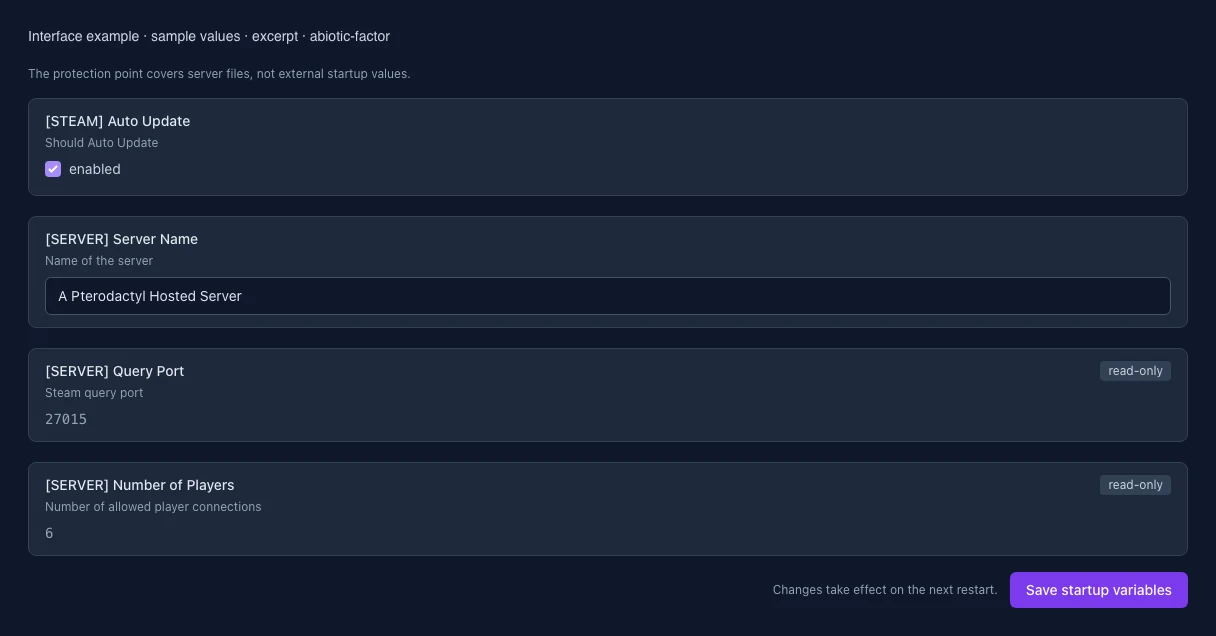
What the interface looks like

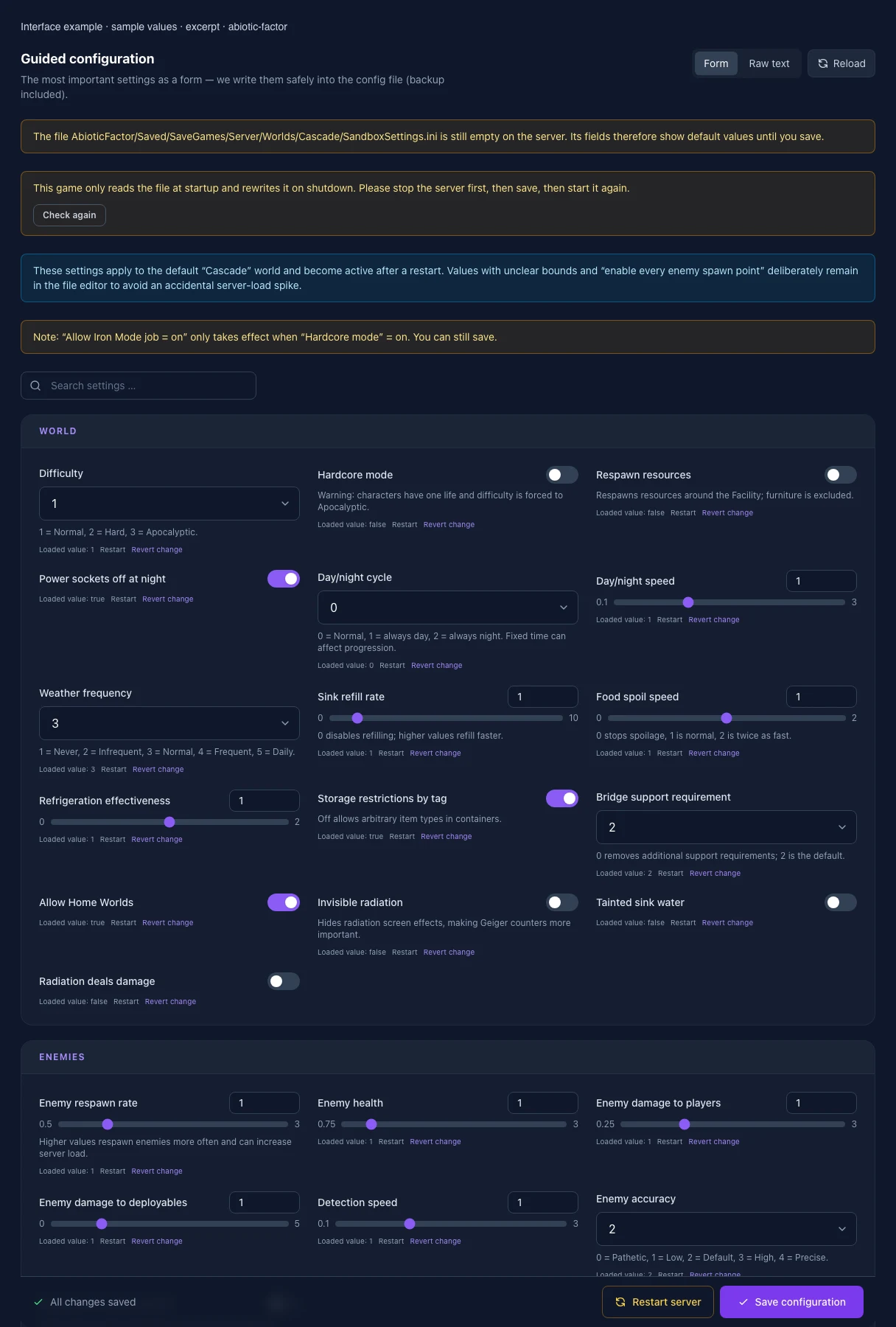
The image shows the interface on its capture date; earlier versions may differ.

Excerpt of the current interface with sample values. Values and prerequisites illustrate the controls; available tools depend on server software, plugins and permissions.
Excerpt of the current interface with sample values. Values and prerequisites illustrate the controls; available tools depend on server software, plugins and permissions. · Captured on 2026-10-08
Excerpt of the current interface with sample values. Values and prerequisites illustrate the controls; available tools depend on server software, plugins and permissions.
Excerpt of the current interface with sample values. Values and prerequisites illustrate the controls; available tools depend on server software, plugins and permissions. · Captured on 2026-10-08

What the settings do

These values come from our guided editors. Defaults are the editor starting values; they do not show the contents of a customer server.

Difficulty

1 = Normal, 2 = Hard, 3 = Apocalyptic.

Setting
GameDifficulty
Default
1
Range / options
1, 2, 3
Hardcore mode

Warning: characters have one life and difficulty is forced to Apocalyptic.

Setting
HardcoreMode
Default
false
Respawn resources

Respawns resources around the Facility; furniture is excluded.

Setting
LootRespawnEnabled
Default
false
Power sockets off at night
Setting
PowerSocketsOffAtNight
Default
true
Day/night cycle

0 = Normal, 1 = always day, 2 = always night. Fixed time can affect progression.

Setting
DayNightCycleState
Default
0
Range / options
0, 1, 2
Day/night speed
Setting
DayNightCycleSpeedMultiplier
Default
1
Range / options
0.1 – 3
Weather frequency

1 = Never, 2 = Infrequent, 3 = Normal, 4 = Frequent, 5 = Daily.

Setting
WeatherFrequency
Default
3
Range / options
1, 2, 3, 4, 5
Sink refill rate

0 disables refilling; higher values refill faster.

Setting
SinkRefillRate
Default
1
Range / options
0 – 10
Food spoil speed

0 stops spoilage, 1 is normal, 2 is twice as fast.

Setting
FoodSpoilSpeedMultiplier
Default
1
Range / options
0 – 2
Refrigeration effectiveness
Setting
RefrigerationEffectivenessMultiplier
Default
1
Range / options
0 – 2
Storage restrictions by tag

Off allows arbitrary item types in containers.

Setting
StorageByTag
Default
true
Bridge support requirement

0 removes additional support requirements; 2 is the default.

Setting
BridgeSupports
Default
2
Range / options
0, 1, 2
Allow Home Worlds
Setting
HomeWorlds
Default
true
Invisible radiation

Hides radiation screen effects, making Geiger counters more important.

Setting
InvisibleRadiation
Default
false
Tainted sink water
Setting
TaintedSinkWater
Default
false
Radiation deals damage
Setting
RadiationDealsDamage
Default
false
Enemy respawn rate

Higher values respawn enemies more often and can increase server load.

Setting
EnemySpawnRate
Default
1
Range / options
0.5 – 3
Enemy health
Setting
EnemyHealthMultiplier
Default
1
Range / options
0.75 – 3
Enemy damage to players
Setting
EnemyPlayerDamageMultiplier
Default
1
Range / options
0.25 – 3
Enemy damage to deployables
Setting
EnemyDeployableDamageMultiplier
Default
1
Range / options
0 – 5
Detection speed
Setting
DetectionSpeedMultiplier
Default
1
Range / options
0.1 – 3
Enemy accuracy

0 = Pathetic, 1 = Low, 2 = Default, 3 = High, 4 = Precise.

Setting
EnemyAccuracy
Default
2
Range / options
0, 1, 2, 3, 4
Apocalyptic enemy abilities

Allows these abilities regardless of the selected difficulty.

Setting
ApocalypticAbilities
Default
false
Damage to allies

0 disables friendly fire; 1 applies full standard damage.

Setting
DamageToAlliesMultiplier
Default
0.5
Range / options
0 – 3
Hunger speed
Setting
HungerSpeedMultiplier
Default
1
Range / options
0 – 2
Thirst speed
Setting
ThirstSpeedMultiplier
Default
1
Range / options
0 – 2
Fatigue speed
Setting
FatigueSpeedMultiplier
Default
1
Range / options
0 – 2
Continence drain
Setting
ContinenceSpeedMultiplier
Default
1
Range / options
0 – 2
XP gain

0 prevents players from leveling skills.

Setting
PlayerXPGainMultiplier
Default
1
Range / options
0 – 3
Item stack size
Setting
ItemStackSizeMultiplier
Default
1
Range / options
1 – 30
Item weight
Setting
ItemWeightMultiplier
Default
1
Range / options
0 – 5
Item durability
Setting
ItemDurabilityMultiplier
Default
1
Range / options
0.1 – 10
Durability loss on death
Setting
DurabilityLossOnDeathMultiplier
Default
0.1
Range / options
0 – 1
Show death messages
Setting
ShowDeathMessages
Default
true
Allow recipe sharing
Setting
AllowRecipeSharing
Default
true
Allow pagers

Pagers help players find one another.

Setting
AllowPagers
Default
true
Allow transmog
Setting
AllowTransmog
Default
true
Skip research minigames
Setting
DisableResearchMinigame
Default
false
Death penalty

0 = keep all; 1 = equipment & hotbar; 2 = hotbar only; 3 = equipment only; 4 = drop all; 5 = destroy all.

Setting
DeathPenalties
Default
1
Range / options
0, 1, 2, 3, 4, 5
First-spawn weapon

0 = None, 1 = Shiv, 2 = Desk Leg, 3 = Kitchen Knife, 4 = Starter Baton, 5 = Pipe Club, 6 = Random.

Setting
FirstTimeStartingWeapon
Default
0
Range / options
0, 1, 2, 3, 4, 5, 6
Host access to death bags
Setting
HostAccessPlayerCorpses
Default
true
Allow character reset
Setting
AllowCharacterReset
Default
true
Destroy player furniture

On destroys furniture at zero durability; off packages it instead.

Setting
PlayerFurnitureDestruction
Default
false
Allow Iron Mode job

Only applies in Hardcore mode and makes the start substantially harder.

Setting
AllowIronMode
Default
true
[STEAM] Auto Update

Should Auto Update

Setting
AUTO_UPDATE
Default
1
When it takes effect
Takes effect after saving and restarting the server.
Server name

Name in the Steam server list, up to 63 UTF-8 bytes (accented letters and emoji take more space). No double quotes or line breaks: the game cannot apply them. Changes take effect after a restart.

Setting
SERVER_NAME
Default
A Pterodactyl Hosted Server
When it takes effect
Takes effect after saving and restarting the server.
Steam query port

Port for the Steam server query. It is assigned automatically and is read-only here.

Setting
QUERY_PORT
Default
27015
When it takes effect
Takes effect after saving and restarting the server.
Maximum players

Number of players allowed at the same time. This startup value is managed centrally and is read-only here.

Setting
NUM_PLAYERS
Default
6
Range / options
1 – 32
When it takes effect
Takes effect after saving and restarting the server.