Back to overview

Barotrauma: updates, settings and interface

Game updates, plugin versions and improvements to our interface with a traceable history.

Recorded, available and installed are different states. Your actual installation status and suitable updates are shown in the server panel.

Interface Deployed state checked

Guided startup parameters

The running panel release contains a change to this tool. Recorded field differences show new, removed or changed settings. The date identifies when the deployed state was checked; existing game and plugin installations are not updated by this interface change.

Interface Deployed state checked

Guided startup parameters

The running panel release contains a change to this tool. Recorded field differences show new, removed or changed settings. The date identifies when the deployed state was checked; existing game and plugin installations are not updated by this interface change.

Interface Deployed state checked

Guided startup parameters

The running panel release contains a change to this tool. Recorded field differences show new, removed or changed settings. The date identifies when the deployed state was checked; existing game and plugin installations are not updated by this interface change.

Interface Deployed state checked

Guided startup parameters

The running panel release contains a change to this tool. Recorded field differences show new, removed or changed settings. The date identifies when the deployed state was checked; existing game and plugin installations are not updated by this interface change.

Interface Deployed state checked

Guided startup parameters

The running panel release contains a change to this tool. Recorded field differences show new, removed or changed settings. The date identifies when the deployed state was checked; existing game and plugin installations are not updated by this interface change.

Interface Deployed state checked

Guided startup parameters

The running panel release contains a change to this tool. Recorded field differences show new, removed or changed settings. The date identifies when the deployed state was checked; existing game and plugin installations are not updated by this interface change.

Interface Deployed state checked

Guided startup parameters

The running panel release contains a change to this tool. Recorded field differences show new, removed or changed settings. The date identifies when the deployed state was checked; existing game and plugin installations are not updated by this interface change.

Setting Deployed state checked

Barotrauma: settings

The running panel release contains a change to this tool. Recorded field differences show new, removed or changed settings. The date identifies when the deployed state was checked; existing game and plugin installations are not updated by this interface change.

Changed settings (57)
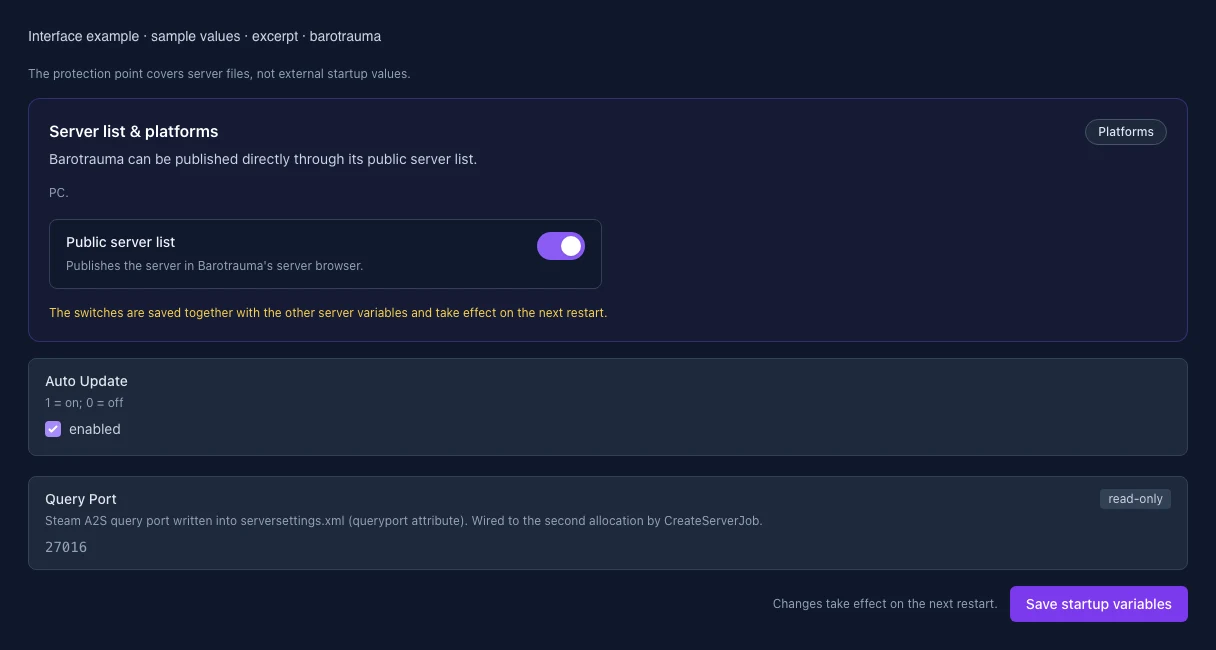
  • Query Port: Changed QUERY_PORT

    Steam A2S query port written into serversettings.xml (queryport attribute). Wired to the second allocation by CreateServerJob.

    Before

    Setting
    QUERY_PORT
    Default
    27016
    Range / options
    … – 65535
    When it takes effect
    Takes effect after saving and restarting the server.

    After

    Setting
    QUERY_PORT
    Default
    27016
    Range / options
    … – 65535
    When it takes effect
    Takes effect after saving and restarting the server.
  • Auto Update: Changed AUTO_UPDATE

    1 = on; 0 = off

    Before

    Setting
    AUTO_UPDATE
    Default
    1
    When it takes effect
    Takes effect after saving and restarting the server.

    After

    Setting
    AUTO_UPDATE
    Default
    1
    When it takes effect
    Takes effect after saving and restarting the server.
  • Public Server: Changed PUBLIC_SERVER

    List the server in the public Barotrauma/Steam server browser. Required for the Steam A2S query port to open (True/False). Without it the server is only reachable via direct IP join.

    Before

    Setting
    PUBLIC_SERVER
    Default
    True
    Range / options
    True, False
    When it takes effect
    Takes effect after saving and restarting the server.

    After

    Setting
    PUBLIC_SERVER
    Default
    True
    Range / options
    True, False
    When it takes effect
    Takes effect after saving and restarting the server.
  • Allow AFK: Changed AllowAFK

    Before

    Setting
    AllowAFK
    Default
    true

    After

    Setting
    AllowAFK
    Default
    true
  • Server tick rate: Changed TickRate

    The game technically allows up to 60 but warns against values above 20, so the panel caps this at the default 20.

    Before

    Setting
    TickRate
    Default
    20
    Range / options
    1 – 20

    After

    Setting
    TickRate
    Default
    20
    Range / options
    1 – 20
  • Play style: Changed PlayStyle

    Before

    Setting
    PlayStyle
    Default
    Casual
    Range / options
    Serious, Casual, Roleplay, Rampage, SomethingDifferent

    After

    Setting
    PlayStyle
    Default
    Casual
    Range / options
    Serious, Casual, Roleplay, Rampage, SomethingDifferent
  • Player limit (MaxPlayers): Changed MaxPlayers

    Barotrauma allows at most 16 players. More players need more RAM and CPU — the recommendation follows your plan.

    Before

    Setting
    MaxPlayers
    Default
    8
    Range / options
    1 – 16

    After

    Setting
    MaxPlayers
    Default
    8
    Range / options
    1 – 16
  • Server name: Changed ServerName

    At most 60 characters; cannot be empty. Emoji may count as two characters.

    Before

    Setting
    ServerName
    Default
    Server

    After

    Setting
    ServerName
    Default
    Server
  • Automatically restart round: Changed AutoRestart

    Before

    Setting
    AutoRestart
    Default
    false

    After

    Setting
    AutoRestart
    Default
    false
  • Ironman with permadeath: Changed IronmanMode

    Only applies in Permadeath mode and prevents obtaining any new character after death.

    Before

    Setting
    IronmanMode
    Default
    false

    After

    Setting
    IronmanMode
    Default
    false
  • AFK kick after (sec): Changed KickAFKTime

    Before

    Setting
    KickAFKTime
    Default
    600
    Range / options
    60 – 7200

    After

    Setting
    KickAFKTime
    Default
    600
    Range / options
    60 – 7200
  • Respawn mode: Changed RespawnMode

    Before

    Setting
    RespawnMode
    Default
    MidRound
    Range / options
    None, MidRound, BetweenRounds, Permadeath

    After

    Setting
    RespawnMode
    Default
    MidRound
    Range / options
    None, MidRound, BetweenRounds, Permadeath
  • Vote duration (sec): Changed VoteTimeout

    Before

    Setting
    VoteTimeout
    Default
    30
    Range / options
    5 – 300

    After

    Setting
    VoteTimeout
    Default
    30
    Range / options
    5 – 300
  • PvP win score: Changed WinScorePvP

    Before

    Setting
    WinScorePvP
    Default
    200
    Range / options
    1 – 1000

    After

    Setting
    WinScorePvP
    Default
    200
    Range / options
    1 – 1000
  • Karma system: Changed KarmaEnabled

    Uses the existing karma preset; this editor does not modify the separate karma file.

    Before

    Setting
    KarmaEnabled
    Default
    false

    After

    Setting
    KarmaEnabled
    Default
    false
  • Killable NPCs: Changed KillableNPCs

    Before

    Setting
    KillableNPCs
    Default
    true

    After

    Setting
    KillableNPCs
    Default
    true
  • Allow rewiring: Changed AllowRewiring

    Before

    Setting
    AllowRewiring
    Default
    true

    After

    Setting
    AllowRewiring
    Default
    true
  • Kick voting: Changed AllowVoteKick

    Before

    Setting
    AllowVoteKick
    Default
    true

    After

    Setting
    AllowVoteKick
    Default
    true
  • Randomize route seed: Changed RandomizeSeed

    Before

    Setting
    RandomizeSeed
    Default
    true

    After

    Setting
    RandomizeSeed
    Default
    true
  • Allow disguises: Changed AllowDisguises

    Before

    Setting
    AllowDisguises
    Default
    true

    After

    Setting
    AllowDisguises
    Default
    true
  • End-round voting: Changed AllowEndVoting

    Before

    Setting
    AllowEndVoting
    Default
    true

    After

    Setting
    AllowEndVoting
    Default
    true
  • Save server logs: Changed SaveServerLogs

    Before

    Setting
    SaveServerLogs
    Default
    true

    After

    Setting
    SaveServerLogs
    Default
    true
  • Allow spectating: Changed AllowSpectating

    Before

    Setting
    AllowSpectating
    Default
    true

    After

    Setting
    AllowSpectating
    Default
    true
  • Minimum respawn ratio: Changed MinRespawnRatio

    Before

    Setting
    MinRespawnRatio
    Default
    0.2
    Range / options
    0 – 1

    After

    Setting
    MinRespawnRatio
    Default
    0.2
    Range / options
    0 – 1
  • Respawn interval (sec): Changed RespawnInterval

    Before

    Setting
    RespawnInterval
    Default
    30
    Range / options
    10 – 3600

    After

    Setting
    RespawnInterval
    Default
    30
    Range / options
    10 – 3600
  • Maximum shuttle time (sec): Changed MaxTransportTime

    Before

    Setting
    MaxTransportTime
    Default
    180
    Range / options
    30 – 3600

    After

    Setting
    MaxTransportTime
    Default
    180
    Range / options
    30 – 3600
  • Submarine selection: Changed SubSelectionMode

    Before

    Setting
    SubSelectionMode
    Default
    Manual
    Range / options
    Manual, Random, Vote

    After

    Setting
    SubSelectionMode
    Default
    Manual
    Range / options
    Manual, Random, Vote
  • Voice chat: Changed VoiceChatEnabled

    Before

    Setting
    VoiceChatEnabled
    Default
    true

    After

    Setting
    VoiceChatEnabled
    Default
    true
  • Friendly fire: Changed AllowFriendlyFire

    Before

    Setting
    AllowFriendlyFire
    Default
    true

    After

    Setting
    AllowFriendlyFire
    Default
    true
  • Allow mod downloads: Changed AllowModDownloads

    Off prompts players to use Workshop downloads instead and reduces direct server transfers.
    Before

    Setting
    AllowModDownloads
    Default
    true

    After

    Setting
    AllowModDownloads
    Default
    true
  • Mode selection: Changed ModeSelectionMode

    Before

    Setting
    ModeSelectionMode
    Default
    Manual
    Range / options
    Manual, Random, Vote

    After

    Setting
    ModeSelectionMode
    Default
    Manual
    Range / options
    Manual, Random, Vote
  • Description and MOTD: Changed ServerMessageText

    At most 2000 characters. Emoji may count as two characters. Leave empty to remove the description.

    Before

    Setting
    ServerMessageText
    Default

    After

    Setting
    ServerMessageText
    Default
  • Use respawn shuttle: Changed UseRespawnShuttle

    Before

    Setting
    UseRespawnShuttle
    Default
    true

    After

    Setting
    UseRespawnShuttle
    Default
    true
  • General vote ratio: Changed VoteRequiredRatio

    Before

    Setting
    VoteRequiredRatio
    Default
    0.6
    Range / options
    0 – 1

    After

    Setting
    VoteRequiredRatio
    Default
    0.6
    Range / options
    0 – 1
  • Allow file transfers: Changed AllowFileTransfers

    Before

    Setting
    AllowFileTransfers
    Default
    true

    After

    Setting
    AllowFileTransfers
    Default
    true
  • Game mode: Changed GameModeIdentifier

    Before

    Setting
    GameModeIdentifier
    Default
    sandbox
    Range / options
    sandbox, mission, pvp, multiplayercampaign

    After

    Setting
    GameModeIdentifier
    Default
    sandbox
    Range / options
    sandbox, mission, pvp, multiplayercampaign
  • Maximum lag compensation (ms): Changed MaxLagCompensation

    Before

    Setting
    MaxLagCompensation
    Default
    150
    Range / options
    0 – 500

    After

    Setting
    MaxLagCompensation
    Default
    150
    Range / options
    0 – 500
  • Track opponent in PvP: Changed TrackOpponentInPvP

    Before

    Setting
    TrackOpponentInPvP
    Default
    true

    After

    Setting
    TrackOpponentInPvP
    Default
    true
  • Traitor probability: Changed TraitorProbability

    Before

    Setting
    TraitorProbability
    Default
    0
    Range / options
    0 – 1

    After

    Setting
    TraitorProbability
    Default
    0
    Range / options
    0 – 1
  • Restart delay (sec): Changed AutoRestartInterval

    Before

    Setting
    AutoRestartInterval
    Default
    60
    Range / options
    10 – 3600

    After

    Setting
    AutoRestartInterval
    Default
    60
    Range / options
    10 – 3600
  • Lock all default wires: Changed LockAllDefaultWires

    Before

    Setting
    LockAllDefaultWires
    Default
    false

    After

    Setting
    LockAllDefaultWires
    Default
    false
  • Allow drag-and-drop giving: Changed AllowDragAndDropGive

    Before

    Setting
    AllowDragAndDropGive
    Default
    true

    After

    Setting
    AllowDragAndDropGive
    Default
    true
  • Destructible outposts: Changed DestructibleOutposts

    Before

    Setting
    DestructibleOutposts
    Default
    false

    After

    Setting
    DestructibleOutposts
    Default
    false
  • Kick-vote cooldown (sec): Changed DisallowKickVoteTime

    Before

    Setting
    DisallowKickVoteTime
    Default
    120
    Range / options
    0 – 3600

    After

    Setting
    DisallowKickVoteTime
    Default
    120
    Range / options
    0 – 3600
  • End-round vote ratio: Changed EndVoteRequiredRatio

    Before

    Setting
    EndVoteRequiredRatio
    Default
    0.6
    Range / options
    0 – 1

    After

    Setting
    EndVoteRequiredRatio
    Default
    0.6
    Range / options
    0 – 1
  • Disconnected character remains (sec): Changed KillDisconnectedTime

    Before

    Setting
    KillDisconnectedTime
    Default
    300
    Range / options
    0 – 3600

    After

    Setting
    KillDisconnectedTime
    Default
    300
    Range / options
    0 – 3600
  • Kick vote ratio: Changed KickVoteRequiredRatio

    Before

    Setting
    KickVoteRequiredRatio
    Default
    0.6
    Range / options
    0 – 1

    After

    Setting
    KickVoteRequiredRatio
    Default
    0.6
    Range / options
    0 – 1
  • Start when enough clients are ready: Changed StartWhenClientsReady

    Before

    Setting
    StartWhenClientsReady
    Default
    false

    After

    Setting
    StartWhenClientsReady
    Default
    false
  • Allow linking Wi-Fi to chat: Changed AllowLinkingWifiToChat

    Before

    Setting
    AllowLinkingWifiToChat
    Default
    false

    After

    Setting
    AllowLinkingWifiToChat
    Default
    false
  • Looted money destination: Changed LootedMoneyDestination

    Before

    Setting
    LootedMoneyDestination
    Default
    Bank
    Range / options
    Bank, Wallet

    After

    Setting
    LootedMoneyDestination
    Default
    Bank
    Range / options
    Bank, Wallet
  • Minimum players for traitors: Changed TraitorsMinPlayerCount

    Before

    Setting
    TraitorsMinPlayerCount
    Default
    1
    Range / options
    1 – 16

    After

    Setting
    TraitorsMinPlayerCount
    Default
    1
    Range / options
    1 – 16
  • Level difficulty: Changed SelectedLevelDifficulty

    Before

    Setting
    SelectedLevelDifficulty
    Default
    0
    Range / options
    0 – 100

    After

    Setting
    SelectedLevelDifficulty
    Default
    0
    Range / options
    0 – 100
  • Allow immediate item delivery: Changed AllowImmediateItemDelivery

    Before

    Setting
    AllowImmediateItemDelivery
    Default
    true

    After

    Setting
    AllowImmediateItemDelivery
    Default
    true
  • Skill loss on death (%): Changed SkillLossPercentageOnDeath

    Before

    Setting
    SkillLossPercentageOnDeath
    Default
    20
    Range / options
    0 – 100

    After

    Setting
    SkillLossPercentageOnDeath
    Default
    20
    Range / options
    0 – 100
  • Required ready ratio: Changed StartWhenClientsReadyRatio

    Before

    Setting
    StartWhenClientsReadyRatio
    Default
    0.8
    Range / options
    0 – 1

    After

    Setting
    StartWhenClientsReadyRatio
    Default
    0.8
    Range / options
    0 – 1
  • Bot takeover on permadeath: Changed AllowBotTakeoverOnPermadeath

    Before

    Setting
    AllowBotTakeoverOnPermadeath
    Default
    true

    After

    Setting
    AllowBotTakeoverOnPermadeath
    Default
    true
  • Extra loss on immediate respawn (%): Changed SkillLossPercentageOnImmediateRespawn

    Before

    Setting
    SkillLossPercentageOnImmediateRespawn
    Default
    10
    Range / options
    0 – 100

    After

    Setting
    SkillLossPercentageOnImmediateRespawn
    Default
    10
    Range / options
    0 – 100
Interface Deployed state checked

Guided startup parameters

The running panel release contains a change to this tool. Recorded field differences show new, removed or changed settings. The date identifies when the deployed state was checked; existing game and plugin installations are not updated by this interface change.

Interface Deployed state checked

Guided startup parameters

The running panel release contains a change to this tool. Recorded field differences show new, removed or changed settings. The date identifies when the deployed state was checked; existing game and plugin installations are not updated by this interface change.

Interface Deployed state checked

Guided startup parameters

The running panel release contains a change to this tool. Recorded field differences show new, removed or changed settings. The date identifies when the deployed state was checked; existing game and plugin installations are not updated by this interface change.

Interface Change documented

Guided startup parameters: revised

The guided tools were revised in the shared panel code. The entry concerns the interface or its processing. The date records the change; availability on an individual server depends on the game, software, plugins and permissions.

Interface Change documented

Guided startup parameters: revised

The guided tools were revised in the shared panel code. The entry concerns the interface or its processing. The date records the change; availability on an individual server depends on the game, software, plugins and permissions.

Interface Change documented

Guided startup parameters: revised

The guided tools were revised in the shared panel code. The entry concerns the interface or its processing. The date records the change; availability on an individual server depends on the game, software, plugins and permissions.

Interface Change documented

Guided startup parameters: revised

The guided tools were revised in the shared panel code. The entry concerns the interface or its processing. The date records the change; availability on an individual server depends on the game, software, plugins and permissions.

Interface Change documented

Guided startup parameters: revised

The guided tools were revised in the shared panel code. The entry concerns the interface or its processing. The date records the change; availability on an individual server depends on the game, software, plugins and permissions.

Interface Change documented

Guided startup parameters: revised

The guided tools were revised in the shared panel code. The entry concerns the interface or its processing. The date records the change; availability on an individual server depends on the game, software, plugins and permissions.

Interface Change documented

Guided startup parameters: revised

The guided tools were revised in the shared panel code. The entry concerns the interface or its processing. The date records the change; availability on an individual server depends on the game, software, plugins and permissions.

Interface Change documented

Guided startup parameters: revised

The guided tools were revised in the shared panel code. The entry concerns the interface or its processing. The date records the change; availability on an individual server depends on the game, software, plugins and permissions.

Interface Change documented

Guided startup parameters: revised

The guided tools were revised in the shared panel code. The entry concerns the interface or its processing. The date records the change; availability on an individual server depends on the game, software, plugins and permissions.

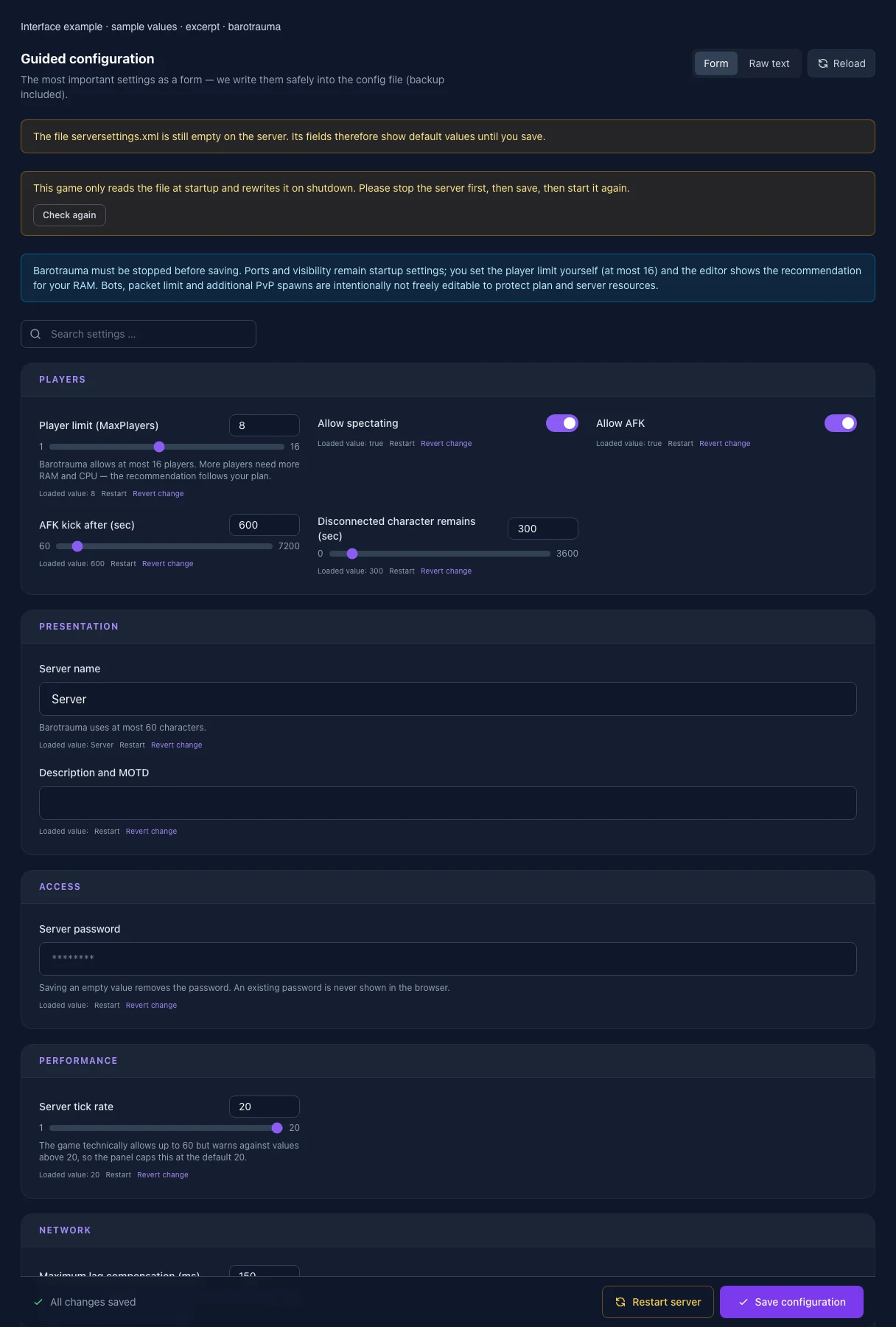
What the interface looks like

The image shows the interface on its capture date; earlier versions may differ.

Excerpt of the current interface with sample values. Values and prerequisites illustrate the controls; available tools depend on server software, plugins and permissions.
Excerpt of the current interface with sample values. Values and prerequisites illustrate the controls; available tools depend on server software, plugins and permissions. · Captured on 2026-10-08
Excerpt of the current interface with sample values. Values and prerequisites illustrate the controls; available tools depend on server software, plugins and permissions.
Excerpt of the current interface with sample values. Values and prerequisites illustrate the controls; available tools depend on server software, plugins and permissions. · Captured on 2026-10-08

What the settings do

These values come from our guided editors. Defaults are the editor starting values; they do not show the contents of a customer server.

Player limit (MaxPlayers)

Barotrauma allows at most 16 players. More players need more RAM and CPU — the recommendation follows your plan.

Setting
MaxPlayers
Default
8
Range / options
1 – 16
Server name

At most 60 characters; cannot be empty. Emoji may count as two characters.

Setting
ServerName
Default
Server
Description and MOTD

At most 2000 characters. Emoji may count as two characters. Leave empty to remove the description.

Setting
ServerMessageText
Default
Server tick rate

The game technically allows up to 60 but warns against values above 20, so the panel caps this at the default 20.

Setting
TickRate
Default
20
Range / options
1 – 20
Maximum lag compensation (ms)
Setting
MaxLagCompensation
Default
150
Range / options
0 – 500
Save server logs
Setting
SaveServerLogs
Default
true
Allow mod downloads

Off prompts players to use Workshop downloads instead and reduces direct server transfers.
Setting
AllowModDownloads
Default
true
Allow file transfers
Setting
AllowFileTransfers
Default
true
Voice chat
Setting
VoiceChatEnabled
Default
true
Play style
Setting
PlayStyle
Default
Casual
Range / options
Serious, Casual, Roleplay, Rampage, SomethingDifferent
Game mode
Setting
GameModeIdentifier
Default
sandbox
Range / options
sandbox, mission, pvp, multiplayercampaign
Randomize route seed
Setting
RandomizeSeed
Default
true
Start when enough clients are ready
Setting
StartWhenClientsReady
Default
false
Required ready ratio
Setting
StartWhenClientsReadyRatio
Default
0.8
Range / options
0 – 1
Submarine selection
Setting
SubSelectionMode
Default
Manual
Range / options
Manual, Random, Vote
Mode selection
Setting
ModeSelectionMode
Default
Manual
Range / options
Manual, Random, Vote
Level difficulty
Setting
SelectedLevelDifficulty
Default
0
Range / options
0 – 100
Allow spectating
Setting
AllowSpectating
Default
true
Allow AFK
Setting
AllowAFK
Default
true
AFK kick after (sec)
Setting
KickAFKTime
Default
600
Range / options
60 – 7200
Disconnected character remains (sec)
Setting
KillDisconnectedTime
Default
300
Range / options
0 – 3600
Automatically restart round
Setting
AutoRestart
Default
false
Restart delay (sec)
Setting
AutoRestartInterval
Default
60
Range / options
10 – 3600
Respawn mode
Setting
RespawnMode
Default
MidRound
Range / options
None, MidRound, BetweenRounds, Permadeath
Use respawn shuttle
Setting
UseRespawnShuttle
Default
true
Respawn interval (sec)
Setting
RespawnInterval
Default
30
Range / options
10 – 3600
Maximum shuttle time (sec)
Setting
MaxTransportTime
Default
180
Range / options
30 – 3600
Minimum respawn ratio
Setting
MinRespawnRatio
Default
0.2
Range / options
0 – 1
Skill loss on death (%)
Setting
SkillLossPercentageOnDeath
Default
20
Range / options
0 – 100
Extra loss on immediate respawn (%)
Setting
SkillLossPercentageOnImmediateRespawn
Default
10
Range / options
0 – 100
Bot takeover on permadeath
Setting
AllowBotTakeoverOnPermadeath
Default
true
Ironman with permadeath

Only applies in Permadeath mode and prevents obtaining any new character after death.

Setting
IronmanMode
Default
false
Friendly fire
Setting
AllowFriendlyFire
Default
true
Allow disguises
Setting
AllowDisguises
Default
true
Allow rewiring
Setting
AllowRewiring
Default
true
Lock all default wires
Setting
LockAllDefaultWires
Default
false
Allow linking Wi-Fi to chat
Setting
AllowLinkingWifiToChat
Default
false
Allow immediate item delivery
Setting
AllowImmediateItemDelivery
Default
true
Allow drag-and-drop giving
Setting
AllowDragAndDropGive
Default
true
Destructible outposts
Setting
DestructibleOutposts
Default
false
Killable NPCs
Setting
KillableNPCs
Default
true
Kick voting
Setting
AllowVoteKick
Default
true
End-round voting
Setting
AllowEndVoting
Default
true
End-round vote ratio
Setting
EndVoteRequiredRatio
Default
0.6
Range / options
0 – 1
General vote ratio
Setting
VoteRequiredRatio
Default
0.6
Range / options
0 – 1
Kick vote ratio
Setting
KickVoteRequiredRatio
Default
0.6
Range / options
0 – 1
Vote duration (sec)
Setting
VoteTimeout
Default
30
Range / options
5 – 300
Kick-vote cooldown (sec)
Setting
DisallowKickVoteTime
Default
120
Range / options
0 – 3600
Traitor probability
Setting
TraitorProbability
Default
0
Range / options
0 – 1
Minimum players for traitors
Setting
TraitorsMinPlayerCount
Default
1
Range / options
1 – 16
Karma system

Uses the existing karma preset; this editor does not modify the separate karma file.

Setting
KarmaEnabled
Default
false
Looted money destination
Setting
LootedMoneyDestination
Default
Bank
Range / options
Bank, Wallet
Track opponent in PvP
Setting
TrackOpponentInPvP
Default
true
PvP win score
Setting
WinScorePvP
Default
200
Range / options
1 – 1000
Auto Update

1 = on; 0 = off

Setting
AUTO_UPDATE
Default
1
When it takes effect
Takes effect after saving and restarting the server.
Steam query port

Port for the Steam server query. It is assigned automatically and is read-only here.

Setting
QUERY_PORT
Default
27016
Range / options
… – 65535
When it takes effect
Takes effect after saving and restarting the server.
List in the public server browser

Controls whether the server appears in the relevant public server browser.

Setting
PUBLIC_SERVER
Default
True
Range / options
True, False
When it takes effect
Takes effect after saving and restarting the server.