
In the reviewed mcfreehost catalog, Cobblemon Official comes with 6 GB RAM, Optimised with 4 GB and COBBLEVERSE with 8 GB. These are plan tiers, not proven minimum values and not a promise of a fixed player count. What matters is the load of your own world: exploring, battling, catching, running pastures or using additional mods.
This guide helps you tell a Cobblemon memory bottleneck apart from long ticks and client FPS. The historical bot measurement from September 23, 2026 is a limited example for this. The data was reviewed again on October 7, 2026; no new load test was performed. Our catalog now lists Cobblemon 1.8.4; this measurement applies to 1.8.1 and was not repeated for 1.8.4.
Name the Problem First
| What your group notices | What you compare first |
|---|---|
| Only one client shows low frames per second | Client settings and GPU; not automatically the server RAM |
| Blocks react late and several players stutter | Server tick times, activities and world areas loaded at the same time |
Server shuts down with Java heap space |
Specific error message, heap limit and memory history |
| A server stops without this Java message | Exit/OOM hints and the effective container limit; cause still open |
| Problem starts right after a pack change | Version set and last change, before you book more resources |
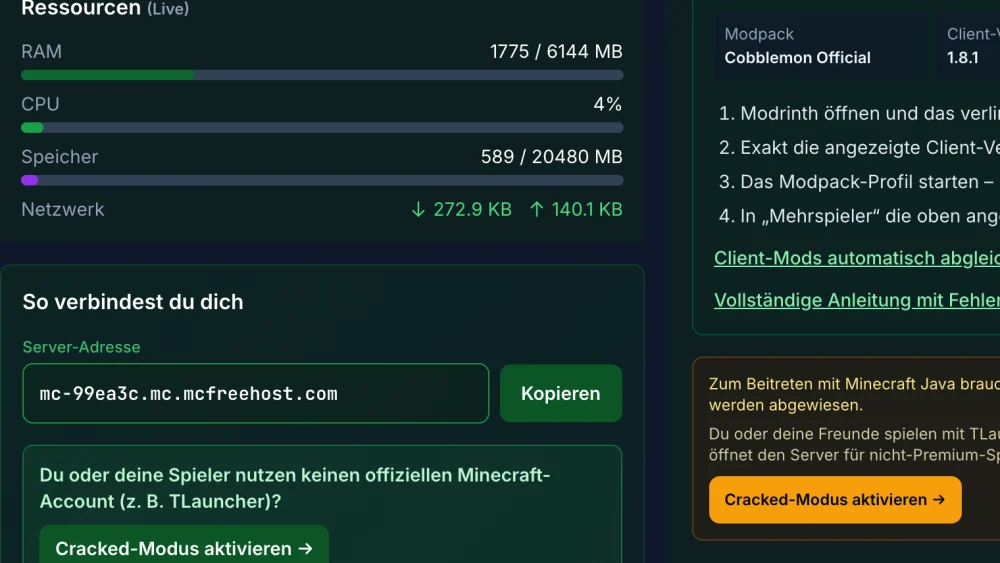
A high percentage in the RAM display does not answer these questions on its own. Java heap, memory used by the process and the actual container limit are different quantities. The Java heap does not include the entire memory of the JVM.
 (Enlarge image)
The Oracle documentation on memory errors distinguishes Java heap space, other memory areas and possible leaks. A single OutOfMemory message does not yet prove a memory leak. A merely rising curve also does not prove that Java is fundamentally unable to return memory.
What the Cobblemon Bot Run Actually Measured
The setup was Cobblemon Official 1.8.1, Minecraft 1.21.1 and Fabric with a product allocation of 6,144 MB. The Java heap was limited to 6,144 MB. The resource interface reported an overlying container limit of around 7,373 MB. The run is therefore not a test under a hard total limit of 6 GB and certainly not proof for Official with 4 GB.
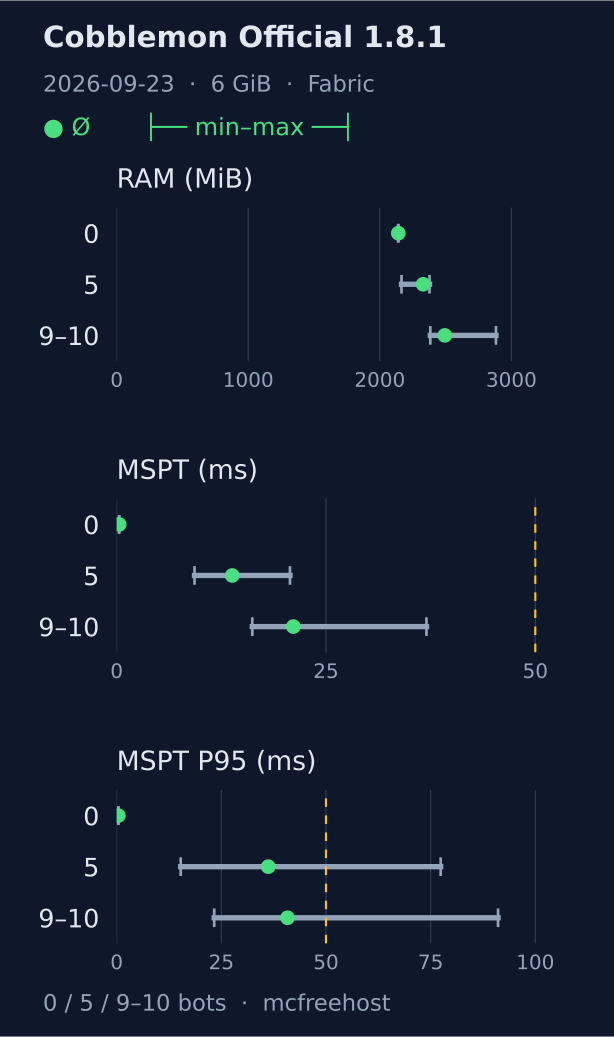
The bots ran and explored new areas. View and simulation distance were set to 10, wild Pokémon were enabled and vanilla mob spawns were disabled. The values in the following table were recalculated from the retained samples and match the summary from back then.
| Observed bots | Resource RAM avg / max (MB) |
Heap used avg / max (MB) |
Queried MSPT avg / max (ms) |
Highest queried MSPT P95 (ms) |
|---|---|---|---|---|
| 0 | 2,140 / 2,142 |
614 / 617 |
0.3 / 0.3 |
0.4 |
| 5 | 2,329 / 2,378 |
1,173 / 1,441 |
13.8 / 20.7 |
77.4 |
| 9–10 | 2,494 / 2,883 |
1,438 / 1,869 |
21.1 / 37.0 |
91.1 |
Units: The sampler at the time divided bytes by 1,048,576 and labeled the result as MB. The table keeps this label. The resource value comes from memory_bytes of the server interface; it is not the full cgroup value including page cache.
 (Enlarge image)
The dot shows the mean of the samples, the gray area their minimum to maximum. The yellow line marks 50 ms. For MSPT P95 this is the distribution of the queried P95 values, not a newly calculated P95 across all ticks. The chart shows a single historical bot run and not player capacity.
Measurement Windows and Excluded Tier
| Tier | Evaluated window (UTC) |
Resource samples |
Tick queries |
|---|---|---|---|
| Idle | 16:27:15–16:31:15 |
16 |
4 |
| 5 bots | 16:33:15–16:41:30 |
33 |
9 |
| 9–10 bots | 16:43:50–16:52:00 |
27 |
7 |
For the bot tiers, the evaluation began after roughly two minutes of warm-up; the windows are open on the right. The planned 20-bot tier was not reached. Several bots were disconnected, and the observed count dropped from temporarily 11–15 to 2. An average over this mixed phase is not a 20-player result. It is therefore missing from the chart and from the comparable tier table.
The console queries reported normal 20 TPS operation. This does not imply a gapless guarantee of smooth individual frames or of all ticks: individual queried P95 tick values were already above 50 ms. Averages can hide such spikes.
Limits That Matter for Your Decision
- No real gameplay situations: The bots did not catch, battle, open menus or build farms. They mainly generated exploration and spawn load.
- Vanilla mobs were off: In a normal survival world, their activity adds to the load.
- Short observation: The bot tiers lasted about eight minutes. An evening with a growing world or a multi-day heap history was not tested.
- Samples: Tick times were queried roughly once per minute; not every spike between queries is captured.
- One pack and one setup: Optimised, COBBLEVERSE, NeoForge and additional addons were not measured here under comparable load.
- No RAM comparison: The bot run contains no smaller Official allocation under the same conditions.
Summary, sample counts and measurement conditions as JSON. The figures are historical measurement data; the catalog and the runtime of your own instance may differ.
What You Can Observe Specifically in Cobblemon
Note the pack release, active players, whether they are in old or new areas, and the visible problem. Then compare the same sequence, rather than comparing an empty server after a restart with a large exploration session.
Cobblemon generates spawn attempts around players. The settings in the following table exist in 1.8.4 with the same default values; the assessment comes from the investigations at the time with 1.8.1. It explains possible levers, but not a measured percentage saving for every world.
| Setting or activity | Targeted attempt |
Possible cost of the change |
|---|---|---|
pokemon |
Lower the density step by step in a backed-up test |
Fewer wild Pokémon; after lowering, connected players must reconnect |
ticks |
Schedule spawn attempts less often |
Slower spawn build-up; a reload alone does not apply every saved spawner setting |
| View/simulation distance | Compare a smaller distance with the same players |
Less visible or simulated world |
| Many pastures in one place | Compare behavior in a less loaded area |
Change gameplay setup or location |
| Simultaneously exploring new chunks | Compare existing areas against new areas |
No proof that world generation alone is responsible |
| Additional mods or chunk loaders | Test the last change individually on a copy |
Content must not disappear from your only production world during testing |
For pokemonPerChunk, 1.8.1 was examined against 1.7.3 with the same world and a stationary test player. The default of 1.0 yielded roughly 63 instead of 23 Pokémon within a 96-block radius on the test bench. This is a local version comparison, not a general factor for every world. If you had increased pokemonPerChunk while using Cobblemon version 1.7 (e.g. 1.7.3), you should recheck your actual density after an update; see Adjusting the Spawn Rate.
Do not change save intervals or the saving of wild Pokémon solely because of a high RAM bar. This can alter recovery or gameplay behavior. The config reference describes the meaning and version binding of the values. For a prepared, limited world, the Chunky guide helps; however, existing chunks do not eliminate the entire entity and mod load.
Change, Compare and Return if Needed
- Fully back up the world, configuration and Cobblemon player data. Note the current version set and the observed problem.
- Choose a single justified lever. Test data-altering experiments with a copy and keep the working files ready.
- Stop the server before manual file changes. With
main.json, a JSON syntax error can cause the content to be overwritten with default values on load. - After the change, check the same activity, the same places and, if possible, the same active group. Check tick history, memory hints and a real join.
- If there are side effects, restore the backed-up state. A new software version and its data state must match.
If spark is installed for your combination, its command reference explains TPS, GC and memory diagnostics. A Paper tutorial is not automatically a Fabric command. spark was not used in the historical bot run; its features are therefore not part of this measurement.
Classifying the Older 1.7.3 Values Separately
The existing historical measurement summary from August 2026 concerns Cobblemon Official 1.7.3, a different world setup and a different memory measurement. It contains three aggregated profile runs with a 4,096 MB allocation as well as a separate run with 6,144 MB. The effective container limits were above that in each case. The original summary carries over historical MB labels; no retroactive precision is claimed here for these older values.
| Older metric | Three profile runs, largest aggregated value |
Separate 6 GB run |
|---|---|---|
| Memory P95, historical MB | 2,847 |
2,807 |
| Memory peak, historical MB | 2,937 |
3,033 |
| Swap, historical MB | 0 |
0 |
| OOM events | 0 |
0 |
The largest P95 value across several runs is not a pooled P95 of all samples. TPS and MSPT are missing from this August summary. Do not compare the numbers with the later bot run as a speed ranking; version, world and measurement method differ.
FAQ
How much RAM should I choose for Cobblemon?
Check the specific pack offered. In the catalog reviewed on November 24, Official is listed with 6 GB, Optimised with 4 GB and COBBLEVERSE with 8 GB. Use this mapping as a starting point and then assess the actual world load. It does not replace a load test with your group.
Does the bot run prove that Official is fine with 4 GB?
No. It was run with a 6,144 MB heap and an effective container limit of around 7,373 MB. A low observed heap in this setup does not prove the behavior of a smaller allocation.
How many real players can a 6 GB server handle?
This data does not answer that. There were exploring bots, not a comparable session with catching, battling, pastures and farms. The planned 20-bot tier was also invalid. Test your usual activities instead of using a table row as a player limit.
Does more RAM help against all Cobblemon lag?
No. Additional memory can ease a confirmed memory bottleneck. Slow ticks caused by mod logic or world activity are not automatically fixed by it. Check the error message, heap/container limit and tick history together.
Why is the server slower after an update?
First compare the version and the last change. For the examined jump from 1.7.3 to 1.8.1, the local Pokémon density increased at the same value. That is a possible cause, not a diagnosis for every later update or every custom mod combination.
Does Cobblemon run on the free plan?
The free mcfreehost plan has 2 GB and does not offer this Cobblemon pack option. The introductory article on Cobblemon explains the paid pack offers and the first matching Java join.
Sources and Review Status
- Own bot run on September 23, 2026, Official 1.8.1, Minecraft 1.21.1, Fabric, requested 6,144 MB, effective limit around 7,373 MB, vanilla mobs off. The three comparable tiers and their sample counts are listed above; the unreached 20-bot tier is excluded.
- Own investigation of the configuration, reload effect and spawn density on September 23, 2026; based on the Cobblemon source code at tag 1.8.1.
- Comparison of the named settings with the Cobblemon source code at tag 1.8.4 on November 24, 2026: default values unchanged.
- Historical August export: 1.7.3, aggregated profile runs and a separate run with disclosed limits.
- Oracle: Distinguishing memory errors.
- spark: Commands and diagnostics.
Evidence check: November 24, 2026. The renewed evaluation of existing data is not a new test. This article names neither a measured RAM minimum nor a guaranteed player limit.
