Chunky generates the chunks of your world in advance. Normally the server computes a chunk the first time a player enters it; that is the most expensive thing a Minecraft server does. With a pre-generated world it no longer happens, and players who fly far or travel with elytra no longer stall the server. This guide shows how to define an area, start generation and what happens to disk space and performance. The screenshots come from a test server running Paper 1.21.4 with Chunky 1.4.40.
Installation
Chunky exists as a plugin for Paper and Spigot and as a mod for Fabric, NeoForge and Forge. In the panel you find it under Plugins → Browser; the plugins page also has the Chunky assistant, which starts generation and shows progress. The commands need the permission chunky.command; they belong in the moderation group.
Define the area and start
Generation runs in four steps:
/chunky world world
/chunky shape square
/chunky center 4000 4000
/chunky radius 128
/chunky start
world selects the world (default: the one you are standing in). shape sets the shape; square is the usual one, circle saves the corners. center is the midpoint, radius the distance in blocks to the edge. Chunky confirms every setting in chat and reports world, shape, centre and radius on start.
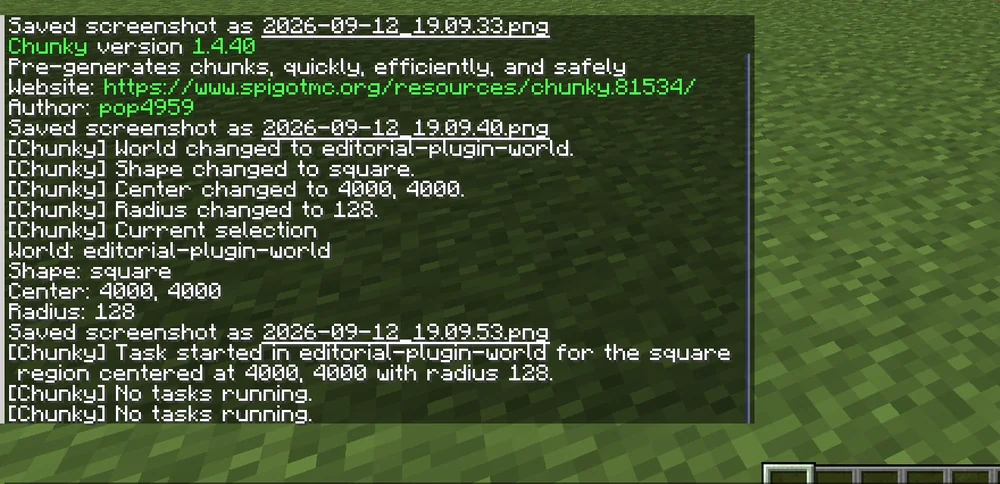
If the world has a world border, /chunky worldborder takes it over directly as the area. That is the cleanest way because players cannot get past it anyway.
How large should the area be?
Think in terms of area. A radius of 128 blocks gives 256 × 256 blocks, that is 16 × 16 chunks, 256 chunks. A radius of 5,000 blocks is already 390,625 chunks. On disk a generated chunk takes roughly 10 to 30 KB depending on terrain; a 5,000-block radius is therefore several gigabytes. Check your server's free disk space in the panel before starting.
For a server with five to ten players a radius of 2,000 to 3,000 blocks is usually enough. The Nether needs an eighth of that because eight Overworld blocks correspond to one Nether block.
During generation
Chunky gives players priority: when someone joins, generation slows down. It still pays to run large areas at night or with an empty server. Useful commands:
/chunky progressshows progress, chunks per second and remaining time./chunky pausepauses,/chunky continueresumes, even after a restart./chunky cancelaborts; already generated chunks remain.
Speed depends on the CPU. One core manages roughly 20 to 60 chunks per second; a 3,000-block radius therefore takes one to two hours.
Common mistakes
- Server full. Generation aborts when the disk fills up, and the server can no longer save. Check space and take a backup first.
- Wrong world. The command took the world you were standing in. Set
/chunky worldwith a name. - Generation gone after restart. Chunky remembers the task;
/chunky continueresumes it. Onlycanceldeletes it. - Area too small. Chunky generates nothing outside the area; players who travel further trigger normal chunk loading again.
Related guides
Whether chunk loading really causes the stutters is shown by spark: profile lag. The world border and other basic values are explained in Configure server.properties.
Sources
- Chunky wiki: https://github.com/pop4959/Chunky/wiki
- Commands: https://github.com/pop4959/Chunky/wiki/Commands
- Project page: https://www.spigotmc.org/resources/chunky.81534/
Chunky: view an example
Our own captures from a demonstration environment. The version and setup shown may differ from your server.

1.4.40