LuckPerms is the permissions plugin that decides who may run which commands on a Paper or Spigot server. Without a permissions plugin there are only two tiers: operators with everything and regular players with almost nothing. LuckPerms adds groups in between: guests, builders, moderation. Each group carries permission nodes, and players inherit the nodes of their groups.
This guide walks from installation to the first moderation group. The commands come from the official LuckPerms documentation; the screenshots were taken on a test server running Paper 1.21.4 with LuckPerms 5.5.71.
Installing through the panel
In the server panel you find LuckPerms under Plugins → Browser. The search pulls its data from Modrinth; loader and server version are checked against the plugin metadata before the file lands in plugins/. The world protection assistant on the plugins page installs LuckPerms together with WorldGuard and WorldEdit in one step if you want the bundle. After a restart the plugin announces itself on join with version and author.
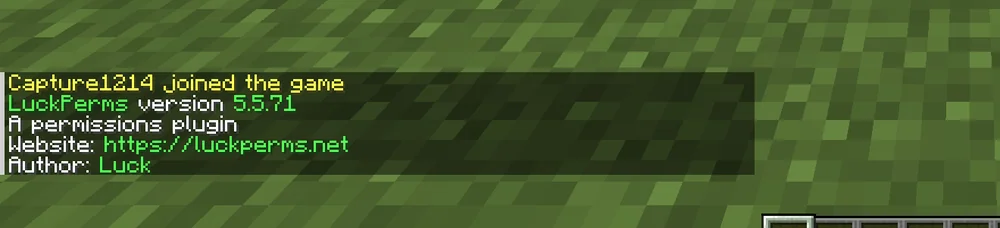
The output appears when you type /luckperms or the short form /lp without arguments. It is the quickest test that the plugin is really running.
How permissions are structured
A permission node is a string such as essentials.home or worldedit.region.set. Every plugin ships its own nodes and documents them. A node can be true or false. The wildcard worldedit.* covers all nodes of a plugin; that is handy for moderation and dangerous for regular players.
LuckPerms has three levels:
- Groups bundle nodes. Every player automatically belongs to the group
default. - Players inherit from their groups and can carry additional nodes of their own.
- Contexts restrict nodes, for example to one world or one game mode.
Keep the structure flat. Two to four groups are enough for most servers.
Creating the first group
The following commands run in the server console or in-game as an operator:
/lp creategroup mod
/lp group mod permission set worldedit.* true
/lp group mod permission set essentials.kick true
/lp user PlayerName parent add mod
The first line creates the group. The two permission set lines grant it all of WorldEdit and the EssentialsX kick command. The last line adds a player to the group. You can verify the result with /lp user PlayerName permission check essentials.kick.
For the default group the opposite direction pays off: remove commands players do not need. Without the bukkit.command.plugins permission Paper no longer shows the /plugins command at all; the player only sees an unknown-command error.

/lp group default permission set bukkit.command.plugins false
This is not a security measure in the strict sense, but it keeps the plugin list away from curious guests.
The web editor
The console becomes tedious for larger changes. /lp editor produces a link to the web editor on luckperms.net. There you see all groups and players in a table, set nodes with the mouse and push the session back to the server with one click at the end. The link is valid for a few minutes and only usable with the generated code. Sessions contain player names and UUIDs, so do not share the link.
Common mistakes
- A permission has no effect. The player is still an operator. Operators bypass LuckPerms. Remove
opand work with groups only. - Misspelled node. LuckPerms accepts any text, typos included. Check the node in the documentation of the plugin in question.
- Wildcard in
default. A*node in the default group gives every guest everything. Use wildcards only in moderation groups. - Changes gone after a restart. LuckPerms stores data in an H2 file inside the plugin folder by default. If the folder is not writable on restart, changes are lost. The console output on startup shows the error.
Storage and backups
All data lives in plugins/LuckPerms/. The panel backup includes the folder. For networks with several servers LuckPerms offers a shared MySQL database; for a single server H2 remains the simplest choice.
Related guides
How to install and update plugins in general is covered in Install and manage plugins. Region protection is explained in WorldGuard: protect regions, the building tools in WorldEdit: build and undo.
Sources
- LuckPerms wiki: https://luckperms.net/wiki/Home
- Command reference: https://luckperms.net/wiki/Command-Usage
- Web editor: https://luckperms.net/wiki/Web-Editor
LuckPerms: view an example
Our own captures from a demonstration environment. The version and setup shown may differ from your server.

LuckPerms 5.5.71 · 2026-09-12

LuckPerms 5.5.71 · 2026-09-12