Fabric Loader launches Fabric mods; Fabric API is an additional mod library. A new loader replaces neither a missing API nor a mod file built for the wrong Minecraft version. On a Fabric server at mcfreehost, you therefore first check the entire version set and the specific startup message. Only then do you change the affected component and test with a matching client.
Content verified: October 7, 2026. This guide covers Java with Fabric. Paper plugins, Forge/NeoForge files and native Bedrock servers are different software paths. No specific loader version is recommended as suitable for every pack.
Minecraft, Loader and API Are Three Separate Specifications
| Component | What it determines | Where you compare it |
|---|---|---|
| Minecraft | Game version and data basis of the world | Server startup log and the client instance actually launched |
| Fabric Loader | Loading the mods and checking declared requirements | Startup log, software management and pack specification |
| Fabric API | Library functions for mods that need them | Mod file in the mods folder and its download metadata |
| Modpack and individual mods | Content, dependencies and required side | Pack version, server pack, file/project details |
| Java | Runtime with which Minecraft and the mods start | Startup/crash log and the requirements of the chosen game version |
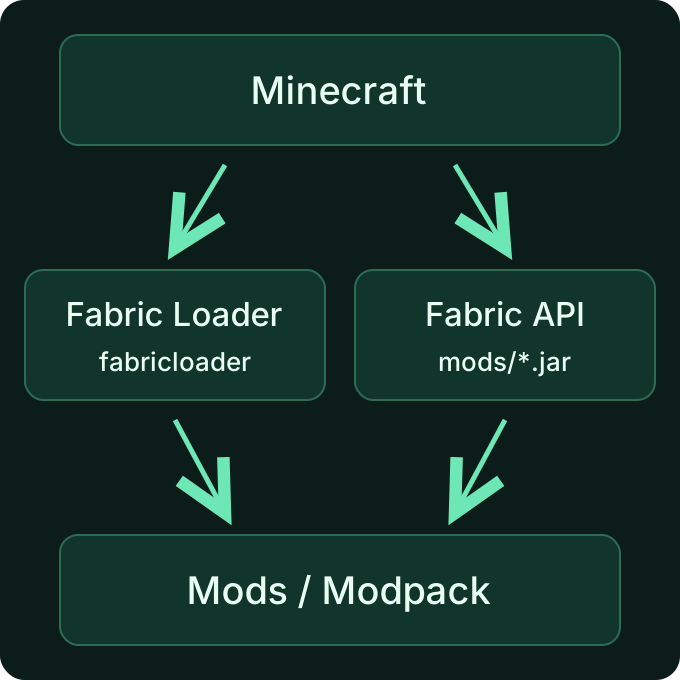
The three building blocks must match the requirements of your pack. The latest release of a library is not a shared version number for all three.
In its mod installation guide, Fabric explains that you must check the game version, loader family and Java edition. A Fabric API file for a different Minecraft branch does not become compatible simply by renaming it. Likewise, placing a Forge mod in the Fabric folder does not turn it into a Fabric mod.
1. Record the Actual Version Set
Before making any changes, note down the following details for the server and the client instance you use:
Minecraft: exact game version
Fabric Loader: version actually loaded
Fabric API: file name and published version
Modpack: name and specific pack version
Java: runtime used in the startup log
Last change: what is different since the last successful start
This is a template for your notes, not a finished compatible version set. Especially with multiple launcher instances, it is not enough to have the right version installed somewhere: you must launch exactly that instance. A launcher update, a pack version and a Minecraft update are different changes.
For a ready-made modpack, start with its documented server pack and the intended client version. Do not update every mod individually to "latest". The pack's composition may deliberately use an older file. For the actual client download and joining, the modpack join guide helps.
2. Choose the Right API File and Mod Side
Open the file list of the official Fabric API project and filter by your Minecraft version. Then check whether the selected file meets the requirements of the pack and the affected mods. The release date alone does not answer this question; a new release may be intended for a different game branch.
For every additional file, check:
- Is it published for Fabric and approved for your Minecraft version?
- Does it belong on the client, the dedicated server, or both sides?
- Which additional libraries does exactly this version require?
- Is an older release of the same mod still in the server folder?
A second API file next to the old one is not a clean replacement. Back up the previous file outside the active mods folder before you put the matching version in place. An arbitrarily renamed JAR can still be loaded; really remove the old active file from this folder.
Pure graphics or interface mods are often only needed on the client. So do not copy the entire client folder to the server unchecked. The Fabric mod metadata distinguishes the environments client, server and *. The details of the project or server pack remain authoritative; a wrongly declared mod can still crash later.
3. Read the Message Correctly
Open the startup output in the server management. If the abort begins with a dependency list such as Incompatible mods found!, note down: which mod, which requirement and which existing version are named.
| Observation | Meaning | Targeted next step |
|---|---|---|
| A required mod is missing | A mandatory dependency is not met | Obtain the missing library for the same Minecraft branch |
| The existing API is too old | The mod requires a different API version or version range | Choose an API file approved for it; replace the old active release |
| A mod requires a different Minecraft version | The downloaded mod file does not match the game branch | Find the matching mod release; do not blindly upgrade the existing world for this |
| The loader does not meet the requirement | The loaded loader version does not match the pack specification | Prepare the loader change as a change to the startup software |
| The same mod identifier appears multiple times | Two active files may provide the same mod | Check the file list and pack contents for duplicate releases |
| Startup gets further and only fails with an exception | The dependency check does not fully explain the error | Examine the startup/crash report and the last change |
The list can contain several interlinked requirements. Resolve the named conflict as a coherent set; the top line is not automatically the sole cause. Afterwards, check the new startup output instead of continuing to follow the old message.
A Mixin error or NoClassDefFoundError on its own does not prove a missing Fabric API. The Fabric guide to crash reports explains relevant error chains, system data and the mod list. The mod named first may be involved without being solely responsible. If the server does not start at all, the startup error guide also narrows down causes outside the version selection.
4. Change on mcfreehost and Test with a Way Back
First back up the world, configuration and the previous version set. A copy of just the mod files is not enough for a way back after a world conversion. Plan the change for a time when your group is not playing, and stop the server cleanly via the management panel.
The loader belongs to the startup software. Use the intended software/version path of your server for it; do not place a loader JAR in mods as a supposed API. When switching or reinstalling, read the displayed notice about data retention. Stop before confirming if no complete backup exists yet. The API and other mod libraries, on the other hand, belong in mods as matching mod files.
For a managed modpack, follow its update and installation path. A later pack update may overwrite a manual file replacement. So document your own changes and clarify whether they are compatible with the desired pack version at all. How you control automatic updates is described in the update guide.
After the change, check the following in order:
- The server reaches the ready state; the new startup log shows the expected game and loader versions.
- A client with the intended pack version can actually join.
- A mod function that matters for your group works in the right world.
- After a clean restart, the world and settings are preserved.
A successful start does not yet confirm a successful modpack join. Conversely, a newer API does not fix a lack of RAM. If the start works and the server is only overloaded by new chunks or many entities, separate this resource issue from the version error. For free servers, the limits of the free entry apply; an additional library does not increase the available RAM.
If the new state fails, stop making further changes and restore the documented old software state together with the backup from before the change. Do not start a world that has already been loaded with a newer Minecraft as an improvised downgrade with older software. For support, note the pack version, last change and relevant log lines; check logs for credentials before sharing them.
FAQ
Can I always set Fabric Loader to the latest version?
A loader supports several game versions, but that is no guarantee for every pack composition. Check the requirements of the pack and the mods, back up the current state and test the switch. A loader update does not replace a wrongly chosen mod file.
Does Fabric API need the same version number as Minecraft?
No. Fabric API has its own version number. What matters are the Minecraft versions listed for that file and the requirements of the mods that use it.
Does Fabric API need to be present on both server and client?
That depends on the mods on the respective side. If they need Fabric API, a matching release must be present there. The pack and project details tell you which files are intended for the client and which for the server.
Do client and server need the same loader?
The loader number alone does not decide whether you can join. Both sides must meet their mod requirements. For a ready-made pack, you use its intended version on both sides and keep the Minecraft version matching; do not swap the loader independently of the pack.
Can I simply disable a missing mandatory dependency?
Disabling the dependency check does not make the missing functions available. Find the matching file or return to the working pack state. Changes to the metadata file are not a normal repair path for this guide.
Why can't I join even after a successful server start?
The server start checks its own environment. A wrongly launched client instance, a different pack version or missing shared content may only show up when joining. Then compare the actual versions and the specific client error message.
Sources and Basis for Verification
- Fabric: Installing Mods — game version, loader family and installation.
- Fabric: Installation and Server Launcher — loader as part of the startup installation.
- Fabric API: published files — assignment to game versions.
- Fabric: Mod Metadata — environments and declared dependencies.
- Fabric: Reading Crash Reports — error chains and system/mod details.
The sources were checked on October 7, 2026. A specific version set remains a decision for your pack; this article does not claim a new startup or join test of your individual world.