If your Minecraft client with TaCZ 1.1.4-hotfix reports a ClassCastException from ClientChunkCache to ServerChunkCache after a respawn or dimension change, the attachment cache cannot finish updating. Our add-on mod fixes this specific error path in the tested Forge 1.19.2 setup. You place it additionally in the mods folder of your Minecraft instance and keep the original TaCZ file.
What you need: Minecraft 1.19.2, Forge 43.x and TaCZ 1.1.4-hotfix. We tested Forge 43.5.0 with Java 17. The add-on belongs in every affected player client. It is a custom compatibility fix by mcfreehost and not an official TaCZ release.
How do you recognize this TaCZ error?
After the affected respawn, open the file logs/latest.log inside your Minecraft instance. The key message names both classes: ClientChunkCache cannot be cast to ServerChunkCache. The associated stack shows PacketDistributor.trackingEntity, NetworkHandler.sendToTrackingEntity, LivingEntityDrawGun.draw and RefreshClonePlayerDataEvent. An error message only on the server or a different crash is not enough for this diagnosis.
When the local player object is replaced, TaCZ updates its weapon data. In the examined version, this client path calls a function meant for sending to players tracked on the server side. Forge expects a server chunk cache here but gets a client chunk cache. The exception interrupts the function before the attachment cache is fully rebuilt.
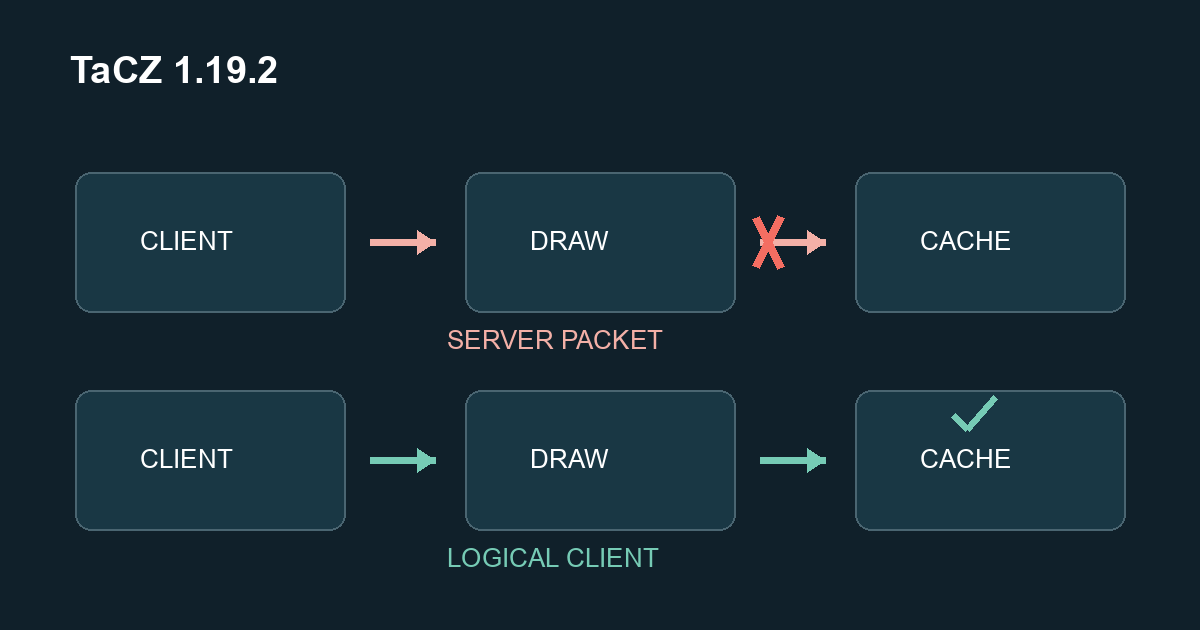
This is an error in this code path. More server RAM does not fix the incorrect type cast. Conversely, a weapon problem without this log message does not prove that you have the same error. In that case, check versions, other mods and the actual crash report.
Download and Verify the Add-on
Download tacz-clonefix-1.19.2-1.0.0.jar. The file is 2,613 bytes in size. Its SHA-256 is:
4211368ec9461ad28f1c90d3d2faff7c9ad2b974bbc8b730008d730338bbcdc7
On Windows, you can verify the download in PowerShell with Get-FileHash -Algorithm SHA256 and the path to your downloaded file. On macOS, shasum -a 256 works with that file path. Compare the full hash; upper and lower case in the hexadecimal output do not matter. A different hash means that you do not have the same verified file. In that case, do not install the file and download it again from the linked source.
The add-on does not replace the TaCZ JAR. The original file tacz-1.19.2-1.1.4-hotfix-all.jar stays installed. Download the matching original version from Modrinth if it is missing from your instance. We have not released this add-on for Minecraft 1.20.1, NeoForge or other TaCZ versions.
For technical verification, you will find the source package with build instructions and the source package checksum. The SHA-256 of the ZIP is 484b50152fa905e9959d8bf2e3cb9b700d8cd35fb77bb50c79beba5d47a878bb. Our own sources are under the MIT license; Minecraft, Forge and the original TaCZ are not included. We submitted the cause and the proposed correction as a GitHub bug report to the TaCZ project. The sanitized comparison evidence is linked there.
Installation in the Right Minecraft Client
- Close Minecraft completely. In the launcher, open the directory of the instance you actually use to join your modded server. With multiple profiles, each one may have a different
modsfolder. - Copy only the additional JAR into this
modsfolder. Keep the other mods and the original TaCZ file. Do not install two copies of our add-on at the same time. - Start the same instance with Minecraft 1.19.2 and Forge. In the mod list, check that TaCZ and the entry
TaCZ 1.19.2 client clone refresh fixwere loaded. - If possible, test on your own test server. Before a respawn, back up the world and store valuable items from your inventory; without a suitable game rule, they can be lost on death. Connect to your server and first test your weapon in a safe place. Then perform a normal respawn and a dimension change. Check the weapon, the attachment and the new
logs/latest.logfor the described error path.
Every affected fellow player must install the add-on in their own client. Uploading it only to the server mods folder does not repair the client function. Our comparison server ran with the unmodified original TaCZ and without the add-on mod. For this fix, you need no changes to your world and no additional server permissions.
What Did We Actually Test?
On October 9, 2026, we compared the original version and the add-on on the same Forge 1.19.2 setup. In four deliberately triggered cache refreshes, the original aborted with the described exception; the add-on completed all four and rebuilt the silencer cache. In the functional test, the client and dedicated server confirmed the same 28 shots with an AK47 and the attachment tacz:muzzle_silencer_ursus. Respawn and switching between the Overworld and the Nether were also included.
The first graphical comparison ran on a larger set of 58 mod files. The four targeted refreshes tested the actual TaCZ player path and cleared the cache before the call for that purpose. You do not need to perform this test procedure during normal play. The original could also shoot in this comparison. Therefore, we do not promise that every shooting problem will disappear with this add-on. Other weapons, additional attachments and singleplayer have not been fully tested.
An additional isolated comparison used only TaCZ as a content mod plus our own measurement tools. Forge without TaCZ did not show the described error; with the original it occurred during normal player changes, with the add-on it did not. There too, four targeted cache refreshes failed in the original and all four succeeded with the add-on. This Linux test checked networking and player data with world rendering suspended and is not an additional graphics benchmark. Its additional shot measurement yielded 22 local success reports and 21 server events; the cause of the unconfirmed shot after the Nether switch is unresolved. The 28 confirmed shots mentioned above come from the separate graphical test.
You can trace the cause in the original TaCZ 1.19.2 code. On the logical client side, the fix only skips the server event and the server dispatch; reset, weapon assignment and attachment update continue to run.
FAQ
How do I remove the add-on again?
Close Minecraft and remove only tacz-clonefix-1.19.2-1.0.0.jar from the affected instance. Keep TaCZ and the rest of your mods. At the next start, the original path is active again.
What do I do with a different error or a new TaCZ version?
First compare the exact message and the loaded versions. For a different error, this guide is not a confirmed solution. Once an official version fixes the same error, we will check the version status and update the recommendation. Do not install the add-on unchecked alongside a different TaCZ version.
Do I need a bigger hosting plan for this?
For this type cast, switching plans does not help. Large modpacks can still have their own RAM requirements. Before setting up a new modded server, check the minimum requirements of your specific pack. For simpler setups, you will find free Minecraft servers at mcfreehost; this does not imply modpack compatibility. The guide and the add-on download remain freely accessible.
Editorial and testing status: mcfreehost, technical review on 09.10.2026. We publish the tested version limits and will adjust the recommendation once a suitable official fix is verified. You can report a differing error with version details and a sanitized log via our contact form.