
Free Minecraft hosting at mcfreehost is possible without a credit card within the offered Free scope. The verified scope offers 2 GB RAM, 10 GB storage, two created Free servers and one Free server running at a time. In addition, there are inactivity and retention rules. Whether that suits you is something you check based on your edition, your world and a real shared game night.
This guide helps you assess the free scope before a longer project. The exact initial setup is explained in Create a Minecraft Server for Free. A free hosting plan is not a free Minecraft license and not a promise of unlimited performance.
Verification status: October 7, 2026. Available software, options and plan conditions may change. Before confirming, check the selected scope and its price in the actual configurator.
Your Requirements Fit on One Sheet of Paper
Write down what you really want to play. “Minecraft with friends” is not yet enough as a technical description: Java, native Bedrock and a Java modpack can need different clients and software.
| Requirement | Before the project starts |
|---|---|
| Java without additional client mods | Desired Minecraft version and possible server plugins |
| Phone, Bedrock on Windows or console | Specific device and the actual path to an external server |
| Java and Bedrock together | Supported crossplay setup and a test with both clients |
| A modpack | Full pack name, pack version, loader and pack requirements |
| An existing world | Edition, game version, required extensions and an unchanged original copy |
| A longer break from playing | Your own backup and the specific retention period |
A server mod is not a Paper plugin. A native Bedrock server does not simply accept Java clients. Geyser connects supported Bedrock clients to a Java server, but does not replace required Java client mods. This limit is explained in the Geyser FAQ.
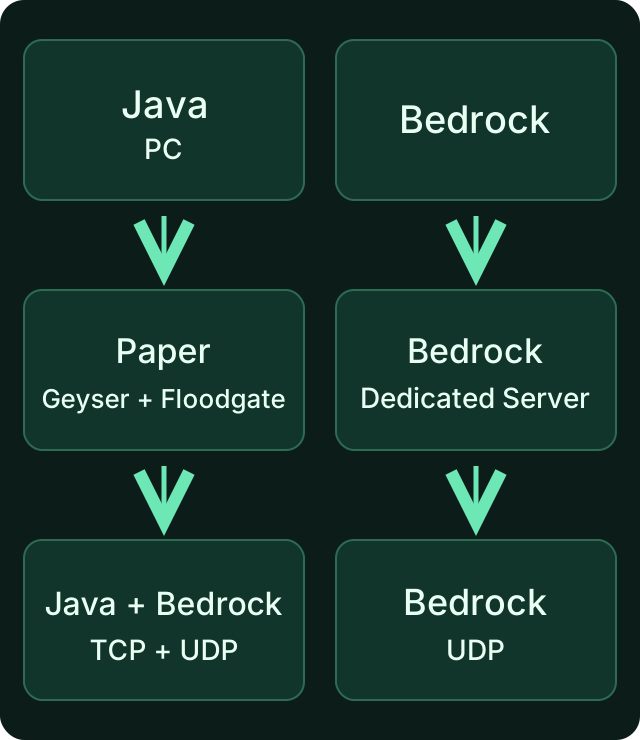
The edition comes before the plan comparison. A low price does not make an unsuitable client/server combination compatible.
If a particular pack already requires more memory, the free scope is not a sensible substitute for that requirement. For the offered Cobblemon packs, you will find a concrete selection at Create a Cobblemon Server. The pack offers mentioned there are not automatically part of the normal 2 GB Free scope.
What Free Specifically Includes
The limits are more than just sleep mode. For a small private world, the resources, running servers and preserved game states matter most.
| Free limit | Verified scope |
|---|---|
| Memory | 2 GB RAM |
| Storage space | 10 GB |
| Created Free servers | Up to two |
| Online at the same time | One Free server |
| Inactivity after a session already played | Sleep threshold after 15 minutes without players |
| Freshly set up, never played on | Separate setup window of 60 minutes until the sleep threshold |
| Restore points | Three: two automatic and one manual |
| Additional panel management | One invited collaborator |
The sleep values are thresholds of the inactivity process, not a stop guarantee to the second. The sleep times mentioned are default values. The effective server configuration as well as ongoing backup or maintenance operations can shift the onset. While the server sleeps, the game state stays saved and the simulation pauses. Under high load, the start may have to wait; “automatically reactivatable” does not name a guaranteed number of seconds. You check start, wake-up, resources and game behavior in the setup that is actually running. A second created Free server does not allow two free worlds to be active at the same time.
Backups and collaborators are already part of the free base in the verified scope. A blanket statement like “backups only come with paid plans” would describe this scope incorrectly. You still have to check which backup was actually set up and successfully created; three intended points do not mean three verified ways back for every change.
Start Without a Credit Card and Check the Order
For the Free start, you choose the offered free hosting and the matching edition. After signing up, check that your selection still contains the free scope and no additional paid order. Observe the verification required in the account, and only take over the connection details after provisioning, from the correct server.
An optional balance top-up or an add-on feature booked later is a separate process. You do not have to pay in advance to evaluate the normal free scope described. Whether a paid order needs a particular payment method is shown in its checkout; “paid” does not generally mean “only with a credit card”.
The matching Minecraft edition and your entitlement to use it are separate. For consoles, platform permissions or an online subscription may be required. You will find the device path in the Bedrock guide. A hosting account alone does not replace these prerequisites.
Test the Free Server Realistically
Test the features of your actual group instead of just counting a successful first start. Use the intended clients and extensions; an empty server without your pack tests a different setup.
- Connect via the current panel address. For Bedrock, you use the assigned Bedrock port, not an assumed default port.
- Check known builds or a small test world and normal game actions without OP.
- Play your planned routine together: exploring, building and the few plugins or mods you actually want.
- End the session cleanly. After a normal restart or wake-up, check the same world, inventories and a saved change.
- Check whether the backup contains the necessary complete state and how you can restore it.
The guide for friends helps with the invitation, access list and a collaborator. To play, friends do not need shared owner credentials. Grant OP or panel rights only for the task someone is supposed to take on.
A Problem Does Not Automatically Lead to a Purchase
If the test fails, you first check the specific cause. A wrong pack version does not disappear with more RAM. A low frame rate on a single computer does not prove a memory limit of the server.
| Observation | First check |
|---|---|
| Only one player fails to join | Edition, current client instance, version and the exact message |
| Everyone waits after a break | Sleep/start status and the wake-up path actually offered |
| New chunks cause delays | World generation, simultaneous exploration and server load |
| Storage is full | Actual files, world size and a backed-up original copy before cleanup |
| Server hits a memory limit | Current usage and log with the extensions in use |
| World or inventory seems changed | Loaded world and player identity; back up the existing state first |
For investigating server load, spark helps. The values have to be read in the context of your gameplay. A higher max-players entry does not create additional resources; PaperMC describes it as an admission limit.
Clarify Retention Before a Break
In the verified Free process, a server that has already been played on can be released after 14 days of inactivity. For a server that was never activated, there is a separate 7-day process. Warnings and the specific account status are what counts. A short visit to the website is not a general substitute for real player activity on a world that has already been played on.
With a corresponding archiving, 30 days of retention are provided. This is not unlimited storage and not a running server. Download an important world in time as a complete backup and also note down the required settings or extensions.
If your project is only played every few weeks, this point is especially important. Do not judge Free only by a free first hour, but also by whether your breaks fit the retention model. The exact operating paths are explained in 24/7, Sleeping and Waking Up.
Decide on More Scope Only After Testing
Free fits if your compatible clients can join, the gameplay routine works, the resources are sufficient and you can plan for inactivity and backups. No fixed player count or particular lag level is derived from this.
If only sleep mode contradicts your needs, you check the corresponding add-on option. It does not automatically increase RAM or storage, and continuous operation alone does not make every remote farm work without players. If an actual resource or feature limit is reached, you look into the matching plan. Not every problem needs the same upgrade. The specific decision is covered in Free, Add-On Feature or Paid Plan.
Keep your complete backup before switching. The documented upgrade path preserves the server, but does not replace a functional test afterwards. Do not change plan, world version, loader and mod list at the same time if you want to recognize which change helped.
FAQ
Is the normal MCF Free start possible without a credit card?
Yes, within the free scope described. Check the price and selection in the specific order. Optional purchases or balance top-ups are separate processes.
Is sleep mode the only limit?
No. RAM, storage, simultaneous Free servers, retention, backup points and collaborators are also limited. Check the entire scope against your needs.
How many friends can play?
A fixed capacity is not promised here. Software, world, view distance, extensions and simultaneous activities determine the load. Test your real group.
Does every modpack work for free?
No. Pack compatibility and documented resource requirements still apply. An offered pack server may need a different scope than the normal 2 GB Free plan.
Are there backups in the Free scope?
The verified scope includes three restore points, two automatic and one manual. Check the actual setup, the backup contents and a suitable way back.
Do I have to pay right away if something doesn't work?
First check the exact cause. Login, client version, port or the wrong world are not blanket RAM problems. Only afterwards choose a suitable change or a larger scope.
Sources and Verification Status
- PaperMC: Server software and version-dependent runtime.
- PaperMC: Player limit, view distance and simulation.
- Geyser: Crossplay and limits of client mods.
- Minecraft EULA.
The MCF product limits were verified on October 7, 2026. The checklist is a suggested acceptance test for your group; it does not claim a new performance test or a comparison with another host.
Measured wake times: duration varies with load and queueing and can be substantially longer than one minute. Current P50, P95 and success rate: mcfreehost product facts.
You can order a matching server here: Rent Minecraft server.