
The short answer: On a free Java server running Paper, you install Simple Voice Chat directly in the panel: open the Plugins card, choose Browse plugins, type “Simple Voice Chat” and click Install. The panel assigns the dedicated UDP port for voice chat by itself, so you don't have to open or enter anything. Then you restart the server. Only players who have also installed the Simple Voice Chat mod in their own Minecraft Java can speak and hear. Bedrock players stay silent, even if they join via cross-play.
This guide is current as of October 30, 2026. We went through the steps in the panel on October 30, 2026 on our own free test server running Paper 1.21.11, and the images come from there. What Simple Voice Chat itself can do is documented in the project's official documentation. We did not run a voice test with real players for this guide; what remains open is listed below under Verification.
What You Need
- A Java server with Paper. Paper loads plugins, and Simple Voice Chat is available for it as a plugin. A free Minecraft server at mcfreehost is enough. On Fabric, Simple Voice Chat is a mod instead of a plugin, more on that below.
- The right permission. If you are not the owner of the server but a co-manager, you need “Manage mods” and, for the restart, the additional permission to restart the server.
- The mod for everyone who wants to talk. According to the official FAQ, you can join without the mod, but you cannot use any voice chat feature. The mod is available for Fabric, Forge, NeoForge and Quilt. All variants work together: someone on Fabric can talk to a friend on Forge on your Paper server.
Step 1: Install the Plugin in the Panel
- Open your server in the panel and click the Plugins card in the overview.
- Choose Browse plugins and enter “Simple Voice Chat”.
- Click the Simple Voice Chat entry by henkelmax. Next to it, the search shows extensions such as a Discord bridge or a recording tool; you don't need them for the voice chat itself.
- In the plugin window, click Install.
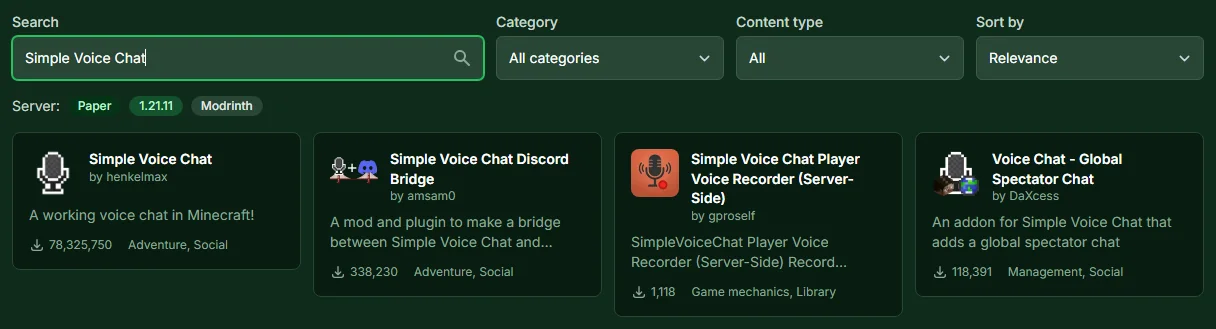
The panel then reports two things: that the plugin is installed and which port Simple Voice Chat received. The port is a dedicated UDP port just for voice chat. It is not the port your friends use to connect, and it does not conflict with the Bedrock port used for cross-play.

Step 2: Restart and Check Readiness
Click Restart now. Until the restart, the server keeps running with the old state; only afterwards does it load the plugin. In our test, the server log showed after the restart that the voice chat had started on the assigned port.
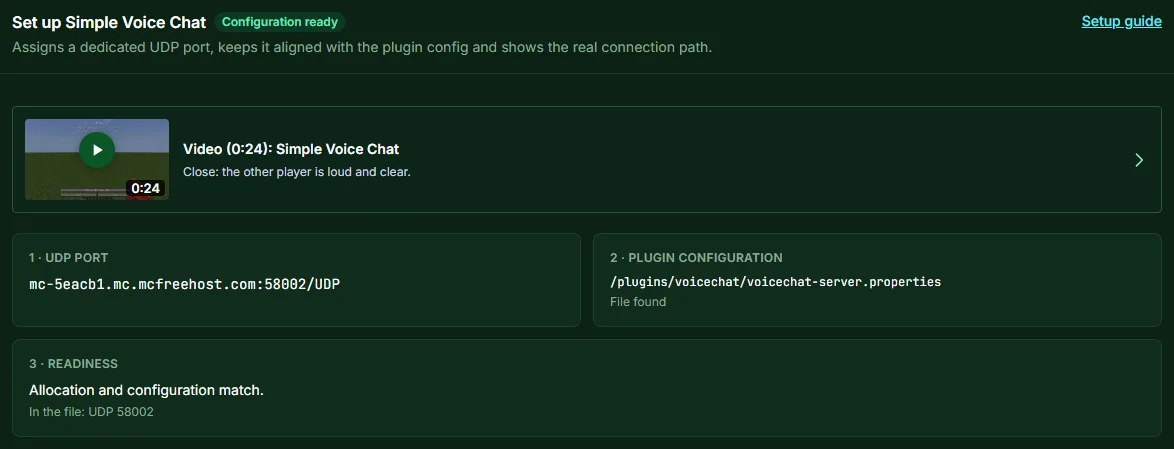
Then reload the Plugins page. The Set up Simple Voice Chat section appears there. It shows three items:
- UDP port: your server's address with the port for voice chat.
- Plugin configuration: the file
voicechat-server.properties, which Simple Voice Chat creates on first start. - Readiness: whether the port in the file matches the assigned port.
If it says Configuration ready at the top, everything is entered. In our test this was the case right after installation; you only need the Assign port & configure button if it says Setup incomplete. The short video in the section shows what the voice chat sounds like in the game.
Step 3: Adjust Settings (Optional)
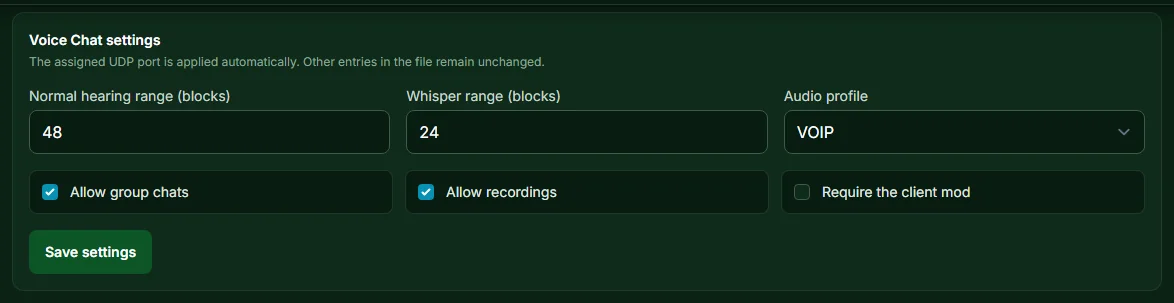
Under Voice Chat settings you change the most important values without opening the file yourself. The port is applied automatically, and other entries in the file stay as they are.
| Setting | Default | What it does |
|---|---|---|
| Normal hearing range (blocks) | 48 | how far normal speech can be heard, 1 to 512 blocks |
| Whisper range (blocks) | 24 | range when whispering, at most as large as the normal hearing range |
| Audio profile | VOIP | the audio codec; the alternatives are AUDIO and RESTRICTED_LOWDELAY |
| Allow group chats | on | whether players may use group chats |
| Allow recordings | on | whether players may record the voice chat |
| Require the client mod | off | on: the server kicks players without the mod |
Keep Require the client mod off as long as not everyone has the mod. Otherwise the server kicks friends without the mod, and Bedrock players cannot install the mod at all. After Save settings, you need another restart for the values to take effect.
Step 4: Install the Mod for All Players
Everyone who wants to speak or hear installs Simple Voice Chat in their Minecraft Java. The official downloads are on the project page; the mod is available for Fabric, Forge, NeoForge and Quilt. According to the official FAQ, it works most reliably when everyone has the same version of the mod as the server.
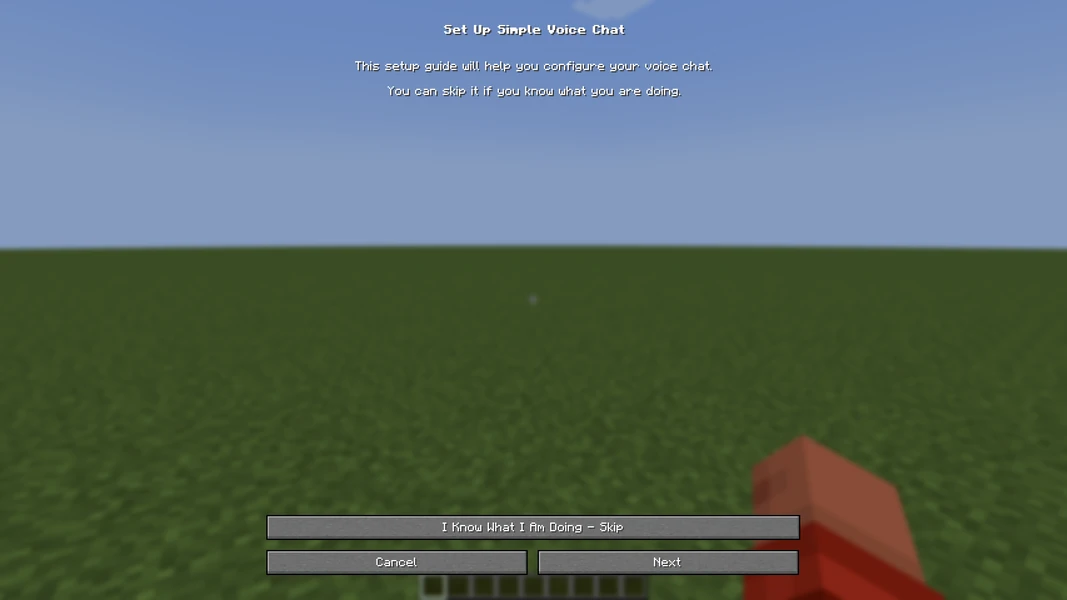
On the first join, the mod tells you in chat that it needs to be set up. Pressing the V key opens a short setup: choose a microphone, choose speakers, and talk via push-to-talk or voice activation. Your players don't enter a port; according to the FAQ, only the server needs to have the port open.
How your friends get onto the server in the first place is explained in the guide Minecraft Server with Friends.
Step 5: Test in the Game
The readiness check in the panel verifies the port and the file, but not a player. You do the actual test in the game: as an operator, enter /voicechat test <playername>. According to the official guide, the command checks that specific player's connection to the voice chat.
A browser-based port checker doesn't help here. The voice chat runs over UDP, and according to the official guide, generic port checkers cannot reliably test a UDP port.
If It Doesn't Work
- “Not connected” appears in the game: Check in the panel whether it says Configuration ready and whether you restarted after installation. Then run the test command for the affected player.
- One player hears nothing, the others do: Usually that player is missing the mod, or it doesn't match the Minecraft version. With V they can check their microphone and speakers.
- The section says “Setup incomplete”: Click Assign port & configure and restart afterwards. If the file is still missing, the server starts once with the plugin; Simple Voice Chat creates it then.
- You want to get rid of the voice chat again: Uninstall the plugin under Installed plugins. In our test, the panel released the port again when doing so.
Simple Voice Chat on Fabric
If your server runs Fabric instead of Paper, Simple Voice Chat is a mod there. You then find it via the Mods card instead of Plugins. On mod servers, the file is located in the folder config/voicechat. We did not go through this route for this guide; afterwards, check in the Set up Simple Voice Chat section whether it says Configuration ready.
FAQ
Does Simple Voice Chat cost anything? No. The plugin and the mod are free. The panel assigned the dedicated voice chat port on our free test server without any extra booking.
Can Bedrock players join the voice chat? No. According to the official FAQ, Simple Voice Chat only runs in Minecraft Java; technically, such a voice chat cannot be implemented in Bedrock. Bedrock players who join your Paper server via cross-play can play along but hear nothing.
Does everyone have to install the mod? Only those who want to speak or hear. Without the mod, you can still join according to the FAQ, as long as you leave Require the client mod off.
Do I need to open a port on my router or in the panel? No. The panel assigns the UDP port itself and enters it in the plugin's file. Your players don't need to open any port.
Does it also work with Discord or Mumble? According to the FAQ, Simple Voice Chat needs no other service and runs completely on its own. There are separate extensions for connecting to Discord, which we don't describe here.
My server is asleep. Does the voice chat keep working after it wakes up? A free server goes to sleep after 15 minutes without players and wakes up on the first connection attempt. How long that takes on average and how you keep it awake is covered in Minecraft Server 24/7 for Free. We did not test the voice chat right after waking up for this guide; if in doubt, check it with the test command.
Sources and Verification
Verification: We carried out the steps in the panel on October 30, 2026 on our own free test server running Paper 1.21.11: installation via the plugin search, automatically assigned UDP port, restart with the voice chat started in the server log, defaults 48, 24 and VOIP, and release of the port on uninstall. The information about Simple Voice Chat itself comes from the official documentation, read on October 30, 2026:
- Frequently asked questions: Simple Voice Chat FAQ: mod required on the client, joining without the mod possible as long as the mod isn't required, all loaders compatible with each other, no Bedrock, same versions recommended, only the server needs the open port.
- Server setup: Server Setup: test command
/voicechat test, generic port checkers are unsuitable for UDP. - Server configuration: Server Config: hearing range 48, whisper range 24, codec VOIP, AUDIO or RESTRICTED_LOWDELAY, group chats, recordings, kicking players without the mod.
- Client setup: Client Setup: setup using the V key.
- Plugin page: Simple Voice Chat on Hangar: client mod for Fabric, Forge or Quilt required, default port 24454 UDP, which the panel at mcfreehost replaces with a dedicated port.
- mcfreehost: plugin search and installation, “Set up Simple Voice Chat” section with settings and limits, sleep mode after 15 minutes without players; from our panel and our configuration.
- Not verified: a conversation with real players, the route via Fabric or NeoForge, the voice chat right after waking up from sleep mode.
Measured wake times: duration varies with load and queueing and can be substantially longer than one minute. Current P50, P95 and success rate: mcfreehost product facts.
Video (0:24): Simple Voice Chat
Our own captures from a demonstration environment. The version and setup shown may differ from your server.
- Close: the other player is loud and clear.
- He walks away. His voice fades.
- Out of range: no voice at all.
- He comes back. His voice is clear again.
2.6.23
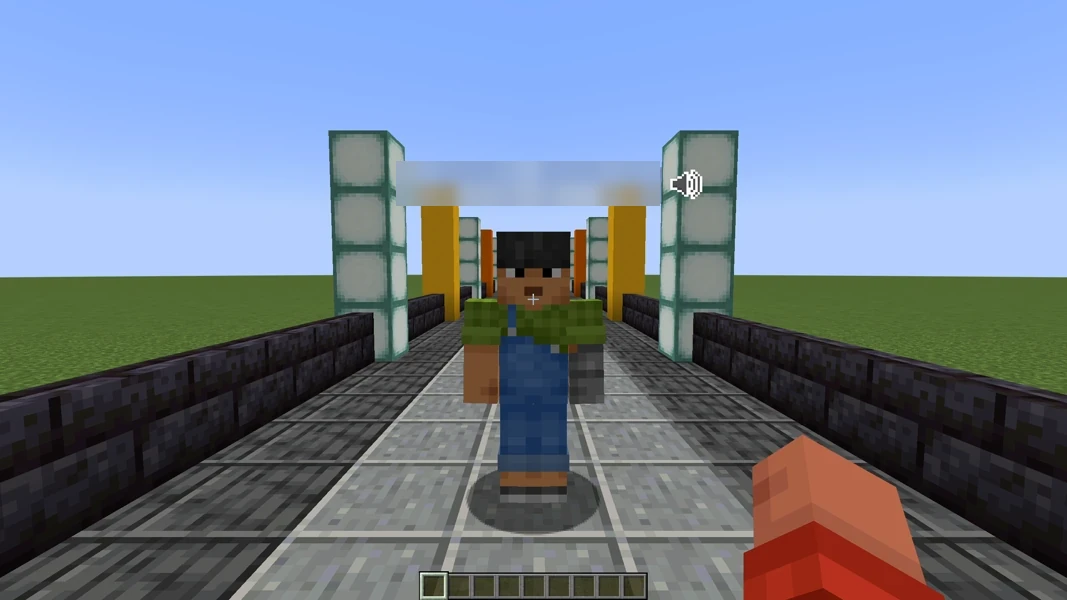
Simple Voice Chat 2.6.23 · Paper 1.21.1 · 2026-09-15
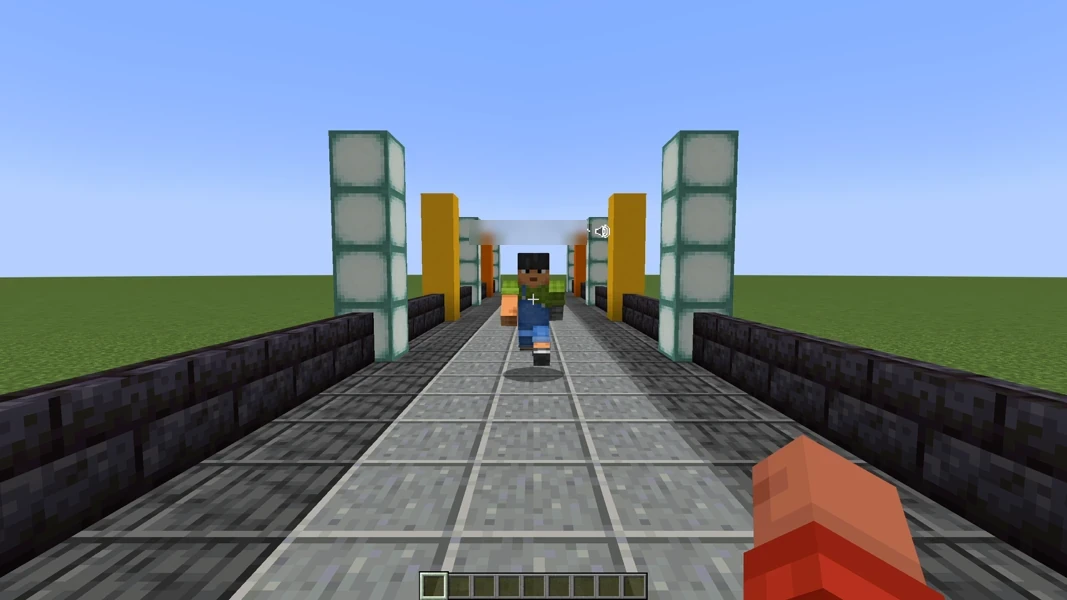
Simple Voice Chat 2.6.23 · Paper 1.21.1 · 2026-09-15
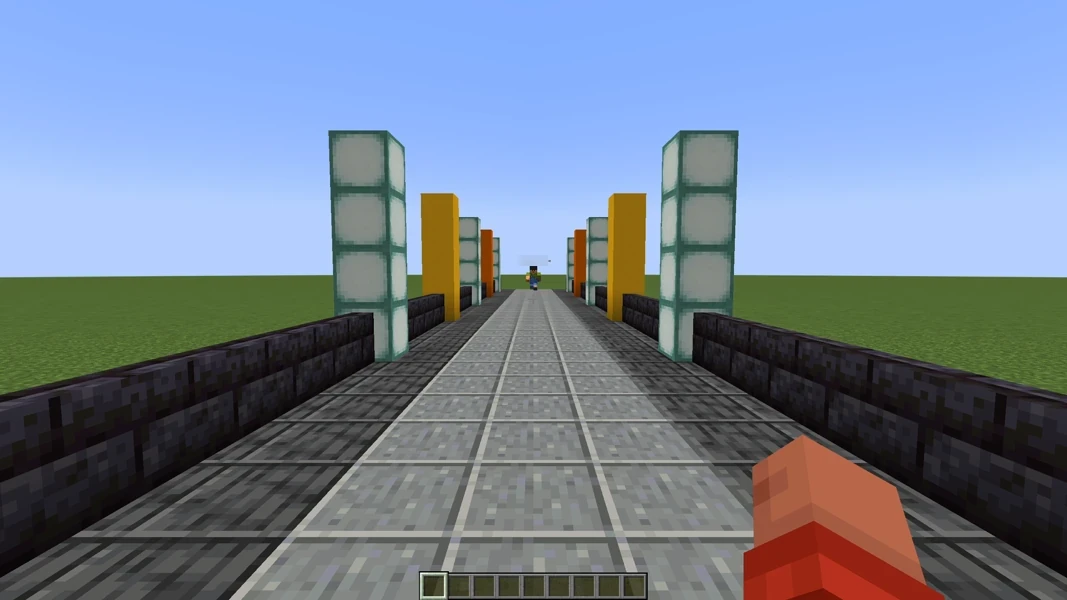
Simple Voice Chat 2.6.23 · Paper 1.21.1 · 2026-09-15
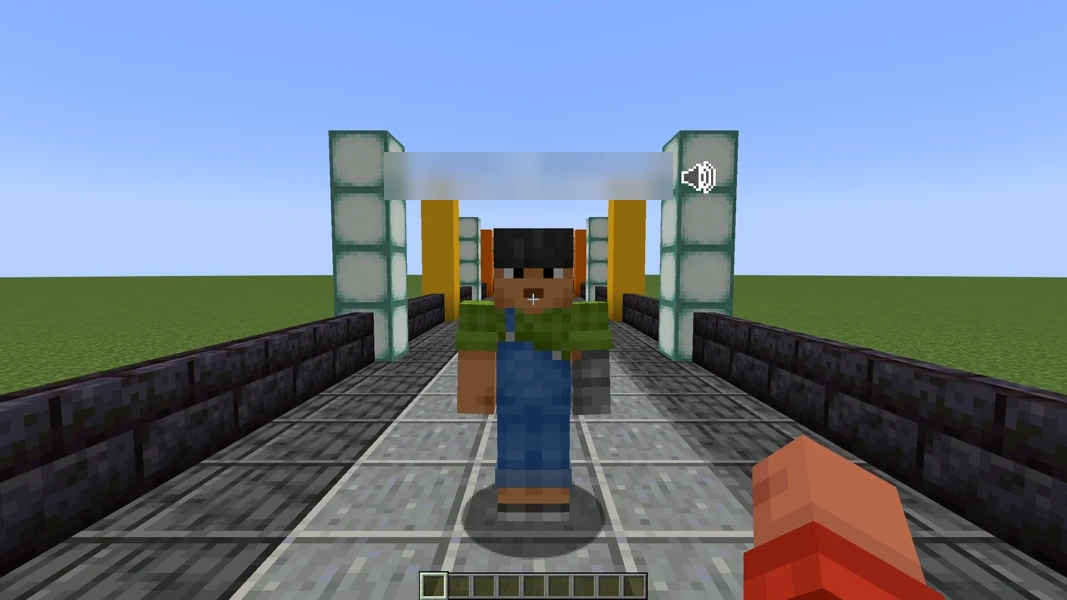
Simple Voice Chat 2.6.23 · Paper 1.21.1 · 2026-09-15