
The short answer: Start your server and open Game Settings → Gamerules in the panel. There you turn Keep inventory after death on and Nether access through portals off; both take effect immediately. You lock the End under Game Settings → Configuration with Lock the End, and then you restart the server. The End is only closed after this restart. Your worlds are kept, and you can open everything again later.
This guide is current as of October 30, 2026. We went through all the steps on October 30, 2026 on our own free test server with Paper 1.21.11, and the images come from there. What the rules do in the game is described in the Minecraft Wiki. We did not try out dying and walking through the portal with real players; what is still open is listed below under Verification.
The three wishes at a glance
| Wish | Where in the panel | When it applies |
|---|---|---|
| Keep inventory after death | Game Settings → Gamerules → "Keep inventory after death" | immediately |
| Lock the Nether | Game Settings → Gamerules → "Nether access through portals" | immediately |
| Lock the End | Game Settings → Configuration → "Lock the End" | after the next restart |
The order is worth following: first the two gamerules, then lock the End, then restart. The reason is explained further below.
Before you start
The server must be running. The panel sets gamerules directly on the running server; if it is off or asleep, the page shows "Server must be running". A free server goes to sleep after 15 minutes without players, so just start it in the panel.
Paper keeps separate rules for each world. On Paper, the main world, the Nether and the End each have their own set of gamerules. The switches in the panel therefore set a rule in all three worlds at once. A command in the console does not do that: in our test, gamerule keep_inventory true only changed the main world, and the rule stayed off in the Nether and the End. For someone who dies in the Nether, the Nether's rule applies.
Step 1: Keep inventory after death
- Open Game Settings → Gamerules.
- Type "Keep Inventory" into the search at the top.
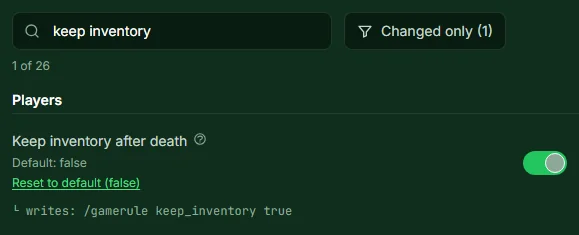
- Turn on Keep inventory after death. The panel reports "Keep inventory after death saved."
According to the Minecraft Wiki, players keep their items and their experience after death. Health and hunger are still reset, and effects such as potions disappear as usual.
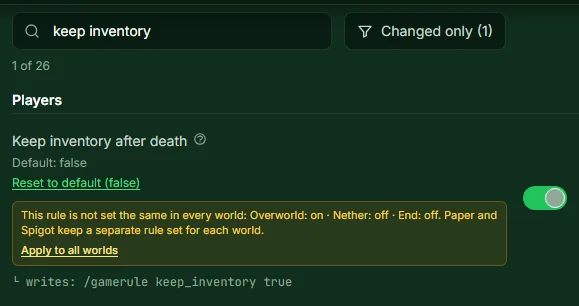
If you see a yellow notice under the rule saying it is not set the same in all worlds, someone changed it for just one world beforehand, for example via the console. The notice states in which world it is on and in which it is off. Click Apply to all worlds, and the rule applies everywhere.
Afterwards the rule looks like this, without a notice:
Step 2: Lock the Nether
- Type "Nether" into the gamerule search.
- Turn Nether access through portals off. The panel saves immediately.
Nether portals can still be built and lit afterwards, but they no longer take anyone to the Nether. The panel describes it that way itself, and the Minecraft Wiki explains the rule as a switch for whether the Nether can be entered via portals.
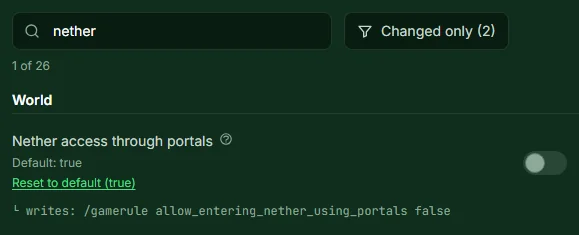
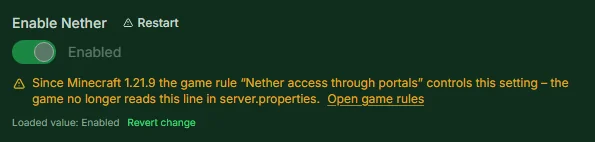
This gamerule has existed since Minecraft 1.21.9. Before that, the allow-nether line in server.properties controlled the Nether. On newer versions the panel therefore shows the Enable Nether field under Configuration as locked, with a notice and a link to the gamerules. If your server still runs an older version, the gamerule is missing; in that case you turn off Enable Nether there and restart. We did not reproduce this route on an older version.
Step 3: Lock the End and restart
There is no gamerule for the End. Paper controls it through the bukkit.yml file, and the panel has its own switch for that.
- Open Game Settings → Configuration.
- In the End dimension block, click Lock the End. Access then shows as "locked".
- Restart the server.
Only the restart closes the End. In our test, the End was still loaded before the restart; afterwards the server no longer knew the dimension. End portals that have already been built then simply don't work. The End itself stays saved, it just isn't reachable.

You only see the switch on Paper and other servers that read bukkit.yml. Vanilla and Fabric don't have this setting, and the panel hides the block there.
Why the order matters
After the lock, the server no longer loads the End. A gamerule that you change afterwards can therefore only be set by the panel in the main world and the Nether. If you open the End again later, the old state still applies there. So set the rules first and lock the End last.
Opening everything again later
- Nether: Turn Nether access through portals back on in the gamerules. Applies immediately.
- End: Click Open the End under Configuration and restart. In our test, the server loaded the End again after opening it and restarting.
- Keep inventory after death: Simply turn the rule off again.
After opening the End, it's worth taking a look at the gamerules: if a rule shows the notice that it isn't the same in all worlds, click Apply to all worlds.
FAQ
Do I have to restart for the gamerules? No. The panel reads the values live from the running server, and changes take effect immediately. Only the End lock needs a restart.
Will I lose my Nether or my End if I lock them? No. The lock only makes the dimension unreachable; the saved data stays on the server. The panel says: "Your world stays intact — it is just out of reach."
I set the rule in the console, but people still lose everything in the Nether. On Paper, a command in the console only applies to one world. Set the rule in the panel or click Apply to all worlds under the rule.
What is the command if I use the console after all?
Since Minecraft 1.21.11 it is gamerule keep_inventory true, before that gamerule keepInventory true. For the Nether and the End on Paper, you additionally need execute in minecraft:the_nether run … or execute in minecraft:the_end run … in front of the command. The switch in the panel is more convenient.
Can I lock the Nether for two weeks and then open it? Yes. The lock lasts until you turn the rule back on; you do that yourself at the desired time. For the End, a restart is needed afterwards as well.
How do I invite friends to the server? The guide Minecraft Server with Friends explains that. You can get your own server as a free Minecraft server at mcfreehost.
Sources and Verification
Verification: We carried out all the steps on October 30, 2026 on our own free test server with Paper 1.21.11 and checked the server log: a console command without execute only changes the main world, "Apply to all worlds" aligns all three worlds, the Nether rule applies without a restart, the End lock only after the restart, the rules are kept across the restart, and after opening it and another restart the server loads the End again. The meaning of the rules comes from the Minecraft Wiki, read on October 30, 2026:
- Gamerules: Minecraft Wiki: Game rule:
keep_inventorykeeps items and experience, while health, hunger and effects are reset;allowEnteringNetherUsingPortalsarrived with 1.21.9, and since 1.21.11 the rules in the console are lowercase with underscores. - mcfreehost: Gamerule page with search, notice for differing values per world and "Apply to all worlds", locked "Enable Nether" field, "End dimension" block with restart notice, sleep mode after 15 minutes without players; from our panel and our configuration.
- Not verified: a real death with the rule turned on, a player going through a portal, a Minecraft version before 1.21.9, what happens to players who are in the End at the moment it is locked.
Measured wake times: duration varies with load and queueing and can be substantially longer than one minute. Current P50, P95 and success rate: mcfreehost product facts.