The short answer: Download your world on aternos.org under Worlds, create a free Minecraft server at mcfreehost with the same Minecraft version, and upload the ZIP in the panel under Game Settings → Worlds → Upload world. Then click Switch on the new world and restart the server. If your Aternos server ran on Paper or Spigot, the Nether and End are separate worlds: in that case you upload three ZIPs and name them accordingly. Don't give up Aternos until everyone has found their stuff again on the new server.
This guide is current as of October 30, 2026. We ran through the upload on October 30, 2026 on our own free test server with Paper 1.21.11. For that, we packaged a test world the way Aternos delivers it for Paper: three ZIPs for the main world, Nether and End, with a marker in each dimension. The images come from this test. How the download works on Aternos is described in the Aternos help; we did not do a real download from Aternos. What is still open is listed below under Verification.
Before you start
Software: Check on Aternos which software your server uses, and pick the same one at mcfreehost. For plugins, Paper, Purpur and Spigot are available for free, among others; for mods Fabric, Forge, NeoForge and Quilt, plus Vanilla.
Version: Your new server needs the same Minecraft version as the world. You set it under Manage → Version. The panel rejects a world from a newer version and asks you to update the server version first. If the world is older than the server, the panel asks when switching, because Minecraft permanently converts it at startup; before that, it automatically creates a protection point.
Size: The normal form accepts archives up to 95 MB. Larger worlds you upload below it via Upload large world (resumable), according to the panel up to 10240 MB. The extracted world must fit into the 10 GB of storage of the free server.
Step 1: Download the world from Aternos
- Log in on aternos.org and open the Worlds page.
- Select the world and click Download. Aternos downloads it as a ZIP.
- Use your normal browser for this. The Aternos help advises against download managers and other programs.
According to the Aternos help, the download also works while the server is running. Still, tell your fellow players beforehand: anything built on Aternos after the download will be missing on the new server.
How many worlds you need depends on the software:
| Software on Aternos | What you download |
|---|---|
| Paper, Spigot and other Bukkit software | three worlds: the main world, …_nether and …_the_end |
| Vanilla, Fabric, Forge, NeoForge, Quilt | one world; the Nether and End are contained in it, in the folders DIM-1 and DIM1 |
That's how the Aternos help describes it: Bukkit software puts the Nether and End in separate folders, Vanilla stores them in the world folder. From Minecraft 26.1, the dimensions are located in the world folder under dimensions; we did not check this structure for the move.
Step 2: Create a free server and set the version
- Create a free Minecraft server with the same software your Aternos server had.
- In the panel, open Manage → Version and set the Minecraft version of your Aternos world.
The new server already has its own empty world named world. It doesn't get in the way: your Aternos world is added under a new name, and you switch to it afterwards.
Step 3: Upload the world
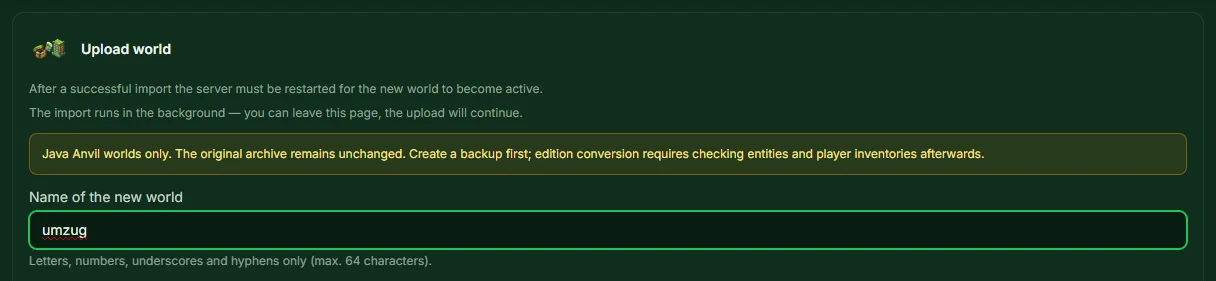
- Open Game Settings → Worlds and click Upload world.
- Enter a name under Name of the new world, for example
umzug. Letters, numbers, underscores and hyphens are allowed.worlddoesn't work, as your server already has that name. - Under World archive, select the ZIP of the main world and click Upload.
- The import runs in the background. In our test, the small test world appeared in the list after ten seconds at most; large worlds take longer.
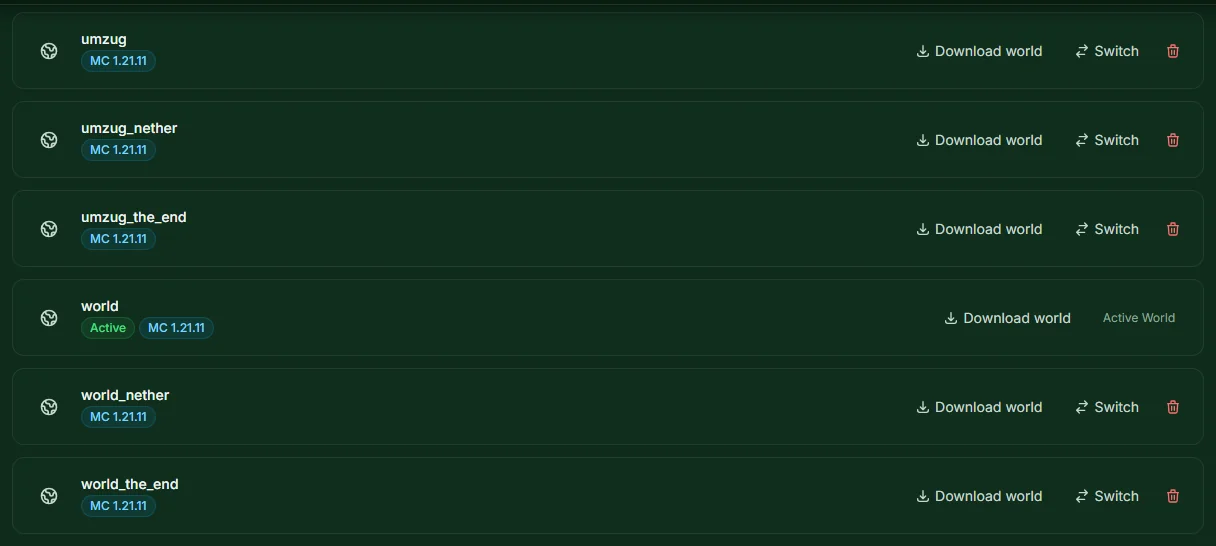
Paper and Spigot: add the Nether and End. Upload the two other ZIPs the same way, each on its own. As names, use the name of the main world with the ending _nether or _the_end respectively. If the main world is called umzug, the others are called umzug_nether and umzug_the_end. Paper uses these names to recognize which Nether and which End belong to the main world.
Don't pack all three worlds into one ZIP. The panel expects exactly one world per archive and otherwise reports "The archive does not contain a valid Minecraft world (level.dat is missing)."
Vanilla, Fabric and mod loaders: one ZIP is enough. The Nether and End are contained in the world. You can also load such a world onto a Paper server: in a test on October 28, 2026, the panel accepted it, and Paper moved the Nether and End into separate worlds by itself on first startup.
Step 4: Activate the world and restart
- In the list, click Switch on the main world, not on
…_netheror…_the_end. - The panel reports that the active world was changed and the server needs to restart. Restart it.
If the world has the same version as the server, the panel switches without asking. In our test, the server then started with the uploaded world, and the markers in the main world, Nether and End were all there.
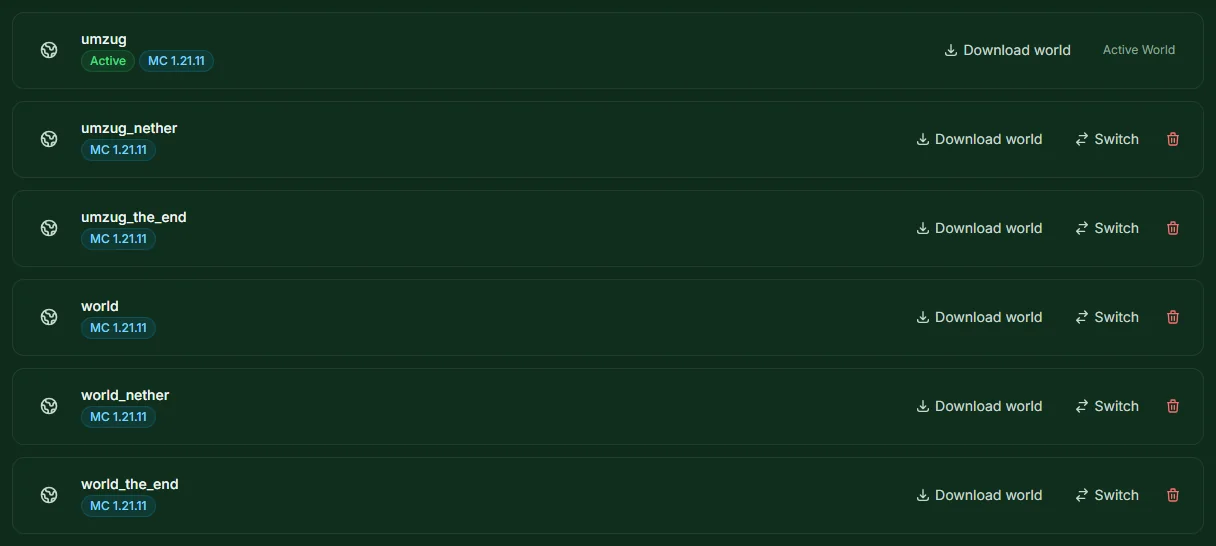
The empty world world stays in the list. If you don't need it anymore, delete it there.
What isn't in the world
The Aternos help describes the download as a ZIP with your world. Everything the server stores outside the world folder, you set up again at mcfreehost:
- Plugins and mods: reinstall them via the Plugins or Mods card. The plugins' data is not in the world.
- Whitelist: under Game Settings → Configuration, turn on "Enable Whitelist" and enter the names under Whitelist.
- Server settings: difficulty, game mode, PvP and the like under Game Settings → Configuration.
- Operators: assign them again in the console with
opand the player name.
According to the Minecraft Wiki, however, the player data comes along with the world: each player's inventory, ender chest and position are in the main world in the playerdata folder, from Minecraft 26.1 under players/data. With the same Microsoft accounts and online mode enabled, everyone should find their stuff again. We did not try this with real player data from Aternos.
Test first, then give up Aternos
- All fellow players join once. How that works is explained in the guide Minecraft Server with Friends.
- Everyone checks their inventory, ender chest and spawn point.
- You look at the base, chests and farms, including in the Nether and the End.
- You keep the downloaded ZIPs as a backup.
A free server goes to sleep after 15 minutes without players and wakes up at the first connection attempt. How to keep it reachable for longer is explained in Minecraft Server 24/7 for Free. What else sets mcfreehost apart from Aternos is described in the Aternos Alternative.
FAQ
Does the move cost anything? No. The free server and the world upload cost nothing. You don't need the mcfreehost migration assistant for this; it leads to a paid server.
I packed all three worlds into one ZIP and get "level.dat is missing". The panel accepts exactly one world per archive. Upload the main world, Nether and End as three separate ZIPs, as described in step 3.
My world is larger than 95 MB. Under Worlds, use the Upload large world (resumable) section. If the transfer breaks off, select the same file again and the upload continues. The world must fit into the 10 GB of storage.
My Aternos server ran on Paper, but at mcfreehost I want Fabric or Vanilla.
Then you need a world in the Vanilla structure. According to the Aternos help, Aternos converts it itself when you change the software there; afterwards you download the one world. Alternatively, you download all three worlds and move the DIM-1 folder from …_nether and the DIM1 folder from …_the_end into the main world's folder. We did not run through this route ourselves.
My Aternos server ran in cracked mode. According to the Minecraft Wiki, players in offline mode get a different identifier than their Microsoft account, and inventory and progress are tied to that identifier. What you should check before changing the login mode is covered in the guide Offline Mode for a Group of Friends. We did not test a move from a cracked server.
Does this also work with a Bedrock world? For Bedrock you need a free Bedrock server; it rejects a Java world. What the upload looks like there is explained in the guide Moving a Realms World to Your Own Server. We did not try the route from Aternos for Bedrock.
Sources and Verification
Verification: We carried out the upload on October 30, 2026 on our own free test server with Paper 1.21.11: three ZIPs in the structure of a Paper server uploaded as umzug, umzug_nether and umzug_the_end, switched the main world, restarted and found the markers in all three dimensions in the server log. The panel rejected a ZIP with all three worlds. On October 28, 2026, a test server additionally accepted a world in the Vanilla structure. The remaining information comes from these sources, read on October 30, 2026:
- Aternos help: Download your world (Worlds page, download as ZIP, normal browser, Nether and End separate on Spigot and Paper), Merge the Nether and The End into one world folder (folders
world_netherandworld_the_end, merging when changing software, manual steps) and Keep your world safe (download also while the server is running). - Minecraft Wiki: Java Edition level format (
DIM-1,DIM1,playerdata, new structure from 26.1) and Universally unique identifier (own identifier in offline mode). - mcfreehost: world manager with upload up to 95 MB in the browser and resumable upload, check for
level.dat, version check when switching, 10 GB storage and sleep mode after 15 minutes on the free plan; from our panel and our configuration. - Not verified: a real download from Aternos, a world with real player data, a cracked server, Bedrock worlds, the world structure from Minecraft 26.1, an upload via SFTP, an older world on a newer server version.
Measured wake times: duration varies with load and queueing and can be substantially longer than one minute. Current P50, P95 and success rate: mcfreehost product facts.