Lewati ke konten

Until Des 31: 4 GB for €4 a month. On the yearly plan you pay at most €1 per GB of RAM, for Minecraft Java, Minecraft-Modpacks and eight more games.

See the offer

Set up with AI

Tell your server what to do. For free.

Connect Claude or ChatGPT to your server and handle everything in the chat: plugins, files, console, backups. No pass and no subscription, for every server at mcfreehost.

Free · every feature included

Works with ChatGPTClaudeClaude CodeCodex

Example · Claude mcfreehost connected

Install EssentialsX on my Minecraft server and restart it.

3 actions run: plugin found, installed, server restarted

Done. EssentialsX is installed and the server was back online after 41 seconds.

PluginVersionStatus
LuckPerms5.4active
EssentialsX new2.21active
You confirm reinstalls, software changes and account actions in your browser. You choose which servers the AI can see.

Connect in two steps

  1. Step 1

    Connect

    Opens Claude with the connector already filled in. Confirm it there and sign in with your mcfreehost account.

    Add to Claude (opens claude.ai in a new tab) Using ChatGPT, Claude Code or Codex? See the guide
  2. Step 2

    Get started

    Opens a new chat with this message:

    Use the mcfreehost connector to check the status of my server. Don’t change anything yet.
    Start chat in Claude (opens claude.ai in a new tab)

    The message is then in the input field. You send it yourself.

Included at mcfreehost at no extra cost:

  • Files
  • Console
  • Backups
  • Plugins and mods
  • Start and stop
  • Troubleshooting

Your AI provider may charge for its own service.

Watch your assistant at work.

Animated demo with sample data. No server is changed here.

Your AI assistant Example
Your AI assistant

Hi! I can check your server, change settings, create a backup or import a world. What should I do?

You

Check my server and the latest console messages.

The assistant is replying …
Your AI assistant

Your server is running. In this example, the latest console messages show no startup errors. I have not changed anything.

Check complete. Nothing was changed.
Your AI assistant

Hi! I can check your server, change settings, create a backup or import a world. What should I do?

You

Set the difficulty in my server.properties to normal.

The assistant is replying …
Your AI assistant

I saved difficulty=normal in server.properties. Your connection needs the appropriate file permissions for this.

Setting saved in this example.

Your AI assistant

Hi! I can check your server, change settings, create a backup or import a world. What should I do?

You

Create a backup and check that it has finished.

The assistant is replying …
Your AI assistant

The backup is complete. I then checked that it exists.

Backup complete and checked in this example.

Your AI assistant

Hi! I can check your server, change settings, create a backup or import a world. What should I do?

You

Import the world I uploaded.

The assistant is replying …
Your AI assistant

I can import the world you uploaded. First, confirm the world import in your browser.

Confirm the world import in your browser

Confirmed in your browser.

World imported in this example after your confirmation.

Three requests for your first try

My Minecraft server will not start. Read the status, version and latest console lines and explain what is wrong. Do not change anything yet.

Could not copy. Select the text and copy it manually.

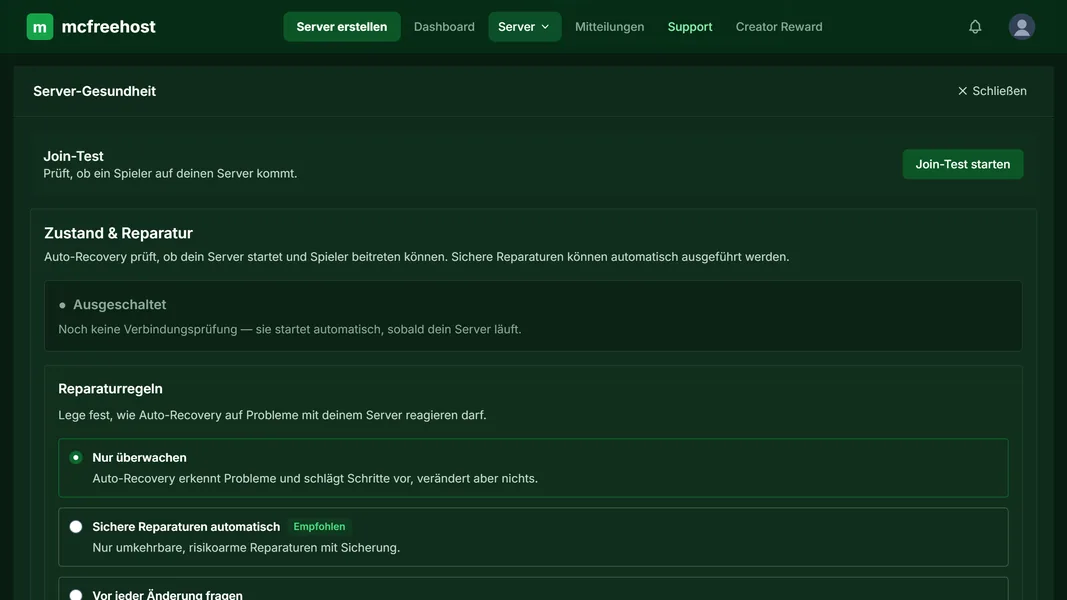
Health and join test · mcfreehost

Health and join test

Ask it to check the status and recent console messages before making changes.

Example views from the mcfreehost panel. You decide what your assistant can do there.

Add these three friends to the whitelist and then check that the whitelist is switched on.

Could not copy. Select the text and copy it manually.

Check whether this plugin fits my Paper version, and ask me before installing it.

Could not copy. Select the text and copy it manually.

What a request actually triggers depends on your server, your plan and the permissions you granted.

What your assistant can do on a Minecraft server

Example views from the mcfreehost panel. You decide what your assistant can do there.

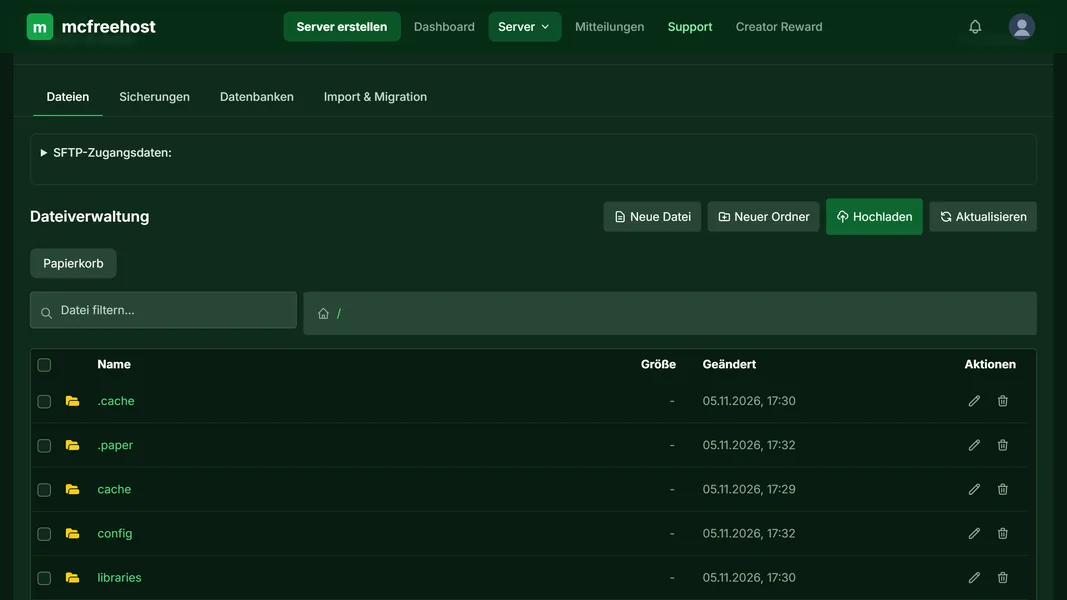
Files · mcfreehost

Files

Have settings in server files adjusted. You choose whether to grant file access.

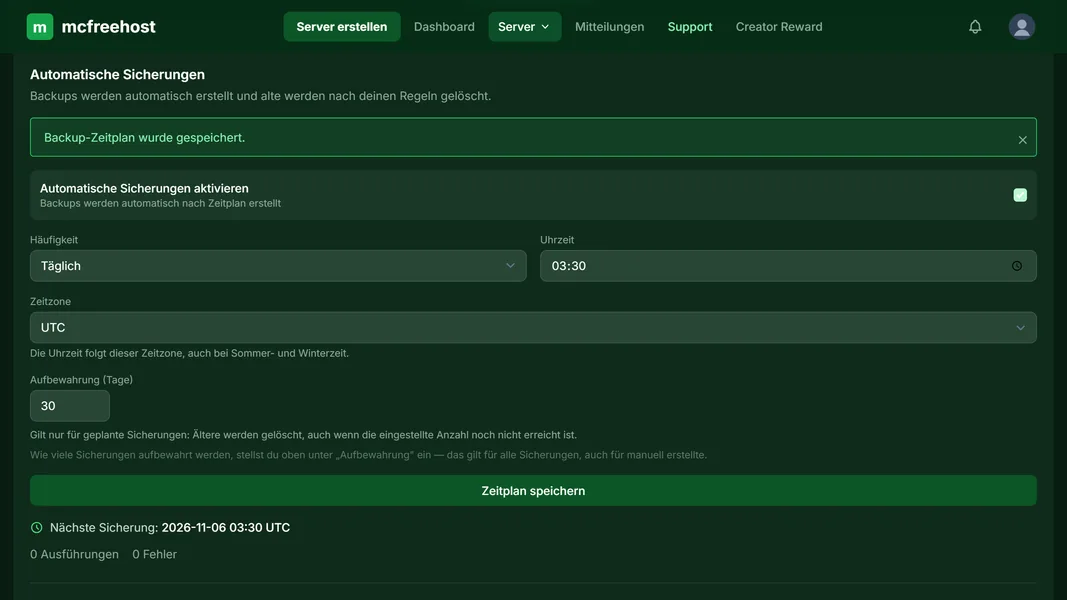
Backups · mcfreehost

Backups

Have backups created and their completion checked. You manage the schedule in the panel.

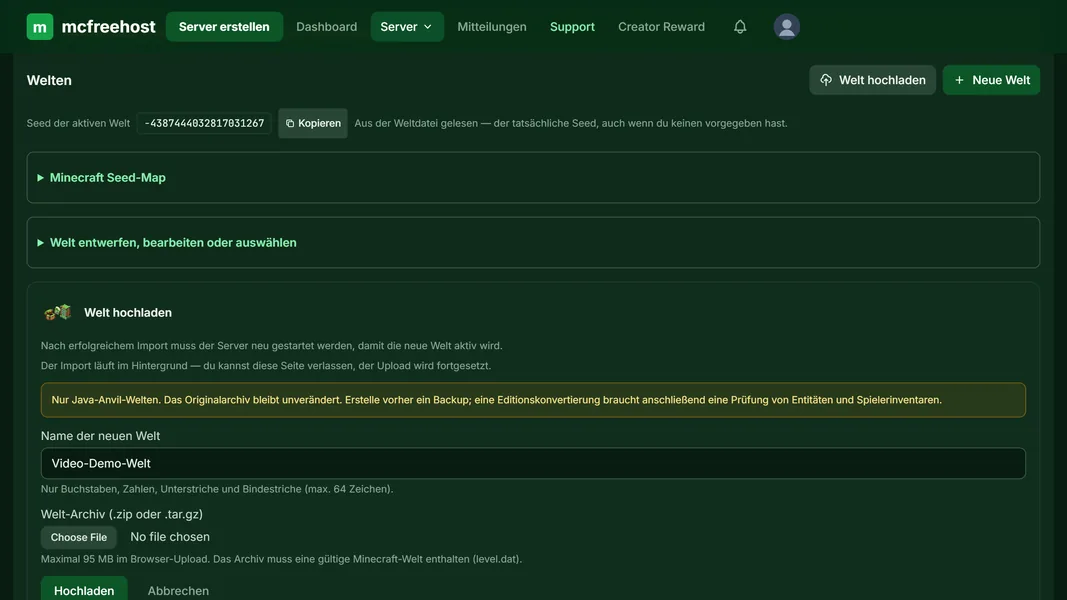
Worlds · mcfreehost

Worlds

Have an existing world imported. With the standard connection, you confirm this step in your browser.

Show every action of the interface

The catalogue lists every action of the interface, including some for other games and for premium features. On your server, only what fits the game, plan and server software applies, and only what you granted the access key.

Server & power

  • servers_list
  • server_status
  • server_start
  • server_stop
  • server_restart
  • reinstall_status
  • server_tps

Players

  • players_list
  • whitelist_read
  • whitelist_add
  • whitelist_remove
  • bedrock_allowlist_read
  • bedrock_allowlist_add
  • bedrock_allowlist_remove
  • bedrock_allowlist_enforce
  • bedrock_pocketmine_whitelist_read
  • bedrock_pocketmine_whitelist_add
  • bedrock_pocketmine_whitelist_remove
  • players_live
  • players_broadcast
  • player_message
  • players_history
  • unban_requests_list
  • unban_request_accept
  • unban_request_reject
  • whitelist_requests_list
  • whitelist_request_accept
  • whitelist_request_reject

Console

  • console_read
  • console_command
  • operator_reserve
  • log_share

Files

  • files_list
  • file_read
  • file_write
  • file_patch
  • directory_create
  • files_delete
  • trash_list
  • trash_restore
  • trash_purge
  • file_copy
  • file_rename
  • files_compress
  • file_decompress
  • server_icon_status
  • server_icon_set
  • server_icon_remove

Backups

  • backups_list
  • backup_create
  • backup_restore
  • backup_delete
  • backup_rename
  • backup_protect
  • backup_destinations_list
  • backup_destination_connect
  • backup_destination_bind
  • backup_destination_test
  • backup_destination_disconnect
  • backups_recovery_list
  • backup_cloud_restore
  • backup_incremental_create
  • backup_incremental_restore
  • backup_mirror
  • backup_schedule_read
  • backup_schedule_update
  • backup_settings_update
  • backup_files_browse
  • backup_files_restore

Schedules

  • schedules_list
  • schedule_create
  • schedule_update
  • schedule_delete
  • task_create
  • task_update

Configuration

  • config_read
  • config_write
  • bedrock_gamerules_read
  • bedrock_gamerule_set
  • eula_status
  • eula_accept

Worlds

  • worlds_list
  • world_create
  • world_switch
  • world_delete
  • world_studio_job_status
  • world_studio_cancel
  • world_studio_import
  • world_studio_snapshot
  • world_studio_snapshot_status
  • geoworld_search
  • geoworld_status
  • geoworld_start
  • geoworld_cancel
  • world_library_list
  • world_library_install
  • schematics_list
  • schematic_place
  • bedrock_worlds_list
  • bedrock_world_create
  • bedrock_world_switch
  • bedrock_world_delete
  • world_import_status
  • world_import_install

Versions

  • versions_list
  • version_status
  • version_preview
  • version_change
  • java_runtime_read
  • java_runtime_select
  • loader_builds_list
  • loader_build_change

Server software

  • software_catalog
  • software_preview
  • software_change

Plugins & mods

  • addons_list
  • addons_search
  • addon_versions
  • addon_install
  • addon_update
  • addon_remove
  • live_map_status
  • live_map_enable
  • live_map_continue
  • plugin_analysis
  • plugin_outdated_mods_status
  • plugin_outdated_mods_choose
  • plugin_outdated_mod_reenable
  • plugin_config_files
  • plugin_config_read
  • plugin_config_write
  • mod_settings_list
  • mod_settings_read
  • mod_settings_save
  • mod_settings_run_action
  • spark_diagnostic_start
  • spark_report
  • hologram_list
  • hologram_toggle
  • skript_list
  • skript_toggle
  • skript_reload
  • skript_modules_list
  • skript_module_save
  • worldguard_regions
  • worldguard_status
  • worldguard_reload
  • worldguard_global_flag
  • worldedit_reload
  • worldedit_group_access
  • veinminer_status
  • veinminer_apply_preset
  • chunky_status
  • chunky_prewarm_start
  • voice_chat_status
  • voice_chat_setup
  • voice_chat_save_config
  • voice_chat_repair_crossplay
  • voice_chat_restart
  • mc_settings_read
  • mc_settings_save
  • mc_settings_world_property
  • mc_settings_core_status
  • mc_settings_core_lookup
  • minecraft_maker_runs
  • minecraft_maker_create

Modpacks

  • modpacks_catalog
  • modpack_preview
  • modpack_status
  • modpack_install
  • modpack_update
  • modpack_settings_read
  • modpack_settings_write
  • modpack_versions
  • modpack_client_pack_read
  • modpack_client_pack_refresh
  • modpack_client_pack_rotate_link
  • modpack_client_pack_mod_mode
  • modpack_profile_find
  • modpack_profile_apply
  • modpack_rollback

Bedrock packs

  • bedrock_packs_list
  • bedrock_catalog
  • bedrock_pack_install
  • bedrock_pack_enable
  • bedrock_pack_disable
  • bedrock_pack_remove
  • bedrock_migration_status
  • bedrock_migration_start
  • bedrock_migration_confirm_join
  • bedrock_migration_cancel
  • bedrock_migration_revert

Server settings

  • notifications_read
  • notification_rules_update
  • notification_alerts_update
  • notification_quiet_hours_update
  • settings_read
  • settings_update
  • auto_update_read
  • auto_update_set
  • profile_quiet_hours_read
  • profile_quiet_hours_update
  • discord_webhook_read
  • discord_webhook_set
  • discord_events_update
  • discord_webhook_test
  • startup_variables_read
  • startup_variables_update

Metrics and history

  • metrics_current
  • metrics_history

Activity log

  • activity_list

Health and join test

  • health_status
  • join_test_start
  • join_test_status
  • health_crash_diagnosis
  • health_repairs_list
  • health_boot_repair
  • health_plugin_repair_preview
  • health_plugin_repair_apply

Databases

  • databases_list
  • database_create
  • database_delete
  • database_password_rotate

World export and import

  • export_start
  • export_status

Server address

  • subdomain_check
  • subdomain_change

Game tools

  • cs2_build_update
  • rust_wipe_schedule_read
  • rust_wipe_schedule_create
  • rust_wipe_schedule_cancel
  • rust_startup_params_read
  • rust_startup_params_update
  • rust_map_preview
  • cs2_map_pool_read
  • cs2_map_pool_write
  • cs2_match_status
  • cs2_match_load
  • cs2_match_control
  • cs2_map_change
  • ark_ini_read
  • ark_ini_write
  • ark_mod_order_read
  • ark_mod_order_write
  • valheim_worlds_list
  • valheim_world_activate
  • valheim_backups_list
  • valheim_backup_create
  • valheim_plugins_list
  • valheim_plugin_toggle
  • minecraft_players_admin_read
  • minecraft_player_op
  • minecraft_player_deop
  • minecraft_player_kick
  • minecraft_player_ban
  • minecraft_player_unban
  • minecraft_crossplay_read
  • minecraft_crossplay_set
  • minecraft_gamerules_read
  • minecraft_gamerule_set
  • minecraft_cracked_mode_read
  • minecraft_cracked_mode_set
  • minecraft_presets_list
  • minecraft_preset_apply
  • minecraft_anti_xray_read
  • minecraft_anti_xray_set
  • minecraft_item_obfuscation_read
  • minecraft_item_obfuscation_set
  • minecraft_end_access_read
  • minecraft_end_access_set
  • minecraft_gameplay_options_read
  • minecraft_gameplay_option_set
  • minecraft_many_players_read
  • minecraft_many_players_set

Reinstall

  • server_reinstall

Account

  • account_read
  • account_profile_update
  • account_billing_history
  • account_subscriptions
  • account_email_change
  • account_password_change
  • account_delete_request
  • subscription_cancel
  • subscription_reactivate
  • account_security_status
  • account_two_factor_manage
  • account_payment_methods_manage
  • account_order_prepare

Support tickets

  • support_ticket_create

All tools of the AI connector

Connect with Claude or ChatGPT

Add this address as a custom connector. Then sign in here and choose servers, permissions and duration. You don’t need a key for this.

Connector address

https://mcfreehost.com/api/automation/v1/mcp

Could not copy. Select the text and copy it manually.

Menu names are shown as they appear in English; in your language they read similarly.

What you need

You need Claude or ChatGPT on a plan that allows custom connectors:

In Claude

Claude: Free (one custom connector), Pro, Max, Ultra, Team and Enterprise.

On Team and Enterprise, a team owner adds the connector.

  1. Open “Customize” → “Connectors” and choose “+ Add” → “Add custom connector”.
  2. Enter a name, for example mcfreehost, and paste the address.
  3. Under “OAuth client”, choose “Register automatically”, then “Add”.
  4. Choose “Connect”, sign in here and allow access.

In ChatGPT (in the browser)

ChatGPT: Business, Enterprise and Edu, only in the browser at chatgpt.com.

On Business, an admin or owner adds the server. OpenAI currently lists no other ChatGPT plans for this.

  1. On chatgpt.com, open “Plugins” and choose “+” → “Add custom MCP server”.
  2. Enter a name, for example mcfreehost, and paste the address under “Connection”.
  3. Choose OAuth for sign-in, confirm the notice and sign in here.

As of 2 November 2026, according to the Anthropic and OpenAI help pages.

You have neither? Ask our support directly

For developers: Claude Code, Codex, REST

Terminal route with Claude Code or Codex

  1. Sign in to mcfreehost with the account your Minecraft server belongs to, and install Claude Code or Codex on your computer.
  2. Copy the two commands for your assistant and run them in your computer's terminal. They do not belong in the Minecraft console.
  3. In the browser you pick the servers, permissions and duration. Read access is enough to begin with; you do not need to copy a token.
  4. Start with a question that changes nothing, such as status, version and the latest console lines. Only once the answer checks out should requests with changes follow.

Sign in through the browser and share your server

Add the connection in your assistant and open the login. You sign in to mcfreehost and choose which server is shared with which permissions.

On this route you never type a token into a command.

claude mcp add --scope user --transport http mcfreehost https://mcfreehost.com/api/automation/v1/mcp
claude mcp login mcfreehost

Could not copy. Select the text and copy it manually.

Or: create an access key by hand

For programs without a browser login, create a personal access key in your profile. The examples show the setup with a placeholder that you replace with your token.

Important: this is not a command for your server's game console. Enter it in the terminal on your own computer (Windows: PowerShell, macOS and Linux: Terminal).

claude mcp add --scope user --transport http mcfreehost https://mcfreehost.com/api/automation/v1/mcp --header "Authorization: Bearer <TOKEN>"

Codex expects the access key in an environment variable. The export line only applies to the open terminal; for later starts, add it to your private shell profile.

Important: this is not a command for your server's game console. Enter it in the terminal on your own computer (Windows: PowerShell, macOS and Linux: Terminal).

export MCFREEHOST_ASSISTANT_TOKEN="<TOKEN>"
codex mcp add mcfreehost --url https://mcfreehost.com/api/automation/v1/mcp --bearer-token-env-var MCFREEHOST_ASSISTANT_TOKEN

Your own MCP clients need Streamable HTTP and a bearer token. If your client supports OAuth, sign in through the browser instead.

URL: https://mcfreehost.com/api/automation/v1/mcp
Header: Authorization: Bearer <TOKEN>

Every action is also available as a REST interface. The OpenAPI file describes each call.

Important: this is not a command for your server's game console. Enter it in the terminal on your own computer (Windows: PowerShell, macOS and Linux: Terminal).

curl -H "Authorization: Bearer <TOKEN>" https://mcfreehost.com/api/automation/v1/servers

<TOKEN> is only a placeholder here. Enter your real access key only in your assistant's private setup.

Before you ask for changes
  • On a sleeping free server, the start first reports that the server is being woken. The assistant should wait and check the status again.
  • Modpack installs, version changes and backups keep running even after the interface has accepted the request. Have the assistant check that they finished.
  • With file and console permissions an assistant can change a lot. Only grant them when a task really needs them.
  • Email, password and cancellation cannot be reached this way. You always confirm those steps yourself in the browser.
  • Revoke an access key you no longer need in your profile. It stops working immediately.

Free servers: wake first, then check

A free server at mcfreehost goes to sleep after 15 minutes without players. The world, plugins and settings stay as they are. When you ask your assistant to start it, the request wakes the server up. The reply only means that waking has begun. Have the assistant check the status afterwards until the server is really running, and only then read the console. That way it does not mistake a sleeping server for a crash.

Plugins and mods that match the version

The most common problem on a fresh Minecraft server is a plugin or mod that does not fit the server version. Paper loads Bukkit and Spigot plugins, while Fabric, Forge and NeoForge each need their own mods. Before any install, have your assistant read the server software and version and explain why the file fits. The free plan comes with 2 GB of RAM, so large modpacks are worth checking first. If the server will not start afterwards, the console usually names the mod that is missing or needs too much memory.

Invite friends without handing over everything

For a round with friends, one request is often enough: add these players to the whitelist and check that it is switched on. The assistant needs the player permissions for that, but neither your files nor your account. Give it exactly those permissions and only the server in question. Free and premium servers are shared one by one; a server you create later is never added automatically.

You decide what the assistant may do

  • Single permissions instead of full access: read, start and stop, players, console, files and account are separate choices.
  • Selected servers only: an access key sees the servers you give it. New servers are not added on their own.
  • Time limit: you decide how long an access key stays valid.
  • Withdraw at once: after you revoke it in your profile, every further request with that key is refused.
  • Log: every action appears with time and access key in your server's activity history.
  • Throttled requests: an assistant stuck in a loop cannot flood your server with calls.
  • No token in the chat: the access key belongs only in your assistant's protected settings field.

automation:unattended is the extra permission for work without browser confirmation. Without it, the assistant asks you in your signed-in account before it switches the server software, installs or updates a modpack, reinstalls the server, imports a world, changes the server address or opens a support ticket. Email, password, cancellation and account deletion always need your confirmation, even with this permission. Everything else it carries out right away within your permissions.

Questions about AI management at mcfreehost

Does this work with a free server too?

Yes. The interface comes with every server at mcfreehost, including the free plan, at no extra cost. For Claude or ChatGPT you need a plan with that provider that allows custom connectors; the provider may charge for it.

What happens if my server is asleep?

A start or restart request wakes it up. Loading the world takes a little time. Ask your assistant to check the status again before it sends console commands or looks for errors.

Which assistants can I connect?

The easiest are Claude or ChatGPT in the browser as a custom connector. If you prefer the terminal, use Claude Code or Codex; your own programs can talk MCP over Streamable HTTP or use the REST interface.

Can the assistant spend money or switch to premium?

No. Orders, a switch to premium and payments always need your confirmation in your signed-in account. Without you, the access key pays for nothing.

How do I take the access away again?

Revoke the access key in your profile under "Automation API". From then on mcfreehost refuses every request made with it. Changes the assistant made before stay in place; that is what backups are for.

Panel view

Escape closes the large view. At original size, you can pan within the view.