You create a Cobblemon server for your group of friends on mcfreehost via the Cobblemon page. Choose the pack you want and check the plan before ordering. After installation, you need a successful server start and at least one real join with the matching Java client instance. A green status indicator alone does not confirm this join.
Catalog checked: October 7, 2026. Cobblemon Official is listed there with pack version 1.8.1, Minecraft 1.21.1, Fabric Loader 0.19.5, and 6 GB RAM. The following images show our check from September 23, 2026. Any address visible in them is an example from that time; use the address of your own server in the current panel.
1. Decide on a Pack and Prepare the Group
Before ordering, everyone needs to know which pack you are playing. Cobblemon Official, Cobblemon Optimised, and COBBLEVERSE are different compilations. The same Minecraft version or the same Cobblemon mod is not enough to treat them as the same client.
| Offer in the checked catalog | Pack version | Minecraft / Fabric Loader | Catalog RAM |
|---|---|---|---|
| Cobblemon Official | 1.8.1 | 1.21.1 / 0.19.5 | 6 GB |
| Cobblemon Optimised | 1.8.1c | 1.21.1 / 0.19.5 | 4 GB |
| COBBLEVERSE | 1.7.42 | 1.21.1 / 0.18.4 | 8 GB |
The RAM values are the intended catalog tiers. They do not guarantee a fixed number of players or a specific memory requirement for a world that has grown. Official and Optimised were freshly installed on September 23, started, and joined with a real Java client. However, proof that Optimised starts with 4 GB is not a load test of your group.
Cobblemon is provided on mcfreehost in the paid offering. The free plan has 2 GB RAM and is not an offered Cobblemon pack route. If your group wants to start for free, first decide on a Minecraft server intended for that; the free guide explains this entry route.
COBBLEVERSE shows its own adventure content. The following existing video shows an arena, the Team Rocket tower, and the recording world of this pack. These structures are not automatically part of Cobblemon Official.
Also check your friends' devices: Cobblemon requires Minecraft Java Edition and the necessary mods on the client. The Cobblemon wiki lists Java as the supported edition. A purchased Bedrock version on a phone or console does not replace the Java client instance.
2. Check the Order and the First Start
- On the Cobblemon page, open "Configure Server".
- Check the specific pack, the offered RAM tier, and the listed price. On the Cobblemon page, Official is listed with 6 GB; check your own selection in the configurator.
- Complete the order and wait for the installation to finish. Do not start a second installation attempt while an installation is running.
- On the first start, read the console. Only the ready state without a subsequent crash is the basis for joining.
- Then copy the current connection address from the server overview.
Installation time depends, among other things, on the pack download and the initial world generation. This guide does not promise a fixed waiting time. If the start fails, note the first concrete error message and the pack version; ordering repeatedly does not solve a missing dependency.
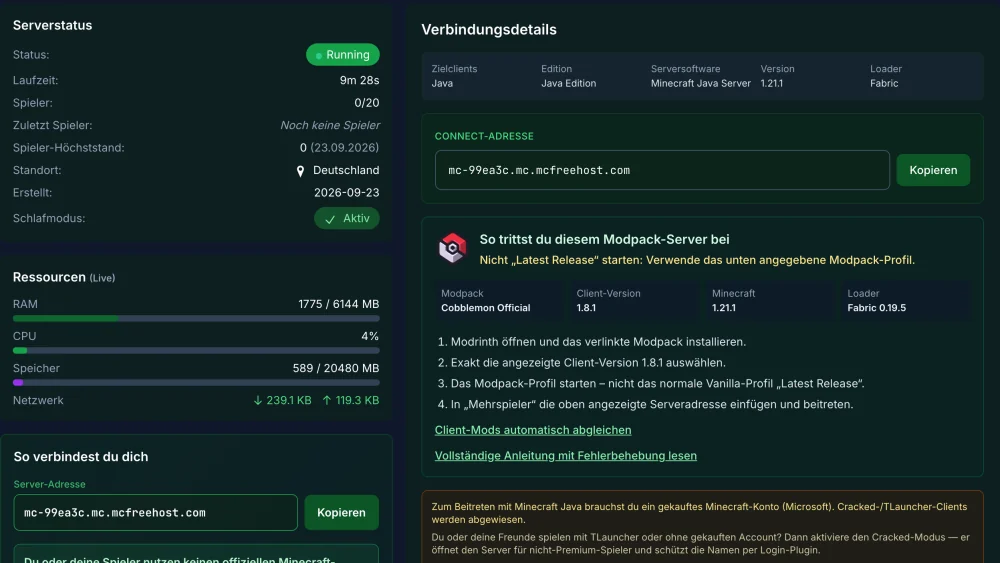
For a selected managed pack, installation takes place via the intended modpack route. Do not additionally upload the entire local launcher folder. Client-only mods and a server pack have different purposes. For startup problems, the guide on failed server starts helps.
3. Connect the First Friend with Exactly the Right Instance
In the panel, open the modpack card and copy the pack name, client version, Minecraft version, and loader. Also send your friend the connection address. This is more specific than an invitation with just the word "Cobblemon".
For the currently checked Official catalog entry, the mapping is:
Pack: Cobblemon Official Modpack [Fabric]
Pack version: 1.8.1
Minecraft: 1.21.1
Fabric Loader: 0.19.5
Address: copy from your own panel
If your installed pack release differs from this, pass on its actual data. An existing server is not automatically raised to this state by a new catalog release.
The official Cobblemon Modrinth guide explains installation, login, and starting the pack. For your connection:
- Install the matching pack, for the Official offering the Fabric release, in the agreed pack version.
- Start this pack instance. The normal Vanilla profile "Latest Release" is a different instance.
- Open the multiplayer menu and enter the address from the panel, including a port if one is listed there.
- Join and check whether the starter selection and the Cobblemon interface are accessible.
- Leave the server and reconnect. Check whether the chosen starter and the team are retained.
Additional graphics-only mods may differ between client and server. However, the required gameplay mods and their versions must match the chosen pack. Do not add any further mods during this first test; otherwise you mix up setup and troubleshooting. Further launcher and version cases are covered in Joining a Modpack Server.
Geyser is not a Cobblemon join route for Bedrock. Geyser fundamentally supports Java servers that can be joined without mandatory client mods. Its FAQ on mod compatibility excludes servers with required client mods. This is the relevant limit for Cobblemon; the blanket statement "Geyser can only do Vanilla" would be too broad.
4. Secure the Private Group
First let a player with normal permissions join. Do not give every friend OP so that the first join works. Client matching and administrator permissions are separate things.
For a private group, you can use the whitelist. In the panel console, Minecraft commands are entered without a leading slash:
whitelist on
whitelist add <Java-Spielername>
Replace the placeholder with the actual Java player name. Then test the join of an allowed account. The whitelist limits access; it does not replace logging in to a Minecraft account.
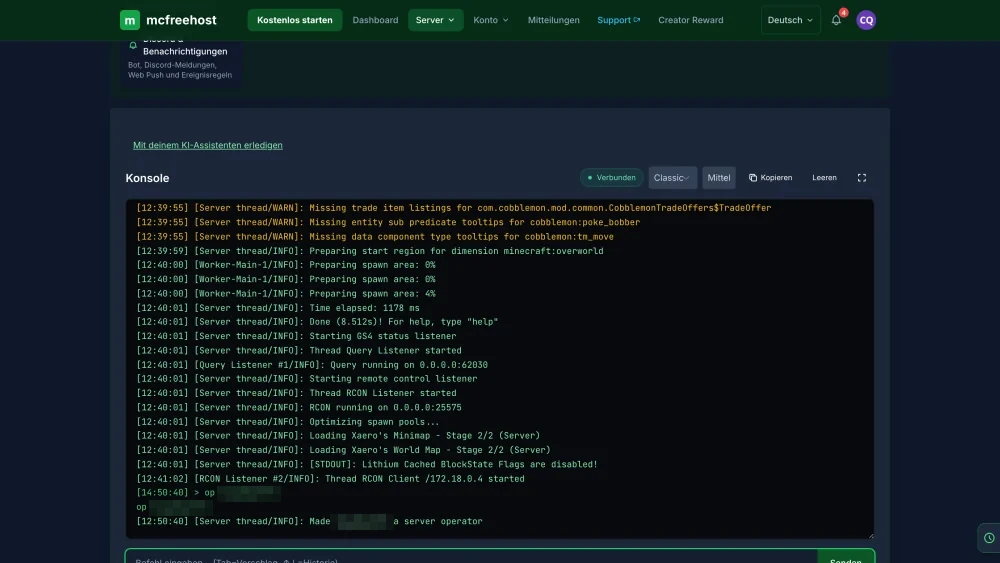
If you need administration commands, grant OP specifically to the intended administrator account:
op <Java-Spielername>
To revoke it, use deop <Java-Spielername>. Cobblemon administration commands can hand out Pokémon or change data. For individual allowed commands, targeted permissions are more sensible than blanket OP; see Cobblemon Permissions with LuckPerms.
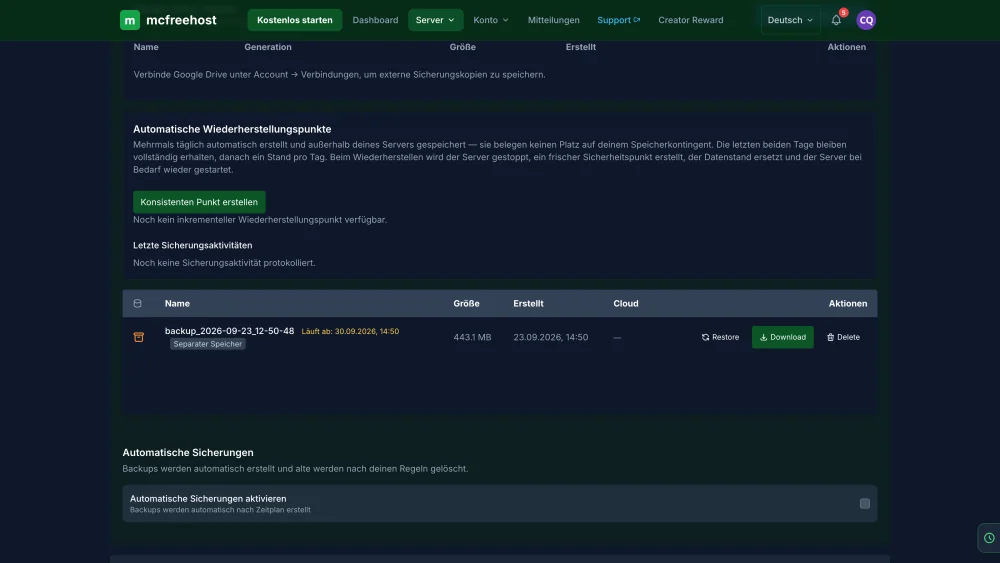
After a successful join, create a full backup. It must include the world, configuration, and Cobblemon player data. Team and PC are not an interchangeable part of a plain landscape file. Check that the backup has completed before you try extensions or updates.
5. Change Settings Only After a Successful Join
For the checked Cobblemon version, the server configuration is located in config/cobblemon/main.json. Back it up before making changes and start with a single value. The in-game editor of /cobblemonconfig saves the local client file on a dedicated server; it is not a substitute for the server file in the panel.
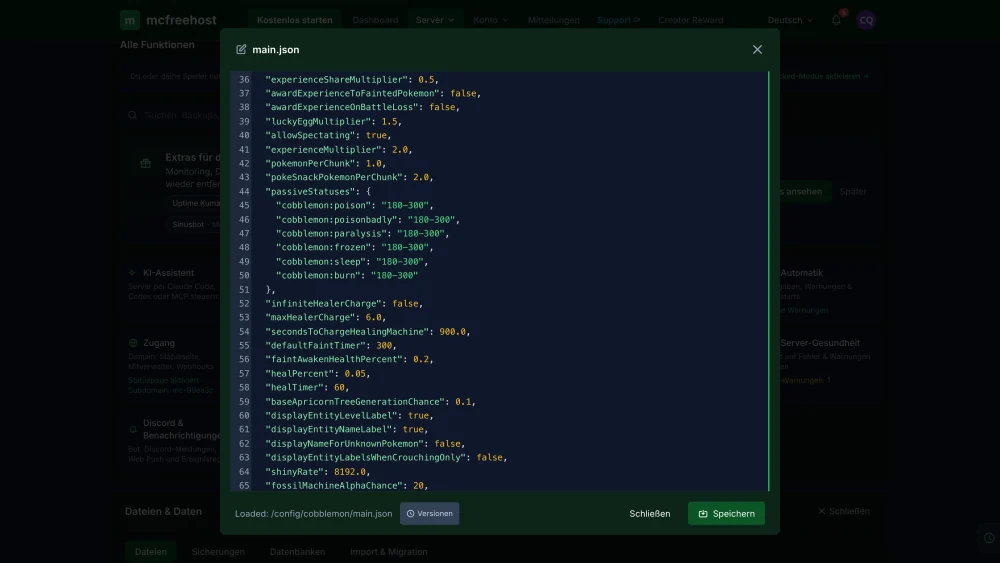
| Setting in Cobblemon 1.8.1 | Default | What to note when getting started |
|---|---|---|
pokemonPerChunk |
1.0 | Density upper limit; after lowering it, a reload is not enough for players who are already connected |
shinyRate |
8192 | Its own probability value; do not confuse it with a RAM or spawn quantity setting |
ticksBetweenSpawnAttempts |
20 | Interval between spawn attempts in ticks, not a guaranteed number of new Pokémon |
maxPokemonLevel |
100 | Maximum level; do not change it to fix a join error |
For 1.8.1, the following was checked on September 23: a JSON syntax error can cause the file to be overwritten with default values when loading. Therefore keep the working copy available outside the edited file. /cobblemonconfig reload reloads the configuration with the corresponding administration permission; some values need a reconnect or a restart afterward. The config reference explains the individual values and their reload behavior.
The historical load measurement of September 23, 2026 examined Cobblemon Official 1.8.1 with 6 GB and exploring bots. It was not a test with players battling or catching; Vanilla mobs were switched off and the planned 20-bot stage was not reached. No fixed capacity commitment follows from it. For measured values and a targeted distinction between memory and tick problems, read Cobblemon RAM and Performance.
If Start or Join Fails
| Observation | First sensible check |
|---|---|
| Server start aborts | First concrete log message, installed pack, and last change |
| Server is online, client is rejected | Instance actually started, pack release, and shared gameplay mods |
| Only phone or console fails | Bedrock instead of the required Java mod client |
| Configuration is back to default | Backup and JSON syntax; do not lose the original file through further attempts |
| Team or PC missing after a move | Completeness of the world and Cobblemon player data; do not back up an empty new state as a replacement |
Old bug reports for other Cobblemon versions are not a diagnosis for your current server. Note the version, time, and the specific message. Do not remove a content mod as an experiment from the only copy of the world: missing content can be lost on the next save.
FAQ
Can I create Cobblemon for free on mcfreehost?
Cobblemon is provided in the paid pack offering. The free plan has 2 GB RAM and does not offer this Cobblemon pack route. For a free start, choose a Minecraft server intended for that.
Is 4 GB enough for every Cobblemon group?
No, that is not proven. The Optimised release was installed, started, and joined with 4 GB. Official is listed in the checked catalog with 6 GB. World size, addons, and actual activity change the load; a short start test does not guarantee trouble-free long-term operation.
Why does the join fail despite Minecraft 1.21.1?
The game version is only one detail. Also check the pack name, pack version, loader, and the client instance actually started. Official 1.8.1, Optimised 1.8.1c, and COBBLEVERSE 1.7.42 are different packs.
Do all friends have to be operators?
No. Joining normally requires matching game software and, if applicable, a whitelist entry. Grant administration permissions separately and specifically.
Can I transfer an existing Cobblemon world?
Prepare a full backup with the world, configuration, and Cobblemon player data. Test the copy under the same intended Minecraft, loader, and pack combination. Check the team, PC, and known builds before you give up the previous state.
Does a new order update my old servers?
No. A new catalog state and an existing save game are separate. Plan a pack update with a full backup, a matching client version, and a review of the changes. The Cobblemon update guide covers the version change separately.
Sources and Verification Status
- Cobblemon: supported edition and installation.
- Cobblemon: installation with Modrinth.
- Official pack 1.8.1: Minecraft 1.21.1, Fabric, client and server release.
- Cobblemon configuration in tag 1.8.1: version-specific settings.
- Geyser: limits with required client mods.
Catalog data and external installation notes were checked on October 7, 2026. Our own installation, join, configuration, and bot measurements date from September 23, 2026. This article does not claim a new load test or a check of your individual world. The existing panel images show this historical state of verification.