Bring your save
File access and uploads are available. Moving a local save or switching platforms may require additional conversion steps. Back up the original files first.

PALWORLD · YOUR OWN WORLD
Catch Pals, build your base and play together on your own server.
Steam · Xbox · PS5 · Mac
€6.78 /month
Selection: 6 GB RAM · 18 GB storage
Choose RAM, term and server type to your liking.
Palworld · Starter: 6 GB RAM from €6.78/month · Recommended: 16 GB RAM €18.34/month
Claude Code · Codex
Connect Claude Code or Codex to your server. Ask your assistant to install plugins, adjust settings or investigate startup issues. You choose which servers it can access.
Check my server status. Do not change anything yet.See examples
Integration included at no extra charge. You need a compatible AI assistant; its provider may charge separately.
Starting points, not a performance guarantee: every tier allows 32 players; Pals, bases and concurrently active players drive memory usage. Pocketpair recommends 16 GB for a dedicated server. The price applies to the RAM tier listed.
| Use case | RAM | Price/month |
|---|---|---|
| 2–4 players, one base | 6 GB | €6.78 |
| 4–8 players, two bases | 8 GB | €9.32 |
| 8–16 players, several bases | 12 GB | €13.83 |
| Up to 32 players, Pocketpair recommendation | 16 GB | €18.34 |
| Large world, many Pals and bases | 24 GB | €27.36 |
MANAGE YOUR WORLD
Server name, password, player limit and community listing in one place. The image shows the existing Palworld settings panel.
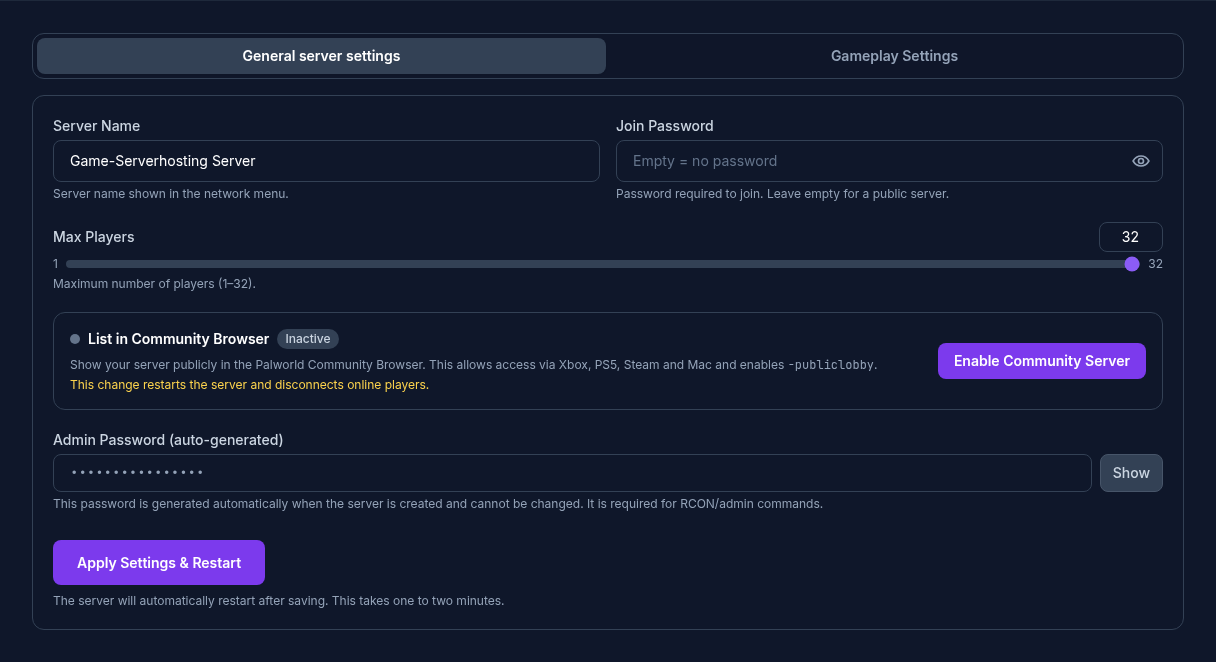
Crossplay connects Steam, Xbox, PS5 and Mac. Here is how to find your server:
Select resources and location. See the final price before ordering.
Set your server name, password and player limit in the panel.
Consoles find the server in the community list. PC players can also connect directly.
File access and uploads are available. Moving a local save or switching platforms may require additional conversion steps. Back up the original files first.
Create manual backups or set a schedule. Restoring a backup returns the world to the state recorded in that backup.
Browse the CurseForge catalogue for research. Automatic installation is not currently released. Check server version, mod type and platforms; consoles cannot use arbitrary PC mods.
Bases, working Pals, mods and uptime affect resource use alongside concurrent players. Pocketpair lists 16 GB RAM as an operating requirement and warns of a higher risk of memory crashes at 8 GB. Smaller packages do not promise capacity for 32 active players.
Scheduled restarts limit long runtimes, but do not fix software bugs or guarantee crash-free operation.
Official system requirements ↗