A cheap Minecraft server is the scope that fixes the limit you have actually reached. If the standard MCF Free server carries your world reliably, you don't need to choose a larger plan. If only the inactivity mode bothers you, check Always Online. If your setup does hit a resource or feature limit, compare the matching paid plan.
This guide starts from an existing Free world or a concrete need. It does not replace a general search for a supposedly cheapest host. For the first assessment of the free offer, use free hosting without a credit card.
As of: October 7, 2026. On the review date, the active MCF catalog also includes a paid 2 GB plan. A blanket statement like "a switch is only possible from 3 GB" describes the current offer incorrectly. The configuration actually offered and the confirmed checkout remain authoritative.
Which Limit Have You Reached?
Write down one concrete observation. "We need a better server" doesn't yet explain which change would help.
| Observation | Next check |
|---|---|
| Waiting after a break | Check sleep/start status; then compare the No-Sleep feature or a paid scope |
| Memory errors in the pack | Check the error message and pack requirements; then compare a suitable RAM tier |
| Lag while exploring | Examine tick time, world generation and simultaneous activity; clarify the cause before buying |
| Two parallel worlds | One simultaneously running Free server in the standard scope; compare the permitted operation for both worlds |
| Additional co-managers | One co-manager in the standard Free scope; compare the management options you actually need |
| One client fails | Match edition, client instance and version; buying RAM doesn't fix a wrong combination |
The Fabric guide helps with a version conflict. spark helps with server load. A plan change replaces neither a suitable loader nor correct authentication.
Measuring Three Paths Against the Same Need
The standard Free scope has 2 GB RAM and 10 GB storage. Two Free servers can be created, and one can run at a time. Inactivity, retention and other limits still apply. What matters is which of them actually bothers you.
| Operating mode | Scope |
|---|---|
| Free | No hosting payment and no payment method needed for the free base plan; check inactivity mode, resources, retention and your own backup |
| Always Online | Lifts the standard Free sleep mode for the valid period; check feature cost, duration, balance and resource needs |
| Paid plan | Check the chosen service scope with No-Sleep operation; compare RAM, other resources, total price and contract terms |
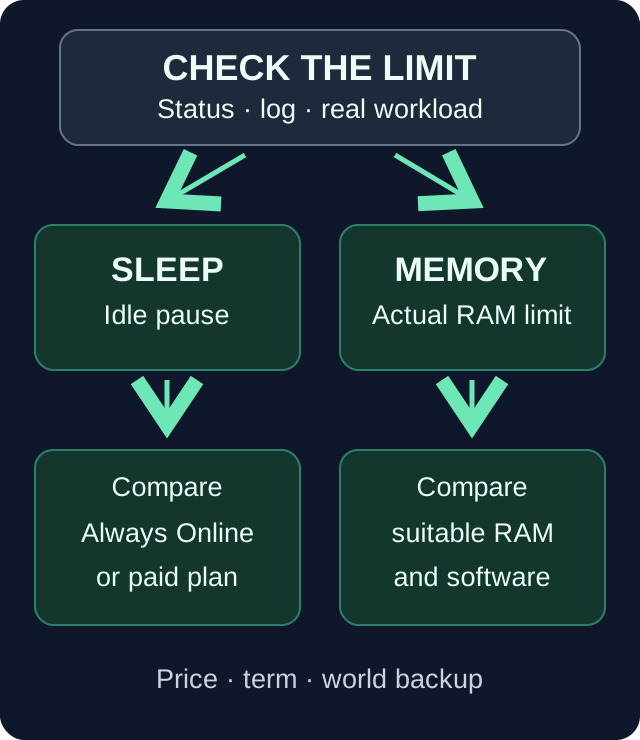
A No-Sleep feature and additional RAM solve different problems. Neither path implies a fixed player count or a performance boost.
Backups are not a blanket reason to pay right away: the standard Free scope we reviewed includes three restore points, two automatic and one manual. You check whether their setup and scope fit your plans. A paid plan may include more; compare the concrete difference instead of an invented Free gap.
Comparing Prices Against the Current MCF Offer
The following overview uses current price placeholders from the MCF catalog. The amounts refer to the stated scope; before booking, the total price and duration in the offered configuration are what count.
| Offer | Price basis per month |
|---|---|
| Standard Free scope with 2 GB | €0 hosting costs |
| Always Online as a single feature | €1.99 |
| Paid Java plan with 2 GB | €2.80 |
| Paid Java plan with 3 GB | €3.99 |
| Paid Java plan with 4 GB | €5.30 |
| Paid Java plan with 8 GB | €10.29 |
This is not a market comparison and no promise of a lowest price. Other providers, durations, editions and pack offers may have a different scope. Also compare other providers' offers by CPU equipment, storage and regular renewal price; an introductory discount says little about the following month. Compare only offers that cover the same need; 8 GB for a large pack is not an alternative price for an empty 2 GB server.
In the flow we reviewed, the Always Online single purchase uses account balance. A required minimum top-up and the price of the individual feature are different amounts. The active period and possible automatic renewal are also part of your planning. The detailed operating and expiry terms are covered in 24/7, Sleeping and Waking Up.
The paid switch may have its own payment method in the offered checkout. "Paid hosting" does not generally mean "credit card required". There, check the actual total amount, renewal, cancellation terms, payment method and any existing balance usage; don't assume a contract term from another provider's plan overview.
Two Concrete Decision Situations
Your world plays well, but the pause is annoying. First check whether the start after a pause really bothers you: after sleep mode the first join may fail at first, and depending on capacity a start may have to wait. Then check whether you only want to lift the standard inactivity mode. A valid Always Online feature can cover this need. It does not automatically expand the 2 GB RAM or 10 GB storage and guarantees no particular farm performance without players. If a paid plan includes further services you need, compare its actual additional scope.
A modpack needs more resources. First check the pack name, version, server files and the documented requirements. Modpacks can have their own minimum tiers and a different product slug; first choose the software and pack, then check the price of the same configuration. The Java prices in the table above apply only to the Java plan named in each case. A No-Sleep feature creates no additional memory. Only then choose a suitable resource tier that is actually offered and check the running setup. The Cobblemon RAM diagnosis shows why plan RAM, Java heap and measured usage should be considered separately.
In both cases, a successful switch is not proof that every other problem has been solved. More RAM can fix a memory bottleneck; it does not make a faulty plugin correct and does not eliminate every long tick time. Keep the starting state and the observed error.
Securing the World and Order Before the Switch
Back up the complete state you need: world, configuration, pack version and relevant extension data. Note which server is to be switched. Merely exporting the visible terrain is not enough if your progress also lives in mod data or a database.
Check already active features and their expiry. If a paid plan already covers a function, it should not be planned as a necessary additional payment. After the switch, check the actual status instead of precautionarily buying the same function again. Unclear remaining duration or payment is something you clarify with support on the existing order.
Inform your fellow players about a possible restart. Keep a plan change separate from a simultaneous Minecraft downgrade, loader change or world import. Returning to a previous plan does not automatically make a damaged world version compatible again.
Using the Offered Upgrade Path
Open the correct existing server and its offered switch path. Choose the concrete paid scope deliberately; a 2 GB switch can be a plan change without a RAM increase. So check the named service, not just the number.
The documented switch path updates the existing server and is not an order to create a new empty world. During a running installation or an unavailable selection, it cannot simply be applied. Wait for the actual confirmation and, if the result is unclear, don't start a second purchase on suspicion.
If a payment has gone through but the server doesn't yet show the confirmed scope, keep the receipt and status. Another order can cause double costs and doesn't help with assignment. Note the time and the concrete order and have its state checked.
Testing the Same World After the Change
Compare displayed resources and booked scope. Then, with your previous compatible clients, check joining, the known spawn, inventory and the features of your group. Verify a harmless saved change after a normal restart.
If you changed the sleep mode, check the actual No-Sleep status and period. If you booked RAM, re-check the earlier load case under comparable conditions. An empty server after the switch is not a fair comparison with your earlier full play session.
If the game state is unexpected, don't immediately put an arbitrary backup over the new world. Back up the current state, check the active world and player identity, and then choose the appropriate way back. A billing problem and a game state problem each need the right check.
FAQ
What is the cheapest solution for our Free world?
If the current scope meets your verified need, no switch is necessary. If there's a problem, investigate its concrete cause and compare only the service needed for it.
Do I have to choose more than 2 GB for the paid switch?
On the review date, the active MCF catalog includes a paid 2 GB plan. Use only the selection offered in the concrete switch path and decide deliberately on the plan scope; the RAM number alone doesn't name its added value.
Does Always Online help with a RAM bottleneck?
The single feature lifts the standard Free sleep mode. For additional RAM, you check a suitable resource tier. Pack compatibility and the actual cause of the error still apply.
Will my world be preserved during the upgrade?
The documented switch path works on the existing server. Back up the complete game state beforehand and check the world, inventory and settings afterwards. This is no guarantee for simultaneous version or loader changes.
Do I absolutely need a credit card for a paid plan?
Check the payment methods actually offered at checkout. Paid and credit-card-required are not the same thing; a feature purchase from balance may also use a different path than a plan switch.
Should I pay again if the result is unclear?
First check the existing order, payment and server status. A second blind order can cause double costs. Keep the receipt and clarify the concrete discrepancy.
Sources and Review Status
- PaperMC: Resource parameters and runtime.
- PaperMC: Player limit and world load from view/simulation distance.
The MCF catalog, Always Online bookability and the documented switch path were checked on October 7, 2026. The decision situations are examples, not new benchmarks or assurances about other providers' contract terms.
Measured wake times: duration varies with load and queueing and can be substantially longer than one minute. Current P50, P95 and success rate: mcfreehost product facts.