A free cracked Minecraft server is technically a Java server with altered account verification. At mcfreehost, there is a software- and version-dependent panel route with login protection for this. Whether you need it is something you clarify before enabling it: Bedrock crossplay alone does not require a cracked Java mode, and an expired Microsoft session is renewed in the launcher first.
This guide helps a small private group choose the right login and preserve an existing save. The hosting is free within the verified Free scope, not the Minecraft license. Use a properly obtained edition; a server password does not replace a right to use the game.
Last checked: October 7, 2026. The software limits mentioned refer to the current MCF panel route. They do not say that the respective login project fundamentally does not support other Minecraft versions.
Keep Four Terms Apart
| Term | What it actually decides |
|---|---|
| Minecraft account and session | Regular sign-in of the game being used |
| Server address | Which server a client connects to; it is not a password |
| Server-specific login | Additional sign-in for the names that the installed login system manages through it |
| Whitelist and permissions | Who is admitted and what an admitted player may do |
With online-mode=true, a normal Java server checks connecting accounts against the Minecraft account database. PaperMC on server.properties explains this. online-mode=false removes this check on the server. It neither creates a Minecraft license nor automatically a secure identity.
A suitable login protection can protect registered names with an additional sign-in. Before the first registration, with a faulty configuration, or after the extension fails, however, different conditions apply. "Nobody can take over your name" is therefore not a general promise.
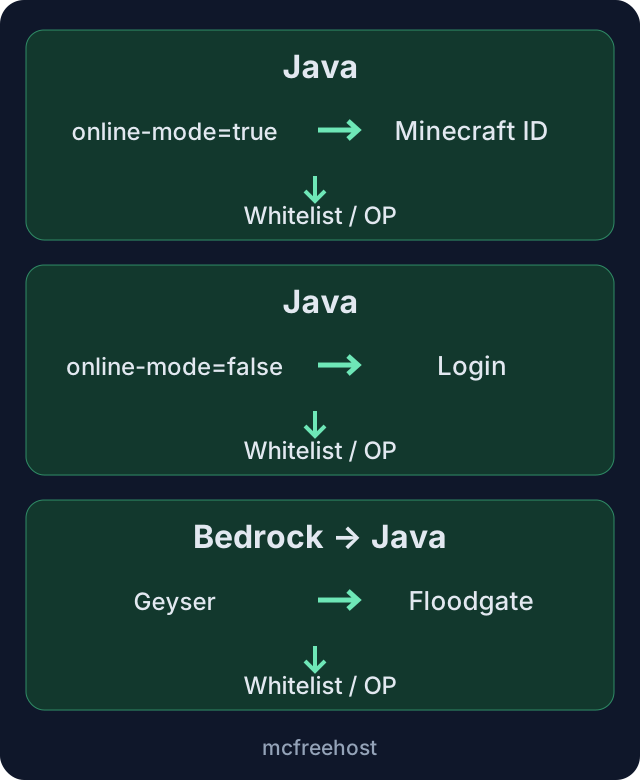
The graphic separates three sign-in routes. The Bedrock route applies to a supported Java crossplay server; a native Bedrock server is a different environment.
Does Your Group Even Need Offline Mode?
First look at the specific situation. With "Invalid session", the affected player closes the game and launcher, signs in again with their regular account, and tries to join again. Do not change the login for all players because of a single expired session.
For phone or Bedrock on Windows, you check the crossplay status and the Bedrock port. In a supported Geyser setup, Floodgate allows Bedrock authentication without an additional Java account. This does not mean that every Java player without a valid session has to be let in.
| Your situation | First sensible route |
|---|---|
| Everyone uses regular Java accounts | Use normal account verification and check launcher sessions |
| Java and Bedrock should play together | Test the supported crossplay route and both ports |
| A specific Java login is rejected by the server | Compare the error message, account, and the actual server mode |
| Deliberately deviating server-specific login | Check supported software, backup, and login behavior beforehand |
| Large Fabric pack with an additional login mod | Check pack compatibility and resources separately; not automatically included in the 2 GB Free plan |
For the invitation and the shared play test, use Minecraft with Friends. A new auth configuration does not replace a suitable edition, pack version, or reachable address.
Which Software Does the MCF Panel Route Support?
The verified Bukkit/Paper route uses LibreLogin with an intended Minecraft range of 1.8 to 1.21.1. In addition, the Java runtime must match the bundled login plugin. An old Paper server is therefore not suitable on the basis of its Minecraft number alone.
For Fabric, the panel route checks a range of 1.14 to 26.2 and looks for an actually matching EasyAuth build including the necessary Fabric API. A number within the range is not a promise that every mod combination works. With an unknown version, a missing build, or an unsuitable runtime, activation must be rejected.
The project pages LibreLogin and EasyAuth describe their login features. Which release MCF installs and supports, however, is determined by the specific panel route. Do not additionally install a second login system just because its project lists more current features.
Do not blindly switch a production server to an older Minecraft version. World format, mods, and player data may be incompatible. If the existing setup is not supported, prepare a suitable separate test environment. The Fabric guide explains version matching.
Before the Switch: Secure Data and Responsibility
Note the Minecraft version, server software, and existing login extensions. Back up the world, inventory data, permissions, and the data of the login system in use. Keep this copy separate from the experiment. A backup of just the visible terrain is not enough if player inventories or an auth database are affected.
When switching the login mode, matching names do not automatically mean the same player identity. UUID mapping and the data migration of the specific login system can determine which inventory, which ender chest, and which permissions are loaded. Check known contents with the accounts actually intended; do not copy other players' files on a hunch.
Decide who carries out the switch. Regular players do not need a shared MCF owner password to join. Permissions for a co-manager and operator rights in the game are separate decisions.
Use the Offered Switch and Wait for the Start
- Open the correct Java server and the tab for cracked/non-premium players.
- Read the displayed software, version, or runtime notice. If the approval is missing, do not force it via
server.properties. - Make sure the group is informed about the necessary restart and the initial state is backed up.
- Confirm the offered activation with the server name and wait for the result.
- Then check the displayed login status and the current start. A green server status alone does not prove working login protection.
The MCF route checks whether the intended protection was loaded on restart. If this check fails, the activation is not successful. Do not work around such an error by removing the login folder or manually setting online-mode to false.
Installation and restart take different amounts of time depending on the environment. This guide does not promise completion with one click or after a fixed minute.
How Players Sign In
In the supported setup, an automatic login is intended for regularly recognized Java accounts. Floodgate Bedrock players should likewise not be forced into Java password registration in the appropriate crossplay setup. Verify this in practice; a failed recognition must not be understood as a request to enter a Microsoft password.
If the installed system requires a local registration, it shows the appropriate prompt. Newer EasyAuth releases on Fabric may offer an interface instead of chat commands; what counts is the display in the game. In the previous Bukkit flow, the commands are:
/register <neues_Serverpasswort> <neues_Serverpasswort>
/login <Serverpasswort>
The angle brackets mark placeholders and are not typed. Use a new password intended only for this server. It does not belong in normal chat messages, screenshots, recordings, or shared logs. The leading slash is required for a command sign-in.
Character rules differ between login releases. Follow the specific input hint instead of applying the rule of an old EasyAuth version to all new builds. For a wrong password or an already taken name, an authorized recovery path helps; do not delete the entire login database. In the support ticket, share the error message, version and server type, never a password.
Test Together Before Everyone Is Invited
Test with a normal player account without OP: join, required login, movement, inventory, and a harmless saved change. Disconnect and test the next join. Run this process for the other intended sign-in routes as well.
If a server-specific login is intended, an account that is not signed in must be kept from protected game actions. Set up a dedicated test name for this; do not test passwords or names of uninvolved people. Already registered, known names belong to their previous users.
If protection is missing, you end the experiment. If the inventory has changed or permissions are wrong, you check the identity mapping on the test environment. Do not grant OP as a fix for missing registration. For a private group, a suitable access list remains advisable in addition.
Switching Off and Returning After Errors
Use the same panel route to disable it. After that, regular Java account verification applies again; further Bedrock access depends on the supported crossplay setup. Check the intended accounts and their data again.
Turning off a switch is not automatically a complete data rollback. If the experiment changed data, restore the backed-up software, world, and login state together. Do not turn off the login plugin while account verification stays disabled; that would not be a safe way back. Do not delete login databases as an attempt to solve a password problem.
Free Limits Still Apply
The verified free plan offers 2 GB RAM and 10 GB storage. Two Free servers can be created, and one can run at a time. Login extensions do not turn this into an unlimited modpack offering or continuous operation. Sleep mode and retention continue to apply; details at 24/7 for Free: Check the Limits.
FAQ
Is cracked hosting the same as free Minecraft?
No. Hosting costs, playing entitlement, and technical account verification are separate things. The Minecraft EULA still applies; an offline switch or server password does not replace it.
Do I need the mode for Bedrock friends?
Not for Bedrock crossplay alone. First check Geyser, Floodgate, and the assigned Bedrock port on a Java server that supports them.
Is an offline server with a login plugin automatically secure?
The plugin has to fit, start correctly, and actually protect. Test the login without OP, as well as existing identities and permissions. An installed JAR alone is not proof of success.
Why does my Paper server not offer a switch?
The verified MCF route has software, version, and Java requirements. Paper newer than 1.21.1 lies outside the intended login range. Read the panel notice; a blind world downgrade is not a safe way out.
What do I do about an empty inventory after the switch?
Stop the experiment and check player identity and UUID mapping on the backed-up copy. If needed, restore the entire old state instead of renaming player files at random.
Which password do I have to use?
A separate, new server password following the input hint of the installed login system. Never the Microsoft, email, or MCF account password, and never in a normal chat message.
Sources and Last Check
- PaperMC: Account Verification and server.properties.
- LibreLogin: Sign-In and Identity Features.
- EasyAuth: Server-Specific Sign-In.
- Floodgate: Bedrock Authentication in a Java Setup.
- Minecraft EULA.
Product values and the MCF login route were checked on October 7, 2026. The guide describes preparation and testing; it does not claim a new live test of every software, mod, and account combination.
Measured wake times: duration varies with load and queueing and can be substantially longer than one minute. Current P50, P95 and success rate: mcfreehost product facts.