When Minecraft stutters for a friend, their frame rate may be low, their connection may respond with a delay, or the server may be processing its game steps too slowly. spark helps with a running server; it does not prove the cause of every stutter from a single number. Start with the specific observation during your shared play session.
This guide collects a manageable diagnosis for a small MCF group. A free server with 2 GB RAM has limited resources, but more RAM is not a blanket fix for every delay. If a pack doesn't finish starting at all, first follow the startup diagnosis.
Checked: October 7, 2026. The screenshots show an earlier Paper 1.21.4 test. Their values are neither a new MCF benchmark nor a promised level of performance for your world.
Write Down the Shared Observation
Note the time, location and action: Is someone flying into new terrain, is a farm running, or does even turning the camera stutter? Compare a second friend over the same period. "Only one person is affected" narrows down the diagnosis, but it does not yet prove that person's internet connection is the cause.
| Observation | Next comparison |
|---|---|
| Camera and image stutter | Check client FPS, graphics load and device |
| Blocks react late | Look at current server ticks and connection together |
| Only one friend gets disconnected | Compare their message, client and connection with a successful join |
| Server isn't running yet | Check the current startup log instead of a runtime profiler |
A TPS average over several minutes can hide a brief dropout. So note the time and look at matching time windows. Observe the normal in-game action during which the problem occurs; an artificially created extreme load answers a different question. If the world has only just been loaded after the server woke up, also measure a later running session: startup load and recurring load while playing are different situations. An empty server serves only as a comparison measurement and does not prove that your play session runs smoothly.
Check Whether spark Is Already Present
Paper has included spark since Minecraft 1.21. This is described in the Paper profiling documentation. First check the existing command and the current startup output. An error message for /version spark alone does not prove a missing plugin when the integration is built in.
For other server builds, you may need the matching plugin or mod build. A Bukkit plugin does not belong on a pure Fabric server. Check the support that matches the installed Minecraft and loader version before you add another file.
An authorized account can be given spark.tps specifically and, if needed, spark.profiler. The broad permission spark covers more than the first numeric comparison. The official command reference lists the respective permissions. Regular friends need neither profiler management nor MCF owner access to report the problem.
Read Tick Duration and TPS in the Right Time Window
Run this during the observed delay:
/spark tps
The normal target value of 20 ticks per second corresponds mathematically to a time budget of 50 milliseconds per tick: 1,000 ms divided by 20. The spark explanation of TPS and MSPT distinguishes tick rate from required tick time.
Besides the median, also read the upper values and the respective time window. The 95th percentile describes a distribution; it is neither the worst single value nor, on its own, proof of what players perceived. There is no universal threshold where nobody notices anything up to 19 TPS and everyone has the same experience below it.
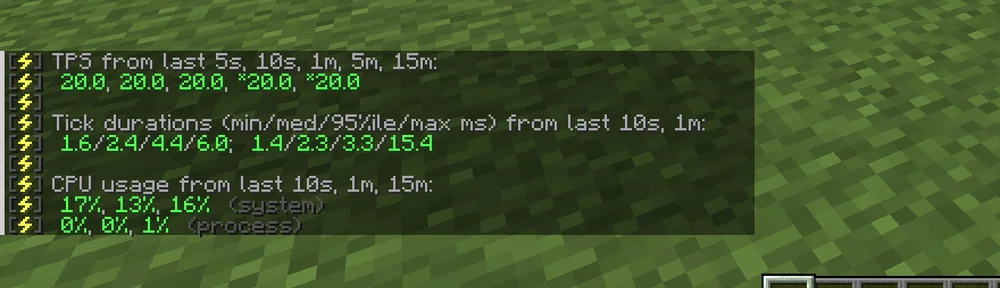
Earlier snapshot: In the last ten seconds, the figures are 20 TPS, with a 2.4 ms median and a 4.4 ms 95th percentile. This calm sample says nothing about your later farm or any other load moment.
System CPU and process CPU are different figures. Container limits, the number of processors and the measurement method also influence the interpretation. A low percentage alone does not prove that the main thread is processing quickly enough. Booked RAM, the Java heap and the total process memory are also considered separately.
Run a Limited Recording if Needed
If the numerical diagnosis still leaves the cause open, an authorized account can start the profiler. Agree on a short, normal in-game action and note the start and end:
/spark profiler start
/spark profiler info
Make sure the run includes the actual dropout. One minute can serve as a first sample of your own, but it is not a guaranteed minimum or success duration. For rare dropouts, you need a time span that fits the observation, and you end the recording deliberately.
The current commands distinguish the outputs: /spark profiler stop ends the run and normally delivers a report in the web viewer, whose link you can find again in the console output when the profiler ends (note it down together with your game situation); /spark profiler cancel discards it without the final upload. /spark profiler open opens a viewer for the running diagnosis and is not a local view directly in the game.
For a file instead of the normal upload, the current documentation gives:
/spark profiler stop --save-to-file
Check that your installed build offers this route, and note the reported file path. A locally saved file is not yet a publicly accessible viewer link. Do not additionally grant heap dump permissions just to collect a first tick diagnosis.
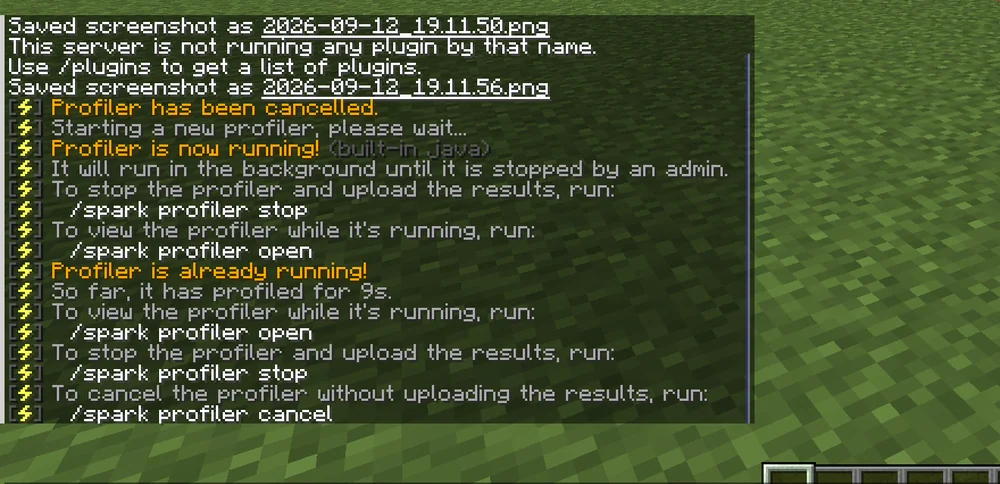
Earlier demonstration of the controls. The visible message about a plugin not being found and the built-in profiler running afterwards are not a current installation diagnosis of your server.
Check the Report Before Sharing
A spark report is not generally free of personal information. The official raw data description shows metadata with the name and identifier of the user who ran it. Other contents depend on the report type, server and options.
Check the actual report before passing it on, and share it specifically with the responsible support team. A viewer that has already been opened or published is not withdrawn by later cancelling a different run. Also don't treat a heap dump file like an ordinary anonymous screenshot.
For the first support diagnosis, add the time, pack or plugin versions, the number of active players and the observed action. Do not include other people's credentials or an uncontrolled full file export.
Derive a Verifiable Change from the Diagnosis
A call tree shows where time was observed in the measured period. A high share for a plugin is a starting point for further checking, not automatically proof that this plugin alone is faulty. The spark guide to lag spikes helps with reading it in the matching time window.
If new terrain areas are involved, generation and the loading of already existing chunks differ. Chunky can prepare an agreed area, but it does not take every later piece of chunk work off the running server. Check memory and load before you generate a large area.
If longer garbage collection pauses are involved, examine consumption and its progression. They do not prove a memory leak on their own, nor that an upgrade is enough. The Cobblemon RAM guide separates historical measurements from plan and process limits.
Back up the baseline before making a change. Change one justified thing and repeat the same in-game action under comparable conditions. Document individual values, time windows and player count; a coincidentally calmer second minute is not reliable proof of improvement.
FAQ
Does 20 TPS mean the server never stutters briefly?
No. An average can hide short dropouts. Check tick durations and the time window of the specific observation, as well as the client and connection.
Does current Paper need an additional spark plugin?
Paper has included spark since 1.21. Check the existing integration and its features before installing anything additional.
Is profiler open a local report without an upload?
It opens the viewer for the running diagnosis. For an explicitly local conclusion, check the save-to-file route offered by the installed build.
Is the report guaranteed not to contain personal data?
The official raw data documentation shows, among other things, the username and identifier in the metadata. Check the actual report before sharing it.
Does only one affected friend prove an internet problem?
It is a comparison hint. The client, connection and server-side processes for that player must be examined further based on the specific observation.
Should I immediately get more RAM when there is lag?
First establish the resource limit. RAM does not generally help against slow tick work, a faulty client or connection problems.