A Minecraft modpack on a free server may still be installing, may abort during startup, or may already be running while a friend can't join. These three situations need different next steps. Start with the current panel status and the log of this startup attempt. Don't randomly delete mods or the shared world first.
This guide walks you through the first failed MCF Free start. The verified 2 GB of RAM and 10 GB of storage are a limited hosting scope. A pack that is visible in the catalog is therefore not automatically suitable for Free. A large pack may need more resources just to load, before anyone plays.
Verified: October 7, 2026. This guide uses no invented startup time and no ranking of supposedly most common errors. What matters is your current attempt and the requirements of the selected pack release.
First identify which step is missing
| Panel state | What you check next |
|---|---|
| Installation is running or waiting | Installation progress and the current message; don't reinstall repeatedly |
| Start runs, then aborts | The complete new startup log and the first concrete cause of the error |
| Server is running, friend can't get in | Compare client pack, address and join error separately |
| Server is running, game stutters | Investigate runtime load; this is a different problem from a failed start |
An installation job in a queue is not yet a mod crash. An old error message on the screen also doesn't necessarily describe the attempt that is currently running. Compare the time, startup job and status. If an installation or restore process is already running, wait for its result.
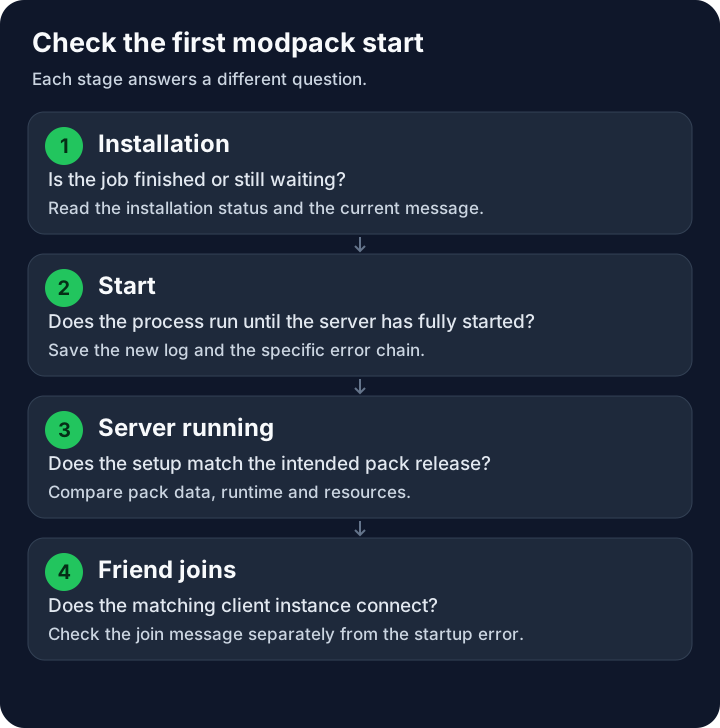
The flow separates installation, start and join. It contains no promised wait times.
Record the attempt before you change anything
Note the pack name and the exact pack release. Add the Minecraft version, loader including build, selected runtime, and the RAM and storage scope. The pack release is a different number from the Minecraft version. A pack can have several releases for the same Minecraft version.
Save the complete current console log as a file. If a crash report was generated, save that too. Not every abort automatically creates a file in the crash-reports folder. A screenshot showing only the last red line can hide the actual cause.
Stop the server before you change files. Before making changes to an existing save, back up the world, mod list, configuration and any necessary player data. Keep the original copy separate. If you give a log to support, remove credentials and other private content from the copy you share, but keep the error chain and relevant version information.
Read the cause from the error chain
Read the first concrete error and the associated Caused by sections. For Fabric, the official crash report guide explains how the report and the error chain relate. The last follow-up error is not always the trigger.
Could not execute entrypoint stage 'main' indicates an error when executing an entrypoint. This line alone does not prove a client-only mod. Only the named extension, the rest of the error chain and its installation documentation provide a well-founded next step.
A message about a missing dependency requires the right dependency in the right version and environment. A message about an incompatible Minecraft or loader version first requires a version comparison. The Fabric version guide covers this comparison in more detail.
With UnsupportedClassVersionError, the Java class version of a loaded file does not match the runtime in use. The Java reference describes this. Check the runtime requirement of the specific pack release. Don't switch Java, Minecraft and all mods to random newer releases at the same time.
Use the intended server pack
A client pack also contains extensions for visuals, controls or other client features. A server pack can therefore have a different file list. Don't copy a friend's entire mods folder onto the server to create supposedly identical lists.
Check the project page of the selected release: Is there a dedicated server pack, additional server instructions or explicitly required changes? Use that release and its accompanying guide. The Fabric installation documentation distinguishes between the environment and compatibility of mods.
Don't remove a mod solely because of its name. Some projects offer optional server features even though their client use is better known. If the specific release is clearly offered for the client only or is unsuitable for the server, first stop the server and back up the world, mod list and configuration. Then, in line with the pack's instructions, move the file into a separate folder outside mods; don't delete it at first. Keep a list of the changed files.
A clean test with the intended server pack is often more informative than numerous individual changes to the broken setup. For an existing world, even this test needs a separate copy and matching world and mod versions.
Compare resources with an actual finding
Read the requirements of the pack release. Compare them with the available Free scope, free disk space and the environment that is actually running. The booked RAM, the Java heap setting and the memory needs of the entire process are different quantities.
An explicit OutOfMemoryError message is an important memory finding. A single exit code 137 or the word Killed alone, however, does not yet prove why the process was terminated. Check additional resource and system messages, or have support match the specific attempt.
If the proven pack requirement exceeds Free, choose a smaller suitable pack or check the additional scope you need. The plan decision guide starts from this specific limit. A larger package neither fixes a missing dependency nor automatically fixes a wrong runtime.
Make a traceable second attempt
Change only the documented cause and then restart in an orderly way. Compare the new log with the saved original attempt. A different error message can mean that the first error was fixed and another one has become visible.
If individual mods need to be examined in isolation, use a separate test setup with a copy and an expendable test world. Don't start your only original world with content mods removed, because their blocks or data may go missing or be altered. The main mod, libraries and mandatory extensions belong together in the comparison. If a subset starts, all you know at first is that this combination works under the test conditions; the removed part may contain its own error. Halving the file list does not guarantee a fixed number of restarts: mods that depend on each other and multiple errors can distort the procedure.
For world, registry or generator errors, end the attempt before you try further versions. An unreadable world is not automatically permanently damaged; a missing or changed mod can also be involved. For Unable to read or access ..., read the exact file path and the preceding messages: the file may be missing, unreadable, have wrong permissions or invalid data. For world or save file errors, unclear identity mapping or repeated aborts, send support the complete relevant log section, the mod list, the versions and the last change. Don't restore world files on a hunch, and don't delete any player progress for diagnosis. Don't delete the world as a diagnostic measure.
After a stable start comes the first modpack join with a matching client instance; a started process does not yet prove a successful client join. Have two friends join with the identical pack release and check that the existing world and player data are intact. Only then is the problem solved. For a running but slow server, spark for lag analysis is the next separate step.
FAQ
Does an entrypoint error prove a client-only mod?
No. It shows a failed entrypoint. Read the extension involved, the error chain and its server requirements before you remove a file.
Does the mod list have to be identical on client and server?
Not entirely. Client-only and server-only components can differ. The versions required for the connection and game content must match the pack.
Can I start every offered pack with Free?
Visibility in the catalog is not a Free guarantee. Check the requirements of the specific release against 2 GB of RAM and 10 GB of storage, as well as the space actually available.
Does exit code 137 always mean too little RAM?
The code alone does not clearly identify this cause. Check additional messages and resource findings from the attempt in question.
Should I create a new world if there's a world error?
Back up and preserve the existing state first. Check missing mods, registry, generator and versions in a copy. A new world is no proof that the old one is beyond saving.
What information helps support?
Pack name and release, Minecraft and loader, runtime, resources, time, panel status and the complete new log. Add the last change and any existing crash report without private credentials.