MCServerHost and mcfreehost both offer free Minecraft hosting. As publicly read on October 7, 2026, the MCServerHost Free card lists 4 GB RAM and 10 GB storage; mcfreehost offers 2 GB RAM and 10 GB storage on its Free plan. The larger advertised memory is a real point of comparison. On its own, it does not prove higher tick performance or suitable modpack compatibility.
This comparison helps your small group before you start or switch. It shows verifiable offer details, differences in how well each claim is documented, and a comparable test of your own. No account was created and no game server was ordered for MCServerHost; its statements are provider claims, not our own runtime measurements.
Which Site Belongs to Which Provider?
The similar names do not mean a shared account. This comparison uses https://mcserverhost.com/ for MCServerHost and https://mcfreehost.com/ for mcfreehost. The MCServerHost site names Coritan LLC as the operator. Use the right domain for login, support and export; a password or server record cannot be transferred between the portals.
Documented Free Scope and Open Conditions
The MCServerHost details come from the publicly rendered home page and Free configuration page. MCF values were additionally checked against product rules and the running application. This difference in documentation is part of the comparison.
| Item | Both offers on the review date |
|---|---|
| Free RAM | MCF: 2 GB. MCServerHost: the Free card and configurator list 4 GB; the FAQ differs and lists 3.5 GB. Clarify the effectively available amount before starting. |
| Storage | MCF: 10 GB. MCServerHost: 10 GB according to the Free card. Check file system usage and backups in the actual account. |
| Payment method | MCF Free requires no credit card. MCServerHost also advertises the Free start without a credit card. |
| Pauses | Both describe sleeping when inactive and automatic wake-up. Specific MCServerHost time limits were not confirmed. |
| Files | MCServerHost lists a file manager and SFTP in the Free configurator. MCF provides the intended file access in the panel; check export before starting your project. |
| Backups | MCF Free: three restore points, two of them automatic and one manual. MCServerHost explicitly confirms daily automatic backups for Paid; clarify the Free scope separately. |
| Software | MCServerHost advertises one-click plugins and modpacks as well as Java/Bedrock selection. MCF ties the selection to the specific software, version and pack requirements. |
| Address | Both offer their own subdomain. For Bedrock, read up on the assigned port and device access; do not blindly reuse a Java address. |
The 4 GB / 3.5 GB discrepancy is open. It is neither quietly smoothed over here nor held against the provider. The DDR details also differ within the MCServerHost site itself. For your decision, actual memory and gameplay matter more than a guess at explaining these texts.
What Limits Does MCF Actually Have?
Within the reviewed MCF Free scope, you can create two servers, with one running online at a time. A server that has already been played can sleep by default after 15 minutes without players; for a server that has never been played, 60 minutes apply. These sleep times are default values. The effective server configuration as well as ongoing backup or maintenance processes can shift the start. When waking up, the start can additionally wait for available capacity. Waking up is not a guaranteed join automatically: installation, startup and connection attempt need to actually finish.
Unused Free servers are recycled according to the applicable retention rules: after 14 days without play activity, or after seven days for servers that were never activated. The subsequent archive is kept for 30 days. Back up important data yourself in good time; an archive is not an unlimited continuation of your project.
The free plan is therefore not limited by sleeping alone. RAM, storage, retention, restore points and a limited co-manager are part of it as well. Free operation and waking up explains everyday use, and Assessing free hosting covers its suitability for a longer project.
Check Crossplay and Modpacks on Your Devices
A Java/Bedrock menu on an order page does not yet confirm a shared server. For crossplay, Java servers need a suitable Geyser/Floodgate setup and Bedrock devices need a reachable address including port. Some consoles offer no normal menu path to an arbitrary external address.
At MCF, crossplay is tied to supported Java server software with Geyser/Floodgate. A native Bedrock server (BDS) is a different server case and does not accept Java clients directly. Start Bedrock for free leads from the actual device to the connection. A Java modpack such as Cobblemon is not fully translated by Geyser into Bedrock models, battles and menus.
Even a one-click modpack button does not prove that every pack fits into the Free RAM. Look up your specific pack and its client requirements. At MCF, Cobblemon Official and Create+ with 6 GB as well as Cobblemon Optimised with 4 GB are part of the paid offer; these packs are not offered on the 2 GB Free plan. This does not imply a general statement that all small mods must be paid.
How to Make Your Test Comparable
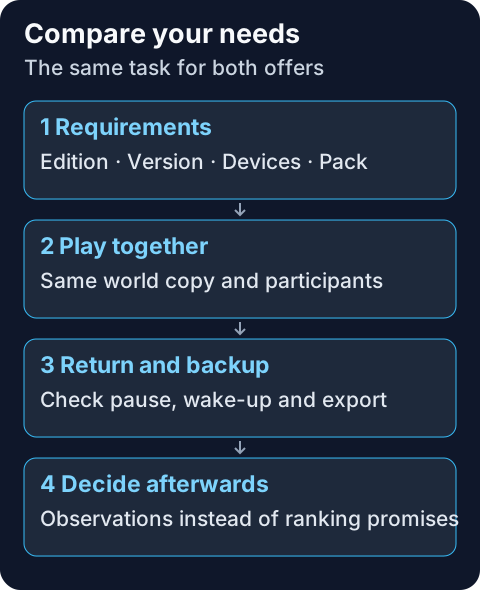
Set the same small task for both offers: same edition and version, same planned participants, a shared meeting point and a short trip into new terrain. If the terms of use allow it, use a copy of the same world. Keep the original separate.
Note the observed startup time including start and end. Distinguish between the first installation, a normal restart and waking up after a pause. A provider promise about setup is not a join you measured yourself. Advertised slots or ideal player counts are likewise no acceptance test for your specific group.
Then check joining with the actual devices. Play together, end the session cleanly and try the way back later. Read the current status and log details if the connection fails. For an ongoing MCF session, spark for a specific lag finding helps; no single number replaces comparable conditions.
Finally, check whether the world and important player data can be exported. A visible backup button does not yet confirm a completed backup or a successful restore. A controlled restore into a copy is more reliable than the first experiment on your only world.
Check Upgrade Costs at the Specific Target
The MCServerHost home page lists 10 US dollars for the monthly 4 GB Paid plan. Other terms and taxes can change the figure. The MCF price appears in the configurator for your software and RAM selection before ordering. Compare the same billing period and currency; a conversion without a current exchange rate would not be a reliable cost comparison.
If only the sleep pause bothers you, that is a different need than more RAM or a larger pack. Choosing extra scope after hitting a Free limit covers this decision for an existing MCF save. Moving between providers and changing an MCF plan are different processes.
FAQ
Does MCServerHost offer less free RAM than MCF?
The Free cards we reviewed list 4 GB at MCServerHost and 2 GB at MCF. The differing MCServerHost FAQ lists 3.5 GB; clarify the actual value. No direct performance benchmark is available.
Do both free offers run around the clock?
Both describe a sleep mode. For MCF, the stated time limits have been checked; the exact MCServerHost time limits remain open.
Are automatic Free backups documented for both?
For MCF, the limited Free scope has been checked. MCServerHost explicitly describes daily automatic backups for Paid; this does not confirm the same Free feature.
Does Bedrock crossplay work the same everywhere?
No. Check the server software, translation setup, Bedrock port and device access. An edition selection alone does not confirm a shared Java/Bedrock join.
Does more RAM prove higher tick performance?
No. Memory requirements and tick performance are different measures. The world, mods, CPU load and the specific gameplay all influence the result.
Do I have to delete my current server first?
No. Back up the existing state and check the target server first. Keep the way back open until the world and joining work traceably at the target.
Sources and Review Status
- MCServerHost: home page and plan cards and public Free configurator, read on October 7, 2026 in an isolated headless browser without placing an order.
- mcfreehost: free server, product limits and runtime configuration additionally checked read-only on October 7, 2026.
- Geyser: requirements and limits, for the edition-dependent connection path.
There is no measured performance ranking here, no verified MCServerHost order and no guaranteed player count. Open provider details remain visible so that your decision is based on the scope you need.
Measured wake times: duration varies with load and queueing and can be substantially longer than one minute. Current P50, P95 and success rate: mcfreehost product facts.