A living Minecraft city is made from a city base, matching models, movement and tasks for your group. GeoWorld provides the map world. Cars, traffic lights, residents and a traffic flow only come from your additional setup. Start with one street, one meeting point and one movement that you can stop again.
This guide takes a small MCF group from a city district to the first lively scene. The London shot below shows a custom, prepared production world. It does not promise automatically included traffic or full NPC operation on the free plan.
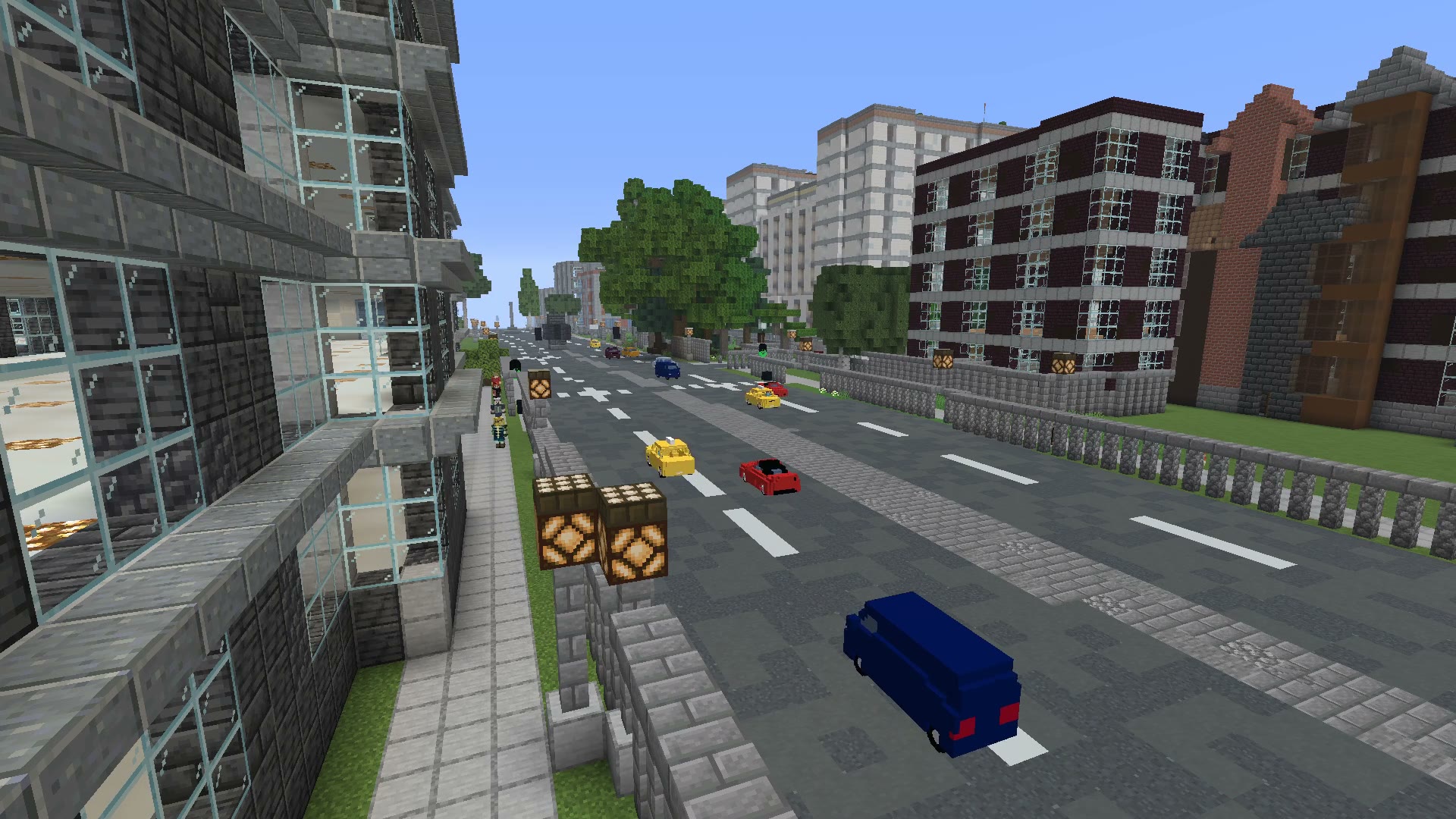
The world base comes from geodata; vehicles, characters, routes and further design were added. Shaders change the appearance. The scene is not an unmodified GeoWorld export.
Four Building Blocks with Different Jobs
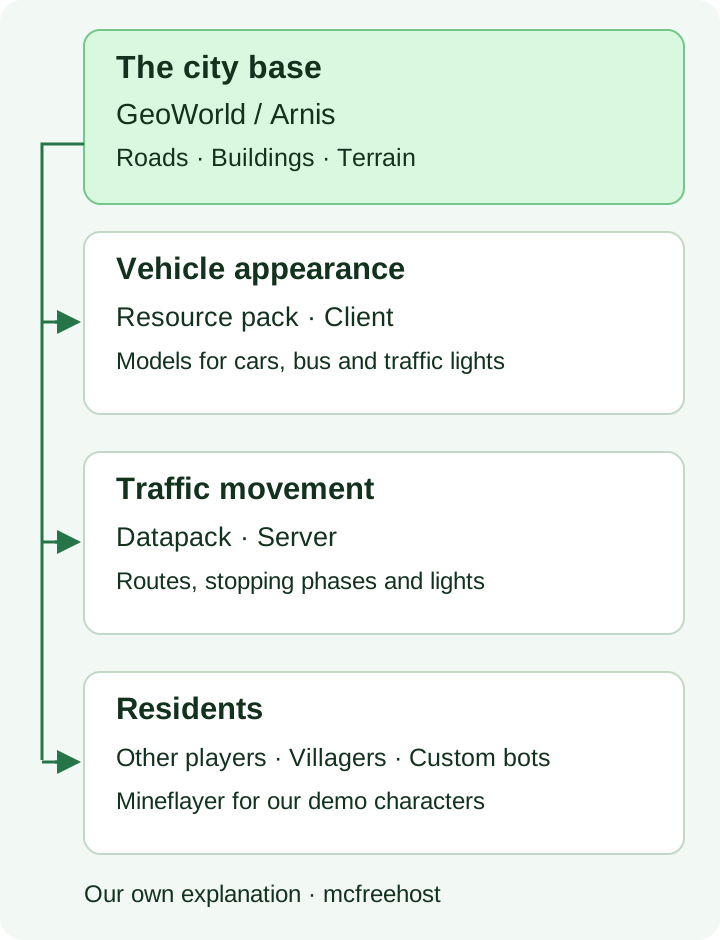
City base: streets, terrain and buildings from the existing map data. Models: the visible car or bus shape. Control: where a model drives, when it stops and how you remove it. Residents: friends, Minecraft mobs or an NPC technique you have explicitly chosen.
A resource pack does not turn an invisible function into a traffic system. A pretty car model does not automatically come with steering, collision or seats. Likewise, an imported street grid does not make every intersection suitable for a predefined vehicle route.
City Base at MCF: the Current Limits
Checked on October 7, 2026: GeoWorld at mcfreehost offers Minecraft Java from 1.21.4 and currently Europe as the available region. The entire area must lie within the coverage. Bedrock is not supported for this described generation path.
Free and Paid can choose from the five offered area tiers of roughly 1, 4, 16, 67 and 268 km². The tiers are based on edge lengths of 1,024, 2,048, 4,096, 8,192 and 16,384 meters; a smaller rectangular area can have a different actual size. Free is therefore no longer generally limited to 1 km².
What matters is at most 5 GB of unpacked world files, your options and enough free server storage. A small ZIP file does not prove that the unpacked world fits. Storage for existing mods, further worlds and your later builds must also remain available.
On the Free plan, at most one successful generation is allowed per account and per server within seven consecutive days. Paid allows up to three successful generations per server in a rolling 24-hour window. Failed or canceled jobs do not count as a successful generation. Clicking repeatedly does not speed up a running job.
For your first attempt, choose a limited, easily recognizable area. After it finishes, compare a street, a square and a distinctive outline in the game. Back up an existing world and check the actual activation before you build technical scenes there. The map preview is not an acceptance check of the finished Minecraft world.
A Street Needs a Game Plan
Decide on the first tour: spawn, meeting point, street and destination. A small shop, a stop or a shared town hall creates a concrete task. Assign responsibilities: who builds the building, who plans the route, who may change the control?
Then decide what "car" means for you. For a decorative scene, a model at the roadside may be enough. For animated traffic you need movement control. If players should get in and steer, you need a vehicle mechanic explicitly suited to that. The filmed London scene does not confirm this last function.
Check the real width of the model, curves and the streets built for Minecraft. Do not carry over London coordinates into your new city. A path that fits in the video may lead through a house wall or over a lowered street in your world.
A Movement Test Without a Third-Party Model
For the first technical test, you can use a red block display marker in a world copy. The following commands were tested on October 4 on a local vanilla Java 1.21.6 server. This is a one-time relative movement, not an automatically driving car and not a load test.
Stand in a free spot. Run the commands as an authorized player; the ~ coordinates refer to your position. A server console without a set execution position is a different context.
/summon minecraft:block_display ~ ~1 ~ {Tags:["mcf_city_route_demo"],block_state:{Name:"minecraft:red_concrete"}}
Move the nearest matching marker within 16 blocks exactly one block in the positive X direction:
/execute as @e[type=minecraft:block_display,tag=mcf_city_route_demo,distance=..16,sort=nearest,limit=1] at @s run tp @s ~1 ~ ~
Then remove the marked displays in the same nearby area:
/kill @e[type=minecraft:block_display,tag=mcf_city_route_demo,distance=..16]
The historical test confirmed movement from X=0 to X=1 and targeted removal. An unmarked display and a different entity type with the same tag were preserved. Stay within the intended nearby area for removal. If you create markers multiple times, the last command may delete several matching displays.
From Movement Block to Controlled Route
If you want to add a real animation, first plan a short straight section. Document start point, end, speed, pause and a unique tag. The control additionally needs a start/stop function; the single teleport above contains neither a loop nor a schedule.
With a datapack, the active world, archive structure and pack format must match the Minecraft version. Mojang lists data pack version 80 for Java 1.21.6; a resource pack has its own version number. Use the release notes and check the version that is actually loaded. A successful resource pack download does not prove that your server-side function is running.
Test a single model first without any other characters. Check obstacles, stopping position and restart. Agree on who may start the scene. Avoid a setup whose only way back is "delete all entities"; the unique tags and a separate working copy make targeted cleanup possible.
Residents Without a Promised Bot Army
The London demo additionally used controlled Mineflayer pedestrians in a local production environment. This is not an automatically provided fleet of logged-in players for every MCF server. Do not simply copy a local offline setup to a public server.
For your first lively square, you can use friends with their existing Minecraft accounts or suitably placed vanilla villagers. Another NPC technique needs a suitable combination of software and version. The visible resident, their paths and their interaction must each be checked separately.
If a resident is supposed to give out a task or open a shop, test exactly that function with a normal player account. "Walks around" proves no permissions, no trading and no saved quest. For building together on a suitable Paper installation, WorldEdit and WorldGuard help; they are not required for every city world.
Troubleshooting and Controlled Expansion
| Observation and next comparison |
|---|
| Normal landscape instead of a city: check the job status and the world that is actually active. |
| Wrong vehicle model: check the assumed resource pack, model assignment and matching version. |
| Model does not move: check the loaded function, the start command and exactly one route. |
| Driving through houses: correct model width and world coordinates in your own section. |
| Only one computer stutters: compare the same scene without shaders or with lower graphics settings. |
| All actions delayed: investigate running functions, entities and tick load with spark. |
Only after the test do you add another intersection or character. After a clean stop and restart, check that the required content is preserved and that the control starts deliberately. A Free server has limited resources and sleep/retention rules; a large free map is no promise of unlimited simulated traffic. The operations guide explains these rules.
FAQ
Are cars and residents included in GeoWorld?
The map world is the base. The vehicles, characters and routes shown were additionally set up for the production scene.
Is Free limited to 1 km²?
In the offer checked on October 7, all five area tiers are also available on the Free plan. World budget, free storage and generation quota remain limiting.
Can the full London traffic package be downloaded?
This article does not offer a ready-made download of the entire demo setup. For a transferable scene, models, rights, versions, routes and control must fit together.
Can players drive the cars themselves?
The prepared animation does not demonstrate a controllable vehicle mechanic. For that, explicitly choose a suitable extension and test how it is operated.
Does the display command automatically create driving traffic?
No. It creates a marker; the second command moves it once by one block. A route with repeated movement needs additional control.
Do I need additional bot accounts for residents?
Not for friends or vanilla villagers. Another NPC technique has its own requirements; the local Mineflayer demo is not a general access solution.
Image Sources and Credits
London: custom Minecraft production world, map data © OpenStreetMap contributors, ODbL, base with Arnis. The display includes shaders and added models.
Models adapted for Minecraft: Low Poly Vehicles Pack by RgsDev, Double Decker Bus by Scailman and Low Poly Man by MHKstudio, each CC BY 4.0 according to the production record. The building block graphic is a custom explanation. This is not an official Minecraft product and has not been approved by Mojang or Microsoft.