LuckPerms manages what a player is allowed to do on your Minecraft server. For a small group of friends, one role for everyday game commands and a second one for a precisely agreed kind of help is often enough. A friend does not need blanket OP just to teleport home, for example. Which permissions are required is determined by the plugin that provides the respective command.
This walkthrough sets up two small roles on a Paper server and tests them in the game. The examples for /home, /sethome and /kick assume EssentialsX; LuckPerms itself does not create these features. Group names are freely chosen, not ready-made MCF ranks.
Checked: October 7, 2026. The screenshots show an earlier functional test and are not a new check of your server.
Distinguishing Game Permissions and Panel Access
| Access area | What it applies to |
|---|---|
| Game group | Permissions within the Minecraft server |
| Operator | Extensive game administration; behavior also depends on the plugins |
| Panel account | Selected panel functions for a separate MCF account |
| Whitelist | Admission to the server, not the game permissions that follow |
In the checked Free scope, you can add one panel co-manager. This limit does not restrict your LuckPerms game groups. Do not give friends a shared owner password. Anyone who only plays along needs neither console access nor the permission to swap plugins. The invitation is described in Minecraft with Friends.
First write down two concrete tasks: "all friends may use a home point" and, if needed, "one responsible person may remove a player for an agreed rule violation." If the second task is not needed at all, leave out the helper role.
Installing LuckPerms Correctly
For Paper, choose the Bukkit/Paper edition of LuckPerms in the plugin section. A Fabric or proxy edition does not belong in the Paper plugin folder. After an installation, restart the server properly and check the current startup log for the loaded plugin name as well as errors. Do not use a general plugin reload as a substitute for a clean start.
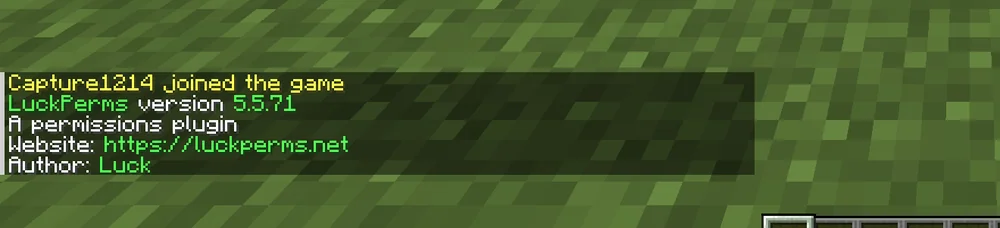
Historical evidence from the chat after joining: Paper 1.21.4 with LuckPerms 5.5.71. It shows the plugin output of this combination that /lp displays in the game without arguments; for your installed versions, the current startup log is what counts.
Use the server console as the owner for the setup. There you write lp without a leading slash; in the game, the same command begins with /lp. The LuckPerms command overview explains the platform names and arguments. Before making changes, check whether groups, direct user permissions or an external storage system already exist. Back up their actual data; a copy of the plugin folder alone does not contain an external database.
Two Roles With a Few Functions
The following example applies to a fresh, backed-up setup with EssentialsX. It is a suggested division of tasks, not a recommendation for all public servers. Run the commands after you have determined which functions are actually needed:
lp creategroup freund
lp group freund permission set essentials.home true
lp group freund permission set essentials.sethome true
lp creategroup helfer
lp group helfer permission set essentials.kick true
The helfer role contains exactly one additional administration function here. It needs neither luckperms.* nor worldedit.* or *. A wildcard permission can unlock functions that have nothing to do with the actual task. So do not grant a wildcard just to make a single error message disappear.
Keep the existing default group. LuckPerms describes it in the documentation on default groups. For this small group, the named friends are explicitly assigned to the new role; this does not automatically change the permissions of all accounts that join in the future.
A plugin may already allow certain actions by default. Two new positive permissions therefore do not amount to a complete list of what a player is allowed to do overall. Check the existing environment and the EssentialsX command and permission overview before assuming a command is blocked.
Adding to Existing Groups
Replace SPIELERNAME with the intended account. Only run the assignment once you can reliably match the identity in the panel or in your own game test:
lp user SPIELERNAME parent info
lp user SPIELERNAME parent add freund
lp user SPIELERNAME parent add helfer
The last line is intended only for the agreed helper. According to LuckPerms on parent groups, parent add adds to existing memberships. parent set, on the other hand, removes existing groups in the relevant context. Do not use it as a casual substitute if you want to keep the other memberships.
Do not set up a large hierarchy with several administration ranks before you know what additional task even arises. Note down for your group which account received which role and why. This makes a later removal traceable.
Testing One Permission and One Limit
First check the calculated values, then the actual actions with your own normal account without OP and without broad wildcard permissions. OP affects default permissions and plugin behavior; however, claiming across the board that operators bypass every LuckPerms check would be wrong. For a traceable test, an account without OP and without a wildcard is still necessary:
lp user SPIELERNAME permission check essentials.home
lp user SPIELERNAME permission check essentials.kick
The permission commands show how LuckPerms sets, removes or checks a value. A directly removed entry can still be inherited from another group. World contexts and other permission sources can also influence the result.
For the joint test, a friend sets a home point and uses /home. For the administration command, you only check with your own, consenting test account whether the helper can perform the planned function and an ordinary friend does not get it. Stop the test if more is unlocked than agreed, and check where the permission comes from.

The image shows the rejected call bukkit:plugins. For this command, check the permission bukkit.command.plugins; the image alone does not prove the cause of the rejection. The rejected call is a single observed effect. It does not prove complete permission security. What matters are the actions your accounts are actually allowed and denied.
Revoking Helper Access Again
Remove the additional role for the affected account:
lp user SPIELERNAME parent remove helfer
Then check the relevant permission and the in-game action again. If it remains allowed, look for another group, a direct entry or another source. Do not delete all user permissions across the board to fix a single access. If the same person was also a panel co-manager, revoke that access separately in the panel.
For a larger overhaul, you can use the LuckPerms web editor. lp editor creates an editing session. Where possible, open only the group or user you need, save the session in the editor and run the apply command generated there on your server. A changed browser tab alone does not update server permissions. Check the changes before applying them and do not share session links publicly: they can contain permissions and account data of your group. This small workflow needs neither a publicly shared editor session nor an additional database.
FAQ
Does every friend need to get OP?
No. Determine the specific plugin permissions and test them with a normal account. OP is not a sensible substitute for a missing individual permission node.
Why does home not work despite a positive permission?
LuckPerms does not provide the command. Check whether EssentialsX is properly installed and loaded, and whether the current error message concerns a permission, a missing home point or another setting. LuckPerms also accepts misspelled node names; therefore compare the node with the plugin's documentation and check group membership, contexts and the actual result with permission check.
Can a Free account have multiple game groups?
The checked limit of one MCF co-manager concerns panel access. It is not a limit for LuckPerms groups. RAM, storage and the other Free limits still apply.
Why can a friend do more than the new role allows?
Existing groups, direct entries, plugin default permissions and other permission sources remain in effect. Check the origin and the actual action; a new group does not automatically set everything else to denied.
Does parent add delete my old groups?
No, the command adds a membership. parent set has a different effect and can remove existing groups in the specified context. Back up and read the initial state first.
Are all administration permissions gone after the role is revoked?
Only if no other source still grants them. Check the game account again and, if necessary, revoke the separate panel access. A renamed rank alone does not revoke any permission.
LuckPerms: view an example
Our own captures from a demonstration environment. The version and setup shown may differ from your server.

LuckPerms 5.5.71 · 2026-09-12

LuckPerms 5.5.71 · 2026-09-12