In Cobblemon 1.8.1, the main.json contains 111 stored keys. This reference helps you find the right value in the MCF pack release you actually chose, read who is responsible for it, and verify a change. It is explicitly tied to Cobblemon 1.8.1 and is not proof for any other mod or pack version.
The complete list is preserved. The default values come from the reference file generated on September 23, 2026; field names and key load paths were checked again on October 7, 2026 against the specified upstream tag. Historical measurements and code reading are named separately. No new game server was modified for this upgrade.
First Read the Version You Actually Have Installed
Note the pack name and pack release, the Minecraft version, the loader, and the loaded Cobblemon version from the current startup or from /cobblemon info, as far as your release offers that command. The pack release and the mod version can carry different numbers. lastSavedVersion shows the last file save state; it does not replace proof of the mod that is currently loaded.
For a different version, read its matching project source and your generated file. Do not copy a complete 1.8.1 configuration over an unknown setup. Addons, datapacks and pack presets can additionally influence the actual game behavior. The Cobblemon introduction explains pack selection and client matching.
The official config page is a helpful orientation, but partly uses older field names and different default values. For this reference, the source code of tag 1.8.1 together with the stored reference file is authoritative.
Distinguish the Server File from the Local Client File
The path is config/cobblemon/main.json in both cases: once on the server and, where applicable, once in a friend's local game instance. The same file name does not mean the same storage location. The in-game configuration editor on a dedicated server saves local client values and is not a general editor for your server file.
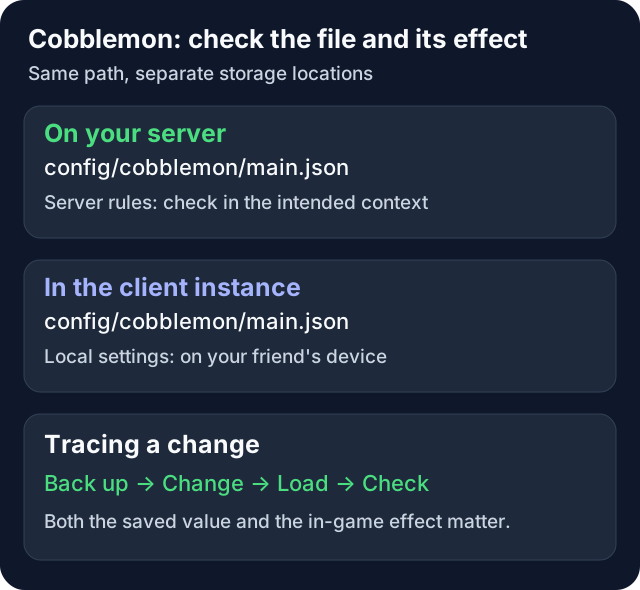
The graphic separates responsibility and change steps. It contains no measured load times.
In the code, 109 fields carry side annotations: 87 as SERVER, 22 as CLIENT. In addition there are lastSavedVersion and thirdPersonViewBobbing. This annotation count is not a blanket count of the effective server and client rules: the level and name labels, for example, are annotated as client fields but are influenced by server values in the described setup.
enableDebugKeys is marked as a client field. It does not grant any game commands or OP permissions. For such permissions, use the separate Cobblemon permissions guide.
Prepare a Change While Preserving the Original State
Back up the complete server file separately before you edit it. For changes to storage or game rules, also back up the matching world and the important Cobblemon player data. Keep the backup until the file and behavior have been verified.
Change one specific existing value and then check the JSON syntax. Number, Boolean and text are different data types; true, for example, is not text in quotation marks. A local JSON validator helps you find missing commas. It does not automatically confirm a sensible value range or the effect in the game.
Copy a single key correctly. The 1.8.1 source explicitly knows a few older names as read aliases, including worldSliceDiameter, worldSliceHeight and BattlePvPMaxDistance. These documented aliases are therefore not equivalent to arbitrary unknown typos. For new changes, still use the current name and no duplicate old/new entries.
After Loading, Read the Saved File Again
Cobblemon 1.8.1 loads the configuration and then writes it back. In the historical check, unknown keys were removed and an invalid maxVerticalCorrectionBlocks value of 999 was capped to 200. Such integer limits are not a universal safeguard for all other numeric fields.
In the historical reload and restart attempts, a syntax error led to default values being loaded and the faulty file being overwritten. This is why the message Reloading Cobblemon settings. is not enough as a success check. After loading, compare the value actually saved and the current log with your backup.
If the installed release offers it, /cobblemonconfig reload reloads the server file. For this, the game account needs the appropriate administration permission. Copied states of player spawners, pastures or machines are not necessarily fully regenerated by this.
The special behavior of pokemonPerChunk was checked historically: raising it took effect after a reload, while lowering it only took effect after the test player reconnected. When lowering it, therefore have the friends involved reconnect or perform a planned restart. The spawn guide covers observing this change.
Read the Complete Reference
Each entry lists the default, the values or unit, the scope, and a load check. A note about reloading the file does not mean that every existing item or stored object is updated immediately. Apart from the historical attempts explicitly mentioned, these are not new gameplay measurements.
The list does not specify safe free-tier performance values. A larger radius, a higher density or more frequent checks can create different load. You can read the real resource picture with the Cobblemon RAM guide.
You can also view the complete reference index as JSON. It contains the same 111 entries and source references. It is a lookup index, not a file to install directly as main.json.
Pokémon in General
| Setting |
|---|
maxPokemonLevel · Default 100. Level, 1–1000. Applies to: Server. Maximum level; also limits the levels of wild Pokémon Load check: Reload the file; check the effect in the matching game context. |
maxPokemonFriendship · Default 255. 0–1000. Applies to: Server. Upper limit of friendship Load check: Reload the file; check the effect in the matching game context. |
announceDropItems · Default true. true/false. Applies to: Server. Chat message when a Pokémon drops items Load check: Reload the file; check the effect in the matching game context. |
defaultDropItemMethod · Default on-entity. on-entity, on-player, to-inventory. Applies to: Server. Where drops land when the drop table does not specify Load check: Reload the file; check the effect in the matching game context. |
dropAfterDeathAnimation · Default false. true/false. Applies to: Server. Drops only after the death animation instead of immediately Load check: Reload the file; check the effect in the matching game context. |
ambientPokemonCryTicks · Default 1080. Ticks. Applies to: Server. Interval between ambient cries; the tooltip calls the value unused, but the code does use it Load check: Reload the file; check the effect in the matching game context. |
experienceMultiplier · Default 2.0. Factor. Applies to: Server. Factor in the XP formula — the default doubles all battle XP Load check: Reload the file; check the effect in the matching game context. |
displayEntityLevelLabel · Default true. true/false. Applies to: Server. Level above the Pokémon; marked as a client value, but the server overrides it Load check: Reload the file; check the effect in the matching game context. |
displayEntityNameLabel · Default true. true/false. Applies to: Server. Name above the Pokémon; controlled by the server as above Load check: Reload the file; check the effect in the matching game context. |
displayNameForUnknownPokemon · Default false. true/false. Applies to: Client. Show names even without a prior scan Load check: Client. |
displayEntityLabelsWhenCrouchingOnly · Default false. true/false. Applies to: Client. Labels only while sneaking Load check: Client. |
fossilMachineAlphaChance · Default 20. 1 in x. Applies to: Server. Alpha chance of the fossil machine; 0 throws an error according to the code (new in 1.8) Load check: Reload the file; check the effect in the matching game context. |
fossilMachineShinyChance · Default 100. 1 in x. Applies to: Server. Shiny chance of the fossil machine; 0 throws an error (new in 1.8) Load check: Reload the file; check the effect in the matching game context. |
honeySlatherAlphaChance · Default 100. 1 in x. Applies to: Server. Alpha chance at honey-slathered logs; 0 disables it (new in 1.8) Load check: Reload the file; check the effect in the matching game context. |
honeySlatherShinyChance · Default 4000. 1 in x. Applies to: Server. Shiny chance at honey-slathered logs; 0 disables it (new in 1.8) Load check: Reload the file; check the effect in the matching game context. |
shinyNoticeParticlesDistance · Default 24. Blocks. Applies to: Client. Range of the shiny particles Load check: Client. |
captureCalculator · Default cobblemon. Formula ID. Applies to: Server. Catch formula; allowed values are cobblemon, generation_1 through generation_9 (including generation_2_fixed, generation_3_and_4) and debug; unknown IDs fall back to the default Load check: Reload the file; check the effect in the matching game context. |
playerDamagePokemon · Default true. true/false. Applies to: Server. Players may damage Pokémon Load check: Reload the file; check the effect in the matching game context. |
pokemonIntrinsicSizeMin · Default 0.95. Factor. Applies to: Server. Smallest random size factor on creation (new in 1.8) Load check: Reload the file; check the effect in the matching game context. |
pokemonIntrinsicSizeMax · Default 1.05. Factor. Applies to: Server. Largest random size factor (new in 1.8) Load check: Reload the file; check the effect in the matching game context. |
babyPokemonLevelDuration · Default 9. Levels. Applies to: Server. For this many levels a Pokémon counts as a baby and is rendered smaller; ≤ 1 disables it (new in 1.8) Load check: Reload the file; check the effect in the matching game context. |
babyPokemonSizeMultiplier · Default 0.9. Factor. Applies to: Server. Size at level 1, rising linearly until the end of the baby phase (new in 1.8) Load check: Reload the file; check the effect in the matching game context. |
minimumRidingScale · Default 0.75. Factor. Applies to: Server. Below this size a Pokémon cannot be ridden (new in 1.8) Load check: Reload the file; check the effect in the matching game context. |
maxDynamaxLevel · Default 10. 0–10. Applies to: Server. Upper limit of the level for the giant form in battle Load check: Reload the file; check the effect in the matching game context. |
infiniteTmUses · Default false. true/false. Applies to: Server. Technical Machines are not consumed on use (new in 1.8) Load check: Reload the file; check the effect in the matching game context. |
Spawning
| Setting |
|---|
enableSpawning · Default true. true/false. Applies to: Server. Disables the natural spawner; in addition there is the gamerule doPokemonSpawning Load check: Reload the file; check the effect in the matching game context. |
worldSpawningBlocklist · Default []. List of dimensions. Applies to: Server. Worlds without spawns, for example minecraft:the_nether (new in 1.8) Load check: Reload the file; check the effect in the matching game context. |
pokemonPerChunk · Default 1.0. Density. Applies to: Server. Density cap in the 48 × 48 block check area of the spawn zone. In 1.8.1 the normal check ends once the limit is reached, that is, at 9 × the effective density value. Load check: Raising: reload; lowering: reconnect players or restart the server (checked historically). |
ticksBetweenSpawnAttempts · Default 20. Ticks. Applies to: Server. Cycle: one spawn pass per player every x ticks (20 = 1 second); the first after 100 ticks Load check: Reconnect. |
maximumSpawnsPerPass · Default 8. Count. Applies to: Server. At most this many spawns per pass Load check: Reload the file; check the effect in the matching game context. |
spawningZoneDiameter · Default 8. Blocks. Applies to: Server. Edge length of the spawn zone (x and z) Load check: Reload the file; check the effect in the matching game context. |
spawningZoneHeight · Default 16. Blocks. Applies to: Server. Height of the spawn zone, centered on the player Load check: Reload the file; check the effect in the matching game context. |
minimumSpawningZoneDistanceFromPlayer · Default 16. Blocks. Applies to: Server. Smallest distance of the zone from the player Load check: Reload the file; check the effect in the matching game context. |
maximumSpawningZoneDistanceFromPlayer · Default 64. Blocks. Applies to: Server. Largest distance of the zone; also the search radius for bait blocks Load check: Reload the file; check the effect in the matching game context. |
maxVerticalCorrectionBlocks · Default 64. Blocks, 1–200. Applies to: Server. How far the zone searches up and down for solid ground; 999 is silently capped to 200 (checked) Load check: Reload the file; check the effect in the matching game context. |
minimumDistanceBetweenEntities · Default 8.0. Blocks. Applies to: Server. Minimum distance of a spawn from other living entities and from spawns in the same pass Load check: Reload the file; check the effect in the matching game context. |
maxNearbyBlocksHorizontalRange · Default 4. Blocks. Applies to: Server. Search radius for spawns that need certain blocks nearby (horizontal) Load check: Reload the file; check the effect in the matching game context. |
maxNearbyBlocksVerticalRange · Default 2. Blocks. Applies to: Server. The same, vertically Load check: Reload the file; check the effect in the matching game context. |
maxVerticalSpace · Default 8. Blocks. Applies to: Server. At most this much headroom is checked Load check: Reload the file; check the effect in the matching game context. |
minimumLevelRangeMax · Default 10. Levels, 1–1000. Applies to: Server. Level range of wild Pokémon with an empty party (1 to x) Load check: Reload the file; check the effect in the matching game context. |
savePokemonToWorld · Default true. true/false. Applies to: Server. false: wild Pokémon disappear when the chunk unloads Load check: Reload the file; check the effect in the matching game context. |
pokeSnackPokemonPerChunk · Default 2.0. Density. Applies to: Server. Density cap for spawns at the bait block Load check: Reload the file; check the effect in the matching game context. |
shinyRate · Default 8192. 1 in x, 0 = never. Applies to: Server. Shiny chance for every Pokémon created, including via command Load check: Reload the file; check the effect in the matching game context. |
teraTypeRate · Default 20. 1 in x. Applies to: Server. Chance of a differing Tera type Load check: Reload the file; check the effect in the matching game context. |
baseApricornTreeGenerationChance · Default 0.1. Factor. Applies to: Server. Frequency of Apricorn and Saccharine trees during world generation Load check: new chunks only. |
despawnerNearDistance · Default 32. Blocks. Applies to: Server. Closer to the player than this, a wild Pokémon never despawns, regardless of age Load check: Reload the file; check the effect in the matching game context. |
despawnerFarDistance · Default 96. Blocks. Applies to: Server. Farther away, they despawn as soon as they are older than the minimum age Load check: Reload the file; check the effect in the matching game context. |
despawnerMinAgeTicks · Default 600. Ticks (30 s). Applies to: Server. Younger Pokémon never despawn Load check: Reload the file; check the effect in the matching game context. |
despawnerMaxAgeTicks · Default 3600. Ticks (3 min). Applies to: Server. From this age, Pokémon despawn even at medium distance Load check: Reload the file; check the effect in the matching game context. |
monitorAlphaRate · Default 40. 1 in x. Applies to: Server. Alpha chance of the Data Monitor in the fossil setup; 0 throws an error (new in 1.8) Load check: Reload the file; check the effect in the matching game context. |
monitorShinyRate · Default 200. 1 in x. Applies to: Server. Shiny chance of the Data Monitor; 0 throws an error (new in 1.8) Load check: Reload the file; check the effect in the matching game context. |
exportSpawnConfig · Default false. true/false. Applies to: Server. Creates best-spawner-config.json and reads it Load check: Restart. |
Starters
| Setting |
|---|
exportStarterConfig · Default false. true/false. Applies to: Server. Creates starters.json and reads it; without the switch, the built-in starters apply Load check: Restart. |
Battles
| Setting |
|---|
autoUpdateShowdown · Default true. true/false. Applies to: Server. Unpacks the battle engine anew on every start; false preserves your own changes in the Showdown folder Load check: Restart. |
defaultFleeDistance · Default 32. Blocks, −1 = no fleeing. Applies to: Server. Distance beyond which a wild battle ends as a flee Load check: Reload the file; check the effect in the matching game context. |
allowExperienceFromPvP · Default true. true/false. Applies to: Server. XP also from battles between players Load check: Reload the file; check the effect in the matching game context. |
experienceShareMultiplier · Default 0.5. Factor. Applies to: Server. XP share for party members holding an XP-sharing item Load check: Reload the file; check the effect in the matching game context. |
awardExperienceToFaintedPokemon · Default false. true/false. Applies to: Server. XP also for fainted party members (new in 1.8) Load check: Reload the file; check the effect in the matching game context. |
awardExperienceOnBattleLoss · Default false. true/false. Applies to: Server. XP also after a lost battle (new in 1.8) Load check: Reload the file; check the effect in the matching game context. |
luckyEggMultiplier · Default 1.5. Factor. Applies to: Server. XP factor for the item lucky_egg Load check: Reload the file; check the effect in the matching game context. |
allowSpectating · Default true. true/false. Applies to: Server. Allow spectating battles Load check: Reload the file; check the effect in the matching game context. |
battleWildMaxDistance · Default 12. Blocks. Applies to: Server. Range for starting a wild battle Load check: Reload the file; check the effect in the matching game context. |
battlePvPMaxDistance · Default 32. Blocks. Applies to: Server. Range of a battle request to players (older spelling: BattlePvPMaxDistance) Load check: Reload the file; check the effect in the matching game context. |
battleSpectateMaxDistance · Default 64. Blocks. Applies to: Server. Range for spectating Load check: Reload the file; check the effect in the matching game context. |
walkingInBattleAnimations · Default false. true/false. Applies to: Client. Walking animations in battle Load check: Client. |
Status Conditions and Healing
| Setting |
|---|
passiveStatuses · Default "180-300" each. Seconds, "min-max" per status. Applies to: Server. Duration until poison, paralysis, freeze, sleep and burn end on their own outside of battle Load check: Reload the file; check the effect in the matching game context. |
infiniteHealerCharge · Default false. true/false. Applies to: Server. Healing machine without charges Load check: Reload the file; check the effect in the matching game context. |
maxHealerCharge · Default 6.0. Charges. Applies to: Server. The maximum charge is taken over when the healing machine is created and is limited to at least 6. A reload alone does not necessarily update the existing machine. Load check: Reload the machine. |
secondsToChargeHealingMachine · Default 900. Seconds. Applies to: Server. Time until fully charged Load check: Reload the file; check the effect in the matching game context. |
defaultFaintTimer · Default 300. Seconds. Applies to: Server. Time until self-revival after a knockout Load check: Reload the file; check the effect in the matching game context. |
faintAwakenHealthPercent · Default 0.2. Fraction 0–1. Applies to: Server. Hit points on waking up; 0 disables self-revival Load check: Reload the file; check the effect in the matching game context. |
healPercent · Default 0.05. Fraction 0–1. Applies to: Server. Passive healing per cycle, at least 1 hit point; 0 disables it Load check: Reload the file; check the effect in the matching game context. |
healTimer · Default 60. Seconds. Applies to: Server. Interval of passive healing (only in the party, not in battle) Load check: Reload the file; check the effect in the matching game context. |
World, Pasture and Trading
| Setting |
|---|
appleLeftoversChance · Default 0.025. Probability. Applies to: Server. Chance of the item “Leftovers” when eating certain fruits Load check: Reload the file; check the effect in the matching game context. |
maxRootsInArea · Default 9. Count. Applies to: Server. Roots in the surroundings before growth stops Load check: Reload the file; check the effect in the matching game context. |
bigRootPropagationChance · Default 0.5. Probability. Applies to: Server. Spread of big roots per random tick (only in low light) Load check: Reload the file; check the effect in the matching game context. |
energyRootChance · Default 0.25. Fraction. Applies to: Server. Share of energy roots among new roots Load check: Reload the file; check the effect in the matching game context. |
defaultPasturedPokemonLimit · Default 16. Count. Applies to: Server. Pokémon per pasture block Load check: Reload the file; check the effect in the matching game context. |
pastureBlockUpdateTicks · Default 40. Ticks. Applies to: Server. Check interval of the pasture Load check: Reload the pasture. |
pastureMaxWanderDistance · Default **32 (1.7.3: 64)**. Blocks. Applies to: Server. Movement radius around the pasture block Load check: Reload the pasture. |
pastureMaxPerChunk · Default 4.0. Density. Applies to: Server. Density limit when placing into the pasture Load check: Reload the file; check the effect in the matching game context. |
maxInsertedFossilItems · Default 2. Count. Applies to: Server. Fossils in the analyzer Load check: Reload the file; check the effect in the matching game context. |
tradeMaxDistance · Default 12. Blocks. Applies to: Server. Range for trades and party requests Load check: Reload the file; check the effect in the matching game context. |
Pokédex
| Setting |
|---|
maxPokedexScanningDetectionRange · Default 10. Blocks. Applies to: Server. Range of the scanner Load check: Reload the file; check the effect in the matching game context. |
unlockAllMoveDexMovesByDefault · Default false. true/false. Applies to: Server. All moves unlocked in the TM machine and move list (new in 1.8) Load check: Reload the file; check the effect in the matching game context. |
hideUnimplementedPokemonInThePokedex · Default false. true/false. Applies to: Client. Hide species not yet implemented in the index Load check: Client. |
Storage
| Setting |
|---|
storageFormat · Default nbt. nbt, json, mongodb. Applies to: Server. Storage format for party and PC; any other value prevents startup Load check: Restart. |
mongoDBConnectionString · Default mongodb://localhost:27017. Text. Applies to: Server. Only for mongodb Load check: Restart. |
mongoDBDatabaseName · Default cobblemon. Text. Applies to: Server. Only for mongodb Load check: Restart. |
pokemonSaveIntervalSeconds · Default 30. Seconds, 1–120. Applies to: Server. Save interval of party and PC data Load check: Reload the file; check the effect in the matching game context. |
defaultBoxCount · Default 40. Boxes, 1–1000. Applies to: Server. PC boxes per player; existing PCs that are not locked are adjusted on load. Check existing contents before reducing. Load check: Reconnect. |
defaultKeyItems · Default []. List of items. Applies to: Server. Key items for new players Load check: Reload the file; check the effect in the matching game context. |
preventCompletePartyDeposit · Default false. true/false. Applies to: Server. The last party member may not be deposited into the PC Load check: Reload the file; check the effect in the matching game context. |
Interface (Client Only)
| Setting |
|---|
summaryPokemonFollowCursor · Default true. true/false. Applies to: Client. Model in the summary follows the mouse Load check: Client. |
partyPortraitAnimations · Default NEVER_ANIMATE. NEVER_ANIMATE, ANIMATE_SELECTED, ALWAYS_ANIMATE. Applies to: Client. Animation in the party overlay Load check: Client. |
pcProfileAnimations · Default ANIMATE_SELECTED. As above. Applies to: Client. Animation of the PC slots Load check: Client. |
summaryProfileAnimations · Default ANIMATE_SELECTED. As above. Applies to: Client. Animation in the summary Load check: Client. |
animateBattleTiles · Default false. true/false. Applies to: Client. Animated portraits in battle Load check: Client. |
Riding
| Setting |
|---|
infiniteRideStamina · Default false. true/false. Applies to: Server. Unlimited stamina while riding Load check: Reload the file; check the effect in the matching game context. |
invertPitch · Default false. true/false. Applies to: Client. Invert the pitch axis Load check: Client. |
invertYaw · Default false. true/false. Applies to: Client. Invert the yaw axis Load check: Client. |
xAxisSensitivity · Default 1.0. Factor. Applies to: Client. Horizontal mouse sensitivity Load check: Client. |
yAxisSensitivity · Default 1.0. Factor. Applies to: Client. Vertical mouse sensitivity Load check: Client. |
swapXAndYAxes · Default false. true/false. Applies to: Client. Swap axes Load check: Client. |
disableRoll · Default false. true/false. Applies to: Client. No roll movement of the camera Load check: Client. |
displayControlSeconds · Default 0. Seconds. Applies to: Client. Display duration of the controls hint after mounting Load check: Client. |
rememberRidingCamera · Default false. true/false. Applies to: Client. Remember the last camera perspective Load check: Client. |
enableInFlightDismounting · Default false. true/false. Applies to: Client. Dismounting in mid-air Load check: Client. |
thirdPersonViewBobbing · Default true. true/false. Applies to: Client. No effect: it is in the file, but the code for it is commented out Load check: —. |
Debug and Internal
| Setting |
|---|
enableDebugKeys · Default false. true/false. Applies to: Client. Local debug keys and riding debug; grants no server command permissions. Load check: Client. |
lastSavedVersion · Default mod version. Text. Applies to: internal. Version with which the file was last saved; do not change by hand Load check: —. |
Back Up Storage and PC Before a Change
storageFormat switches the storage path used. A different string is not a simple format converter for your existing party and PC data. Back up this data and use the migration guide that matches your release before you change the backend.
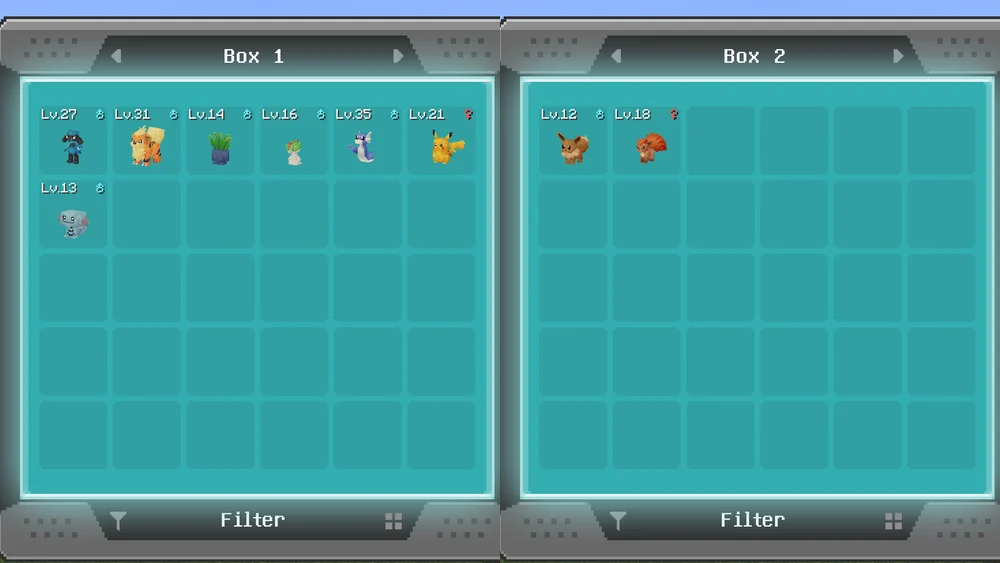
The earlier illustration shows filled boxes. It proves neither a current box count on your server nor a verified reduction or data migration.
For defaultBoxCount, check existing contents and any locked PCs. Do not reduce the number casually as a supposed RAM optimization. World backup, party data and plugin or mod configuration belong together for the way back.
Note Export Files and Update Differences
Without the matching export switches, 1.8.1 uses the built-in starter and spawn presets. exportStarterConfig and exportSpawnConfig can create additional files under config/cobblemon/. Check whether they are actually created and how they are loaded in your release before you create new files yourself.
The bundled spawn JSON contains worldBuckets with the weights 94.0 / 5.0 / 0.5 / 0.2 / 0.3 for common, uncommon, rare, ultra-rare and boss. These are selection weights, not a measured probability for a particular species at every location. The built-in Kotlin class values partly differ from this resource file; the source actually loaded is authoritative.
The exported best-spawner-config.json also has version and replaceWithNewVersion. With a higher internal version, the corresponding load path can replace the export file. Therefore also back up your own spawn adjustments before a pack update. The update guide covers the joint switch of server and clients.
Compared with the stored 1.7.3 reference, there are 16 new and two removed keys. pastureMaxWanderDistance has a default of 32 instead of 64 in the fresh 1.8.1 file. An existing custom value does not automatically become the new default as a result. The density calculation also changed; identical numbers do not necessarily mean identical game behavior.
FAQ
Does this list apply to every Cobblemon pack version?
It is tied to Cobblemon 1.8.1. Check the mod actually loaded, the pack release and any additional extensions before you adopt values.
Why does the file have default values again after an error?
The historical 1.8.1 test confirmed loading defaults and then writing them back after a syntax error. Preserve the faulty state and the separate backup; only reload a file that has been verified as valid.
Can I change server values in the in-game editor?
On the described dedicated setup, this editor edits local client values. The server file and its administration permission are a different route.
Why doesn't a smaller density value take effect right away after a reload?
The existing player spawner may keep the earlier value. For 1.8.1, the necessary reconnect attempt was checked historically; plan for the accounts involved or a restart.
Are all numbers automatically capped safely?
No. The code limits certain annotated integer values. Other numbers can be invalid or cause unwanted behavior. Read the individual entry and check the effect.
May I install the JSON index as main.json?
It is a reference index with descriptions and sources, not an installable configuration. Change the server file that was actually generated, in a targeted way and with the original state preserved.
Sources and Historical Verification Status
The specified tag Cobblemon 1.8.1 and its configuration and load paths were read again. The stored main file and the load attempts date from September 23, 2026, Minecraft 1.21.1 with Fabric. The server spawning measurement used a stationary protocol test player; it was not a full gameplay test with all pack features.
No new load measurements or blanket-confirmed reload behavior for all 111 values are claimed here. The preserved GSH guide covers Pixelmon and its YAML configuration; its keys and commands are not transferred to Cobblemon.