For a small Cobblemon group, you don't need blanket OP rights if your friends only want to open their PC via command. With a suitable permissions mod, you can grant cobblemon.command.pc selectively and test access without OP. Other nodes can cover several commands or branches that affect other players.
This guide and the full node reference apply to Cobblemon 1.8.1. It covers the decision about individual Cobblemon features. General group planning is explained in LuckPerms for your friend group; the exact syntax of all commands can be found in the command reference.
First, clarify which permission check is actually used
Check the mod version with /cobblemon info. LuckPerms must match the server platform and Minecraft version: the Paper plugin file is not a Fabric mod. In the historical test of September 23, 2026, LuckPerms-Fabric 5.4.140 was used with Cobblemon 1.8.1. That is a documented test setup, not a blanket recommendation for every new pack release.
Without a suitable node interface, Cobblemon falls back to vanilla OP levels. The Fabric validator queries the specific node via the Fabric Permissions API and passes the default level as a fallback. A suitable permission manager is additionally required; the API alone is not group management. NeoForge uses a different integration path. The Fabric case measured here does not confirm any arbitrary NeoForge combination.
The node list is not a claim that every command has its own node. /cobblemon info and the root /cobblemonconfig, for example, are registered differently. The developer commands /testcommand and /reloadshowdown check vanilla level 4 directly in 1.8.1; cobblemon.* does not replace this check.
Read shared permissions before granting
Editing also allows resetting: cobblemon.command.pokemonedit.self protects both /pokemonedit and /pokemonrestart. According to the source code, the reset empties the team and PC; with true, the starter selection is also reset. In the historical test, the team clearing was confirmed. The .other variant allows the corresponding access to other players. A separate, independently lockable pokemonrestart node is not defined for this.
Searching also affects other players' PCs: In 1.8.1, cobblemon.command.pcsearch protects both your own search and pcsearch other <player> <properties>. The freshly read builder contains no additional .other permission for this branch. The earlier suggestion to automatically give regular players pc and pcsearch together was therefore too broad. This assignment is a source code finding; a new test with two player accounts was not carried out here.
Other shared nodes are takepokemon for team and PC removal, spawnpokemon for several spawn commands, technicalmachine for TM items and TM progress, and changemark for several mark commands. Aliases also share the requirements of their original command. A different command name does not create its own permission boundary.
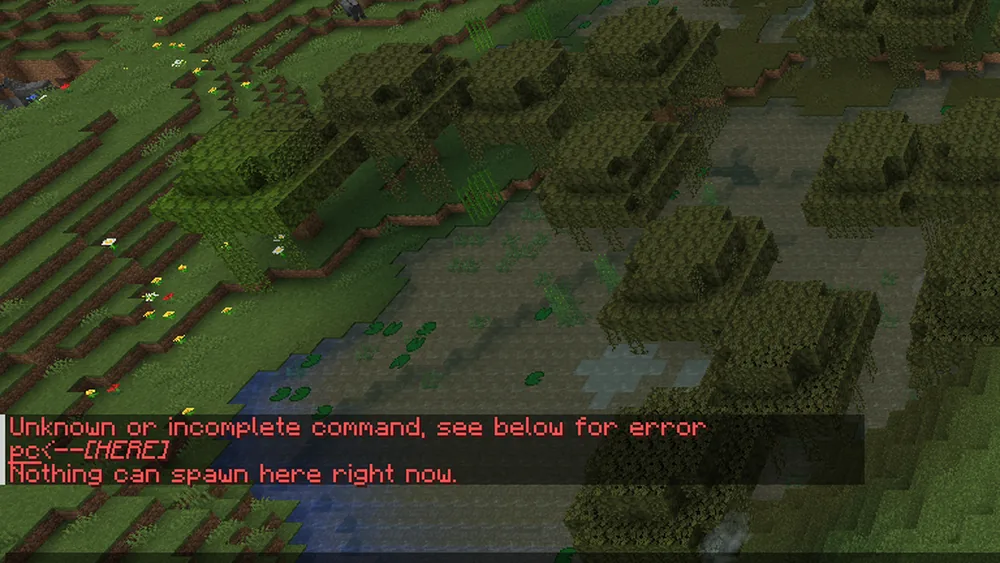
The existing screenshot shows English game messages without player names. "Unknown or incomplete command" alone does not distinguish missing permissions from typos or the wrong version; check all three causes.
A small PC grant for your friends
Back up existing LuckPerms data and read the groups of the intended player. Use an existing, appropriately limited friends group. If freund does not exist yet, create it first; do not remove existing parents just to force the example.
In the server console, the two actual assignments read as follows, without the slash:
lp group freund permission set cobblemon.command.pc true
lp user <spieler> parent add freund
Replace <spieler> with the intended name; the angle brackets are not typed. parent add adds the group. In-game, LuckPerms commands start with /, and only an authorized administrator runs them. Regular friends need neither the administrator's MCF password nor general OP.
This grant is a group decision. Consider whether members should be allowed to open their personal PC anywhere via command or should only use an existing PC block. Game balance and permission scope belong together.
Check the permission in-game and where it comes from
Check the specific node and the current parents:
lp user <spieler> permission check cobblemon.command.pc
lp user <spieler> parent info
Then, using your own regular account without OP, test /pc outside of a battle. Check that the personal PC opens. A mere LuckPerms output confirms the calculation of the node, but it replaces neither the loaded mod handler nor real in-game access.
Check where other permissions come from in the existing profile. Inherited wildcards or OP can broaden the result. Do not use /pokemonrestart, /clearparty, or /clearpc as a harmless test of the restriction: if the boundary is wrong, such an attempt changes exactly the data you want to preserve.
Revoking the grant: distinguishing unset and false
If you only want to take back the group permission you just set:
lp group freund permission unset cobblemon.command.pc
unset removes this specific assignment. It does not automatically mean "forbidden": another group, a context, a wildcard, or the OP fallback can still grant access. An explicitly set false is a different decision and must be checked against the actual inheritance.
If a specific player should no longer have this friends role, remove only that assignment with lp user <spieler> parent remove freund. This does not remove all of their other groups. Afterwards, check the node and the real access again. This leaves a traceable way back without deleting the entire permission profile.
Full node reference for 1.8.1
The following 53 nodes belong to the listed command functions. The source code additionally defines three entries, which are described separately afterwards. The default level is the vanilla fallback without an effective node assignment; it is not a recommendation for regular players.
| Node and effect in 1.8.1 |
|---|
cobblemon.command.pc — default level 2; commands: /pc; effect: open your own PC. |
cobblemon.command.pcsearch — default level 2; commands: /pcsearch; effect: search the PC; the same node also allows the branch for another player, no separate .other node. |
cobblemon.command.healpokemon.self — default level 2; commands: /healpokemon; effect: heal your own team. |
cobblemon.command.healpokemon.other — default level 2; commands: /healpokemon <spieler>; effect: heal another player's team. |
cobblemon.command.friendship — default level 2; commands: /friendship; effect: show friendship value. |
cobblemon.command.checkspawns — default level 2; commands: /checkspawn; effect: show possible spawns at the location. |
cobblemon.command.abandonmultiteam — default level 0; commands: /abandonmultiteam; effect: leave a multiplayer battle team. |
cobblemon.command.spectatebattle — default level 4; commands: /spectateBattle; effect: spectate a battle. |
cobblemon.command.stopbattle — default level 2; commands: /stopbattle; effect: end an ongoing battle. |
cobblemon.command.givepokemon.self — default level 2; commands: /givepokemon; effect: Pokémon into your own team. |
cobblemon.command.givepokemon.other — default level 2; commands: /givepokemonother; effect: Pokémon to another player. |
cobblemon.command.takepokemon — default level 2; commands: /takepokemon, /pctake; effect: remove Pokémon from team or PC. |
cobblemon.command.pokemonedit.self — default level 2; commands: /pokemonedit, /pokemonrestart; effect: edit your own Pokémon, reset your own progress. |
cobblemon.command.pokemonedit.other — default level 2; commands: /pokemoneditother, /pokemonrestartother; effect: the same for other players. |
cobblemon.command.teach.base — default level 2; commands: /teach; effect: teach a move if the learnset allows it. |
cobblemon.command.teach.bypass — default level 2; commands: /teach; effect: teach a move even outside the learnset. |
cobblemon.command.levelup.self — default level 2; commands: /levelup <slot>; effect: level up your own Pokémon by one level. |
cobblemon.command.levelup.other — default level 2; commands: /levelup <spieler> <slot>; effect: level up another player's Pokémon. |
cobblemon.command.helditem — default level 2; commands: /held_item; effect: set held item. |
cobblemon.command.openstarterscreen — default level 2; commands: /openstarterscreen; effect: open starter selection. |
cobblemon.command.pokebox — default level 2; commands: /pokebox, /pokeboxall; effect: move team members into the PC. |
cobblemon.command.pokedex — default level 2; commands: /pokedex; effect: unlock or remove Pokédex entries. |
cobblemon.command.clearparty — default level 2; commands: /clearparty; effect: clear a player's team. |
cobblemon.command.clearpc — default level 2; commands: /clearpc; effect: clear a player's PC. |
cobblemon.command.renamebox — default level 2; commands: /renamebox; effect: rename a PC box. |
cobblemon.command.changewallpaper — default level 2; commands: /changewallpaper; effect: set a PC box wallpaper. |
cobblemon.command.unlockpcboxwallpaper — default level 2; commands: /unlockpcboxwallpaper; effect: unlock a box wallpaper. |
cobblemon.command.boxcount — default level 2; commands: /boxcount; effect: query or change the number of PC boxes. |
cobblemon.command.changemark — default level 2; commands: /givemark, /takemark, /giveallmarks; effect: grant and revoke marks. |
cobblemon.command.technicalmachine — default level 2; commands: /givetm, /technicalmachine; effect: give TM items, unlock or lock TMs (new in 1.8). |
cobblemon.command.spawnpokemon — default level 2; commands: /spawnpokemon, /spawnpokemonat, /spawnpokemonfrompool; effect: create Pokémon. |
cobblemon.command.spawnallpokemon — default level 4; commands: /spawnallpokemon; effect: spawn all species in an area. |
cobblemon.command.giveallpokemon — default level 4; commands: /giveallpokemon; effect: give all species of an area to the team. |
cobblemon.command.spawnnpc — default level 2; commands: /spawnnpc, /spawnnpcat; effect: create an NPC. |
cobblemon.command.npcedit — default level 2; commands: /npcedit; effect: edit an NPC. |
cobblemon.command.npcdelete — default level 2; commands: /npcdelete; effect: delete an NPC. |
cobblemon.command.applyplayertexture — default level 2; commands: /applyplayertexture; effect: give an NPC a player skin. |
cobblemon.command.opendialogue — default level 2; commands: /opendialogue; effect: open a datapack dialogue. |
cobblemon.command.behaviouredit — default level 2; commands: /behaviouredit; effect: open the behaviour editor. |
cobblemon.command.runmolang — default level 2; commands: /runmolang; effect: run a MoLang expression. |
cobblemon.command.runmolangscript — default level 2; commands: /runmolangscript; effect: run a MoLang script from a datapack. |
cobblemon.command.bedrockparticle — default level 2; commands: /bedrockparticle; effect: play a particle effect. |
cobblemon.command.freezepokemon — default level 2; commands: /freezepokemon; effect: freeze a Pokémon's animation. |
cobblemon.command.teststore — default level 2; commands: /teststore; effect: query for command blocks: count matching Pokémon. |
cobblemon.command.querylearnset — default level 2; commands: /querylearnset; effect: query: can the Pokémon learn the move?. |
cobblemon.command.testpcslot — default level 2; commands: /testpcslot; effect: query: does the Pokémon fit in the PC slot?. |
cobblemon.command.testpartyslot — default level 2; commands: /testpartyslot; effect: query: does the Pokémon fit in the team slot?. |
cobblemon.command.cobblemonconfig.reload — default level 2; commands: /cobblemonconfig reload; effect: reload the server config. |
cobblemon.command.getnbt — default level 4; commands: /getnbt; effect: no function (command is empty). |
cobblemon.command.changeeyeheight — default level 4; commands: /changeeyeheight; effect: developer tool. |
cobblemon.command.changescaleandsize — default level 4; commands: /changescaleandsize; effect: developer tool. |
cobblemon.command.changewalkspeed — default level 4; commands: /changewalkspeed; effect: developer tool. |
cobblemon.command.transformmodelpart — default level 4; commands: /transformmodelpart; effect: developer tool. |
Additionally, the source code defines cobblemon.seehiddennpcs and cobblemon.useridingstatsdebug, both with default level 2. They are not additional ordinary command names. The level 2 node cobblemon.command.calculateseatpositions, which is also defined, is orphaned in 1.8.1: the old command is no longer registered.
For healing and level-up for other players, requirements apply at both the root and the sub-branch. A .other node alone is therefore not a general guarantee for every invocation. The complete syntax and execution context remain relevant.
What was historically tested
The test of September 23, 2026 used Cobblemon 1.8.1, Minecraft 1.21.1, Fabric, and LuckPerms-Fabric 5.4.140. A log test player without OP first got no nodes, then selected nodes. The checks confirmed invisible commands when permission is missing, the shared edit/reset node, TM access, and a separate PC node.
With a broad Cobblemon wildcard, further nodes became reachable; the two direct level 4 developer commands remained invisible. This measurement test is not a recommendation to give the wildcard to friends. Not individually tested were all 53 functions, all .other cases with a second player, normal menu interactions, and every default OP level without LuckPerms.
FAQ
Does normal Cobblemon play need an OP account?
Not on its own, neither to play normally nor to use a PC block. A specific administrative or convenience function may require a separate permission.
Is pcsearch a purely personal grant?
Not in 1.8.1. According to the builder, the same node also allows searching another player's PC. Check this boundary before granting it.
Can I lock pokemonrestart separately and allow editing?
Both commands use the same edit node. An invented additional restart node does not resolve this assignment. Only grant the permission if the combined effects are intended.
Does "unknown command" always mean a missing permission?
No. Missing permissions can hide the command; incorrect spelling, the wrong mod version, or a missing execution context can produce similar messages.
Is permission unset enough to fully revoke access?
It removes one assignment. Other inheritances and the OP fallback may remain. Check where the permission comes from and test again without OP.
Does enableDebugKeys unlock administrative commands?
No. The command registration in 1.8.1 is independent of it. The client value for debug keys replaces neither the node check nor direct OP requirements.
Sources and verification status
- Cobblemon 1.8.1: full node definitions.
- Fabric validator 1.8.1.
- PC search and its other branch.
- Fabric Permissions API.
- LuckPerms: Permission Commands and Parent Commands.
The 56 node definitions and relevant builders were re-read on October 7, 2026. Historical measurements and the screenshot date from September. For this revision, no new permissions were granted on a game server and no data was reset.