At mcfreehost you host your Minecraft server permanently free of charge and without a credit card. The free plan includes 2 GB RAM and 10 GB storage, Java or Bedrock, your own subdomain and backups; we don't show any ads. On supported Paper servers, Geyser and Floodgate are set up out of the box, so Java and Bedrock players can play together. If nobody is online for 15 minutes, the server goes to sleep and wakes up as soon as someone connects or you start it in the panel. Free servers are located in Germany (Limburg) or the United States (Vint Hill).
This guide helps you assess the free scope before a longer project. The exact initial setup is explained in Create a Minecraft Server for Free. A free hosting plan is not a free Minecraft license and not a promise of unlimited performance.
Checked: November 13, 2026. The figures come from the active product configuration. You can see the selected scope and the price of €0 in the configurator before you confirm.
Your Requirements Fit on One Sheet of Paper
Write down what you really want to play. “Minecraft with friends” is not yet enough as a technical description: Java, native Bedrock and a Java modpack can need different clients and software.
| Requirement | Before the project starts |
|---|---|
| Java without additional client mods | Desired Minecraft version and possible server plugins |
| Phone, Bedrock on Windows or console | Specific device and the actual path to an external server |
| Java and Bedrock together | Supported crossplay setup and a test with both clients |
| A modpack | Full pack name, pack version, loader and pack requirements |
| An existing world | Edition, game version, required extensions and an unchanged original copy |
| A longer break from playing | Your own backup and the specific retention period |
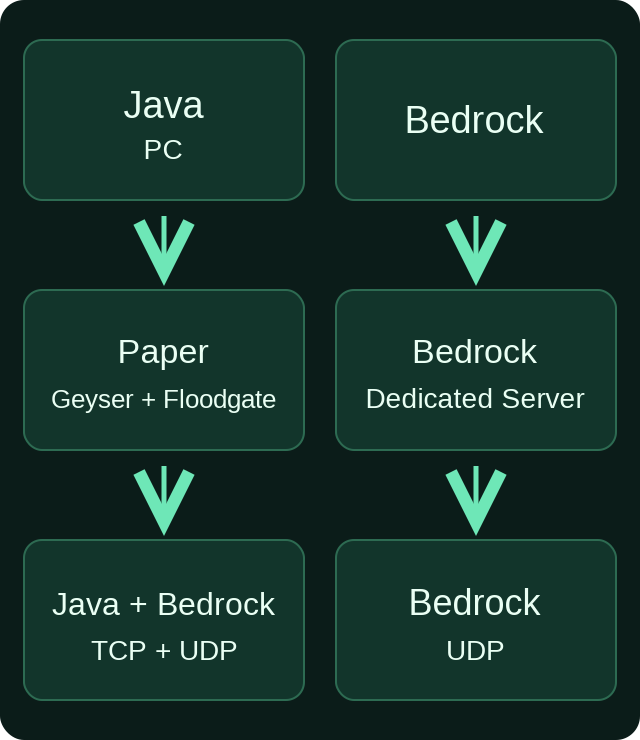
A server mod is not a Paper plugin. A native Bedrock server does not simply accept Java clients. Geyser connects supported Bedrock clients to a Java server, but does not replace required Java client mods. This limit is explained in the Geyser FAQ.
 (Ingrandisci immagine)
The edition comes before the plan comparison. A low price does not make an unsuitable client/server combination compatible.
If a particular pack already requires more memory, the free scope is not a sensible substitute for that requirement. For the offered Cobblemon packs, you will find a concrete selection at Create a Cobblemon Server. The pack offers mentioned there are not automatically part of the normal 2 GB Free scope.
What the free plan includes
This is what you get without paying, and these are the limits of the free plan.
| Free plan | Included |
|---|---|
| Price | €0, no trial period and no payment details |
| Memory | 2 GB RAM |
| Storage space | 10 GB |
| Editions | Java (Paper, Fabric, Forge and more) or Bedrock |
| Crossplay | Geyser and Floodgate out of the box on supported Paper servers |
| Address | Your own subdomain, no port forwarding |
| Ads | No banner ads, pop-ups or third-party advertising |
| Location | Germany (Limburg) or United States (Vint Hill) |
| Created Free servers | Up to two |
| Online at the same time | One Free server |
| Inactivity after a session already played | The server goes to sleep after 15 minutes without players and wakes up when someone connects or via the panel |
| Freshly set up, never played on | The server only goes to sleep after 60 minutes |
| Restore points | Three: two automatic and one manual |
| Additional panel management | One invited collaborator |
While sleeping, your progress stays saved and the simulation pauses. The server wakes up as soon as someone connects or you start it in the panel; if no slot is free at that moment, it joins the start queue and launches automatically once capacity frees up. The sleep times are default values: ongoing backup or maintenance tasks can delay the start. Of two free servers you've created, one runs at a time.
Backups and one co-administrator are already part of the free plan: three restore points, two automatic and one manual. Download an important world in addition before you make major changes.
Start Without a Credit Card and Check the Order
For the Free start, you choose the offered free hosting and the matching edition. After signing up, check that your selection still contains the free scope and no additional paid order. Observe the verification required in the account, and only take over the connection details after provisioning, from the correct server.
An optional balance top-up or an add-on feature booked later is a separate process. You do not have to pay in advance to evaluate the normal free scope described. Whether a paid order needs a particular payment method is shown in its checkout; “paid” does not generally mean “only with a credit card”.
The matching Minecraft edition and your entitlement to use it are separate. For consoles, platform permissions or an online subscription may be required. You will find the device path in the Bedrock guide. A hosting account alone does not replace these prerequisites.
Test the Free Server Realistically
Test the features of your actual group instead of just counting a successful first start. Use the intended clients and extensions; an empty server without your pack tests a different setup.
- Connect via the current panel address. For Bedrock, you use the assigned Bedrock port, not an assumed default port.
- Check known builds or a small test world and normal game actions without OP.
- Play your planned routine together: exploring, building and the few plugins or mods you actually want.
- End the session cleanly. After a normal restart or wake-up, check the same world, inventories and a saved change.
- Check whether the backup contains the necessary complete state and how you can restore it.
The guide for friends helps with the invitation, access list and a collaborator. To play, friends do not need shared owner credentials. Grant OP or panel rights only for the task someone is supposed to take on.
A Problem Does Not Automatically Lead to a Purchase
If the test fails, you first check the specific cause. A wrong pack version does not disappear with more RAM. A low frame rate on a single computer does not prove a memory limit of the server.
| Observation | First check |
|---|---|
| Only one player fails to join | Edition, current client instance, version and the exact message |
| Everyone waits after a break | Sleep/start status and the wake-up path actually offered |
| New chunks cause delays | World generation, simultaneous exploration and server load |
| Storage is full | Actual files, world size and a backed-up original copy before cleanup |
| Server hits a memory limit | Current usage and log with the extensions in use |
| World or inventory seems changed | Loaded world and player identity; back up the existing state first |
For investigating server load, spark helps. The values have to be read in the context of your gameplay. A higher max-players entry does not create additional resources; PaperMC describes it as an admission limit.
Clarify Retention Before a Break
In the verified Free process, a server that has already been played on can be released after 14 days of inactivity. For a server that was never activated, there is a separate 7-day process. Warnings and the specific account status are what counts. A short visit to the website is not a general substitute for real player activity on a world that has already been played on.
With a corresponding archiving, 30 days of retention are provided. This is not unlimited storage and not a running server. Download an important world in time as a complete backup and also note down the required settings or extensions.
If your project is only played every few weeks, this point is especially important. Do not judge Free only by a free first hour, but also by whether your breaks fit the retention model. The exact operating paths are explained in 24/7, Sleeping and Waking Up.
Decide on More Scope Only After Testing
Free fits if your compatible clients can join, the gameplay routine works, the resources are sufficient and you can plan for inactivity and backups. No fixed player count or particular lag level is derived from this.
If only sleep mode contradicts your needs, you check the corresponding add-on option. It does not automatically increase RAM or storage, and continuous operation alone does not make every remote farm work without players. If an actual resource or feature limit is reached, you look into the matching plan. Not every problem needs the same upgrade. The specific decision is covered in Free, Add-On Feature or Paid Plan.
Keep your complete backup before switching. The documented upgrade path preserves the server, but does not replace a functional test afterwards. Do not change plan, world version, loader and mod list at the same time if you want to recognize which change helped.
FAQ
Is the hosting really free and without a credit card?
Yes. The free plan has no end date and no trial period. All you need is an account; we only ask for payment details when you switch to Premium yourself.
Is sleep mode the only limit?
No. RAM, storage, simultaneous Free servers, retention, backup points and collaborators are also limited. Check the entire scope against your needs.
How many friends can play?
You set the player slots yourself. How many can play smoothly at the same time depends on the software, world, view distance and add-ons; the configurator shows an estimate for 2 GB RAM when you create the server.
Does every modpack work for free?
No. Pack compatibility and documented resource requirements still apply. An offered pack server may need a different scope than the normal 2 GB Free plan.
Are there backups on the free plan?
Yes. The free plan includes three restore points, two automatic and one manual.
Do I have to pay right away if something doesn't work?
First check the exact cause. Login, client version, port or the wrong world are not blanket RAM problems. Only afterwards choose a suitable change or a larger scope.
Sources and Verification Status
- PaperMC: Server software and version-dependent runtime.
- PaperMC: Player limit, view distance and simulation.
- Geyser: Crossplay and limits of client mods.
- Minecraft EULA.
The mcfreehost figures come from the active product configuration, as of November 13, 2026.
Tempi di riattivazione misurati: variano con il carico e la coda e possono superare di molto un minuto. P50, P95 e tasso di successo attuali: dati prodotto mcfreehost.
