For a Cobblemon update to 1.8.1, you need a consistent baseline made up of pack, world, player data, and settings. After that, check the loader that actually started and a real join by your group. A green server status or a new version number in the panel alone confirms neither that your Pokémon were preserved nor that your datapacks work.
This guide covers an existing Cobblemon server, in particular the historical change from 1.7.3 to 1.8.1. For a new group, use Create a Cobblemon Server. An old Pixelmon world follows different mod and data formats; nothing in this Cobblemon test gives any assurance for that.
Status as checked: October 7, 2026. Cobblemon 1.8 "Make Your Move" is dated September 6, 2026 in the official changelog, and 1.8.1 September 13. The mod releases for Fabric and NeoForge list Minecraft 1.21.1. The Modrinth upload of 1.8.1 has a UTC timestamp that still falls late on September 12; release date and time zone should therefore be read separately.
Distinguishing Mod Version, Pack Release, and Loader
The MCF catalog lists Cobblemon Official with pack release 1.8.1, Minecraft 1.21.1, and Fabric Loader 0.19.5. Optimised 1.8.1c is a different pack release; COBBLEVERSE in turn has its own release sequence. "Everyone install Cobblemon 1.8.1" is therefore an incomplete invitation.
Before making any change, note the specific details of your server and the client instance you use. The loader number from a pack is not a general minimum requirement of the Cobblemon mod. Likewise, a panel number on file does not prove that exactly this loader actually started.
| Detail | What you should compare |
|---|---|
| Pack | The same agreed bundle on server and clients |
| Mod | Actual mod release in the started pack |
| Game | Version this exact pack was built for |
| Loader | Matching Fabric or NeoForge setup according to the pack and startup log |
| Custom | Server mods, client mods, datapacks, and deviating settings |
A hand-modified mod collection of your own is not automatically an unmodified catalog pack. Check your additions before a full pack update so that removed or replaced mods are not lost unnoticed.
The Changes That Affect Your Group
The official 1.8 changelog mentions Alphas, TMs with a TM machine, a Move Dex, and new habitats. In the normal setup, unlocking TM recipes depends on known moves. New habitat structures expand exploration; areas that have already been generated are not completely rebuilt across the board by an update. Among other things, 1.8.1 fixes a possible freeze during world generation and problems with TM selection.
These points are particularly relevant for an existing save:
Advancements: According to the official changelog, the previous Cobblemon advancements are reset except for the root for the starter selection. This concerns these mod progress entries; it does not follow that all Minecraft advancements or all teams and inventories are lost. Inform the group before the change. The server start test at the time did not measure the reset itself with a previously advanced player account.
Spawn density: The historical single-player comparison with pokemonPerChunk=1.0 showed 22.8 creatures under 1.7.3 and 63.0 under 1.8.1 within 96 blocks. This roughly 2.76-fold observation is not a factor for every world. If you had increased the density beforehand, check your actual setup after the change. Methods and limits are explained in Setting the Spawn Rate in a Controlled Way.
Pasture radius: The default of pastureMaxWanderDistance in 1.8.1 is 32 blocks instead of the previous 64. In the tested update, the existing configuration stayed at 64. A changed default therefore does not automatically reset a stored existing value. Only change it deliberately and check the affected area.
Faulty JSON file: If Cobblemon cannot load main.json, it may save the file again with default values. Back it up before the change and check the syntax as well as the resulting content; a start without an abort does not prove that all of your custom values were preserved.
Checking Custom Datapacks Before Starting
For species_additions, the difference between adding and replacing matters. A historical test added a label to a species: under 1.7.3 the previous labels were kept, while under 1.8.1 the list afterwards contained only the new label. A single changed numeric value was replaced in both versions.
This demonstrates the behavior of the tested label field. Not all other lists and tables were checked in-game; their handling is additionally described version-specifically in the source code. Forms and evolutions must not be lumped together with every other field. For your datapack, check the respective field rule and the full values required.
Keep the original datapacks stored separately. Check changes on a copy of the save first. A full world backup alone does not replace the configurations stored outside the world or the old pack bundle.
Preparing the Update Window and the Way Back
Agree on a time window without further player activity. Note a visible checkpoint: a structure, important chests, a team, and an occupied PC box. Also back up your own mods, config/cobblemon, external spawn configurations, and the storage data actually in use.
The panel route requires a suitable restore point before the update and checks the specific pack target. The backup may be created asynchronously; waiting time is not yet an installation error. If the target is rejected or no usable restore point is created, clarify the finding before you trigger the same installation again.
Also prepare the old client state. A way back must bring the old software and the matching old data back together. A world that has already been modified with the new version is not a reliable downgrade starting point. Confirm in advance which baseline the offered restore actually covers.
Choosing the Right Update Card in the Panel
- Open the correct server and note the current pack assignment.
- Select the offered modpack update, and read the target and the backup notice.
- Only confirm once the baseline and the group are prepared.
- Wait for the restore point, installation, and the subsequent start. Do not start a second pack change in the meantime.
- In the current startup log, check Minecraft, loader, and Cobblemon mod version.
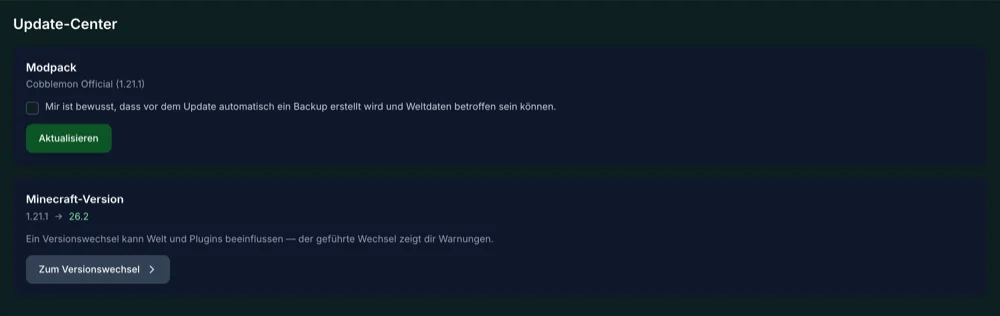
Panel capture from the update attempt at the time. The general Minecraft version card visible below it belongs to a different process. Its target is not an update target for this Cobblemon pack.
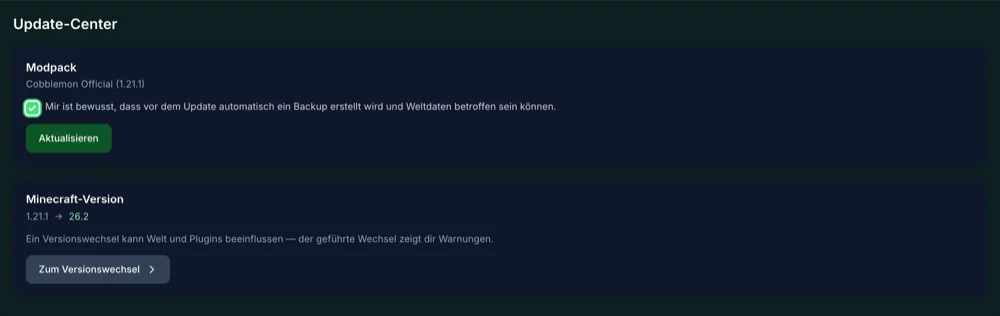
The ticked notice shows the confirmation; on its own, it proves neither that the backup was completed nor a successful restore.
What the Historical Panel Test Actually Showed
In the repeated test of September 24, 2026, a Cobblemon Official server changed from 1.7.3 to 1.8.1. In the startup log, Fabric Loader 0.19.5 was loaded instead of 0.18.4; Minecraft remained 1.21.1. Afterwards, main.json contained 111 keys instead of 97, and the existing pasture radius of 64 was preserved. The world folder was still present and the server reached the ready state.
A first attempt the day before had only updated the mod files and started the old loader. The subsequently corrected update route and the repetition are therefore the relevant historical evidence. This is not a present-day assurance for every loader, pack, or additional-mod combination.
The proof of a preserved folder does not check every block, every team, and every PC box. Fresh Official and Optimised installations were joined separately with a Java client. That does not replace a full gameplay comparison of the migrated save.
The Group Signs Off on the Result in the Game
Install the agreed client pack release in a matching instance. Check a normal join, the chosen world, team and boxes, as well as the structures and contents you noted beforehand. Leave the server and check the saved data when you rejoin. Test your own datapacks and the new features you really use.
Expected advancement changes are no reason to delete player data. If, however, a team or boxes are missing, do not keep playing for now and investigate the backed-up baseline. Repeatedly earning new progress makes the way back harder if an old backup has to be restored later.
Then observe a real stretch of play. A complete start and a short join do not prove long-term stability. In the checked MCF catalog, Official is listed with 6 GB and Optimised with 4 GB; these are plan tiers, not guaranteed player counts. The free 2 GB plan is not an offered Cobblemon pack route.
FAQ
Do I have to switch to 1.8.1 today?
This guide describes exactly this version change. Decide based on the offered pack target, your additions, and the release notes. A documented historical version is not automatically the newest one for every pack.
Does the update delete all progress?
The official notice concerns the previous Cobblemon advancements except the starter root. Other data must be backed up and checked after the change; a general loss of all world or team data has not been announced.
Can I simply keep the previous pasture value?
In the historical test, 64 was preserved even though the new default is 32. Check your stored value and the desired effect instead of assuming an automatic reset.
Why is the same Minecraft version on the client not enough?
Pack name, pack release, loader, and required mods must match as well. The invitation to the modpack server helps with a complete comparison.
Can I just copy the old mod file back if something goes wrong?
That is not a complete way back. Restore the matching old software, world, player, and configuration state. Keep the unchanged baseline until after the gameplay check.
Which new settings can I change?
The config reference explains all 111 keys for 1.8.1, their ranges, and limits. After an update, initially change only the value whose effect you want to check.
Sources and Status as Checked
- Cobblemon: official release 1.8.0.
- Cobblemon: official release 1.8.1 for Fabric.
- Official pack: release 1.8.1.
- Cobblemon configuration in tag 1.8.1.
Release details and local panel path checked on October 7, 2026. The described server, datapack, and loader observations date from September 23 and 24. For this revision, no new server was updated and no new Minecraft capture was made.