A normal free MCF server does not run non-stop 24/7. It uses an inactivity mode and can start again on the next supported connection attempt or via the panel option offered. A fixed wake-up time is not guaranteed. If your world is supposed to run without this free pause, you check Always Online or the paid plan.
What matters is what your group needs: playing together at agreed times, spontaneous joins, or actual simulation without players. These are different requirements. This guide explains how to run an existing MCF server; for setup, use Create a Minecraft Server for Free.
As of: October 7, 2026. The free-tier time limits mentioned and the Always Online availability were checked against the current MCF offering. For an order, the conditions actually displayed and the confirmed scope of service apply.
Telling Four States Apart
A server that can't be reached isn't necessarily asleep. Check the displayed status before you reinstall software or the world.
| Server state | Your check |
|---|---|
| Installation or startup in progress | Wait for provisioning and startup; don't begin a second installation |
| In free sleep mode | Use the wake-up option offered, then reconnect |
| Manually stopped or startup failed | Check the start or the specific error message |
| Released due to longer inactivity | Check retention, warnings and the offered restoration in your account |
Sleep mode pauses the running game process; it is not a world reset. The longer retention period is a different rule. A saved address alone therefore doesn't prove that the original server is still available.
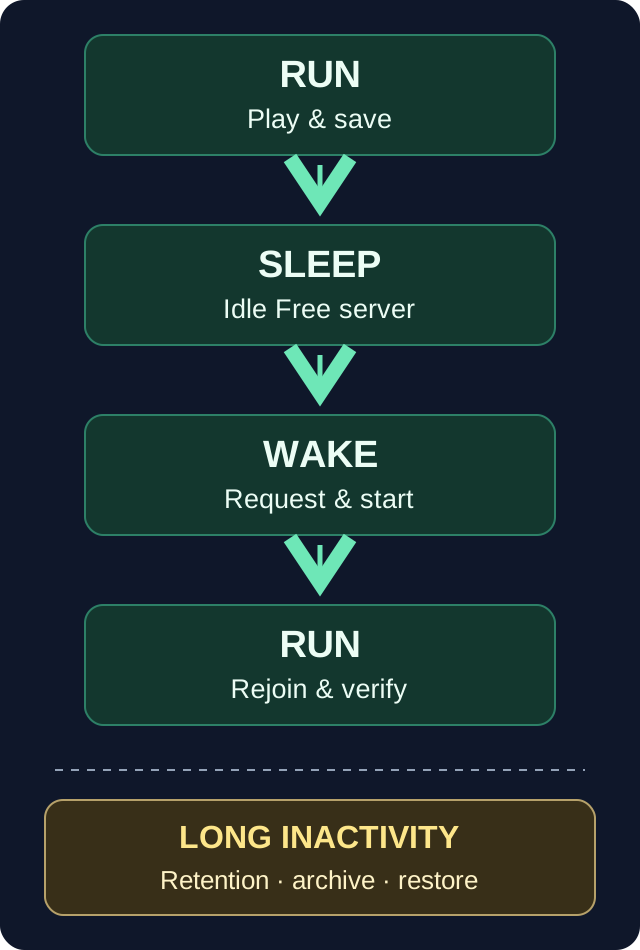
The graphic shows the normal path after a break in play. Archive and restoration are a separate process; an archive can't simply be started by joining.
When the Free Server Goes to Sleep
In the checked normal free operation, the inactivity threshold is 15 minutes without players once the server has already been played on. For a freshly set up server that has never been played on, 60 minutes are provided. These are thresholds for the inactivity process, not a promise of a stop accurate to the second. The sleep times mentioned are defaults. The effective server configuration as well as ongoing backup or maintenance processes can shift the start.
An open browser window or the launcher's server list is not a game join. End your last round cleanly and check in the panel afterwards which state was actually reached. A temporarily valid additional no-sleep offer can change the mode; check its scope and expiry date in your own account. This does not create a general commitment for all free servers.
The world does not keep working while the game process is paused. Scheduled tasks that need the game server itself don't become continuously running tasks as a result. For a private building or survival round, this pause can be fine if you take it into account in how you play.
Waking Up Without a Time Promise
With a supported connection route, the next game join can request the wake-up. Alternatively, you use the wake-up function offered in the panel. For Java, native Bedrock and a crossplay setup, you must not assume the same address entry and the same port without checking.
Use the current connection details from the right server. The Bedrock guide explains joining from a device; the friends guide helps with a shared invitation. The Bedrock port and the Java address are separate details.
After the request, a queue or a running startup may be displayed. A displayed estimate is not a fixed deadline. Wait for the startup to finish and try joining again. Repeatedly starting, stopping and reinstalling creates no additional startup capacity and makes diagnosis harder.
If the state doesn't develop as expected, note the time, status, edition and exact message. Check whether the server is actually asleep or failing because of a software error. Passwords and secret connection details don't belong in a public error report.
Testing a Full Evening
Check your actual routine before you promise everyone a world that's reachable at any time:
- Connect with the appropriate client and determine which world is loaded.
- Remember a harmless change and your own inventory state. Play with the intended extensions.
- End the round normally. After the inactivity phase, check the status in the panel.
- Request the wake-up, wait for the startup to finish and reconnect.
- Check the world, the change, the inventory and the features your group actually uses.
Record the version and the result. Such a test of your own shows whether your routine works; it does not measure a guaranteed startup time at every time of day. If a different spawn or an empty inventory suddenly appears, back up the existing state and check the world and player identity. Don't immediately overwrite all files with some old backup.
Always Online: What You Are Buying
Always Online lifts the normal free sleep mode for the valid service period. The displayed monthly base price is €1.99. On the check date, the option was generally enabled; the actual display in your account remains decisive before a booking.
The checked single purchase uses account credit. If a top-up is needed, a minimum amount may apply; currently the minimum top-up is €5. This is to be distinguished from the price of the individual feature: a remaining credit balance stays in the account and is not a claim that Always Online itself costs €5 per month.
Longer terms offered have a total price. Before confirming, compare the feature, the correct server, the term, the total amount, the existing expiry and the renewal conditions. Another booking of an already active feature can extend its term. It is not a free confirmation of the same order.
The checked renewal of a feature not already covered by the plan uses available credit. If it is missing at expiry, the server falls back to the appropriate free behavior unless there is another valid no-sleep reason. Therefore check the displayed expiry date and your account balance before a longer project. To end it as desired, use the option offered in the account or clarify it with support; switching off a Minecraft plugin does not cancel a hosting feature.
Always Online does not automatically expand RAM, storage space or the compatibility of your modpack. The decision about additional resources is covered in Free, Add-on Feature or Paid Plan.
A Running Process Doesn't Make Every Farm Work
Even without hosting sleep mode, the relevant areas must be loaded and active for their mechanics. The specific Minecraft edition, server software, simulation settings and extensions determine the behavior. A distant build does not become an active farm through a hosting purchase alone.
Therefore explicitly test the desired function without players and with the version you use. PaperMC describes view and simulation distance as separate settings. Don't blanket-raise these values to fix a farm; that can increase the world load.
Always Online also does not mean a technical guarantee without restarts, maintenance or software errors. If your community needs a specific level of availability, check its conditions separately. "No automatic free sleep mode" and "reachable every second" are different commitments.
Longer Break: Back Up the World in Time
The checked free process can release servers that have already been played on after 14 days of inactivity; for a server that was never activated, a separate 7-day expiry applies. Warnings and the actual account status are decisive. A mere panel visit does not generally replace real player activity for a world that has already been played on.
After a corresponding archiving, 30 days of retention are provided in the checked process. An archive is not a permanently available online world and not an unlimited backup. Back up an important save in time, independently of this, and check that the required files are fully included.
A valid purchased add-on feature is a protective reason in the checked normal recycling process. After it expires, the free rules can apply again. For a break of several months, therefore, don't rely on an old purchase confirmation but on the current service period and your own backups.
FAQ
Can I run a normal free server 24/7 without a pause?
The normal free scope includes the inactivity mode. To lift it, you check an additional offer that is actually valid or the paid plan; there is no general free always-on commitment here.
How long does waking up take?
There is no fixed commitment. Queue, software startup, world and extensions influence the process. Check the status and any estimate, and reconnect after the startup has finished.
Does sleep mode delete my world?
Sleep mode alone does not reset the world. Longer inactivity and retention are separate rules. Back up important data and check the current account status.
Why isn't my farm running despite Always Online?
A running process is only one prerequisite. Loaded areas, simulation, edition and the specific mechanics must also fit. Test the intended farm without players instead of only checking the hosting status.
Does Always Online give more RAM?
The feature lifts the normal free sleep mode. You choose additional RAM and other resources via a plan intended for that; check the suitable offer separately.
What happens when the feature expires?
Without another valid no-sleep reason, the appropriate free mode applies again. Check the expiry date, credit and retention before a longer break, and keep your own full backup.
Sources and Review Status
Product time limits, current availability and the pricing basis were checked on October 7, 2026. The evening described is a suggested self-run functional test, not a new measured proof of availability or performance.
Measured wake times: duration varies with load and queueing and can be substantially longer than one minute. Current P50, P95 and success rate: mcfreehost product facts.