Bedrock on a phone, on Windows and on a native Bedrock Dedicated Server can be updated at different times. For your next game night, you should therefore check the versions actually installed on each device and the version the server is currently running. A server that has just been restarted or woken up is not on the intended update target simply because of that.
This guide plans an update window for your private MCF Bedrock group. The reviewed automation applies to the native Bedrock Dedicated Server. A Java server with Geyser and a PocketMine installation are different setups; they have to be checked using their own respective procedures.
Reviewed: October 7, 2026. On the running MCF instance, Bedrock automation and the update attempt before Free sleep are active. There is an approved target version. This statement is not a promise that every future store version will be adopted immediately.
Compare the Devices Before the Session
Ask your friends to read the version shown in the Bedrock build they actually launch. "I don't see an update" in the store is a different finding than "my game shows version X". Store rollout, device settings and available builds can differ from one another.
Note the server version from the current startup log and panel notices. Compare it with the clients in use and with a specific message such as "outdated client" or "outdated server". Not every differing full build number proves the same protocol incompatibility; the actual join and the version notes decide.
Do not use a Preview or Beta build as an ordinary substitute for the agreed stable group. Check the intended edition and release. The official Bedrock server download refers to the native server; the Microsoft server documentation explains how it is structured.
Agree on a Short Update Window
Plan the switch before your shared session, when nobody is playing. Back up the world and relevant settings beforehand and check that the backup is accessible. Having the automatic update path switched off does not replace this backup.
Keep a record of the previous server version and the data copy. After a version change, an older server may no longer be able to read a world that has already been converted. A way back must therefore not simply roll back the server files and carelessly keep using the world that has changed in the meantime.
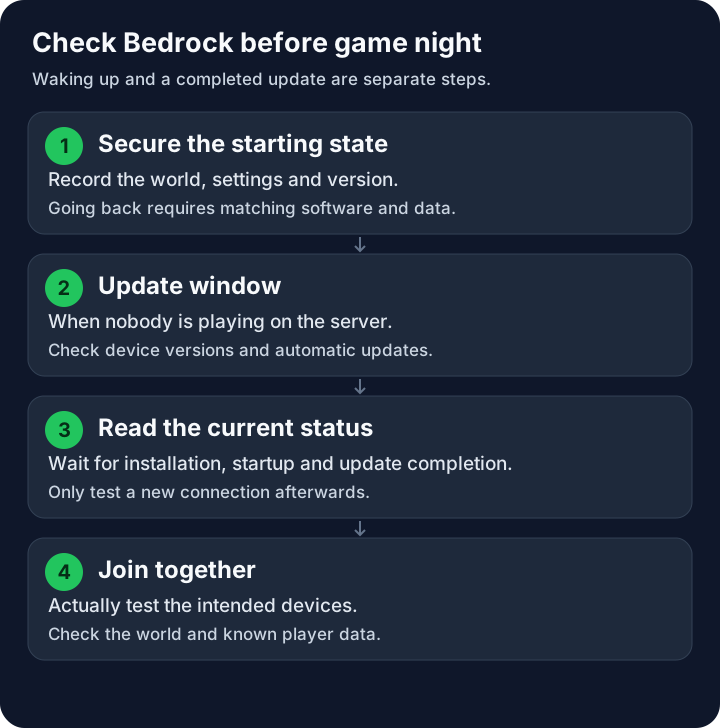
The flow shows your checkpoints. The graphic promises neither a fixed update time nor an error-free version change.
On Free, sleeping and waking up affect operation. For this, read running the existing server together. Only agree on a dependable session once installation, startup and a join have actually been checked.
What the Reviewed MCF Automation Does
The native Bedrock path checks the installed version against an approved target. A newer release on a download page is not automatically the same as the approved target. The offered MCF path decides which server build is actually intended.
An update attempt only continues if no active players are detected and the necessary state checks pass. An unclear player count is not proof that the server is empty. Running installations should not collide with a second update.
The reviewed implementation creates an additional platform backup before the actual update. If this step fails, the version change must not simply proceed without it. This internal safeguard is not a promise about the number or availability of your own plan backups. Keep a starting state that you have verified yourself.
An update can be attempted before Free sleep. Another attempt can also be triggered after waking up. Retries after an error can also affect a server that is already asleep, without keeping it permanently online for your next session. However, waking up does not necessarily wait for a version change to finish. If a friend is already joining, an intended update attempt may also be postponed because of active players.
Use the Switch Deliberately
Open the settings of the server in question (Settings → General) and check the Automatic Updates switch. Switching it off does not update or downgrade any of your friends' devices. Whether it is visible and usable depends on the actual server software and on whether this path is supported.
| State | Effect |
|---|---|
| Automation enabled | A suitable update attempt may be scheduled; check completion separately |
| Automation disabled | Future automatic attempts should skip this server |
| Update already running | Do not treat switching off as an immediate abort; check the current state |
| Server woken up | Check startup and version change separately |
If you disable the automation for a planned version agreement, verify the confirmed setting. Do not rely on a switch immediately reversing an installation that is already well underway. Wait for its result and check the running version.
Enabling it likewise does not mean "all friends can join right now". The target, the server state and the pending work remain relevant. Do not let several people change settings at the same time or trigger reinstallations repeatedly.
Really Test the Completed Change
Watch the current update, installation and startup messages. An old console section may show the previous version; compare the new startup and its time. While an installation is running, you are not testing normal gameplay.
When the server is ready, have one intended device join. Check the world, spawn, known inventories and the expected settings. Then test the other device types that will be used on game night. A single successful connection does not automatically prove that all friends have the same matching build.
Keep a record of the confirmed server version and the tested client versions. The Bedrock introduction adds the address, port and device routes. Copy the current connection details from your panel.
Proceed Selectively in Case of a Version Mismatch
If only one device fails, compare the build it actually launches with a device that connected successfully. Check regular store updates and an accidentally launched Preview. Do not force an arbitrary server reinstallation just because a single client does not match yet.
If the server stays on the old version despite automation being enabled, check with evidence: Is another process running? Are players active? Is there an error or an update that has not finished yet? For support, the time, software, installed server version, client versions and the current message are helpful.
If a change fails, first leave the affected setup unchanged. Preserve the backed-up starting state and the logs. A return is planned with matching software and matching data; do not delete the world to make an old build startable again.
Treat Java Crossplay Separately
If Bedrock friends access a Java server via Geyser, the Java server version, Geyser support and the Bedrock client version are separate components. A Geyser update is not a native BDS version change. Paper may also have its own automatic update path; "Java is never updated automatically" would therefore be wrong. This does not mean, however, that all Java modpacks automatically switch to new pack releases.
First check which software your panel actually shows. Then use the guide for that setup. Inviting a mixed group is explained in Minecraft with Friends.
FAQ
Is the Bedrock update already finished after waking up?
Not necessarily. An attempt can be triggered after startup and may be pending or postponed. Check the new startup log, the update state and a real join.
Can I turn off automatic updates?
Use the offered switch in the settings of the supported server and check the confirmed setting. This does not guarantee that a process that is already running is aborted immediately.
Why wasn't it updated during our session?
The reviewed native update path requires a server that is detected as empty. Active players or an unclear state can postpone the attempt.
Does a different build number automatically mean incompatible?
Not every full number alone answers the protocol question. Compare the builds in use, the specific join message and whether the join actually succeeds.
Does this procedure also apply to Geyser or PocketMine?
This guide describes the native Bedrock Dedicated Server. Java crossplay and PocketMine need the update and compatibility path that fits their software.
Can I simply use the old server version after an error?
Also check the state of the world and data. A world that has changed in the meantime may not fit the older build. Preserve the backup and plan the rollback of software and data together.