mcfreehost is an Aternos alternative for a small Minecraft group of friends if the verified free tier fits your plans: 2 GB RAM, 10 GB storage and one Free server running at a time. Whether a switch is worth it is not decided by a blanket "better", but by your edition, required add-ons, start-up flow and backups. Aternos also offers crossplay, custom addresses and backups; these features are not unique to mcfreehost.
Comparison checked: October 7, 2026. Aternos details come from the official help center, MCF limits from the active product values. No start time, player count or performance superiority is promised for either provider here. Hosting is free; a valid Minecraft license for the edition you use is still required.
Write Down Your Group's Requirements First
Answer these questions before switching:
- Which edition do your friends actually launch: Java or Bedrock? On Windows, both are possible.
- Do you need Paper plugins or a specific Fabric/Forge/NeoForge pack version?
- Do you play occasionally, or does the project need reliable around-the-clock operation without an inactivity pause?
- How large are the world, additional files and backups already?
- Who is allowed to start the server, change settings and restore backups?
Changing providers does not fix an incompatible client instance or a misconfigured mod. If your current Aternos group works reliably and the files you need are offered, a different brand name alone creates no technical advantage.
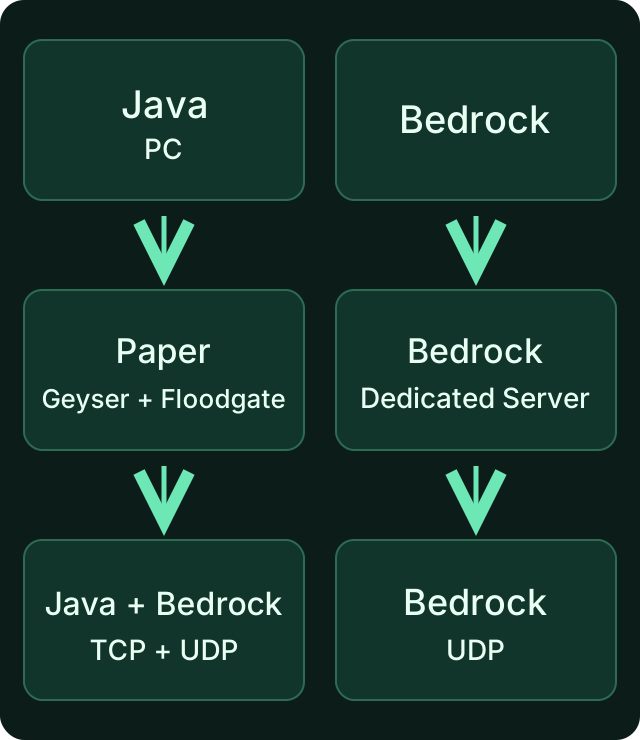
Choose the software you need first. These edition paths explain a technical prerequisite, not a speed comparison between the two providers.
Aternos and mcfreehost: Verified Differences
| Question to check | mcfreehost Free | Aternos |
|---|---|---|
| Which RAM is provided? | 2 GB in the verified plan | According to the help center, allocation depends on software and version; check in the live panel |
| Can Java and Bedrock play together? | Supported Java/Paper path with Geyser and Floodgate; check status and port in the panel | Install Geyser; Aternos installs Floodgate alongside it and preconfigures Geyser for its environment |
| What happens at start-up? | Installation, waking up and available capacity determine the wait; a wake-up request may have to wait | When capacity is full, a start queue with display and confirmation |
| Does an empty server stay online? | Free sleep mode after inactivity | Empty servers are stopped with a displayed countdown |
| Is there a custom address? | Connection address in the panel; check whether the offered name is available | aternos.me address; your own existing domain can also be linked |
| Are there backups? | Three restore points in the verified Free tier: two automatic and one manual | Google Drive link; manual and automatic backups after setup |
| Can arbitrary mod files be uploaded? | Check the software path, compatible files and 2 GB resources; no large pack is promised through file access alone | No FTP access and no arbitrary upload of your own plugins, mods or modpacks; other file types partly allowed |
The table is a dated feature check. It contains no direct load test of both platforms. In its RAM explanation, Aternos lists different allocations depending on the software version. "Aternos always has 1 GB" would therefore not be a reliable comparison statement.
Starting and Waking Up Without a Fixed Number of Minutes
Aternos explains the queue as a result of full capacity. The displayed position and wait time are what matter for your current start; an invented blanket range of 15–30 minutes is not valid comparison evidence.
With mcfreehost, too, a requested start or wake-up may have to wait. The statement "load-dependent waiting times" would be false. Check the status and notices in the panel. A first connection attempt to a sleeping supported server can request the wake-up; if the start is still in progress, another attempt may be needed. This flow does not guarantee joining "automatically".
An MCF Free server that has had players before can by default sleep after 15 minutes without players in the verified state; a server that has never been played on has its own 60-minute limit. The sleep times mentioned are defaults. The effective server configuration as well as running backup or maintenance processes can postpone the start. Aternos describes the stop countdown, which reappears after the last player leaves. Its exact display is authoritative; no universal five-minute deadline is claimed here.
Crossplay Is Possible on Both, but Tied to Software
The Aternos Geyser guide explicitly describes the automatic Floodgate installation and a prepared configuration. You do not generally have to write all the settings yourself there.
With mcfreehost, you check the supported Paper/crossplay path and use the assigned Bedrock UDP port from your panel. The 19132 mentioned in the Aternos Geyser guide is not a general port assignment for other hosts. A native Bedrock server and Java with Geyser are different server paths.
A pack with mandatory Java client mods does not become a Bedrock pack this way. The Geyser FAQ explains this. On consoles, possible platform and sign-in steps are added; switching hosts does not automatically remove these limits. If your group only uses Bedrock, start with the free Bedrock guide.
World and Backup Matter More Than a Short Address
Aternos supports your own existing domains alongside its server address. "Aternos has no custom address" would be false. For both offerings, check the current connection display rather than an old example from a screenshot.
After linking a Google Drive backup service, Aternos offers full backups and configurable automatic backups. A simple world download and a full server backup are different things. Check which settings, add-ons and player data your export includes.
With MCF, a limited number of restore points does not replace an additional copy of an important world outside the server. During a trial switch, keep your previous server and an original backup until joining and data have been verified.
When an MCF Free Test Makes Sense
A test can suit you if you want to use the supported edition path, the storage is enough and the inactivity mode fits your play times. Start by testing a limited save or a copy. What matters is whether the features you need actually work, not whether an empty server shows green once.
| Your need | Sensible next step |
|---|---|
| Small vanilla/Paper group of friends | Check the Free tier, choose the right edition and test with a normal player account |
| Java and Bedrock together | Before switching, check one real join each with the intended devices and ports |
| A specific mod file is missing on Aternos | Check the file requirements, loader and resources; free upload alone does not prove compatibility |
| Larger Cobblemon or other heavy pack | Check the specific pack/RAM path offered; MCF Free with 2 GB is not a general replacement |
| World should be kept through longer play breaks | Read the retention rules and prepare an external backup |
| Public around-the-clock operation or two simultaneously active Free worlds | The verified Free tier does not meet this requirement |
Aternos explains its upload restrictions for custom executable mods and plugins; among other things, datapacks, resource packs and some configuration files are still allowed. "You can't upload any files at all on Aternos" would be too broad a statement.
For the actual first MCF server, Create a Minecraft Server for Free walks you through edition and joining. How to invite a small group and limit permissions is covered in Play for Free with Friends. This comparison does not repeat the full setup process.
Consider Longer Play Breaks Before You Decide
Sleep mode and retention are separate rules. With MCF, sleeping does not immediately delete the world. In the verified Free model, however, recycling can follow after 14 days of inactivity; for a server that was never activated, a seven-day rule applies. A Free archive has a limited retention of 30 days. Do not rely on unlimited restoration for important data.
For inactive servers, Aternos typically mentions about three months, not guaranteed eternal retention. Check the notices on your account and enable backups there. For a group that pauses for weeks, this difference in time limits can matter more than start-up convenience.
Verify the Switch Before Giving Up the Old Save
- Note the edition, Minecraft version, exact server software, add-ons and required features of your current group.
- Back up the world and relevant server data; keep the original separate from the test version.
- Check the MCF Free limits and the matching software path. First test a normal Java join or the intended Bedrock join.
- Check known builds, inventories, permissions and a save followed by a restart. Also check the flow after inactivity.
- Based on these results, decide whether the free switch meets your specific needs. Only give up the previous save after a successful transfer.
A Java world, mod data and Bedrock files do not automatically become interchangeable just because of a new host. Missing mod content must not become the new starting point by saving a damaged test copy. For the general question about around-the-clock operation, 24/7 for Free: Checking the Limits helps.
FAQ
Is mcfreehost free and therefore automatically better than Aternos?
No. Both have a free offer with limits. Compare the software you need, RAM/storage allocation, start-up flow, backups and retention. For a working Aternos server, switching just because of the brand name is not necessary.
Does mcfreehost guarantee no waiting time?
No. Installation, waking up and capacity determine the actual flow. A wake-up request can also have to wait. Check the current status display instead of a fixed number of seconds.
Does Aternos already support crossplay and backups?
Yes. The official guides describe Geyser with a prepared configuration as well as backups via linked Google Drive services. These are not exclusive MCF features.
Can I simply reuse Bedrock port from your panel from the old guide?
With mcfreehost, you use the assigned Bedrock port from your panel. An Aternos or Geyser default is not a general assignment for the new server.
Can I run two MCF Free servers at the same time?
The verified free tier allows two created Free servers in the account, but only one online at a time. Do not plan on two simultaneously active worlds as a capability of this plan.
Should I stay with Aternos for a long break?
Above all, check retention and existing backups. MCF Free has shorter verified recycling periods; Aternos also describes deletion after longer inactivity. An external world copy makes sense with both. A single time limit, however, does not answer your other software requirements.
Sources and Review Status
- Aternos: Queue.
- Aternos: Stop Countdown.
- Aternos: RAM Allocation.
- Aternos: Geyser and Floodgate.
- Aternos: Backups.
- Aternos: Upload and FTP Limits.
- Aternos: Inactivity and Retention.
- MCF: Current Free Entry.
The details were checked on October 7, 2026. MCF product limits come from the active configuration. This article does not publish a direct speed or capacity test between Aternos and mcfreehost.
Measured wake times: duration varies with load and queueing and can be substantially longer than one minute. Current P50, P95 and success rate: mcfreehost product facts.