You can play with friends for free on an mcfreehost server if the verified Free scope fits your small group. First clarify which edition each person uses, choose the matching server path and send a complete invitation based on the panel values. Java and Bedrock do not automatically connect to each other with every piece of software.
This guide organizes your shared game night: Who needs which address, who is allowed to play, who is allowed to manage and what happens between two sessions? The basic order process is explained in Create a Minecraft Server for Free.
Product values verified: October 7, 2026. Free includes 2 GB RAM, 10 GB storage, two created servers and one server running at a time. A free player count setting is not a measurement of how many people your world can handle without lag.
Ask the Group Before Choosing a Server
| Your group | Suitable starting point | What still needs to be checked |
|---|---|---|
| Everyone plays Java | Supported Java server | Server version and, for mods, the specific client instance |
| Everyone plays Bedrock | Native Bedrock Dedicated Server | Device path, compatible version and Bedrock port |
| Java and Bedrock mixed | Supported Java crossplay path with Geyser/Floodgate | Status, both connection paths and specific game mechanics |
| Everyone wants a client-required Java modpack | Matching Java modpack server | The same pack on every client; plan resources separately |
“On Windows” does not answer the edition question yet: Both Java and Bedrock can be installed there. Have each person check which game they actually launch. A Minecraft account or a properly acquired matching edition is still required; free hosting does not provide a free copy of the game.
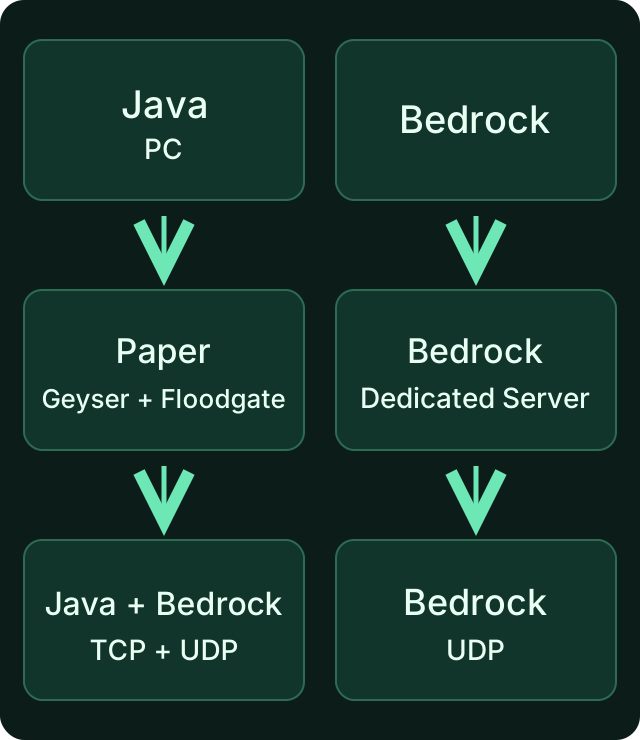
Decide on the edition path together before you send the invitation. Crossplay does not turn an existing Java world into a native Bedrock world.
A Complete Invitation Instead of a Screenshot
Copy the current connection details from the panel. For Bedrock, use the assigned Bedrock port; 19132 from an old tutorial is not a general MCF assignment. Java players receive the Java connection display. Do not append a Bedrock port to the Java address on a hunch.
You can fill out this template in the private group chat:
Our Minecraft Game Night
Edition / server route: [Java, Bedrock, or supported crossplay]
Server version: [exact version from the panel]
Java connection: [Java details from the panel, if needed]
Bedrock address: [Bedrock details from the panel, if needed]
Bedrock port: [assigned Bedrock port]
Client pack: [exact name and version, if needed]
Access: [who is on the private access list]
Start / questions: [responsible person]
The square brackets are placeholders. A game address must not contain https://, no extra space and no password. For a normal join, fellow players do not need an MCF owner account. A separate panel access is only needed for people who explicitly take on management tasks.
Phones and Bedrock on Windows offer an external server entry. For consoles, check the additional platform path before the session; merely adding one person as an Xbox friend does not automatically make a remote dedicated server reachable. Details at Connect to Bedrock for Free.
Test Crossplay in Advance with Both Editions
On a supported Java server, Geyser translates Bedrock connections. Floodgate adds the intended Bedrock login without an additional Java account. Check the status and port of your specific server; this is not a promise for all server types.
First have a Java player join, then a Bedrock player without OP. Once both are in the same world, check together:
- Both see the same spawn and the same existing builds.
- Both can move and place and break a block at an allowed spot.
- Inventory, interaction and the shared game mechanic you want all work.
- The Bedrock player appears with their expected identity.
- After a normal restart, a small agreed-upon change is preserved.
The Geyser FAQ explains the limits with mandatory Java client mods. For Cobblemon or any other such pack, Geyser does not turn Bedrock friends into matching Java mod clients. Individual menus, resource packs and plugins can also work differently between editions; test the features that matter to you.
Keep the Private Group, OP and Panel Management Separate
| Role | What it is needed for | What does not follow from it |
|---|---|---|
| Regular fellow player | Entering the world and playing together | No access to your MCF account or all server commands |
| Listed player | May join according to the relevant whitelist/allowlist | No automatic OP |
| Operator in game | Deliberately granted administrative game commands | No automatically granted panel access |
| Co-manager in the panel | The tasks explicitly selected there | No substitute for a game account and the right edition |
For a small private group, normal play without OP is usually enough. Use the appropriate access list before you share the address widely. On a Java server, the whitelist can be managed via the console; there, commands are entered without a leading slash, in the game with a slash.
A short Java example with placeholders:
whitelist add <JavaName>
whitelist on
whitelist list
You replace <JavaName> with the actual name. The PaperMC documentation on data files recommends the intended commands instead of manually rewriting the player lists. Afterwards, test with a listed and an unlisted normal account. An OP test alone does not check your normal access rule.
For Bedrock via Floodgate, the identity actually used and its whitelist path apply, not a universal name prefix. A native Bedrock server uses its own allowlist path. Do not blindly transfer a Java UUID or a dot before the name to all editions.
A Co-Manager Without a Shared Owner Password
The verified MCF Free scope provides for one co-manager. Open the sub-user management of the specific server, select the permitted rights you need and use the invitation for their own account. You can see which rights are offered on the Free plan there; an invitation does not automatically make anyone a full owner.
If someone only needs to start the server or view the status, they do not need additional rights to change files or login settings. Check together whether the intended tasks work. When the responsibility ends, you revoke the access again. Do not share your password or your second sign-in factor instead.
Regular friends who only play Minecraft do not count as panel co-managers. The limit of one co-manager is therefore not a one-player limit for the world.
Between Two Game Nights: Sleeping and Preserving the World
After 15 minutes without players, a Free server that has been played on before can go to sleep; for servers that have never been played on, a 60-minute limit applies. The stated sleep times are default values. The effective server configuration as well as ongoing backup or maintenance processes can delay when sleep begins. The first attempt after a break can request the wake-up; depending on capacity, the start may additionally have to wait. Wait for the start status and retry the join if necessary. There is no guaranteed time limit automatically and no promised uninterrupted continuous operation.
For longer breaks, separate retention rules apply: recycling after 14 days of inactivity, or seven days for a server that was never activated, and a Free archive with retention limited to 30 days. Also keep an important world stored outside the server. Details are explained in 24/7 for Free: What the Free Server Delivers.
The verified plan has three restore points: two automatic and one manual. Before changing the world, mods or software, check which backup contains your complete starting state. An existing backup name alone does not prove that you can successfully restore the game state you need.
If One Person Cannot Join
| Observation | Check first |
|---|---|
| Nobody can join | Installation, running start or sleep status, and the actual panel address |
| Java works, Bedrock does not | Bedrock port, crossplay status, device and client version |
| Only one modded client fails | The pack instance actually launched and the exact pack version |
| Message about the access list | The intended name or the actual Bedrock identity |
| Building fails near spawn | Spawn or area protection; OP is not a general join fix |
| Progress is missing after restart | Check the active world and backup state, keep the original copy |
Write down the exact error message and the affected edition. Do not change ports, auth mode, loader and world at the same time. That way it stays clear which step helped. Passwords and private login data do not belong in the error description.
FAQ
Does everyone need an mcfreehost account?
Not for normal game joining. They need the matching Minecraft edition, the required client files and correct connection details. A co-manager receives their own shared panel access.
Can a phone and a Java PC play together?
On a Java server that supports it, with working Geyser/Floodgate. First check both joins and then your shared game mechanics. A native Bedrock server does not accept Java clients.
Which port do I write in the invitation?
For Bedrock, the Bedrock port from the current panel. For Java, you take over its connection display. A blanket default port does not replace an assignment.
Do I have to give my friends OP?
Not for normal play. Access list, game commands and panel management are different rights. Only grant the permissions needed for a specific task.
How many friends fit on the Free server?
This guide does not promise a fixed number. 2 GB RAM and 10 GB storage are product limits; world, entities, plugins, view distance and simultaneous activities determine the load. A higher max-players value does not create additional resources.
Can a second Free world run at the same time for another group?
The verified scope allows two created Free servers, but only one online at a time. Plan your game night accordingly or look into a suitable other offer for worlds that are active in parallel.
Sources and Verification Status
- Geyser: Java/Bedrock connection.
- Geyser: Limits of client mods.
- Floodgate: Login.
- Floodgate: Own management commands.
- PaperMC: Whitelist and operator data files.
The MCF Free limits and the sub-user management were verified on October 7, 2026. The suggested shared play test is your own acceptance; it does not claim a new performance test with a specific group size.