Cobblemon 1.8.1 registers 64 root commands and 13 aliases. This complete reference adds permissions, console support, and effects to the exact syntax. /cobblemonconfig reload is listed as an additional subbranch; it is not a 65th root command.
For a specific action, first check the mod version, execution context, and permissions. A command with a personal menu cannot display that menu when called from the console. Likewise, an error message about a nonexistent target is not complete proof that the command works.
Start with a Display Command
In the game, the first version check is:
/cobblemon info
In the server console, leave out the leading slash. The output shows the Cobblemon mod version and build details; it does not tell you which complete client pack release your friends have installed.
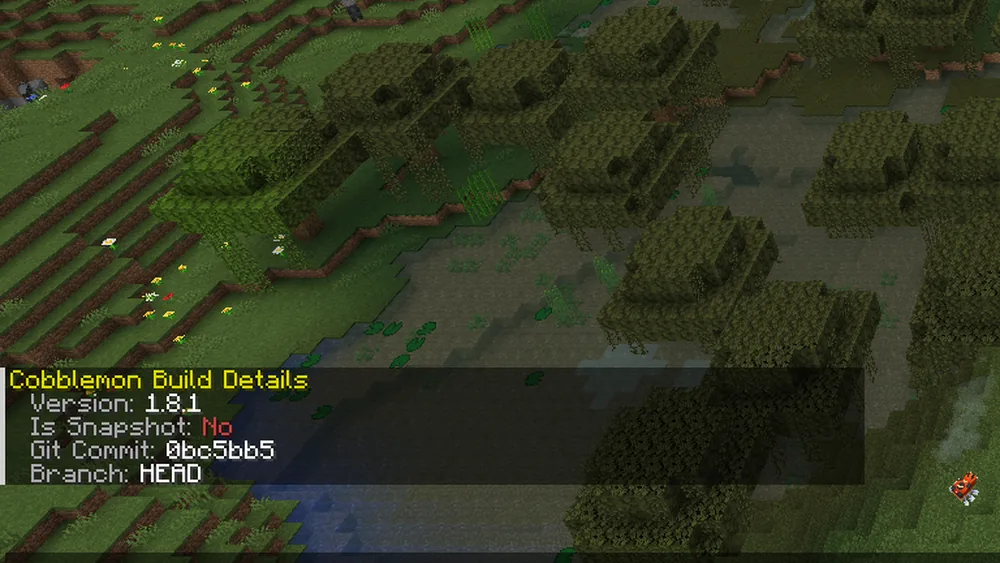
The existing English screenshot documents the build at that time. Branch and commit are information about the mod, not a game world or server address.
Reading the Entries Correctly
<…> marks a required argument, […] an optional one. Do not type the brackets. The placeholder names are explanations; concrete identifiers, argument values, and capitalization must match the installed pack. /spectateBattle has a capital B in 1.8.1.
All permissions starting with command. must be prefixed in full with cobblemon.. The default level describes the vanilla OP fallback, not a recommendation for friends. Subbranches can have additional requirements; shared nodes can unlock multiple effects. The permissions guide explains how to grant them selectively.
“Console” here refers to the server console and the stated branch. It does not claim a separate verification of all command blocks, RCON paths, or menus. Coordinates refer to the source and world of the executed command; a console has no player location.
Commands for Players
| Command, syntax, and usage |
|---|
/pc — Syntax: [box]; Permission: command.pc; Default level: 2; Console: no; Effect: open your own PC, optionally directly at box N; not during battle. |
/pcsearch — Syntax: <properties> or other <player> <properties>; Permission: command.pcsearch; Default level: 2; Console: only with other; Effect: search your own or another player's PC; according to the builder, other has no additional permission node. |
/healpokemon (/pokeheal) — Syntax: [player]; Permission: command.healpokemon.self, with a player additionally .other; Default level: 2; Console: only with a player; Effect: heal the whole team. |
/friendship — Syntax: <slot>; Permission: command.friendship; Default level: 2; Console: no; Effect: show the friendship value of one of your own Pokémon. |
/checkspawn — Syntax: <rarity>; Permission: command.checkspawns; Default level: 2; Console: no; Effect: shows what can spawn at your location in the chosen rarity group, with probabilities. |
/abandonmultiteam (/abandonmultibattleteam) — Syntax: no further arguments; Permission: command.abandonmultiteam; Default level: 0; Console: no; Effect: leave your own multiplayer battle team. |
/spectateBattle — Syntax: <player>; Permission: command.spectatebattle; Default level: 4; Console: no; Effect: watch a player's battle; the only command with uppercase letters. |
/cobblemonconfig — Syntax: no further arguments; Permission: no node; Default level: 0; Console: no; Effect: opens your own config editor (on servers it only changes the local file). |
/cobblemon info — Syntax: info; Permission: no node; Default level: 0; Console: yes; Effect: shows the mod's version, Git commit, and branch. |
Managing Team and PC
| Command, syntax, and usage |
|---|
/givepokemon (/pokegive) — Syntax: <properties>; Permission: command.givepokemon.self; Default level: 2; Console: no; Effect: give a Pokémon to your own team. |
/givepokemonother (/pokegiveother) — Syntax: <player> <properties>; Permission: command.givepokemon.other; Default level: 2; Console: yes; Effect: give a Pokémon to another player. |
/takepokemon — Syntax: <player> <slot 1–99>; Permission: command.takepokemon; Default level: 2; Console: yes; Effect: remove a Pokémon from the team; if a player runs the command, they receive it. |
/pctake — Syntax: <player> <box> <slot 1–30>; Permission: command.takepokemon; Default level: 2; Console: yes; Effect: remove a Pokémon from the PC, analogous. |
/pokemonedit (/pokeedit) — Syntax: <slot> <properties>; Permission: command.pokemonedit.self; Default level: 2; Console: no; Effect: edit your own Pokémon. |
/pokemoneditother (/pokeeditother) — Syntax: <player> <slot> <properties>; Permission: command.pokemonedit.other; Default level: 2; Console: yes; Effect: edit another player's Pokémon. |
/pokemonrestart (/pokerestart) — Syntax: [reset_starter: true/false]; Permission: command.pokemonedit.self; Default level: 2; Console: no; Effect: clear your own team and PC; with true the starter may be chosen again. |
/pokemonrestartother (/pokerestartother) — Syntax: <player> [true/false]; Permission: command.pokemonedit.other; Default level: 2; Console: yes; Effect: the same for another player. |
/teach — Syntax: <player> <slot> <move>; Permission: command.teach.base, without the learn list command.teach.bypass; Default level: 2; Console: yes; Effect: teach a move. |
/levelup — Syntax: <slot> or <player> <slot>; Permission: command.levelup.self, with a player additionally .other; Default level: 2; Console: only with a player; Effect: raise a Pokémon by one level. |
/held_item — Syntax: <player> <slot> <item>; Permission: command.helditem; Default level: 2; Console: yes; Effect: set the held item. |
/openstarterscreen — Syntax: <player>; Permission: command.openstarterscreen; Default level: 2; Console: yes; Effect: open the starter selection if no starter has been chosen yet. |
/pokebox — Syntax: <player> <slot> [box]; Permission: command.pokebox; Default level: 2; Console: yes; Effect: move a team member to the PC. |
/pokeboxall — Syntax: <player> [box]; Permission: command.pokebox; Default level: 2; Console: yes; Effect: move the whole team to the PC. |
/clearparty — Syntax: <player>; Permission: command.clearparty; Default level: 2; Console: yes; Effect: clear the team. |
/clearpc — Syntax: <player>; Permission: command.clearpc; Default level: 2; Console: yes; Effect: clear the PC. |
/renamebox — Syntax: <player> <box> <name>; Permission: command.renamebox; Default level: 2; Console: yes; Effect: rename a PC box. |
/changewallpaper — Syntax: <player> <box> <wallpaper>; Permission: command.changewallpaper; Default level: 2; Console: yes; Effect: set the box wallpaper. |
/unlockpcboxwallpaper — Syntax: <player> <wallpaper> [sound: true/false]; Permission: command.unlockpcboxwallpaper; Default level: 2; Console: yes; Effect: unlock a box wallpaper. |
/boxcount — Syntax: query <player> or add/remove/set <player> <amount 1–1000>; Permission: command.boxcount; Default level: 2; Console: yes; Effect: query or change the number of PC boxes. |
Creating Pokémon and Testing Spawns
| Command, syntax, and usage |
|---|
/spawnpokemon (/pokespawn) — Syntax: <properties>; Permission: command.spawnpokemon; Default level: 2; Console: yes; Effect: create a Pokémon at the executor's position. |
/spawnpokemonat (/pokespawnat) — Syntax: <x y z> <properties>; Permission: command.spawnpokemon; Default level: 2; Console: yes; Effect: create a Pokémon at a coordinate. |
/spawnpokemonfrompool (/forcespawn) — Syntax: [amount]; Permission: command.spawnpokemon; Default level: 2; Console: no; Effect: trigger N normal spawn attempts at the player — useful for testing spawn settings. |
/spawnallpokemon — Syntax: [min [max]]; Permission: command.spawnallpokemon; Default level: 4; Console: no; Effect: create every implemented species within the number range around the player. |
/giveallpokemon — Syntax: [min [max]]; Permission: command.giveallpokemon; Default level: 4; Console: no; Effect: give every implemented species within the number range to the team. |
Battles, Index, TMs, and Marks
| Command, syntax, and usage |
|---|
/stopbattle — Syntax: <player>; Permission: command.stopbattle; Default level: 2; Console: yes; Effect: end the player's battle, for example when a client hangs. |
/pokedex — Syntax: grant/revoke <player> all <index>, grant/revoke <player> only <species> <form>, printcalculations <player>; printcalculations optionally with another index; Permission: command.pokedex; Default level: 2; Console: yes; Effect: unlock or remove Pokédex entries or print completeness; use a concrete valid index ID from the pack. |
/givetm — Syntax: <move> [amount 1–2304] or <move> <player> [amount]; Permission: command.technicalmachine; Default level: 2; Console: only with a player; Effect: give TM items, stacks of 64, overflow drops on the ground (new in 1.8). |
/technicalmachine — Syntax: unlock/lock <player/selector> only <tm> or all; check <single_player>; Permission: command.technicalmachine; Default level: 2; Console: yes; Effect: unlock, lock, or display TMs in a player's progress (new in 1.8). |
/givemark — Syntax: <player> <slot> <mark>; Permission: command.changemark; Default level: 2; Console: yes; Effect: award a mark. |
/takemark — Syntax: <player> <slot> <mark>; Permission: command.changemark; Default level: 2; Console: yes; Effect: remove a mark. |
/giveallmarks — Syntax: <player> <slot>; Permission: command.changemark; Default level: 2; Console: yes; Effect: award all marks. |
NPCs, Dialogues, and Datapacks
| Command, syntax, and usage |
|---|
/spawnnpc (/npcspawn) — Syntax: <class> [level]; Permission: command.spawnnpc; Default level: 2; Console: yes; Effect: create an NPC at the position. |
/spawnnpcat (/npcspawnat) — Syntax: <x y z> <class> [level]; Permission: command.spawnnpc; Default level: 2; Console: yes; Effect: create an NPC at a coordinate. |
/npcedit — Syntax: no further arguments; Permission: command.npcedit; Default level: 2; Console: no; Effect: open the editor for the NPC in your line of sight. |
/npcdelete — Syntax: [target]; Permission: command.npcdelete; Default level: 2; Console: only with a target; Effect: delete an NPC. |
/applyplayertexture — Syntax: <player_name>; Permission: command.applyplayertexture; Default level: 2; Console: no; Effect: give the NPC in your line of sight a player skin. |
/opendialogue — Syntax: <dialogue> <player>; Permission: command.opendialogue; Default level: 2; Console: yes; Effect: open a datapack dialogue. |
/behaviouredit — Syntax: no further arguments; Permission: command.behaviouredit; Default level: 2; Console: no; Effect: behavior editor for the targeted entity. |
/runmolang — Syntax: <expression> [player] [npc] [pokemon]; Permission: command.runmolang; Default level: 2; Console: yes; Effect: run a MoLang expression. |
/runmolangscript — Syntax: <script> [player] [npc] [pokemon]; Permission: command.runmolangscript; Default level: 2; Console: yes; Effect: run a MoLang script from a datapack. |
/bedrockparticle — Syntax: <effect> <target> [locator] or <effect> <world> <x y z>; Permission: command.bedrockparticle; Default level: 2; Console: yes; Effect: play a particle effect. |
/freezepokemon — Syntax: [seconds, -1 = release]; Permission: command.freezepokemon; Default level: 2; Console: no; Effect: freeze the animation of the targeted Pokémon. |
Queries for Command Blocks
| Command, syntax, and usage |
|---|
/teststore — Syntax: <player> <storage> <properties>; Permission: command.teststore; Default level: 2; Console: yes; result value instead of chat message; Effect: number of matching Pokémon in the team or PC. |
/querylearnset — Syntax: <player> <slot> <move>; Permission: command.querylearnset; Default level: 2; Console: yes; result value instead of chat message; Effect: 1 if the Pokémon can learn the move. |
/testpcslot — Syntax: <player> <box> <slot 1–30> <properties>; Permission: command.testpcslot; Default level: 2; Console: yes; result value instead of chat message; Effect: 1 if the Pokémon matches in the PC slot. |
/testpartyslot — Syntax: <player> <slot 1–6> <properties>; Permission: command.testpartyslot; Default level: 2; Console: yes; result value instead of chat message; Effect: 1 if the Pokémon matches in the team slot. |
Server Administration and Developer Tools
| Command, syntax, and usage |
|---|
/cobblemonconfig reload — Syntax: reload; Permission: command.cobblemonconfig.reload; Default level: 2; Console: yes; Effect: reload the server config and send it to all players. |
/reloadshowdown — Syntax: no further arguments; Permission: no node; Default level: 4; Console: yes; Effect: re-establish the connection to the battle engine. |
/testcommand — Syntax: no further arguments; Permission: no node; Default level: 4; Console: silent, no output; Effect: internal test; among other things halves the team's hit points — do not use on live game servers. |
/getnbt — Syntax: no further arguments; Permission: command.getnbt; Default level: 4; Console: no; Effect: no function. |
/changeeyeheight — Syntax: <species> standing/flying/swimming <height>; Permission: command.changeeyeheight; Default level: 4; Console: yes; Effect: change a species' eye height at runtime. |
/changescaleandsize — Syntax: <species> [scale width height]; Permission: command.changescaleandsize; Default level: 4; Console: yes; Effect: change a species' size and hitbox. |
/changewalkspeed — Syntax: <species> <speed>; Permission: command.changewalkspeed; Default level: 4; Console: yes; Effect: developer tool; without a number the command remains incomplete. |
/transformmodelpart — Syntax: position/rotation/scale [<part> [<x y z>]]; Permission: command.transformmodelpart; Default level: 4; Console: no; Effect: move, rotate, or scale a model part. |
/cobblemonclicktext — Syntax: <callback>; Permission: no node; Default level: 0; Console: no; Effect: internal: callback for clickable chat text. |
Treat State-Changing Commands as Such
/pokemonrestart clears team and PC; the true option additionally changes the starter status. The shared edit node is not a harmless menu permission. /clearparty, /clearpc, /takepokemon, and /pctake also interfere with existing player data. Use such actions only for a deliberately chosen person with a secured baseline.
A PC search is not a removal, but in 1.8.1 it also includes the other branch without its own additional node. Removal is checked separately. For healing or level-up on other players, however, requirements apply to both the root and the subbranch. Do not invent a general .other rule for all commands.
/spawnpokemonfrompool 10 triggers real spawn attempts, not a pure preview and not ten guaranteed creatures. For a location-based display, start with /checkspawn common as a player with the appropriate permission. The output is not a measured long-term encounter rate; the spawn guide separates these levels.
Changes Compared to 1.7.3
/givetm and /technicalmachine are newly registered, both via the shared TM node. /calculateseatpositions has been removed from the command registration, although its old permission node is still defined.
The groups for /checkspawn come from worldBuckets in 1.8.1; boss is possible. In an excluded world, the query may silently return zero. According to the version comparison, /giveallpokemon respects its number range. /pc no longer plays the former opening sound. For /pokedex, the internal progress designation was changed; this code renaming is not a standalone new gameplay test.
enableDebugKeys does not switch the developer commands on or off. Their registration is independent of it. The direct level 4 checks of /testcommand and /reloadshowdown are not replaced by a Cobblemon wildcard. Developer tools are documented here because they exist; they are not a normal starting point for a game session.
What the Historical Calls Prove
On September 23, 2026, 86 console calls were logged: all 64 root commands, 12 of the 13 aliases, variants, and the removed legacy command. The alias /npcspawnat was missing from this console series. Some commands were additionally called via a logged test player with selected permissions. Not all menus were verified with a fully modded game client.
The earlier claim that a nonexistent target name prevents all changes was wrong: location spawns actually created entities in the test, and administrative actions were executed. For evaluation, registration, syntax acceptance, error message, and actual effect must be kept separate.
“No player was found” indicates a missing target, not a verified change on a valid player. “Unknown or incomplete command” can relate to permissions, capitalization, mod version, or context. No output proves neither success nor ineffectiveness: spawn commands can create something, while /testcommand without a player returns silently.
The console reported an unexpected error for /changescaleandsize <species> without numbers; /changewalkspeed <species> without a number, by contrast, was incomplete. For /takepokemon, the code that was read catches exceptions and writes them to the server log. So also check the log and the actual data instead of reading an empty chat response as confirmed success.
FAQ
Why doesn't pc work in the console?
The command opens the personal PC of the player who runs it. A console is not a player and cannot display this menu itself.
Is an unknown command always misspelled?
No. Missing permissions can hide it as well. Also check the mod version, capitalization, and the required context.
Do all aliases still exist after a new update?
This list is tied to 1.8.1. The 13 aliases come from the code; 12 were historically called from the console. Check any other version separately.
Is a spawn command just a preview?
No. It can create real creatures. A display of possible location spawns is a different process and does not confirm a long-term encounter rate.
Can I choose the starter again without losing my team?
The documented restart command clears team and PC. The starter screen function and a full reset are different actions. Check the state and do not blindly choose the reset.
What does an empty console response mean?
On its own, it is not proof of success. Check the effect, the execution context, and current log messages; some commands change data without a chat message, others return silently.
Sources and Verification Status
- Cobblemon 1.8.1: registration of all 58 command classes.
- Version-specific command builders.
- Reset of team and PC.
- PC search including the other branch.
- Official Cobblemon wiki: Commands.
Registration and builders were retrieved again on October 7, 2026 and compared with the existing inventory. Historical calls and the image date from September. For this revision, no new player data was changed and no entities were created.